Choosing an image embedding model can make or break a computer vision pipeline, and in a field moving this fast, the practical guidance to moving to production accuracy is thinner than the lists of pre-trained models suggest. Here is the stat that frames this whole guide:
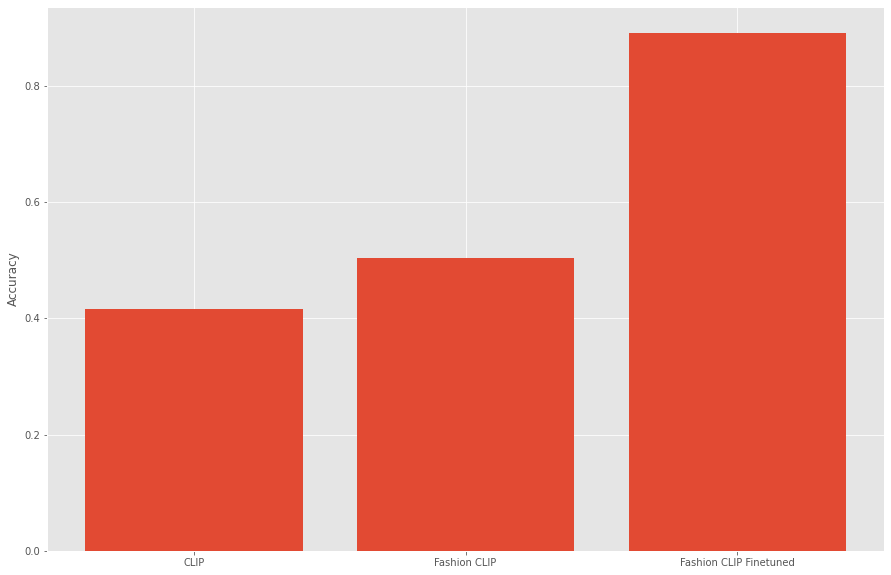
On real retail shelf images, an off-the-shelf CLIP model, OpenAI's contrastive model trained on 400 million image-text pairs, matched the right product 41% of the time. After fine-tuning on the domain, our model hit 89%. Same task, same data, more than double the accuracy. This guide explains what an image embedding model is, compares the models worth considering in 2026, and shows with our own case study numbers why fine-tuning, not model choice alone, is what gets you to production accuracy.
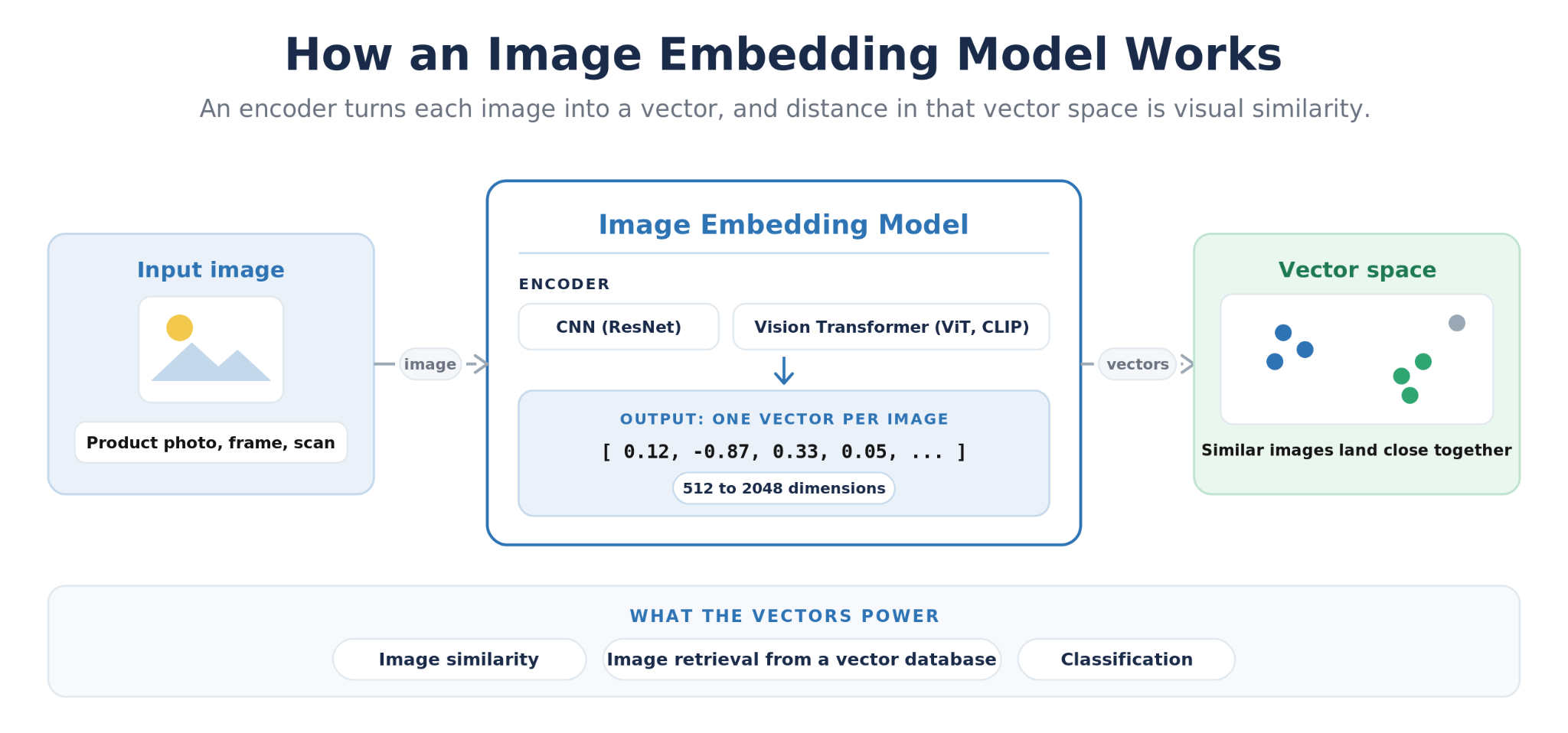
How an image embedding model works: an input image passes through an encoder (CNN or Vision Transformer) and comes out as a vector of numbers (512 to 2048 dimensions); similar images land near each other in the vector space; the vectors feed image similarity comparison, image retrieval from a vector database, and classification.
The short version:
An image embedding model converts an image into a vector of numbers so that visually or semantically similar images sit close together, which is what powers image similarity and image retrieval.
The 2026 shortlist is small: CLIP-ViT-Base32 for multimodal and retrieval work, DINOv2-ViT-B14 for pure-vision accuracy off the shelf, ResNet-50/101 as the lightweight baseline, and MobileNet-V3 for edge devices.
CLIP is our default because its joint image-text space serves the most use cases and, more importantly, it fine-tunes well: we went from 41% to 89% top-1 on retail SKU matching, and to 92.44% top-1 product similarity against a 10M+ product database.
Zero-shot embeddings are fine for coarse categories; fine-grained tasks like SKU-level matching almost always need fine-tuning on domain data.
Embeddings only become a product when paired with a vector database (Milvus, Pinecone, Weaviate) and nearest-neighbor search over cosine similarity.
✂️ Definition
An image embedding model is an ai neural network that converts an image into a fixed-length vector of numbers (typically 512 to 2048 dimensions) that captures its visual and semantic content. Similar images produce vectors that are close together, measured with cosine similarity, which makes embeddings the foundation of image similarity matching, image retrieval, visual search, and classification. Common image embedding models include CLIP, DINOv2, ResNet, and MobileNet-V3.
What Is an Image Embedding Model?
An image embedding model is a neural network that maps an image to a point in a high-dimensional vector space. Feed it a product photo as the input data and it returns a fixed-length list of numbers, typically 512 dimensions for CLIP-ViT-Base32, 768 for DINOv2-ViT-B14, or 2048 for ResNet-50. The encoder compresses the essential features of the image, shape, texture, color, layout, to create that vector. Those numbers are not human-readable, but they have one crucial property: images with similar content, or products from the same category, produce vectors that are close together, and dissimilar images produce vectors that are far apart. It is how machines turn pictures into something they can measure.
The difference (distance) is measured with cosine similarity or L2 distance, so comparing two images collapses into a single dot product. That is what makes image embeddings so useful in production: similarity and difference are quantifiable. You get a direct score between two images, not an LLM's judgment that they look alike, which means you can rank matches, set thresholds, and audit why the system returned what it did. Every downstream task, image similarity, image retrieval, clustering, deduplication, and classification, is built on that one score, and techniques like t-SNE or UMAP let you visualize the embedding space to sanity-check how well your model separates your data."
The Image Embedding Models Worth Considering in the age of LLMs
The artificial intelligence community publishes dozens of benchmark performance numbers for these architectures, but in practice four families cover nearly every use case. Here is the shortlist, with recommendations for selecting between them: what each is best at, and where each one breaks down.
CLIP-ViT-Base32: The Multimodal Default
The CLIP model embeds images and text into the same 512-dimensional space, which means one model powers image-to-image similarity, text-to-image retrieval, and zeroshot classification with no task-specific head. That flexibility is why it shows up in so many applications. The zero-shot behavior comes from that shared space: compare an image's vector to the vectors of label prompts and pick the closest. CLIP's real advantage for production work is what happens after zero-shot, though. Because the encoder is contrastively pretrained on such broad data, it responds extremely well to fine-tuning on a specific domain, and the CLIP ecosystem (Hugging Face weights, open_clip, Fashion CLIP and other domain variants) is the deepest of any embedding model, with the most active open-source community behind it. Its weakness is fine-grained visual detail out of the box: two SKUs of the same shirt look identical to base CLIP embeddings. Our Fashion CLIP product similarity work shows what this looks like in production: a fashion-tuned CLIP variant powering product similarity search that we scaled to 3.2 million unique SKUs with a single example image per SKU.
DINOv2-ViT-B14: Strongest Frozen Features
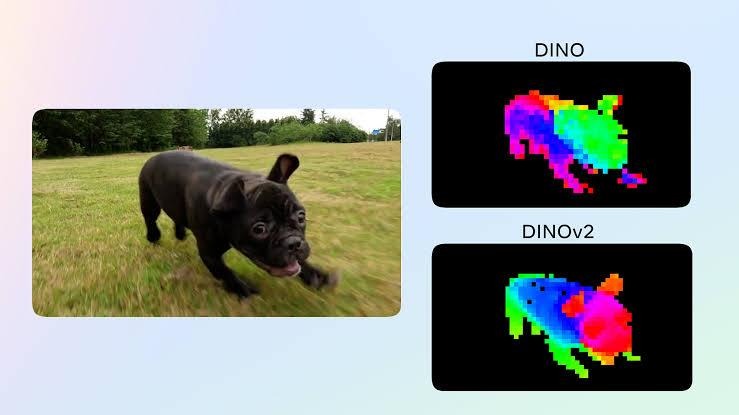
Heatmap showing feature recognition and value
DINOv2 is the model to beat for pure-vision accuracy without fine-tuning. Voxel51's public benchmark research across 6M+ images found DINOv2-ViT-B14 consistently outperformed CLIP and ResNet embeddings for classification tasks, reaching up to 93% accuracy with frozen features. If you need strong image-only embeddings today and cannot invest in fine-tuning, DINOv2's 768-dimensional vectors carry richer representations of the image and are the safe pick. What it lacks is the text side: no text encoder means no text-to-image retrieval and no zeroshot labeling, which rules it out for search experiences where users type queries. Real deployments back the benchmark up: Meta and the World Resources Institute used DINOv2 to map forest canopy height worldwide at 1-meter resolution from 18 million satellite images, and Voxel51's full benchmark write-up has the per-dataset numbers behind the 93% figure.
ResNet-50 and ResNet-101: The CNN Baseline
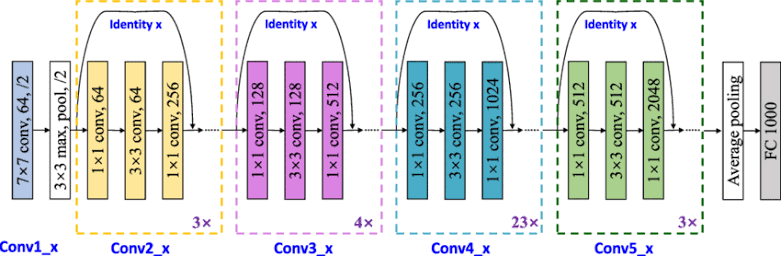
ResNet embeddings (2048 dimensions from the penultimate layer of these convolutional neural networks) remain the baseline every paper compares against, and they are still a reasonable choice when you need a small, fast, well-understood encoder inside a bigger pipeline. PyTorch and TensorFlow ship free pre-trained models, inference is cheap, and behavior is predictable. Performance on fine-grained tasks trails the ViT models by a wide margin, so treat ResNet as scaffolding, not a destination. For a typical real build, this image-to-image search tutorial wires 2048-dimensional ResNet-50 embeddings into a Milvus index for a working visual search system.
MobileNet-V3: Edge and On-Device
When embeddings have to run on a phone or an embedded camera, MobileNet-V3, a lightweight convolutional neural network, is the best approach. Google's MediaPipe image embedder task ships MobileNet-V3 small and large with single-digit-millisecond latency on a Pixel-class device. You trade a meaningful amount of performance for that speed and low computational cost, so it is the right model only when the deployment target forces it. The MediaPipe image embedder task guide documents the setup and the measured numbers: 3.94 ms per embedding on a Pixel 6 CPU for the small model.
Model
Dimensions
Best for
Main limitation
CLIP-ViT-Base32
512
Multimodal search, retrieval, image classification, and fine-tuned similarity (our pick)
Fine-grained detail is weak until you fine-tune
DINOv2-ViT-B14
768
Best frozen features for image-only tasks
No text encoder, so no text-based retrieval
ResNet-50 / 101
2048
Cheap, predictable CNN baseline
Trails ViT models on accuracy
MobileNet-V3
1024
On-device and edge deployment
Accuracy trade-off for latency
Why We Build on CLIP: Fine-Tuning Beats Bigger Zero-Shot Models
Benchmark performance like the numbers above is measured with frozen features, and frozen features are exactly what most teams should not ship. The real value of a model like CLIP is that its contrastive pretraining gives you a launchpad: fine-tune it for the specific tasks in your domain and it learns distinctions that no off-the-shelf model, DINOv2 included, can see. Two of our client builds show the size of that gap.
Retail SKU Matching: 41% to 89% Top-1 Accuracy
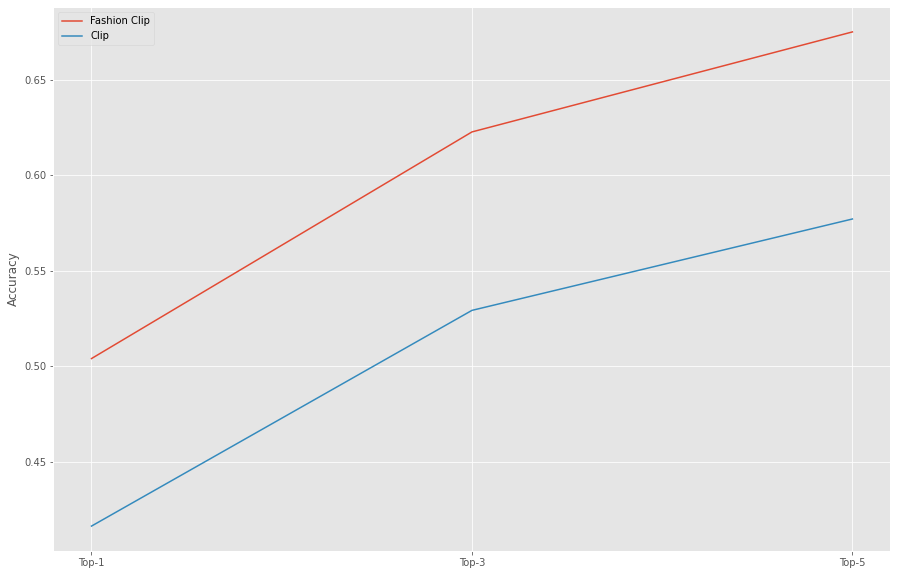
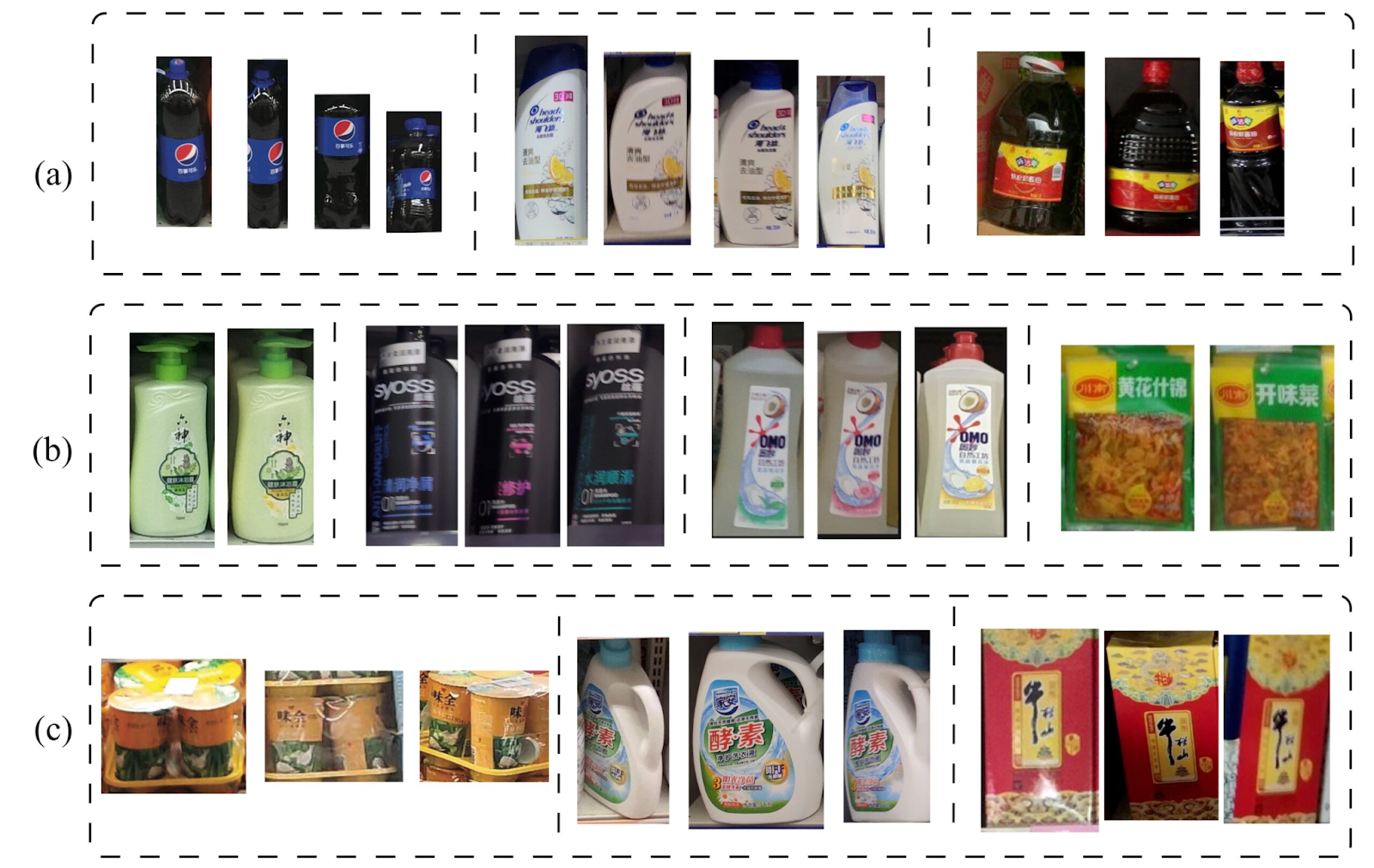
On the RP2K dataset, 500,000+ real shelf photos across roughly 2,400 products, base CLIP embeddings matched the correct SKU as the top result just 41% of the time, and Fashion CLIP, a domain fine-tune for apparel, reached 50%. Shelf images are blurry, angled, and badly lit, and generic embeddings collapse on them. Our fine-tuned SKU image classification model reached 89% top-1 accuracy on the same evaluation, a fair comparison on identical data: same nearest-neighbor cosine similarity setup, more than double the accuracy of base CLIP, purely from how the model was tuned for the domain.
Product Similarity at Catalog Scale: 92.44% Against 10M+ Products
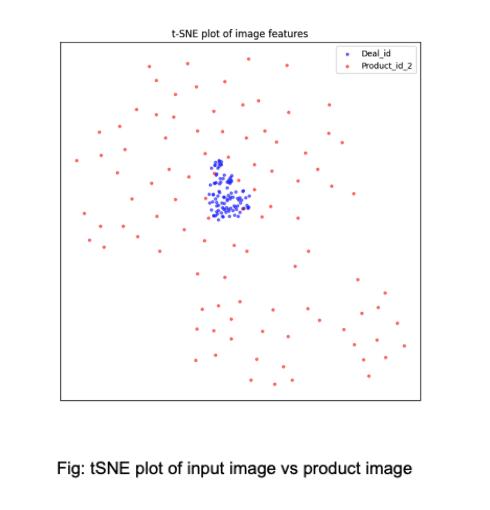
For an ecommerce product matching pipeline, we fine-tuned CLIP for image similarity with a custom loss function and a supporting feature-understanding model. Evaluated by matching input product images against a database of more than 10 million products, the pipeline reached 92.44% top-1 and 99.3% top-3 accuracy. Two details from that process carry over to any fine-tuning project: swapping CLIP's default loss for one designed around the actual task, and tuning hyperparameters specifically to avoid overfitting the domain dataset, monitored with t-SNE plots of the embedding space.
Bar chart of top-1 accuracy on the RP2K retail SKU matching evaluation: base CLIP 41%, Fashion CLIP 50%, our fine-tuned model 89%.
t-SNE visualization of the embedding space from the product similarity case study, showing input product images versus database product images.
The decision rule we tell clients to follow: zero-shot or frozen embeddings are fine when your classes are visually distinct (shoes versus shirts, for instance). The moment the task is fine-grained, same product across marketplaces, SKU variants, shelf recognition, fine-tuning stops being optional. It is the difference between a demo and a system you can bill against.
Image Similarity and Image Retrieval: Where Embeddings Earn Their Keep
Image similarity is the one-to-one or one-to-many comparison task: is this image the same product as that one, and which records in my database are closest? Ranking visually similar products this way drives applications like product matching, SKU deduplication, seller onboarding, and shelf recognition, and it is the task both case studies above solve. The process is always the same: compute an embedding for every catalog image once, embed the query image, and rank by cosine similarity.
Image retrieval (content-based image retrieval, or CBIR) is the search version: a user provides an image, or with CLIP a text query, and you return the nearest neighbors from a large index. Retrieval applications at scale are where a vector database earns its place: Milvus, Pinecone, or Weaviate store the embeddings and run approximate nearest-neighbor search in milliseconds across millions of vectors, so retrieval speed stays flat as the catalog grows. The embedding model decides the quality of the results; the vector database decides whether you can serve them at production latency.
Generating CLIP Image Embeddings in Python
Here is the whole loop to generate embeddings in a dozen lines with PyTorch and Hugging Face. This loads CLIP-ViT-Base32, embeds one image, and normalizes the vector so a dot product between two embeddings is their cosine similarity:
import torch
from PIL import Image
# popular ai libraryfrom transformers import CLIPModel, CLIPProcessor
model = CLIPModel.from_pretrained("openai/clip-vit-base-patch32")
processor = CLIPProcessor.from_pretrained("openai/clip-vit-base-patch32")
image = Image.open("product.jpg")
inputs = processor(images=image, return_tensors="pt")
with torch.no_grad():
embedding = model.get_image_features(**inputs)
embedding = embedding / embedding.norm(dim=-1, keepdim=True)
# cosine similarity between two images: (emb_a @ emb_b.T).item()
Swap the ai model string for a DINOv2 or ResNet checkpoint and the pattern holds. From here, compute embeddings for the whole catalog, write the vectors to a vector database, and you have working image retrieval; fine-tuning is the process that takes the same code from decent to the accuracy numbers above.
Need Production-Grade Image Similarity or Retrieval?
Width.ai builds custom image embedding pipelines: fine-tuned CLIP models, evaluation frameworks, and vector search systems that deliver 90%+ accuracy across retail, ecommerce, and 3.5M+ SKU catalogs. Book a call and we will walk through your images, your matching task, and the accuracy ceiling we can hit. https://www.width.ai/contact
Frequently Asked Questions
What is the difference between an image embedding and a text embedding?
Both are fixed-length vectors, but an image embedding encodes visual content while a text embedding encodes language. Most models produce one or the other. CLIP is the notable exception: it trains an image encoder and a text encoder into the same space, so you can compare an image directly to a sentence, which is what enables text-to-image search and zero-shot classification.
Do I need to fine-tune an image embedding model?
If your classes are visually distinct, no: frozen CLIP or DINOv2 features will carry you. If the task is fine-grained, telling apart SKU variants, matching the same product across marketplaces, recognizing products on noisy shelf photos, fine-tuning is usually the difference between roughly 40 to 50% and 90%+ top-1 accuracy, which is exactly the gap we measured on RP2K.
How is DINOv2 different from CLIP?
DINOv2 is self-supervised on images only, so its features are stronger for pure-vision tasks out of the box; CLIP is contrastively trained on image-text pairs, so it supports text queries and zero-shot labels and adapts better to multimodal products. Off the shelf for image-only classification, DINOv2 usually wins. As a foundation to fine-tune for a domain, and any time text is involved, we reach for CLIP.
What embedding dimension should I use?
Use what the model gives you: 512 for CLIP-ViT-Base32, 768 for DINOv2-ViT-B14 (the middle ground), 2048 for ResNet-50. Higher dimensions are not better by default; they cost storage and query latency in your vector database. Only reduce dimensions (via PCA or a projection head) after you have measured that retrieval quality survives it.
Can I use image embeddings for RAG?
Yes. Multimodal RAG indexes visual data types (product photos, document pages, diagrams) as embeddings, retrieves the nearest ones for a query, and passes them to a vision-language model as context. CLIP-style embeddings are the usual choice because the query side is text.
Pick for the Use Case, Then Fine-Tune for the Domain
Our recommendations in 2026 are short: DINOv2-ViT-B14 for image-only tasks with no tuning budget, MobileNet-V3 on the edge, ResNet as a baseline, and CLIP for everything involving text, retrieval, or a domain you care about. The longer answer is that model choice is only half the decision. Our client work keeps producing the same result: a fine-tuned CLIP model beats every off-the-shelf alternative on the task that actually matters, 89% versus 41% on retail SKU matching and 92.44% top-1 against a 10M-product database. Follow the shortlist, wire up the twelve lines of Python above, and budget your real effort for the fine-tune.