Importing an n8n social media automation takes about two minutes. Download the JSON, open Workflows, Import from File, connect your credentials, done. The hard part is supposed to be over.
Then you run it. Instagram rejects the image because the API will not take a PNG. A post goes out quoting a product spec nobody checked. Or the whole thing works perfectly and publishes to your company accounts before anyone has read a word of it.
The nodes that make a publishing workflow usable are not the ones that post. They are the ones that refuse to. Every branch that skips itself when its input is missing, every gate that waits for a human, every conversion step that exists because one platform's API is fussier than the others.
Those are also the nodes a template listing cannot explain, because from the outside they look like clutter. A 45 minute timer, a format conversion, a filter that throws away recent data. Each one is there because something went wrong once.
Below is a node-by-node walk through the workflow we run for multi-platform publishing, with the reasoning behind each guard. The JSON is public, so you can import it and read along.
Key Takeaways
- One form submission produces posts for LinkedIn, Instagram, Facebook, X, TikTok, Threads and YouTube Shorts, and publishes to the first four automatically.
- Uploaded documents and a blog URL are optional context. When they are present the agent treats them as the primary source of fact rather than writing from the topic alone.
- The Instagram caption follows rules derived from your own top three recent posts, so what performs gets repeated.
- Nothing publishes without a human clicking Approve in an email. The workflow pauses up to 45 minutes waiting.
- Every optional stage skips itself when its input is missing, and every publishing node continues on error, so one broken credential does not take down the other three platforms.
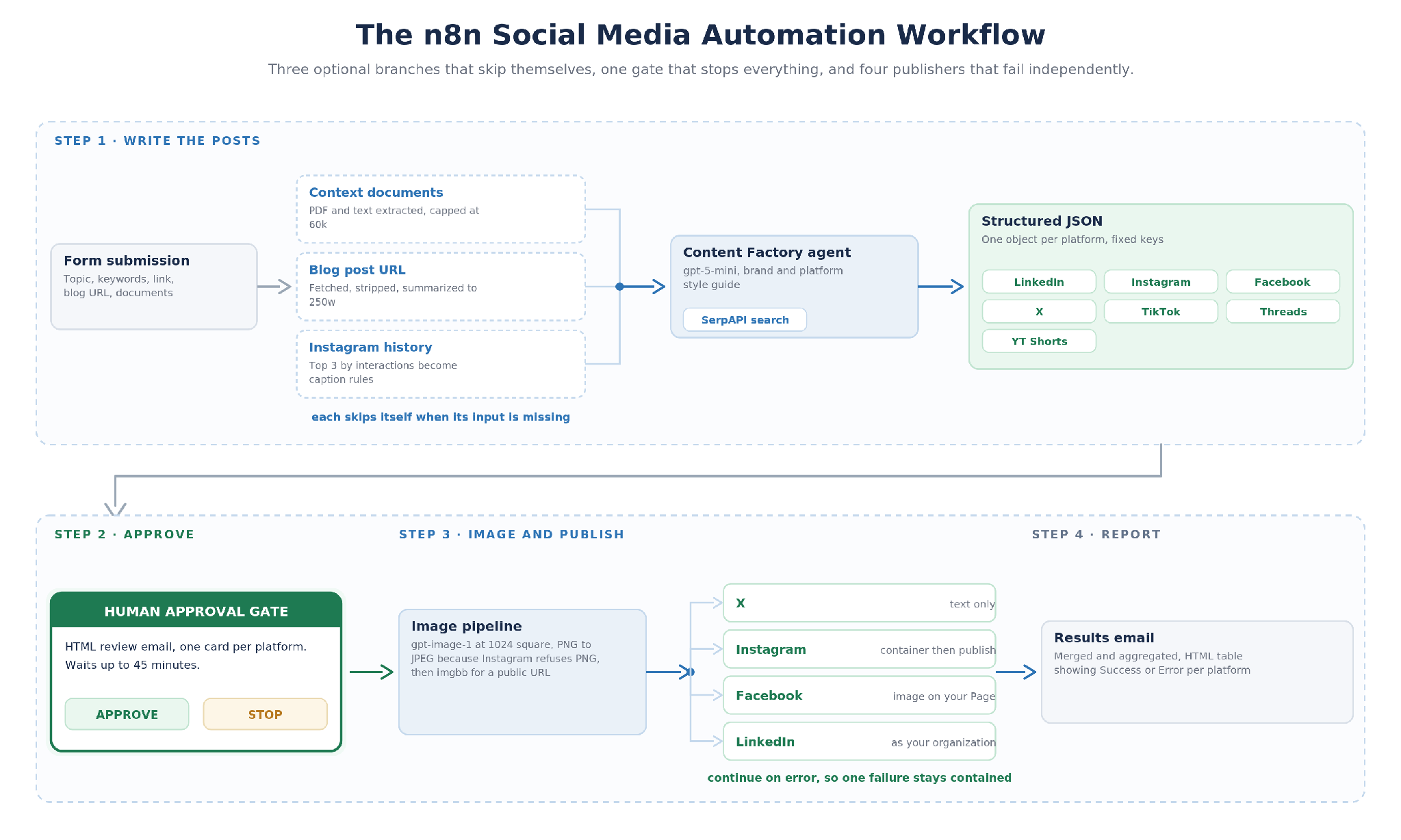
Alt text: n8n social media automation workflow diagram showing content generation, human approval gate, image creation and parallel publishing to X, Instagram, Facebook and LinkedIn
What the Workflow Does
The workflow is triggered by an n8n form, not a schedule. You submit one post at a time and fill in as much or as little as you have.
Four things it does well: repurposing a blog post into platform-specific promotion, launching a product with accurate details pulled from a spec sheet rather than invented, holding a posting cadence without writing seven variants by hand, and improving Instagram captions over time from your own performance data.
Step 1: Writing the Posts
The form collects a topic, optional keywords or hashtags, an optional link to include, an optional blog post URL, and optional context documents. Everything after the topic is optional on purpose, and each optional stage checks for its own input and skips itself when there is none.
Context Documents
Split Context Documents turns the upload into one item per file and decodes text files inline. Is PDF? routes PDFs to Extract PDF Text and everything else straight through, and Merge Documents recombines the paths. Build Document Context joins the results into one block with a heading per file, capping each file at 20,000 characters and the total at 60,000.
The caps matter more than they look. Without them a 200-page PDF blows the context window and the agent writes from whatever survived truncation. The prompt also tells the agent to treat these documents as the primary source of fact, which is the difference between a launch post with the real dimensions in it and one with plausible dimensions in it.
Blog Post Summary
Has Blog URL? skips the branch when the field is empty. Fetch Blog Post downloads the page with a browser user agent, prepends https:// if missing, and times out at 30 seconds. Extract Blog Text keeps the article or main element, strips scripts, navigation, headers, footers, sidebars and forms, and caps at 30,000 characters. Summarize Blog Post writes up to 250 words: the main point, three to six bullets, up to two quotable lines, and the audience and takeaway.
Fetch failures do not stop the run. If the page is JavaScript-rendered or blocks the request, the summary says so and the agent writes from the topic instead.
Instagram Caption Rules
This is the stage that turns the workflow into a loop rather than a generator. Fetch Recent Instagram Posts pulls your last 25 posts with captions, likes, comments and timestamps. Split Out Posts fans them out and Get Post Insights adds reach, saves, shares and total interactions per post, with a failed request on one post not stopping the others.
Rank Top 3 Posts scores by total interactions and keeps three. Anything posted in the last 48 hours is excluded, because Meta's insights lag that long and a fresh post looks like a failure when it is only unmeasured. Posts with no insights fall back to likes plus comments. Derive Caption Rules reads those three and writes five to eight rules covering hook, structure, tone, emoji use, call to action and hashtags, and they override the general style guide for Instagram.
The Content Factory Agent
Social Media Content Factory receives the form inputs, the document context, the blog summary, the Instagram rules and a built-in brand and platform style guide. It calls SerpAPI when the topic needs current information. A structured output parser forces the response into fixed JSON, one object per platform with its own fields, so LinkedIn returns post, hashtags, call_to_action and image_suggestion while X-Twitter returns a character_limit and a video_suggestion.
The parser is what makes the publishing nodes possible at all, since each one reads specific keys and a free-text response would break every one of them.
Step 2: The Approval Gate
Prepare Content Review Email turns the JSON into an HTML email with a card per platform, so the reviewer reads formatted posts rather than a JSON blob. Gmail User for Approval sends it with Approve and Disapprove buttons and pauses the workflow for up to 45 minutes. Is Content Approved? continues only on Approve.
Nothing downstream runs otherwise. No image is generated, no API is called, no tokens are spent. Disapprove and the run ends quietly.
The window is a setting rather than a rule. Forty five minutes suits a reviewer who is at their desk. A team working across time zones should raise it to hours, and the tradeoff is that a run sitting open holds an execution slot until it resolves.
Step 1 is also useful on its own. If you only want the writing and would rather post by hand, stop at the approval email and treat that as the deliverable. Everything after this point is convenience.
Step 3: Image Generation and Publishing
The OpenAI node generates a 1024 by 1024 image with gpt-image-1, prompted with the Instagram image_suggestion the agent wrote, falling back to the caption when the suggestion is empty.
Then two conversion steps that exist purely because of one platform. Convert Image to JPEG re-encodes the PNG, because Instagram's publishing API will not accept PNG. Save Image to imgbb uploads the JPEG with no expiry, because Instagram requires a publicly reachable URL rather than an uploaded file. Neither node is interesting. Both are the reason the workflow publishes to Instagram at all.
Publishing then runs in parallel. X Post sends the text. Instagram Image creates a media container from the imgbb URL with the caption, and Instragram Post publishes it. Facebook Post puts the image, text and call to action on your Page. LinkedIn Post publishes as your organization with the hashtags attached.
Every publishing node is set to continue on error, and each writes into its own Result node. An expired LinkedIn token does not stop X, Instagram and Facebook from going out, which matters more than it sounds: token expiry is the single most common failure in a workflow like this, and the default behavior in n8n is to halt the branch and take everything downstream with it.
Step 4: Reporting What Happened
Merge Results and Aggregate collect the four outcomes into one item. Prepare Results Email builds an HTML table showing Success or Error per platform with the error detail attached, and Gmail Results sends it to the reviewer.
TikTok, Threads and YouTube Shorts are written and included in the approval email but not published automatically, since none of them offers a comparable publishing API. Copy them out of the review email.
Why It Is Built This Way
Read the node list and the writing looks like the product. Run it for a month and the guards are the product.
Three optional stages check for their own input and skip themselves. That sounds like defensive programming and it is really about adoption: a workflow that requires a blog URL, uploaded documents and a connected Instagram account before it will run is a workflow nobody uses on a Tuesday afternoon. This one runs on a topic alone and gets better as you give it more.
The 48-hour exclusion in the Instagram ranking is the kind of detail that only shows up in production. Without it, yesterday's post looks like your worst performer, the caption rules get derived from the wrong examples, and the workflow teaches itself to write badly. It is one line of logic standing between a learning loop and a feedback loop running backwards.
The approval gate is the whole reason this is safe to point at a company account. AI writing tools are judged on their output, but a publishing pipeline is judged on what it does when the output is wrong. Here the answer is that it stops and asks, and if nobody answers in 45 minutes, it stops for good.
The value prop is a posting cadence you can hold without seven writing tasks per topic, grounded in your own documents rather than the model's guess, with a human between the AI and your brand accounts every single time.
Conclusion
The workflow JSON is public. Import it, point it at your own accounts, and rewrite the Content Factory prompt with your brand name, audience and platform style guides, because the version in the file is written for somebody else's brand and it will show.
Then run one topic through it and stop at the approval email. Read what seven platforms look like from one submission before you connect a single publishing credential. That is the fastest way to find out whether the writing is good enough for your accounts, and it costs nothing to undo.
🤝 CTA: WIDTH.AI AUTOMATION BUILDS
Want This Tuned to Your Stack?
Width.ai builds custom n8n and AI automation systems for marketing teams. This template is a starting point, and we extend them with your data sources, your prompts, your approval rules, and production error handling that does not page you at midnight. Book a call and we will walk through the manual work automation can take off your plate.
n8n FAQ
What is n8n social media automation?
Using n8n, an open-source workflow tool, to generate and publish social posts without manual handoffs between steps. A complete workflow takes a topic, writes platform-specific copy, generates an image, routes it for human approval, and publishes.
Does it publish without a human reviewing the posts?
No. The approval email is a hard gate. Nothing downstream runs until someone clicks Approve, and the run ends if nobody does within 45 minutes. You can raise or lower that window on the Gmail node.
Which platforms does it publish to automatically?
X, Instagram, Facebook and LinkedIn automatically. The other three appear in the review email as finished copy that you paste in yourself.
What happens if one platform fails?
The other three still publish. Every publishing node continues on error and records its own outcome, so a failure is contained to one network and shows up in the status email rather than halting the run.
Do I need a developer to run it?
Not to run it. You connect OpenAI, SerpAPI, Gmail, Meta, X and LinkedIn credentials, replace three account IDs, and set two environment variables, all covered in the repo setup guide. Changing the brand voice is prompt editing, not code.
Can I use a model other than gpt-5-mini?
Yes. The writing nodes are standard OpenAI chat model nodes and swap out without touching the rest of the graph. Image generation is the exception, since gpt-image-1 needs a verified OpenAI organization.
