Self-Hosted AI Chatbot: How to Run a Private AI Assistant on Your Own Hardware
Somewhere in the last two years, open weight stopped meaning runs on your machine.
Zhipu released GLM-5.2 in June 2026, a large language model at roughly 753 billion parameters. Anyone can download the weights. Almost nobody can run them. Google shipped Gemma 4 in sizes that fit on a phone, Alibaba shipped Qwen 3.5 models that fit on a laptop, and OpenAI released gpt-oss under Apache 2.0. Two different things now travel under one label.
A self hosted AI chatbot — your own AI chatbot running on hardware you control — lives or dies on that distinction, because the first real question is not which model is best. It is which model fits the memory you have. What follows covers that — how to run LLMs on your own hardware, the runtime that serves them, the deployment end to end, and what you have to configure before any of it is as private as the word self-hosted implies. We run one of these in production ourselves, so it is written from the operator side.
What a Self-Hosted AI Chatbot Is (and No, ChatGPT Is Not Open Source)
A self hosted AI chatbot is an open-weight language model running on infrastructure you control, wrapped in an interface you can talk to. The defining property is where inference happens. If the tokens are generated on your hardware, the conversation never leaves your network, your data remains where it started, and you keep full control of it — that single set of facts is what makes the rest of this worth the effort.
Two terms get used as synonyms and should not be. Open weight means the trained parameters are published under a license you can read. An open source ai model, applied strictly, would also publish the training data and the pipeline, and almost no frontier model qualifies. Nearly everything here is open weight. The distinction determines what you can legally do with the model, which matters once a business is involved.
A good note: managed hosting for an open model is not self-hosting: the model is open, but a vendor runs it and your prompts travel to their servers. A private endpoint from a commercial provider is not self-hosting either, however good the data-processing agreement is. Even inside fully local tooling the line blurs. Ollama offers cloud models that use the same commands and API as local ones, separated only by a suffix on the model name. They are a reasonable product. They are not self-hosting, and if privacy is why you are here, that difference is the whole point.
Why Self-Host
The reasons carry different weight depending on who is asking.
- Data boundary. Nothing you type and no document you attach is transmitted anywhere. For a person asking about a medical result this is a preference. For a company handling patient records, privileged material, sensitive information under NDA, or defense work, it is often the only configuration that clears review, and it turns an approval process into a firewall rule.
- Offline operation. A local model works with the network unplugged. That matters in field environments, in facilities that block outbound connections, and anywhere connectivity is unreliable enough to be a design constraint.
- Cost shape. Commercial APIs from a cloud provider price per token and per seat, which scales linearly with use. Self-hosting front-loads the cost into hardware and then flattens it. For low usage the API is cheaper. For a product feature firing thousands of queries against large datasets, the curves separate quickly.
- No deprecation risk. A model you download cannot be retired underneath you, silently updated into behaving differently, or repriced. If a workflow is tuned against a specific model, owning the weights means owning the behavior. Anyone whose prompt chain has broken because a provider shipped a new checkpoint understands the appeal.
- Full control of the model's behavior. The system prompt, the refusal boundaries, the tone, the context policy, all of it is yours. Open-weight models can also be fine-tuned on your own material into custom models tuned to your domain, which no API model permits at the same depth.
The counterweight is honest and worth stating early: you inherit the operations. Model updates, GPU drivers, storage for weights, monitoring, and the data security posture covered later all become your responsibility. Self-hosting trades a subscription for a system you maintain. That trade is obviously right for some readers and obviously wrong for others, which is what the next section is about.
Who This Is Actually For
Two audiences arrive at this from different directions.
The home lab and personal reader wants a local GPT on a computer they already own, for some mix of curiosity, cost, and a preference for not routing personal questions through a company's servers. A Mac with 16GB of unified memory, a gaming desktop with a mid-range GPU, or a Mini PC running Proxmox all clear the bar in 2026. That reader can be running in under an hour using the desktop path described later.
The business reader has a harder problem: somewhere there is a category of information that cannot go to a third-party model, and an assistant that could do real work if only it were allowed to see it. The industries where this comes up are consistent.
- Healthcare. Clinicians need answers from research, protocols, checklists, and patient records, and the last of those is regulated in ways that make a commercial API a difficult conversation. A self hosted LLM inside the hospital boundary changes what is possible, and we have deployed exactly that, serving a fine-tuned model on-premises so no patient data crosses the network edge — keeping data security inside the hospital's own boundary.
- Legal. Corporate counsel, litigation support, and compliance teams work with privileged documents where data privacy is non-negotiable. Asking questions about an agreement without uploading it anywhere is the entire value proposition, and it is why legal took local models seriously early.
- Field engineering and heavy industry. Offshore energy, merchant shipping, and mining put technical staff in places with handbooks, procedures, and no reliable connectivity. An assistant holding the manuals that answers without a network is useful in a way a cloud service structurally cannot be.
- Defense and public sector. Air-gapped requirements are not negotiable, and they rule out managed services by definition rather than by preference.
The rest of this guide is written with the second group in mind, though the practical steps are the same for both. Everyone starts by picking a model that fits the hardware.
Building against HIPAA, privilege, or air-gapped constraints?
We have shipped on-premises assistants under all three. If you want a second opinion on whether your requirements need a custom
build or whether an off-the-shelf stack clears them, tell us what you are working with.
The Open-Weight Models You Can Run in 2026
Something happened to the open-weight field over the past two years that most guides have not caught up with, and it changes how you should read every model announcement.
Open weights split into two tiers. The frontier tier got dramatically larger — these are large language models with more parameters than any single consumer machine can hold — and GLM-5.2 is only the clearest example: Qwen's flagship is a 397B mixture-of-experts model, and Llama 4 Maverick carries 400B total parameters. All of them are open in the sense that anyone can download the weights, and closed in the sense that running one takes infrastructure you rent by the hour.
Meanwhile a second tier consolidated in the opposite direction, aimed squarely at hardware normal people own. Google's Gemma 4, released April 2026 under Apache 2.0, spans five sizes from a 2B variant meant for phones up to a 31B dense model for workstations, with quantization-aware-trained builds published specifically for local use. Qwen 3.5 arrived in February with a dense lineup from 0.8B to 27B, also Apache 2.0. OpenAI's gpt-oss-20b runs in around 16GB. Small-active mixture-of-experts designs, where only a few billion parameters fire per token, deliver larger-model quality at a memory footprint a consumer GPU can hold.
So when someone calls a model open weight, the useful follow-up is which tier. For self-hosting only the second is relevant, unless you rent GPUs, which is a legitimate architecture with a very different cost profile.
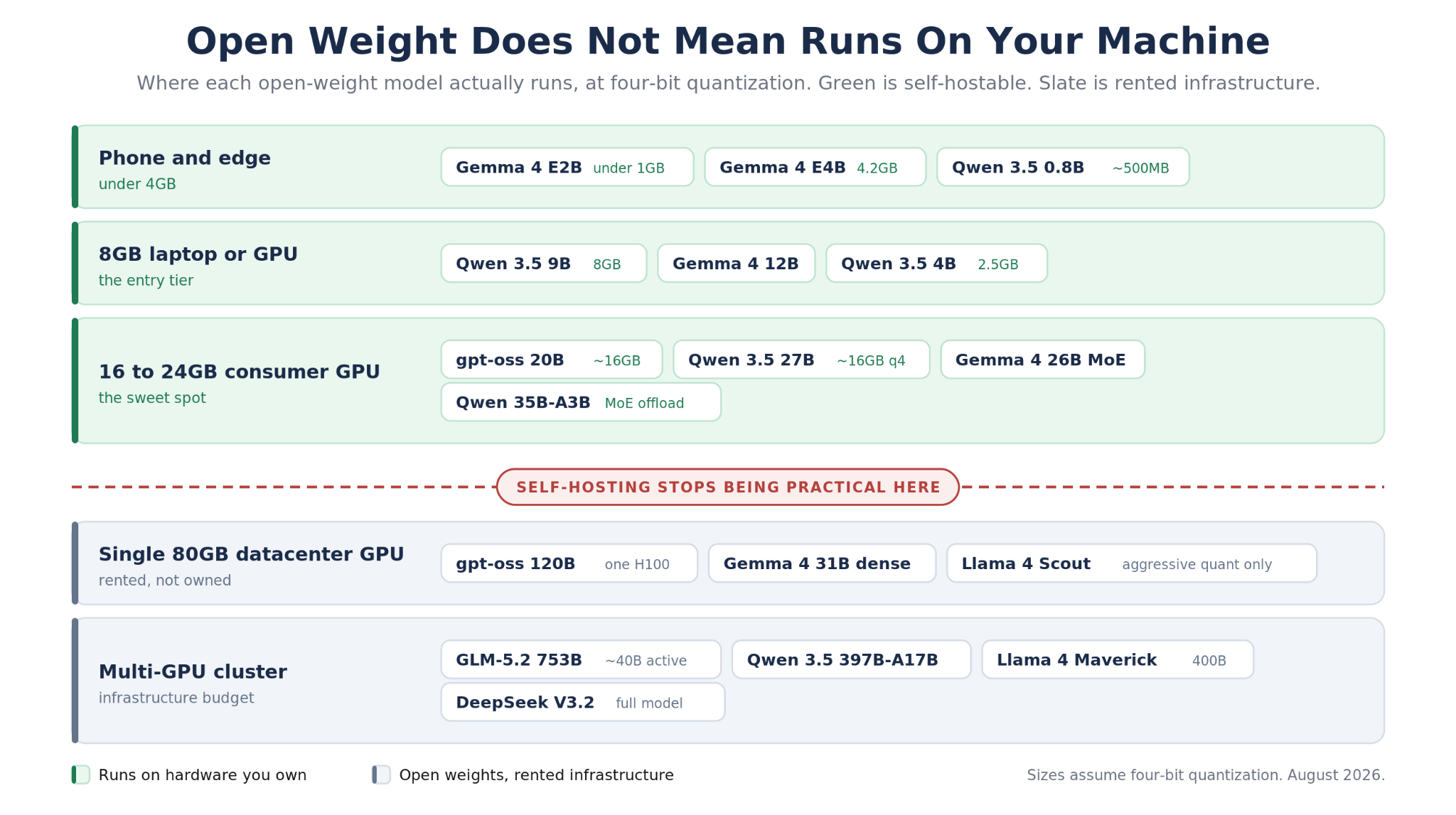
Green rows run on hardware you are likely to own. Slate rows are open weight but need infrastructure you rent.
Which one should you actually pick?
The decision comes down to memory first and task second, in that order, because a model that does not fit does not run.
- Under 8GB of RAM or VRAM: Gemma 4 at 2B or 4B, or Qwen 3.5 at the small end. The 2B text-only Gemma variant fits in well under a gigabyte, which puts a usable assistant on a phone or a Raspberry Pi.
- A 16GB laptop, including Apple Silicon: Qwen 3.5 9B or gpt-oss-20b. This is the sweet spot where quality stops feeling like a compromise for general assistant work.
- A 24GB consumer GPU: Qwen 3.5 27B quantized, Gemma 4 26B MoE, or gpt-oss-20b with room to spare for a longer context window.
- Coding against your own repository: The Qwen coder variants, or GLM if you have the infrastructure. Coding is the task where the gap between a small local model and a frontier API model (or a hosted assistant like GitHub Copilot) is still most noticeable.
- Commercial product with lawyers involved: Apache 2.0 or MIT. Gemma 4, Qwen 3.5, gpt-oss, and DeepSeek weights all qualify. This narrows the field faster than any benchmark.
One practical note that saves a lot of disappointment. Almost everything above runs quantized, usually to four bits, which is what makes these footprints possible at all. Quantization trades a small amount of precision for a large amount of memory, and for conversational work the tradeoff is nearly invisible. Gemma 4's quantization-aware-trained releases go further by accounting for the compression during training rather than after it, which is why the small Gemma variants punch above their size class. All of these open-weight LLM models originate on Hugging Face; Ollama fetches from its own registry, which mirrors most of what you would find there.
Ollama, the Runtime Almost Everything Runs On

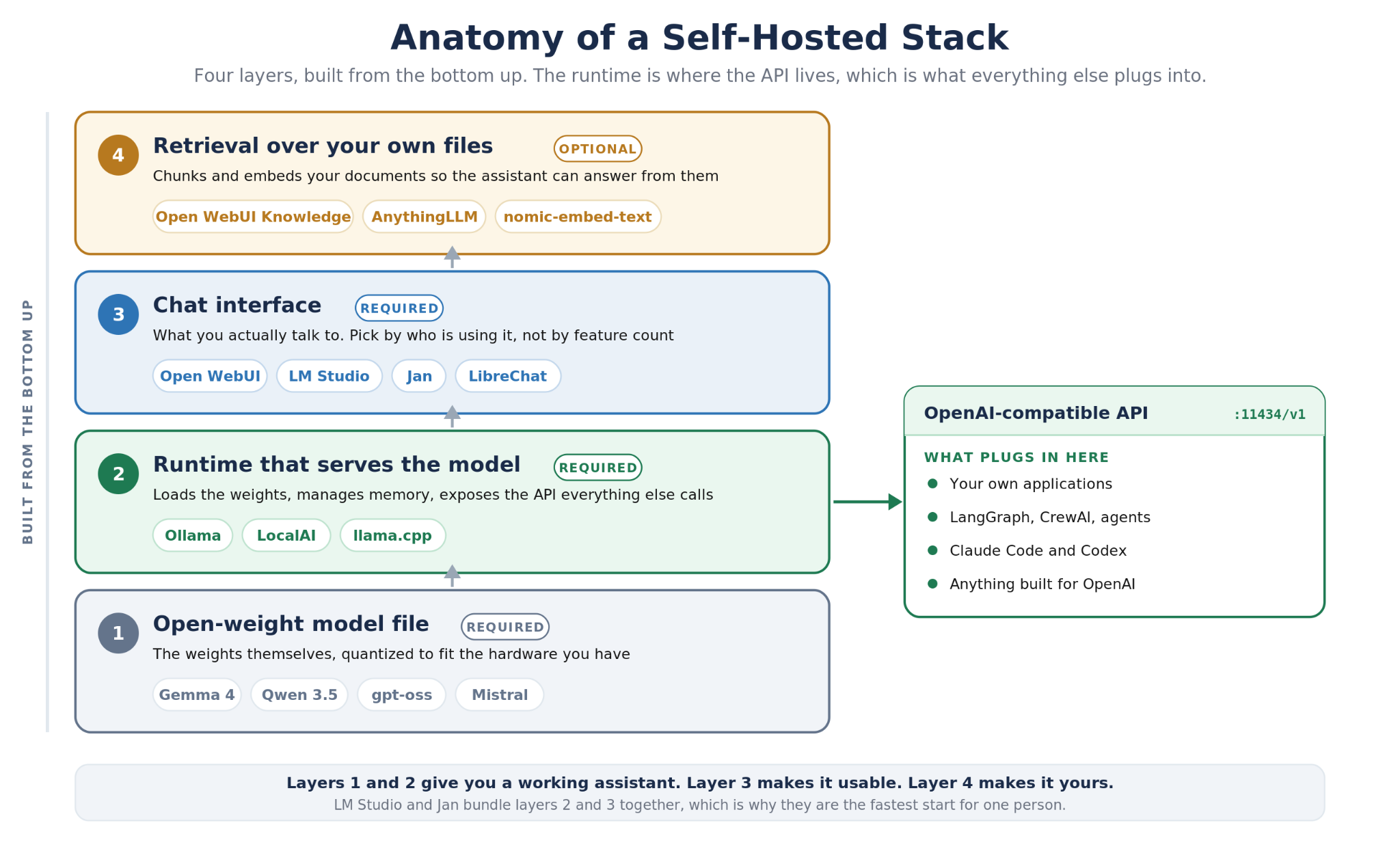
A model file is not a chatbot. Something has to load the weights, manage memory, batch requests, and expose an interface. In 2026 that something is usually Ollama, which became the default the way Docker did for containers: not because alternatives are missing, but because everything else assumes it is there.
The scale is worth stating for anyone deciding whether to build on it. Ollama reported 8.9 million developers when it raised $88 million in July 2026 from Benchmark, Theory Ventures, 8VC, and Y Combinator. The current release is v0.32.0. For a business evaluating whether the foundation under a production system will still be maintained in two years, that is a more useful signal than a GitHub star count, and a better bet on the runtime holding up into the future.
You install it, run one command to pull a model, and you have a local inference server. The interesting part is what it exposes.
- An OpenAI-compatible API. Ollama serves an endpoint at localhost port 11434 speaking the OpenAI chat completions format, plus embeddings and model listing. Any code written against OpenAI's client library works by changing the base URL. That single decision is most of why the ecosystem standardized on it: every framework already supported the interface.
- Anthropic API compatibility as well. Since January 2026 Ollama also speaks the Anthropic messages format, which means tools built for Claude, including Claude Code, can be pointed at a local open model. The ollama launch command wires up Claude Code, OpenCode, or Codex against a local model with no environment variables or configuration files to edit.
- Tool calling at parity with OpenAI. Function calling matches the OpenAI shape including tool choice, so any AI agent built on frameworks such as LangGraph and CrewAI works without provider-specific adapters. Structured outputs are constrained by JSON schema, which matters enormously if the assistant feeds anything downstream, and tool calls stream rather than blocking until completion.
- Real GPU and Apple Silicon support. AMD and NVIDIA GPU acceleration, and since 2026 an MLX-backed engine that made Apple Silicon a serving platform rather than a compromise. Gemma 4 with multi-token prediction runs substantially faster on it, which matters because much of this audience is on a MacBook rather than a GPU tower.
- Embeddings for retrieval. Dedicated embedding models are served the same way, which is what makes the document-question workflow later in this guide possible without adding another service.
Two caveats, both of which matter. Ollama's cloud models look identical to local ones at the command line, and they are not local, as covered earlier. And Ollama ships with no authentication whatsoever, which is a bigger problem than it sounds and gets its own section shortly.
What this looks like in production
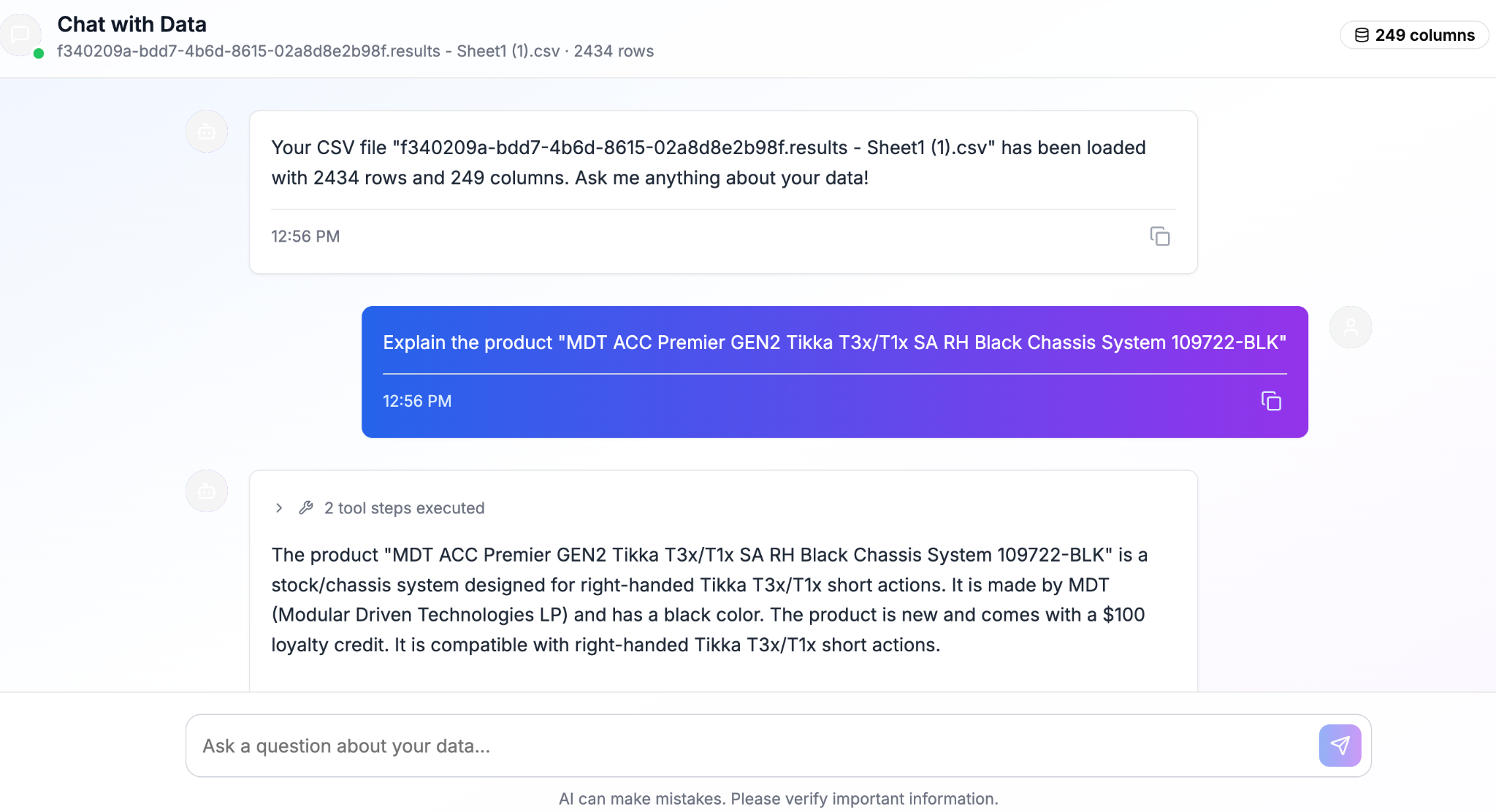
We do not only recommend this pattern, we ship on it. Pumice, our catalog enrichment product, includes a chat feature that lets a user upload a product catalog and ask questions about it in plain language. That feature is served by gpt-oss running on Ollama, on a GPU box on our own server.
The architectural detail worth borrowing is how it answers. Most guides tell you to embed your documents and retrieve the relevant chunks, which works well for prose and poorly for tables. Ask a catalog of forty thousand products how many SKUs are missing a material attribute, and semantic similarity is the wrong tool entirely, because the answer is not in any one retrieved chunk. So the feature runs a hybrid: retrieval handles descriptive and comparative questions, and generated queries handle counts, filters, and aggregates, with the model choosing the path based on what was asked. Anyone building an assistant over structured or tabular data will hit this same wall, and it is the single most useful thing to know before starting.
The Interfaces, and When Each One Is Right
Ollama has no interface of its own beyond a terminal. The tools below are what people actually talk to, and ranking them by GitHub stars hides the fact that they solve different problems.
- Open WebUI. The default answer for most people. It began as an Ollama frontend and grew into a full web UI that behaves like ChatGPT, with history, multiple models, document upload, and user accounts. Running a server for yourself or a handful of people, this is the pick.
- LM Studio. A desktop application bundling runtime and interface, with a model browser built in. Nothing to configure, no Docker, no terminal. The fastest path from zero to a working assistant for one person, and it exposes an OpenAI-compatible server when you outgrow the GUI.
- Jan. Similar territory to LM Studio: a fully open source project, clean interface, offline-first posture. Prefer it if the openness of the client matters to you and not only the model.
- AnythingLLM. Built around document chat. If the job is asking questions of a folder of files rather than general conversation, it handles ingestion, chunking, and workspaces better than a general chat client, and runs fully locally against Ollama or LM Studio.
- LibreChat. The one that belongs in a company. OAuth, SAML, LDAP, and two-factor authentication, plus AI agents, code execution, and persistent memory, fronting many providers at once. If a team needs access with real identity management, the other options will not survive a security review and this one will.
- LocalAI. A drop-in OpenAI-compatible API server covering text, image, and audio models. Useful when you are replacing an API rather than adding a chat window.
- PrivateGPT and LocalGPT. Projects built around a private GPT experience over your own documents, with nothing leaving the machine. Both are more focused than general chat clients and remain reasonable starting points for that single job.
- GPT4All. The first-generation option, tested hands-on here in 2023 and covered further down. Still functional, still a useful reference point, no longer where a new deployment should start.
The pairing that covers most cases is Ollama underneath and Open WebUI on top. Add AnythingLLM if documents are the main event, and swap to LibreChat when a security team gets involved.
How to Actually Deploy One
What follows is the AI setup path from bare hardware to a working private assistant that can answer questions about your own files.
Step 1: Size the hardware realistically
Memory is the binding constraint on what resources the model can actually use. A rough rule that holds up: a four-bit quantized model needs a little over half a gigabyte per billion parameters, plus headroom for context. A 9B model wants around 8GB, a 27B model 16 to 20GB, and gpt-oss-20b lands near 16GB.
On Apple Silicon, unified memory counts as model memory, which is why a 32GB MacBook outperforms expectations. On a PC, VRAM is what counts, and a model that spills into system RAM slows dramatically rather than gracefully. Buying hardware for this, buy memory before compute.
Step 2: Install the runtime and pull a model
Ollama installs from a single package on macOS, Windows, and Linux. Once it is running, one command downloads and starts a model.
At this point you have a working assistant in the terminal and an OpenAI-compatible API on port 11434. Everything after this is interface and integration.
Step 3: Add a chat interface
Open WebUI runs as a container and connects to the Ollama instance on the host. Nothing here is exposed beyond the machine unless you decide otherwise, which is the correct default.
The two docker containers land side by side on the host, with Open WebUI pointed at Ollama over the internal network. Bring it up, open the browser at the local address, create the first account, and the models Ollama has pulled appear in the model picker. Note the port binding above: it listens on the loopback address rather than every interface. That one detail is the difference between a private assistant and one of the exposed servers discussed in the next section.
Step 4: Point it at your own documents
A chatbot that knows only its training data is a novelty. The useful version answers questions about your material, which means retrieval augmented generation: files are chunked, embedded as vectors into a vector database, and the relevant pieces are retrieved and passed to the model as context.
Open WebUI has this built in: pull an embedding model, upload files into a workspace, reference that collection in a conversation. AnythingLLM does the same job with more control over chunking and more patience for large collections.
Add an embedding model for retrieval
Set expectations correctly here, because this is where most first attempts disappoint. Retrieval works well when the answer lives in a passage of text somewhere. It works badly when the answer requires counting, filtering, or aggregating across many records, which is exactly the limitation the Pumice chat feature was built to solve. If your data is tabular, plan for the model to generate queries rather than retrieve chunks.
Step 5: Use it from your own applications
The API is the reason self-hosting scales past a chat window and connects to other systems. Because the endpoint speaks the OpenAI format, existing code works with a changed base URL and a placeholder key.
That placeholder key is not authentication. The server accepts any value, which brings us to the part of self-hosting that gets skipped most often. In production the stack packages neatly into three docker containers — Ollama, Open WebUI, and a vector database — which is how most self-hosted setups end up shipping.
Self-Hosted Does Not Mean Secure
Self-hosting is usually sold as private by definition: the model runs on your own machine, therefore your data is safe. That is true of the inference and false of the deployment, and the gap between the two — where data privacy comes from configuration rather than from the label — has produced one of the larger unmanaged attack surfaces in enterprise software.
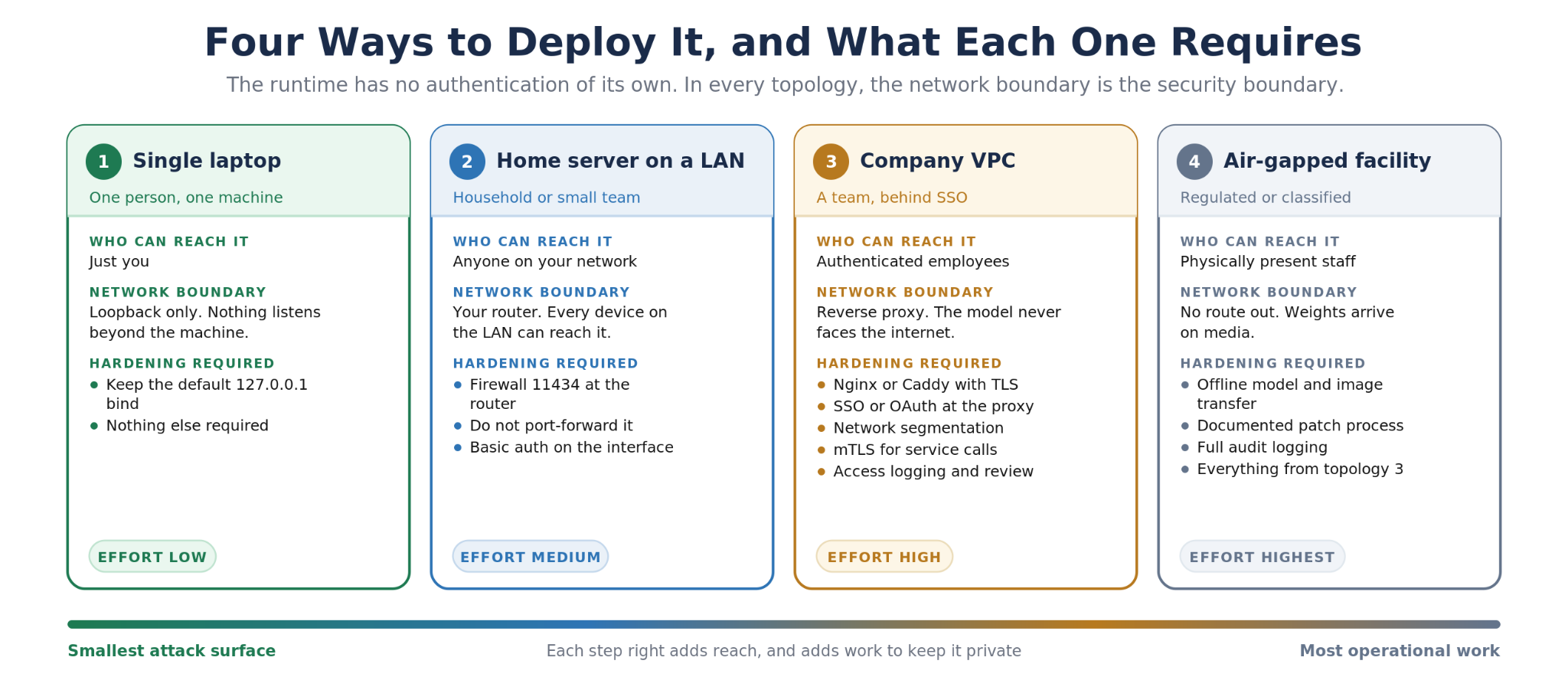
Ollama binds to the loopback address by default, which is correct. But it has no authentication of any kind: no user, no password, no token, no permission model. Anyone who reaches port 11434 can send prompts, enumerate models, read system prompts, and consume your GPU. The security boundary is the network alone, and the moment someone changes the bind address to reach the server from another machine, that boundary becomes whatever their firewall happens to be.
Plenty of people have made exactly that change. A joint investigation by SentinelLABS and Censys mapped roughly 175,000 publicly reachable Ollama servers across 130 countries. UpGuard now classifies an internet-exposed port 11434 as a critical-severity finding against an organization's external attack surface, in the same category as any other unnecessary open port.
Then it got worse. In early 2026 researchers disclosed a heap out-of-bounds read in Ollama's model loader, tracked as CVE-2026-7482 and nicknamed Bleeding Llama, rated critical at CVSS 9.1. Three unauthenticated API calls let an attacker read the server process's heap memory and quietly ship it elsewhere. What sits in that memory includes system prompts, API keys, environment variables, and other users' in-flight conversations. The attack leaves no error in the logs, so without endpoint monitoring there is nothing to notice. Roughly 300,000 internet-facing servers were exposed before the patch landed in v0.17.1.
The lesson is not that Ollama is unsafe software. It is that self-hosting moves responsibility rather than removing risk. On a commercial API, someone else patched the inference server and ran the intrusion detection. Now that is your job, and the assistant holding your privileged documents is a service on your network like any other.
For a regulated deployment, treat the hardening list as part of the build rather than as an afterthought, because a compliance reviewer will ask about all seven items and the honest answer needs to be documented before the assistant sees real data.
What We Found Running This Ourselves, 2023 to 2026
We published our first hands-on evaluation of local assistants in December 2023, testing GPT4All on two tasks a business would actually care about. Revisiting those results is the clearest illustration of how far this field moved, so here they are unvarnished.
The first task was summarizing a medical report, roughly 2,600 tokens of clinical text. Every model took more than fifteen minutes on a four-core machine with 32GB of RAM, which is not a usable interaction, so we cropped the document to about 5,000 characters just to judge quality in reasonable time. Mistral Instruct produced a fair summary that followed instructions and stuck to the facts. A 13B model did slightly worse. A Falcon-based model failed outright, returning two sentences with an incomplete ending.
The second was identifying clauses in a legal agreement. The full document produced no reply at all after twenty-seven minutes. Cropped to 2,000 characters, the model answered in a minute but misread the question, and a reworded prompt returned one correct deadline, one item that was not a deadline, one irrelevant point, and a missed deadline sitting plainly in the text. Our conclusion was that the field was moving in the right direction but that quality warranted heavy testing before trusting it with anything.
Three things changed since, and all three came from the same direction.
- GPU acceleration became standard. Our 2023 finding that local assistants did not use the GPU was accurate for the tooling of the time. Current runtimes accelerate by default. The fifteen-minute summarization is now measured in seconds.
- The models improved beyond recognition. The base models available in 2023 were LLaMA 1, GPT-J, MPT, Falcon, and derivatives like the Code Llama models Meta shipped for programming, and every one of those lines is dead or superseded. A 9B model today beats the 13B models we tested by a wide margin on the same tasks, at a smaller footprint, under a more permissive license.
- The English-only limitation is gone. Qwen and Mistral in particular ship serious multilingual capability, which removed what was a hard blocker for a lot of deployments.
The finding that survived is the one about testing. Local models still vary enormously by task, and the difference between one that handles your work and one that quietly gets it wrong is invisible in a benchmark table. It shows up when you run your own documents through it.
How These Models Get Small Enough to Run
Three techniques do the work of squeezing large neural networks onto small hardware, and knowing what they are makes the model listings readable.
- Quantization. Model parameters are normally stored as floating-point numbers taking two to four bytes each. Compress them to four-bit integers and a model shrinks by a factor of four or more while running on simple integer arithmetic that a CPU handles well. Precision drops, and for language tasks the drop is rarely noticeable. This is the single trick that put capable models on consumer hardware. The quantization-aware variants mentioned earlier take it further still, and the reason they hold quality at small sizes is that the model learns under the compression instead of meeting it at the end.
- Distillation. A smaller student neural network is trained to reproduce the outputs of a larger teacher. This is how a compact model acquires behavior it could never learn from raw text at that parameter count, and it is the reason distilled variants of large reasoning models run on hardware the originals never could.
- Low-rank adaptation. Rather than retraining every parameter to specialize a model into your own custom models, LoRA trains a small set of additional parameters and leaves the base weights frozen. Fine-tuning becomes affordable, and adapters can be swapped per task. If you plan to tune an open model on your own data, this is almost certainly the method you will use.
The Honest Limitations
Four constraints are worth knowing before you commit.
- Quality still trails the frontier. A 27B model on your desk is good. It is not the best commercial model, and on hard reasoning, long-horizon coding, and anything needing broad world knowledge, the difference is real. For summarization, extraction, drafting, and question answering over your own material, the gap is small enough to stop mattering.
- Context windows cost memory. Advertised context lengths assume memory you may not have. Long documents consume RAM alongside the model itself, and a configuration that loads fine can fail on a long conversation.
- The frontier tier is not really self-hostable. The most capable open models need multiple GPUs, and in practice a data center's worth of them. Calling that self-hosting is fair, but it is a rented-infrastructure decision with an infrastructure budget, not something you run in a closet.
- You own the maintenance. Updates, drivers, disk for weights, monitoring, and the entire security posture above are resources someone on your team has to allocate. For an individual this is a hobby. For a company it is a line item, and it belongs in the comparison against a subscription.
When an Off-the-Shelf Stack Stops Being Enough
Everything above assembles from parts anyone can download, and for many readers that is the whole answer. Install Ollama, add Open WebUI, pull a model, point it at some files, lock down the port. There is no prize for building what you can assemble.
There is a wall, though, and it shows up in predictable places.
- Accuracy on your specific material. Generic retrieval returns plausible answers that are wrong often enough to erode trust. This is the most common failure, and a bigger model does not fix it. Tuning retrieval and extraction to the shape of your data does.
- Structured and tabular data. As covered earlier, chunk-and-embed handles prose and falls apart on records. Anything involving counts, filters, joins, or aggregates needs query generation rather than similarity search, and no off-the-shelf chat client does that for you.
- Real integrations. An assistant answering from a folder is useful. One that reads from your ERP, case management system, or PIM and writes results back into those other systems is a different engineering problem.
- A provable accuracy floor. When a regulator, a client contract, or a downstream automated process depends on the output, you need a measured number on your own data rather than a general impression that it works well.
- Fine-tuning on proprietary material. Adapting an open model to your domain language, formats, and task — running your own LLMs on your own data — is where the largest quality gains live, and it is the one thing a commercial API will not let you do at depth.
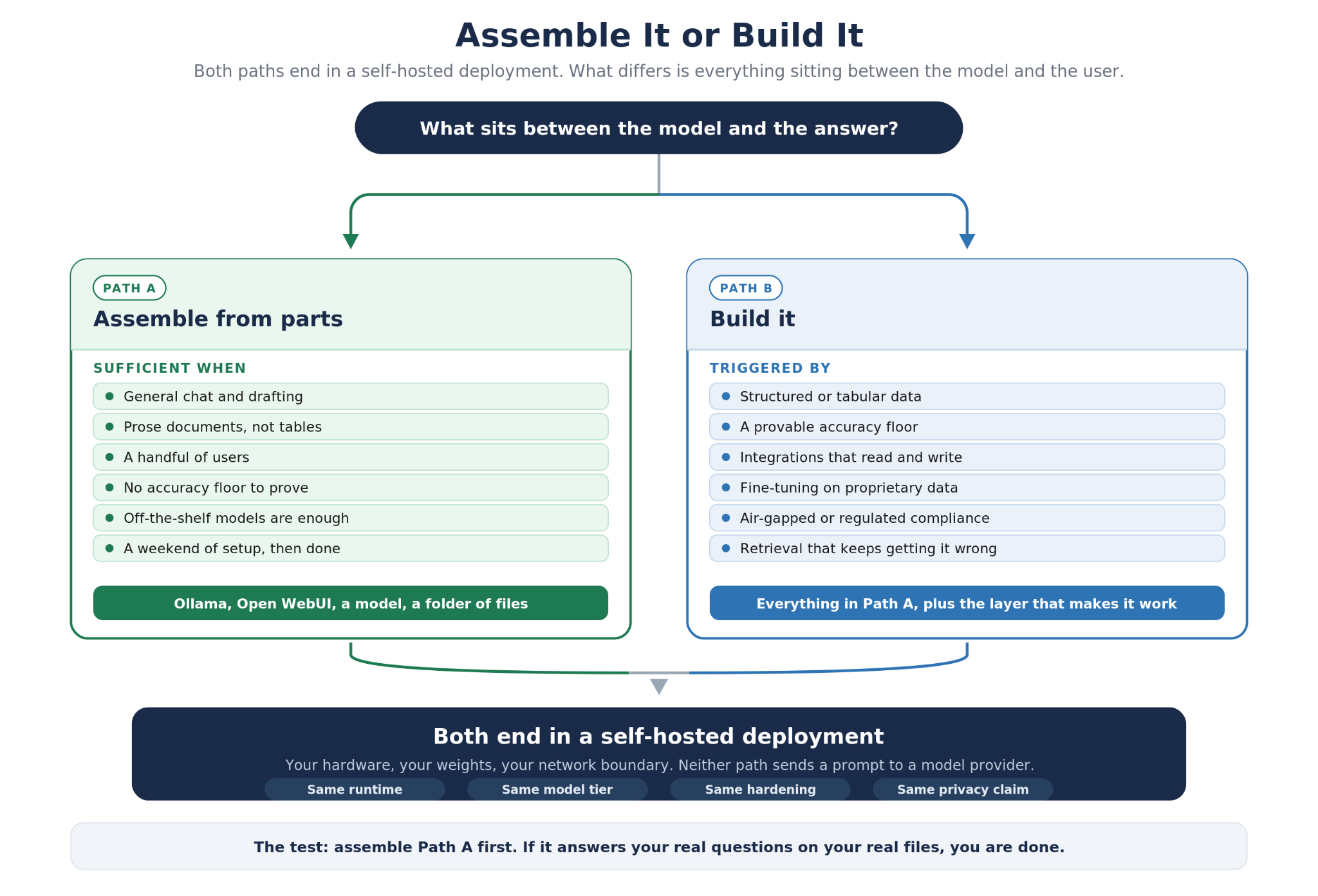
We build the second path. Our healthcare work serves a fine-tuned model on-premises so patient data never crosses the network boundary, with extraction accuracy measured against the client's own records rather than a benchmark set. Pumice chat is the same pattern in a product: an open model, self-hosted, with the retrieval layer designed around the real shape of the data instead of the generic recipe.
If you have hit one of the walls above, or you are trying to work out whether your requirements need a custom build at all, tell us what you are working with. We will say plainly when assembling the off-the-shelf stack is the better answer, because frequently it is.
The Short Version
A self hosted AI chatbot in 2026 is four decisions, not one product. Pick a model that fits your memory rather than the biggest one you can find, because open weight no longer implies runnable. Serve it with Ollama, which everything else assumes. Put an interface in front that matches who is using it, Open WebUI for most, LibreChat when a security team is involved. Then secure the deployment, because the runtime has no authentication and the privacy you came for is a configuration rather than a default — full control is something you set, not something the label guarantees.
The models are good enough now. A quantized 27B model running on hardware you already own will handle summarization, drafting, extraction, and questions about your own files at a quality that would have seemed implausible when we first tested this in 2023. What it will not do on its own is understand the structure of your data, connect to your systems, or prove an accuracy number to a regulator. That is the line between assembling a stack and building one — and it usually maps to whether you have the resources internally to own the ongoing engineering.
If you are working out which side of that line you are on, send us the details. We scope self-hosted and on-premises assistants regularly, and we will tell you when the free stack is all you need.
Need an assistant that runs entirely on your infrastructure?
Tell us what data it has to see and what it has to connect to. We will tell you whether an off-the-shelf self-hosted stack
clears your requirements, and what a custom build changes if it does not.
Frequently Asked Questions
Is ChatGPT open source?
No. OpenAI has never released the weights behind ChatGPT. It did release open-weight models in the gpt-oss family under Apache 2.0, which you can download and self-host, but those are separate models rather than a copy of ChatGPT. For your own AI chatbot with an open source ChatGPT feel, run an open-weight model such as Gemma 4, Qwen 3.5, or gpt-oss locally behind an interface like Open WebUI.
What hardware do I need to run LLMs locally?
Memory is the constraint. A four-bit quantized model needs roughly half a gigabyte per billion parameters plus context headroom, so a 9B model wants about 8GB and a 27B model 16 to 20GB. A 16GB laptop runs a capable assistant, a 24GB GPU runs a very good one, and a 2B model runs on a phone. Apple Silicon is unusually good at this, because the memory the system uses is the same pool the model draws from.
Can a self-hosted AI chatbot run completely offline?
Yes. Once the weights are downloaded, an offline LLM needs no network. Pulling models, updating software, and any web-search feature need connectivity; inference does not. That is what makes local models viable in air-gapped facilities, remote field sites, and anywhere outbound traffic is restricted.
Is a self-hosted chatbot actually private?
The inference is private, and your data remains on your hardware. The deployment is only as private as you configure it. Local runtimes generally ship without authentication and rely on network position, and roughly 175,000 Ollama servers are reachable from the open internet right now. Keep the loopback bind, firewall the port, and put authentication in front of anything remote. Also check your interface for telemetry or cloud sync, and confirm no model with a cloud suffix is quietly sending inference off the machine.
Ollama or LM Studio?
LM Studio for one desktop application with a graphical model browser and no configuration. Ollama for a service other applications talk to, which is what a server, a team, or any software you build needs. Most people who start with LM Studio and keep going end up running Ollama underneath something else.
Which self-hosted LLM is best for a business?
For a private LLM serving a team, the usual shape is Ollama for serving, LibreChat for the interface because it handles enterprise authentication, and an Apache 2.0 or MIT licensed model so legal review is short. Gemma 4, Qwen 3.5, and gpt-oss all qualify. Size the model to the hardware you can allocate, then measure it on your own documents before committing.
When does a custom LLM make sense instead?
When generic retrieval is not accurate enough on your material, when your data is structured rather than prose, when the assistant has to integrate with real systems, when you need a provable accuracy floor, or when fine-tuning on proprietary data is the only way to close the quality gap. Below those conditions, assemble the off-the-shelf stack and keep the money.
