Our Supplier Catalog Ingestion AI Agent | Automating SKU Onboarding
How we built a supplier catalog ingestion AI agent that grounds every SKU against the real vendor source before it writes a word

Matt Payne
September 16, 2026
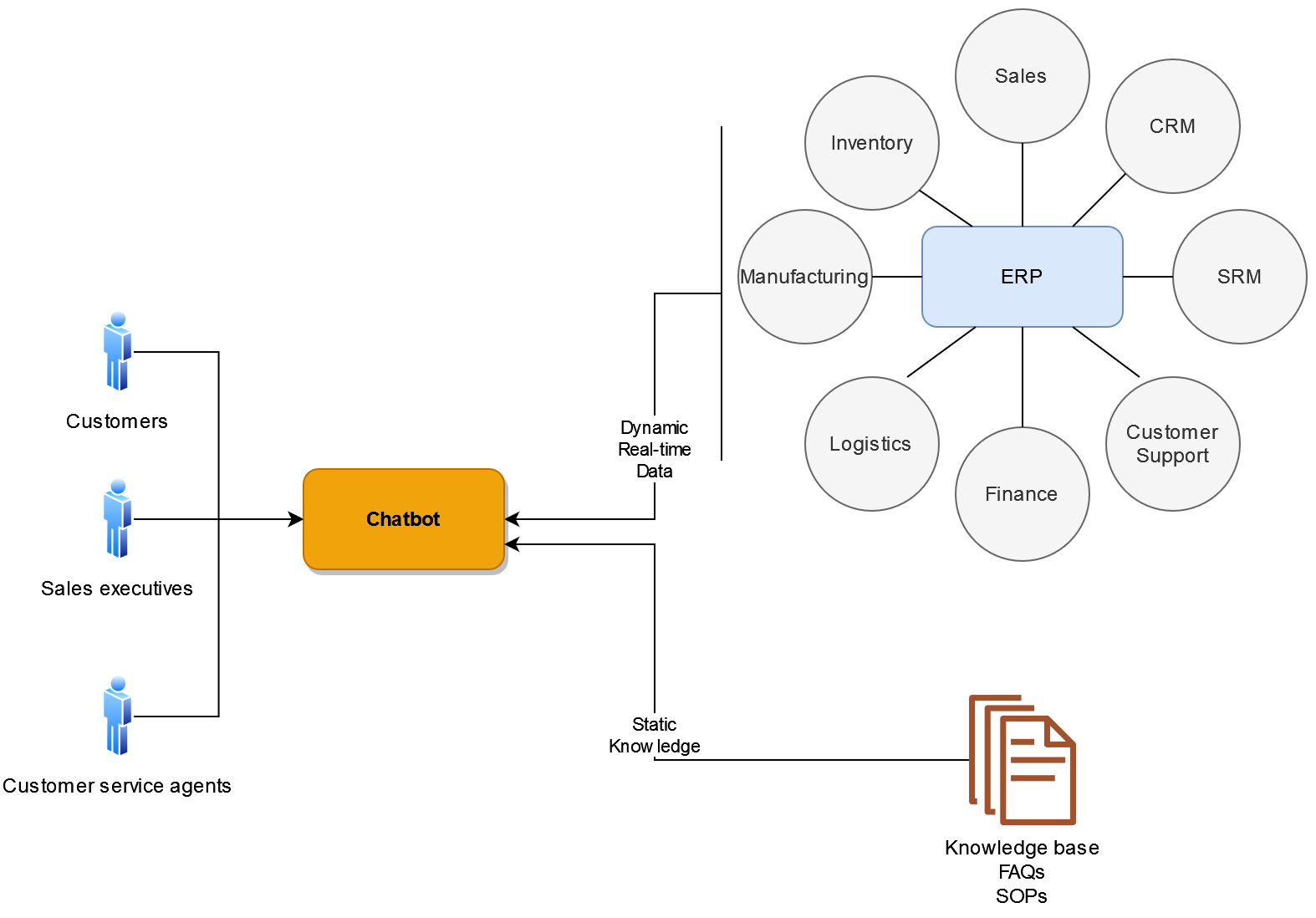
Every day, your finance, HR, procurement, sales, and customer service teams need answers that are locked inside your ERP: an invoice's payment status, stock on hand across warehouses, a customer's order history, a remaining leave balance. The data exists, but getting to it means knowing the right module, running the right report, or pinging the one person who does. So when a client or an executive wants an answer now, employees are forced to choose between a slow, accurate response and a fast, risky guess. That friction adds up. McKinsey has long pegged it at roughly 1.8 hours a day, close to a full day each week, spent just hunting down and assembling information.
Until just a few years ago, that tradeoff was unavoidable, and it carried real costs: false promises, underdelivering, missed commitments, even breached contracts.
However, modern advances in artificial intelligence techniques like agent systems and planning ai systems equipped with reasoning and tool use are enabling businesses to answer complex client questions quickly and accurately. LLM-powered agentic systems that integrate with business systems like enterprise resource planning can reason about complex questions and comprehensively answer them with accurate data. The payoff is measurable: BCG estimates generative AI can cut ERP implementation effort by 20% to 40% and reduce the time new users need to get up to speed by 50% to 60%. In this article, we look into such ERP AI chatbots that no longer require significant investment.
In this section, we explore a typical use case that involves obtaining real-time business information from an enterprise resource planning (ERP) system, either for a user who's directly interacting with the ERP or for a system that's programmatically talking to the ERP:
The complication here is that the company has dozens of warehouses that stock thousands of devices. The client's requirements are many and intricate. Manually matching the products against these complex requirements and then verifying their availability is cumbersome as it is.
But the client wants an immediate answer and expects the order to be fulfilled in a short time, which sounds almost impossible. If the executive asks for more time, there's a risk that this client may buy from a competitor.
Such complex business interactions and repetitive tasks are where AI-powered chatbots can help your employees make solid business decisions and create good impressions with your customers. The complicated requirement matching as well as real-time inventory checking are things that state-of-the-art LLMs can do by fetching real-time data from your ERP systems. They enable your employees to quickly and accurately answer complex questions using your business data.
In the sections below, we explain how our chatbots solve such problems and help you keep your customers happy.
In this section, we explain our field-tested framework for integrating custom LLM-powered chatbots with ERP platforms like SAP S/4HANA and Microsoft Dynamics 365.
Our ai ERP chatbot framework and chatbots support the following capabilities out of the box:
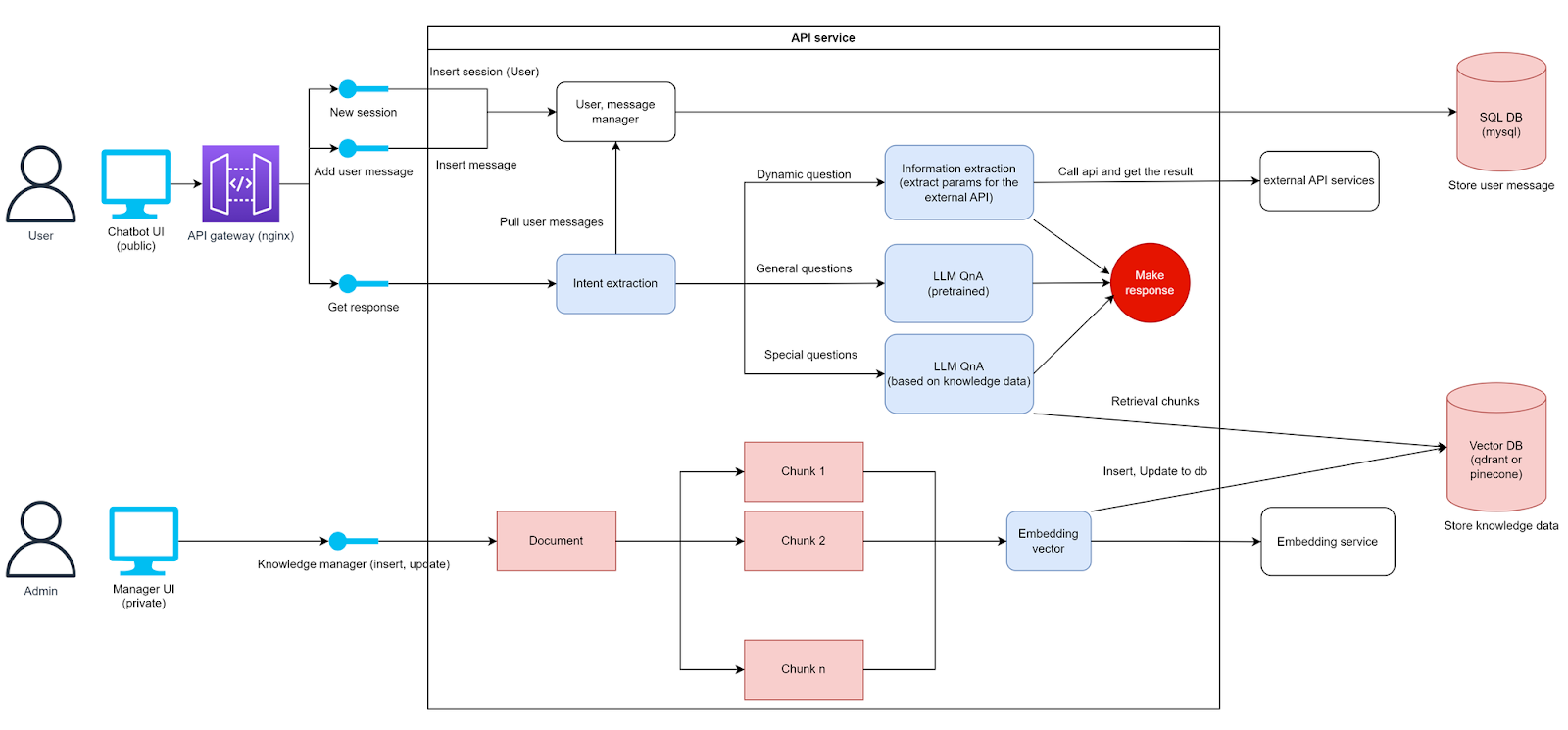
The architecture that enables all these is shown below:
We could have built this on top of an off-the-shelf ERP AI solution, or general-purpose agent builders and workflow tools like n8n or Microsoft Copilot Studio. For simpler internal automations those are a reasonable starting point, but for complex, customer-facing ERP assistants they run into real limits:
For these reasons we use our custom architecture, which keeps us in control of the agent framework, the integrations, and the response time.
The conversational Ai powering our chatbots must be able to:
We equip the chatbot with ReAct based agents that can do tool calling, pull data, validate the data, and take recursion steps to find additional information.
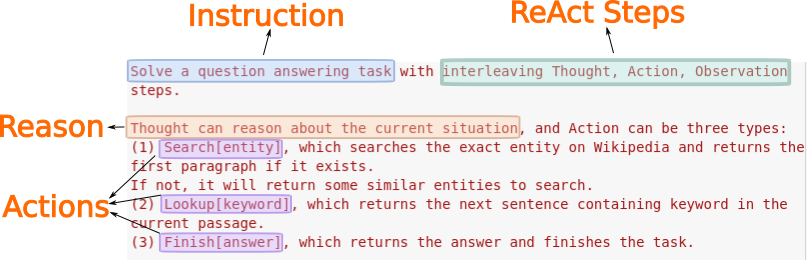
ReAct is a prompting framework to make an LLM plan on how to answer a complex question by combining reasoning with any necessary actions. In the example above, the LLM reasons that in order to answer a complex question comprehensively and accurately, it must break down the question into distinct actions that require interfacing with external systems.
The full list of available actions is domain-specific and supplied via few-shot examples to the LLM. It picks the actions that are most helpful for answering the question and acts on them.
Some few-shot examples for a question-answering task are shown below:
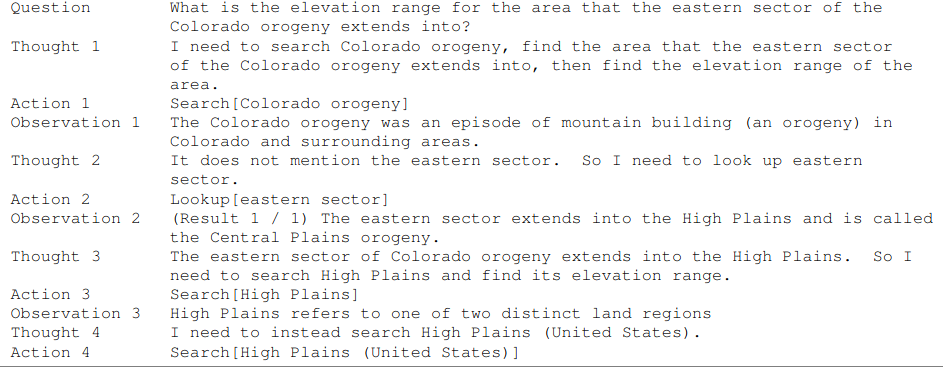
ReAct helps use cases like complex product search with multiple criteria:
Let's look at ReAct in the context of ERP chatbots.
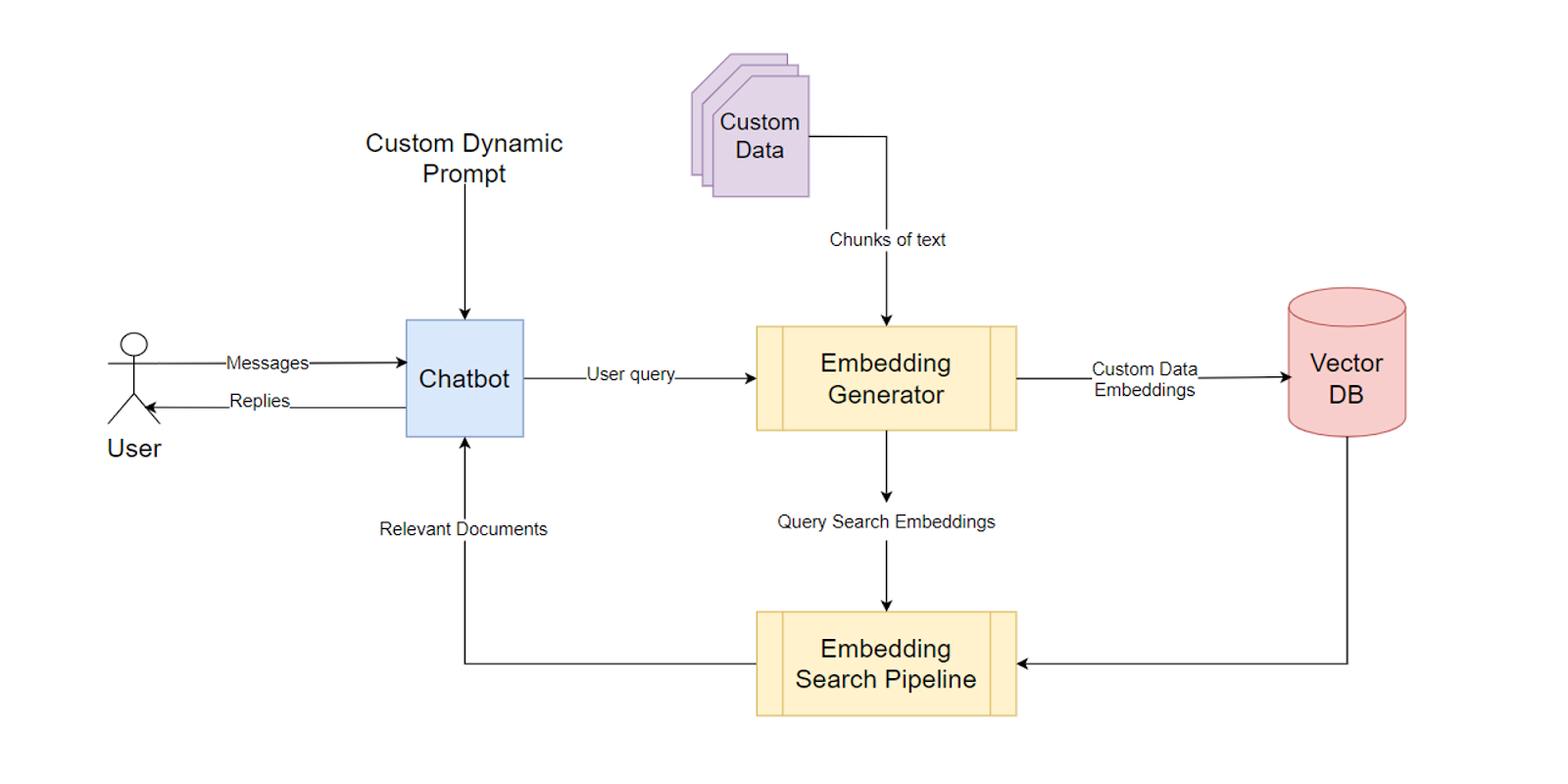
For finding information relevant to a query in static documents like FAQs, product descriptions, customer emails, or discussion forum posts — we implement a ReAct action named "search(query)." It does the following operations:
The framework also supports adding new documents or updating existing ones. After such changes, the document embeddings are recalculated and updated in the vector database.
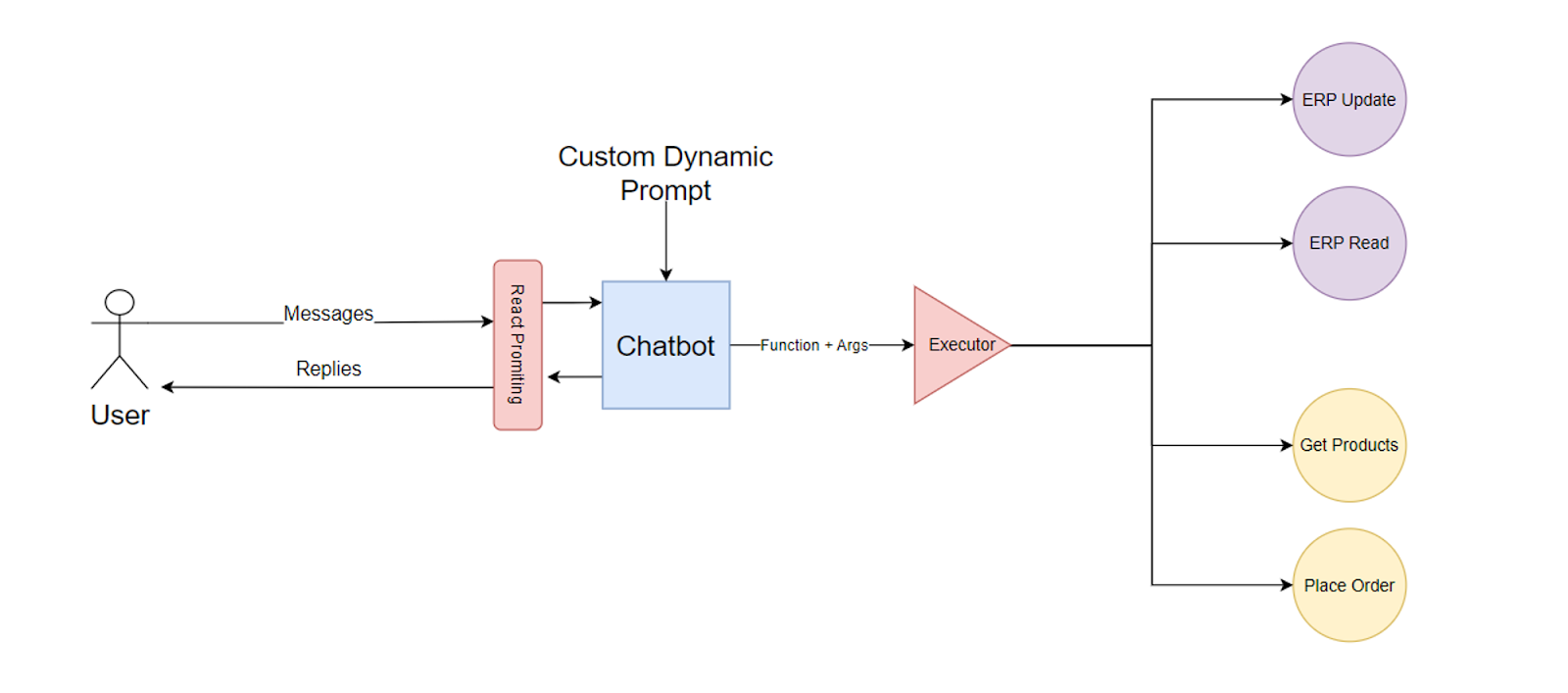
The fetching of different data from ERP systems is implemented using ReAct actions. Depending on the prompt and the detailed metadata for these actions, the LLM decides on the fly whether to invoke one or more of these actions.
Some typical ERP actions are:
The exact module names and APIs depend on the ERP platform you're using. We explore such details for two popular ERP platforms further down under the chatbot integration section.
We implement the ReAct strategy as an agent built on Claude's tool use. Instead of answering from a single prompt, the agent runs a loop: Claude reasons about the question, calls a tool to gather evidence, reads the result, and decides whether it has enough to answer or needs to keep going. That loop is what turns a chatbot into an agent, and it maps directly onto the reason, act, observe cycle that ReAct uses.
We expose the ERP and its surrounding data to Claude as a small set of tools, each defined with a name, a description, and a JSON input schema so Claude knows when and how to call it:
The agent does not stop at the first result. After each tool call it validates what came back against the user's real criteria, and recurses when the data is incomplete or fails the check. Walking through the bulk oscilloscope availability request:
Because validation and the decision to recurse happen inside the loop, the agent only commits to an answer it can support with retrieved, checked data, rather than guessing in a single pass. It is the same mechanism behind the guardrails covered later: the model plans and orchestrates, the tools and the ERP supply ground truth, and any write is confirmed before it commits.
The framework combines all the retrieved document chunks and the relevant dynamic data into a coherent answer by appropriately prompting the LLM.
All that remains now is to get the user query from the ERP's or some other application's front end. Then we display the LLM's answer to the user via that same front end. That's explained in the next section.
Microsoft Dynamics 365 is a popular ERP software among small and medium enterprises. On the other hand, large corporations typically choose SAP S/4HANA because their size and business complexity require its flexibility.
In the following sections, we explain the approaches for integrating a custom chatbot with both platforms.
Such integration always involves fetching data from the ERP backend. However, the chatbot front end (user experience) is typically integrated with a separate business application like a CRM or a service helpdesk. But for some special use cases, it may be integrated directly with the ERP system's dashboards. We explore all these approaches.
Dynamics 365 ("D365" from here on) includes several products to manage different business aspects:
Each product consists of modules and module APIs to fetch and modify their respective data stored in the ERP's databases. Our chatbot framework integrates with these APIs as explained in the following sections.
D365 SCM's inventory management module provides an inventory visibility service that reports real-time inventory levels and availability across all facilities, warehouses, and channels. It also supports stock reservations to prevent problems like overselling and delayed fulfillment.
Our chatbots integrate with the visibility APIs via ReAct actions that are invoked by the LLM on demand. These APIs enable the chatbot to:
When the LLM system invokes one of these actions, the chatbot's server-side logic calls these APIs. The chatbot's server-side logic is typically deployed as a standalone web application.
But when working with third-party systems, the chatbot may also be deployed as an integrated platform component rather than a standalone application. For example, if it's assisting salespersons via their Salesforce dashboards, its server-side logic runs on Salesforce-managed servers.
D365 also offers sales, CRM, and customer service capabilities. So it's possible that some clients want our custom chatbots shown directly on the D365 dashboard itself rather than some third-party application.
For such custom front-end integration, we develop the chatbot as a Power App and use the Power Apps component framework for a custom user interface.
S/4HANA provides components like:
These components publish API endpoints that our chatbots talk to as explained below.
The inventory APIs include:
Our chatbot ReAct actions invoke these APIs in response to instructions from the main Claude system.
Our chatbots are typically deployed as part of other business systems like Salesforce or Zendesk rather than integrating directly into S/4HANA dashboards. The backend components of our chatbots talk to the S4/HANA inventory APIs to get ERP data, combine them with other static information stored outside the ERP system, and show a coherent answer on Salesforce or Zendesk dashboards.
However, in some special scenarios, some job roles and workflows may require direct integration with S4/HANA dashboards. For such cases, our chatbots integrate with the following technologies:
The oscilloscope availability scenario above is deliberately detailed, but nothing about the pipeline is specific to inventory. Each additional use case is just another ReAct action that maps a natural-language question to the right ERP module and API, while the reasoning, document search, and answer-composition layers stay the same. Here are some of the highest-value questions teams ask, and the ERP action behind each.
Two kinds of actions show up here. Read actions, like checking an invoice status or a leave balance, only fetch data and are the safest place to start. Write actions, like reserving stock, raising a purchase request, submitting an expense, or completing routine data entry, change records in the ERP., so they run through the same role-based permissions and approval workflows the user already has. The chatbot never becomes a way around those controls: before any action runs, it confirms who the user is and what they are allowed to see or do, and any sensitive write is routed for approval rather than committed silently. That keeps the assistant aligned with your existing ERP authorization model and your data security and compliance requirements.
No ERP chatbot is plug-and-play, and the failure modes are predictable. Below are the challenges we plan for on every build, and how our architecture & ai algorithms addresses each.
An LLM is only as reliable as the data it can reach, and ERP data is often siloed, inconsistent, or out of date. A model left to its own knowledge will produce plausible but wrong answers. We avoid this by never letting the LLM guess at business data: every figure in an answer comes from a grounded ReAct action that queries the ERP or a retrieved document, not from the model's parameters. When a value cannot be retrieved, the chatbot says so rather than inventing one, and we surface the source behind each answer so users can verify it.
ERP systems hold sensitive financial, customer, and HR data, and a chatbot widens the surface that data can leak through. As covered in the use cases above, every action runs under the user's own ERP role and permissions, so the chatbot can never return something the user could not already access on their own. Beyond that, we log every query and action for auditability, keep personally identifiable information out of third-party model prompts where possible, and use a fine-tuned or self-hosted model when data residency rules require it. The deployment is aligned with whatever compliance regime the business operates under rather than bolted on afterward.
Modern platforms like S/4HANA and Dynamics 365 expose clean APIs, but many ERP landscapes also include older or heavily customized systems with no usable endpoints. For those, we build connectors against whatever interface exists, use a middleware layer to normalize data across modules, and fall back to other integration methods only when no API is available. Mapping a natural-language request to the right ERP action is configuration work that has to be maintained as business rules change, so we scope that ongoing maintenance into every engagement instead of treating the integration as one-and-done.
Most enterprises already run demand forecasting, predictive analytics, and RPA or workflow automation alongside the ERP, and a chatbot that ignores them either duplicates their logic or works against it. We treat those systems as additional tools the agent can call, so it surfaces an existing forecast or triggers an established automation rather than reinventing it, and it respects the guardrails those tools already enforce.
Interactive assistants have to feel instant, and real-time ERP lookups under heavy concurrency can strain both the ERP and the model. This is one reason we use a custom architecture rather than a heavier orchestration tool: it lets us choose fine-tuned or smaller models where they are fast enough, cache and reuse frequent lookups, and run independent ReAct actions asynchronously so a multi-part answer does not block on the slowest call.
LLMs are strong at single-step retrieval and reasoning but weaker at long, multi-leg transactions and exact calculations. We keep the model in the role it does well, planning and orchestrating, and defer precise computation to the ERP itself. Totals, tax, and availability math are returned by the ERP engine, not inferred by the model, and high-stakes writes are confirmed with the user before they commit.
A chatbot that is wrong once, or that feels like a black box, gets abandoned. We design for trust: answers cite their source, the assistant has clear escalation paths to a human or a power user when it cannot help, and it is upfront about what it did and did not do. The goal is a tool people rely on for routine questions, not one they have to double-check.
This chatbot pipeline strategy enables our chatbots to instantly and comprehensively answer very complex queries that you get from users and employees. By combining the awesome question-answering power of modern LLMs with real-time dynamic information from your existing ERP systems and static knowledge from other sources, our chatbots provide unprecedented insights into business operations in real time, greater operational efficiency, and unparalleled productivity in business interactions.
Contact us to see how we can set up a custom chatbot for your ERP.
