HubSpot NetSuite Integration with n8n: Closed Won Deals to Sales Orders, Invoice Status Back to HubSpot
A rep moves a deal to Closed Won in HubSpot, and for sales the job is done. The contract is signed, the amount is set and the products are on the deal.
Then someone in finance types it all into NetSuite again. A week later the order shows 100 units where the deal said 1,000. The rep calling about a renewal can't see whether the first invoice was paid.
Neither system is broken. HubSpot and NetSuite share no ID, so without a HubSpot NetSuite integration every handoff depends on a person matching records by eye.
The fix is to store each system's ID in the other. Our n8n workflow, free to import from our GitHub repo, does it in both directions. Closed Won deals become sales orders, and invoice status comes back to the deal.
Key Takeaways
- Closed Won deals in HubSpot become NetSuite sales orders within a few seconds, through a webhook.
- Customers are matched by email with SuiteQL, and the NetSuite customer ID is saved on the HubSpot contact.
- Each sales order stores the HubSpot deal ID, so a rerun updates that order instead of creating a second one.
- Every 15 minutes, changed NetSuite invoices set the deal's Invoice Status: Invoiced, Partially Paid or Paid in Full.
- Failures post to Slack with the failed step, the error message and a link to the run.
What Is a HubSpot NetSuite Integration?
✂️ SNIPPET BAIT - Definition for featured snippet and AI Overview capture
A HubSpot NetSuite integration connects HubSpot's CRM to NetSuite's ERP so records move between them without retyping. The most common setup turns a Closed Won deal into a NetSuite sales order for the right customer, then sends invoice and payment status back to the deal. It can run through HubSpot's own NetSuite app, a third-party connector or a workflow tool such as n8n.
Why HubSpot and NetSuite Need to Share Data
HubSpot holds everything before the signature: contacts, companies, deals and the products on each deal. NetSuite takes over after it, with sales orders, fulfillment, invoices and revenue. The handoff between the two is where manual work collects.
Without a sync, a closed deal becomes an email to finance and a sales order typed by hand. That adds a delay and invites typos in quantities and prices. It also creates duplicate customers whenever a company name is spelled two ways.
The return trip matters as much. Sales runs renewals, upsells and collections calls from HubSpot, and without payment status on the deal, each one starts with a question to finance.
This workflow keeps its HubSpot NetSuite integration automation to one event in each direction: the deal win and the invoice change. Contact and product edits stay in the system that owns them, so there is never a question of which side wins a conflict.
How the n8n HubSpot NetSuite Integration Is Laid Out
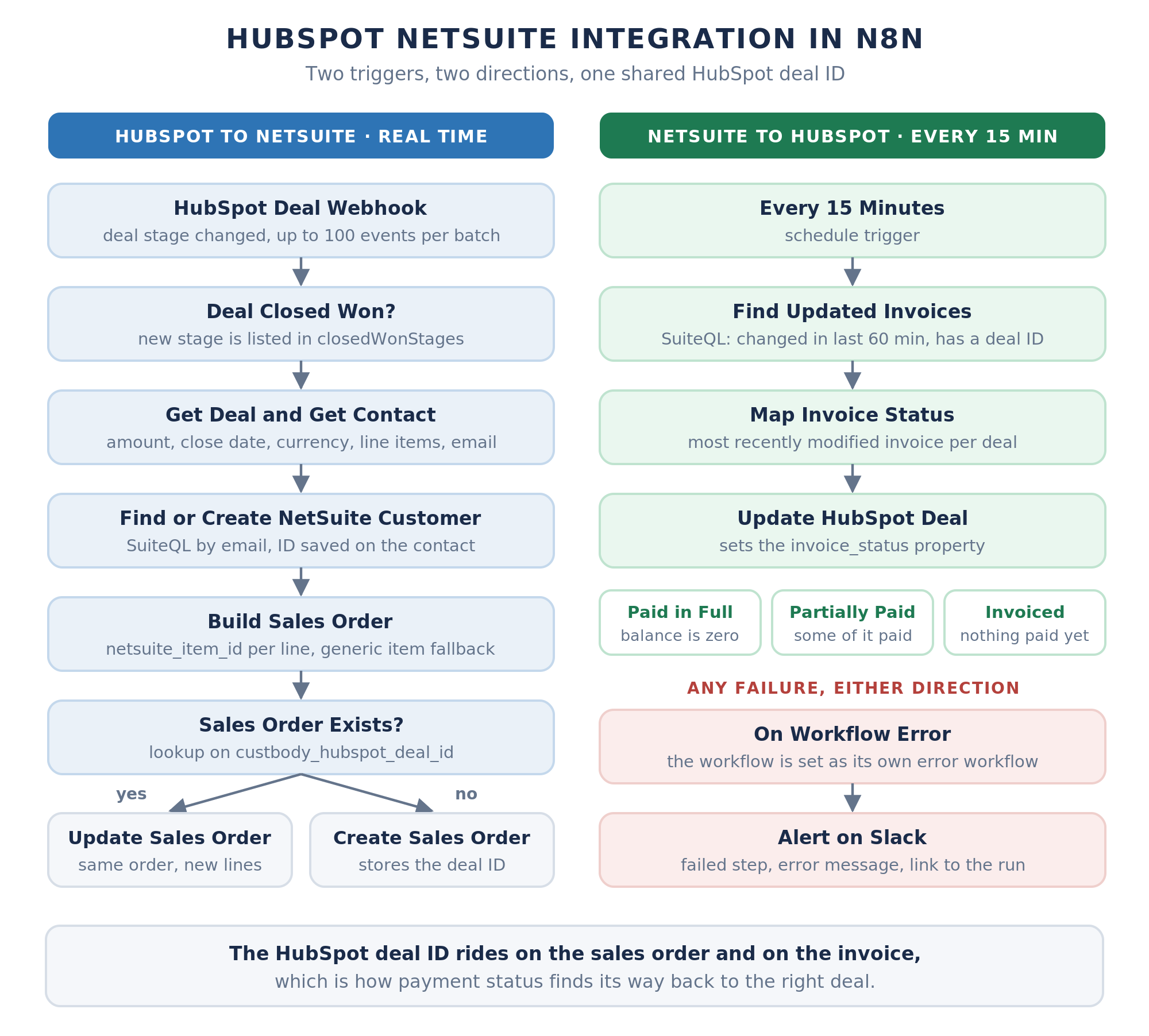
The workflow has two triggers and two flows. A HubSpot webhook fires when a deal's stage changes, and a schedule runs every 15 minutes to check invoices. Both pass through a Settings node, and a switch called Which Sync? sends each run down the right path.
A third trigger, On Workflow Error, catches any failure and posts it to Slack. There is no AI anywhere in the sync, because every step is a fixed rule. That makes it the kind of deterministic work n8n handles best.
Every value you change before the first run lives in Settings. Point netsuiteAccountId at a sandbox such as 1234567_SB1 while you test, then switch it to production:
Connecting n8n to HubSpot and NetSuite
Setup takes about an hour, most of it in NetSuite. Start in n8n with Workflows > Import from File, select hubspot-to-netsuite-sales-order-and-invoice-sync.json, then connect each system.
HubSpot: A Private App for the Token and the Webhook
In HubSpot, go to Development, then Legacy apps, click Create legacy app and choose Private. HubSpot now lists apps built in its UI as legacy apps, and one of them holds both the API token and the webhook subscription this workflow needs. Give the app five scopes: crm.objects.deals.read and write, crm.objects.contacts.read and write, and crm.objects.line_items.read.
Copy the app's access token into the App Token field of an n8n HubSpot credential. Every HubSpot request in the workflow uses that one credential, and the same private app holds the webhook you connect last.
Create three properties before the first run. Contacts get netsuite_customer_id as single-line text. Deals get invoice_status as a dropdown with Invoiced, Partially Paid and Paid in Full, with internal values matching those labels exactly. Products and line items can get an optional netsuite_item_id.
To find your Closed Won stage ID, open Settings > Data Management > Objects > Deals in HubSpot and go to the Pipelines tab. The default pipeline's Closed Won stage is usually closedwon, and custom stages usually have numeric IDs. List the Closed Won ID of every pipeline you sell through in closedWonStages, separated by commas.
NetSuite: REST Web Services, a Custom Field and OAuth 2.0
An n8n NetSuite integration needs three things on the NetSuite side: two features, a custom field and an integration record. Under Setup > Company > Enable Features > SuiteCloud, turn on REST Web Services and OAuth 2.0. Then create a Free-Form Text transaction body field with the ID _hubspot_deal_id. NetSuite adds the custbody prefix, and the field must apply to both sales orders and invoices.
Next, create an integration record under Setup > Integration > Manage Integrations > New, with Authorization Code Grant and the REST Web Services scope. Use n8n's OAuth Redirect URL as the redirect URI, which NetSuite only accepts over HTTPS. Copy the client ID and secret into an n8n OAuth2 API credential with the scope rest_webservices and Header authentication.
In that credential, replace ACCOUNT_ID with the URL form of your account ID, such as 1234567, or 1234567-sb1 for a sandbox. The Authorization URL is https://ACCOUNT_ID.app.netsuite.com/app/login/oauth2/authorize.nl and the Access Token URL is https://ACCOUNT_ID.suitetalk.api.netsuite.com/services/rest/auth/oauth2/v1/token. The role you sign in with must be able to use REST web services and OAuth 2.0. It also needs to create and view customers and sales orders, view invoices and items, and run SuiteQL queries.
NetSuite refresh tokens last seven days in this flow, so the credential needs a fresh sign-in each week. NetSuite 2027.1 also brings two changes. New authorization code integrations must send PKCE, and new integrations can't use token-based authentication. n8n's OAuth2 credential already offers a PKCE grant type.
Connecting the HubSpot Webhook
Publish the workflow, then copy the Production URL from the HubSpot Deal Webhook node. In the private app's Webhooks tab, set that URL as the target, then create a subscription for Deals, Property changed, on dealstage. Make sure the subscription is active and commit the changes.
Use the Production URL, not the test one. n8n's test URL only receives events while the editor is listening. A subscription pointed at the test URL is the first thing to check when nothing happens after a deal closes. If the URL is public, also check the X-HubSpot-Signature header HubSpot adds to each request, which is built from the app's client secret.
HubSpot to NetSuite: Closed Won Deal to Sales Order
This half of the HubSpot NetSuite sync runs in real time, in four steps.
Step 1: Catch the Deal Stage Change
HubSpot posts deal stage changes to the HubSpot Deal Webhook node. It sends up to 100 events in one request and counts any reply slower than five seconds as a failure. So the node replies at once and does the work afterward.
Read Deal Events keeps the latest stage change for each deal in the batch. Deal Closed Won? then passes only deals whose new stage is listed in closedWonStages.
Step 2: Read the Full Deal
The webhook event carries the deal ID and its new stage, not the deal's details. Get Deal reads the name, amount, close date, currency and pipeline, plus the associated contacts and line items. A deal with no contact stops here with an error that names it, because there is nothing to match a customer on.
Step 3: Match or Create the NetSuite Customer
Get Contact reads the contact's email, name, company and phone. Find NetSuite Customer then runs a SuiteQL query on the lowercased email, so Jane@Acme.com and jane@acme.com find the same customer. Email works as the key because it is the one field both systems already hold for the same buyer.
With no match, the workflow creates one: a company customer when the contact has a company, or an individual when it doesn't. NetSuite returns the new record's ID in a Location header. Either way, the ID is saved on the HubSpot contact as netsuite_customer_id.
Step 4: Create or Update the NetSuite Sales Order
Build Sales Order assembles the order, and Find Existing Sales Order looks for one that already carries this deal's ID in custbody_hubspot_deal_id. If it finds one, the workflow updates it and replaces its lines with the deal's current line items. If not, it creates a new order.
To carry more onto the order, add HubSpot properties to the properties list in Get Deal, pass them through Read Deal and set them in Build Sales Order. A PO number property, for example, maps to NetSuite's otherRefNum field.
That lookup is what makes reruns safe. A deal moved out of Closed Won and back, or a webhook HubSpot delivers again later, updates the same order instead of creating a second one. Each order is filled in like this:
NetSuite to HubSpot: Invoice Status Back to the Deal
This direction runs on a schedule, which keeps the whole sync inside n8n with nothing to deploy in NetSuite. Every 15 minutes, a SuiteQL query finds invoices changed in the last 60 minutes that carry a HubSpot deal ID. The window overlaps the schedule on purpose, so a slow or missed run doesn't skip an invoice.
The cutoff time is calculated in netsuiteTimeZone, the time zone set for the integration user in NetSuite. Matching it keeps each invoice check on the right hour.
Map Invoice Status turns each invoice into one value on the deal. Paid in Full means nothing is left to pay, Partially Paid means part of the total is paid, and Invoiced covers the rest, including invoices with nothing paid yet. When a deal has several changed invoices, the most recently modified one wins.
Invoice Status is a dropdown, so it also works in HubSpot views, reports and workflows. A rep can get a task the moment a deal turns Paid in Full.
Map Invoice Status also returns the invoice number and the unpaid amount. Add matching deal properties and include them in Update HubSpot Deal if reps want more than the status. To check more or less often, change the schedule and keep invoiceLookbackMinutes longer than the interval.
The custom field applying to invoices is what links the two directions. When finance bills the sales order, the deal ID carries over to the invoice, and that is how each invoice finds its deal.
Handling Line Items Between HubSpot Products and NetSuite Items
HubSpot product IDs and NetSuite item IDs never match, so the workflow needs a map. It reads netsuite_item_id from each line item, holding the NetSuite item's internal ID. Each line's rate is the unit price, or the amount divided by quantity when no price is set.
Line items without an ID fall back to genericItemId, such as a Services item. A deal with no line items at all becomes one line for the deal amount. If your HubSpot SKUs already match NetSuite, swap the property for a lookup table on hs_sku inside Build Sales Order.
Error Handling and Slack Alerts
Any failed NetSuite request in the sales order flow goes to Report NetSuite Error. It stops the run with an error message holding the deal ID, the deal name, NetSuite's own error and a link to the deal. Set the workflow as its own error workflow, and On Workflow Error posts the step, the message and a link to the run in Slack. To alert somewhere else, swap Alert on Slack for an email or Microsoft Teams node.
Most errors trace back to setup rather than to the deal itself:
Before go-live, run three checks. Move a test deal with a contact to Closed Won, and a sales order should appear in NetSuite within a few seconds. Move it out and back, and the same order should update. Then bill the order in NetSuite, and Invoice Status should change within 15 minutes.
HubSpot's NetSuite App vs an n8n Workflow
HubSpot's own NetSuite app is a HubSpot NetSuite connector available on all HubSpot plans. It syncs contacts, companies, products, invoices and sales orders, and it maps HubSpot deals to NetSuite opportunities. Sales orders come from a deal-based workflow, which can fire automatically, or from a button on the deal record.
Three requirements decide whether the app fits. Workflows that create sales orders need a Professional or Enterprise plan, and custom field mappings need Data Hub. HubSpot's company currency must also match NetSuite's base currency.
The app fits when you want records mirrored and your fields map one to one. The n8n workflow fits when you want orders created without HubSpot workflows, deals come in more than one currency, or reps need payment status on the deal itself.
Either way, pick one system to create sales orders. Running the app's workflow action and this webhook together would create two orders for every won deal.
We'll set up this HubSpot NetSuite sync for free
We install the workflow in your HubSpot and NetSuite accounts, map your stages, items and currencies, and test it with your team. You only pay if you find value.
• Closed Won deals become NetSuite sales orders without retyping
• Customers matched automatically instead of retyped by hand
• Reps see on the deal whether it is invoiced, partly paid or paid
• Sync failures reach Slack the moment they happen
Frequently Asked Questions About Hubspot to NetSuite connections
Can HubSpot integrate with NetSuite?
Yes, in either direction. HubSpot offers its own NetSuite app on all plans, which syncs contacts, companies, deals, invoices and sales orders. For a custom NetSuite HubSpot integration, tools like n8n connect through NetSuite's REST API and SuiteQL, which suits teams that want their own matching, currency and error rules.
Can n8n sync HubSpot and NetSuite in both directions?
Yes. This workflow sends HubSpot deals to NetSuite in real time through a webhook, and sends NetSuite invoice status to HubSpot every 15 minutes through a SuiteQL query. Both directions share one key: the HubSpot deal ID stored on the sales order and the invoice.
How do you connect n8n to the NetSuite API?
Use NetSuite's REST web services with OAuth 2.0. Create an integration record with Authorization Code Grant and the REST Web Services scope, then add its client ID and secret to an n8n OAuth2 API credential. Reconnect it weekly, because the refresh token lasts seven days.
How do you match HubSpot contacts to NetSuite customers?
Match on email. The workflow runs a SuiteQL query for a customer with the same lowercased email and creates one if nothing matches. It then saves the NetSuite customer ID on the HubSpot contact as netsuite_customer_id.
Which HubSpot events should trigger the NetSuite sync?
A deal stage change filtered to Closed Won is the core trigger. This workflow listens to the dealstage property, so each order is sent once, at the moment the deal is won. To push a change, move the deal out of Closed Won and back.
How do you prevent duplicate sales orders between HubSpot and NetSuite?
Store the HubSpot deal ID on every sales order in a custom field, custbody_hubspot_deal_id, and look it up before writing. If an order with that ID exists, update it instead of creating one. HubSpot retries failed webhook deliveries, so the same event can arrive twice even when deals never move backward.
What are the challenges in a HubSpot and NetSuite integration?
The hard parts are identity, items and timing. Customers have to match across two systems with no shared ID, HubSpot products have to map to NetSuite items, and currencies and subsidiaries have to line up. Payment status also has to be pulled back from NetSuite on a schedule, and the OAuth 2.0 connection needs a fresh sign-in every seven days.
What are the best practices for a HubSpot NetSuite integration?
Store each system's ID in the other and look it up before every write. Match customers on a stable key such as email, map items by internal ID rather than name, and set a fallback item for anything unmapped. Test against a NetSuite sandbox first, and send every failure to a channel someone watches.
Conclusion
A HubSpot NetSuite integration comes down to shared IDs. The deal ID rides on the sales order and the invoice, and the NetSuite customer ID rides on the contact. With those in place, Closed Won deals turn into orders without retyping, and payment status shows up where sales already works.
Import the workflow, fill in Settings and run the three go-live checks before real deals flow through it.
