If you're deploying AI workflows into production in 2026, the choice between n8n and LangGraph will shape how your team builds, monitors, and maintains every agent you ship. This isn't a minor tooling preference, as it directly affects error recovery, state management, cost predictability, and whether non-engineers can iterate without bottlenecking developers. The single biggest difference: LangGraph is a code-first framework for AI workflows built around stateful agent execution, while n8n is a visual workflow automation tool designed for seamless integration across hundreds of services.
The short answer: For engineering-heavy orgs building stateful AI agents that require fine-grained control over multi-step reasoning, persistent memory, and human-in-the-loop checkpoints, LangGraph should be your focus. For operations-led teams that need to connect AI models to dozens of SaaS tools quickly and want non-developers to own workflow changes, n8n is the more productive choice. Many mature organizations adopt both: LangGraph powering complex agent logic, n8n handling triggers, routing, and business process automation.
What Is n8n in the Context of AI Workflows?
n8n is a low-code automation platform that has evolved well beyond simple task automation. Originally built for workflow orchestration across business applications, it has added robust AI capabilities since 2024, including LLM provider nodes (OpenAI, Anthropic, Gemini), agent nodes, memory and vector embedding support, webhooks, and schedule triggers. Even though they have added agentic features, n8n is not an AI-native framework, but it has become one of the most popular ways to glue AI model calls to CRMs, databases, ticketing systems, and internal APIs without heavy coding.
n8n features a visual workflow builder with drag-and-drop functionality, and n8n supports over 1,000 native business app integrations as of 2026. It offers both self-hosting for data privacy and control, and a managed cloud product with execution-based billing introduced in mid-2025. n8n allows users to connect apps and APIs without heavy coding, making it accessible to a wide range of teams.
Defining strengths for production AI workflows:
Fast iteration on mixed AI + SaaS flows. n8n supports built-in AI nodes for LLM integration alongside connectors for Gmail, Slack, Salesforce, Postgres, Snowflake, and more. Building workflows that classify an email, call a large language model, and update a CRM takes minutes, not days.
Non-engineers can own workflow behavior. n8n is easier for non-technical users to adopt, and ops, marketing, and support teams can modify triggers, swap parameters, and adjust branching without writing custom code.
Built-in reliability primitives. n8n includes features for easy error handling and monitoring: retries, error workflows, schedules, webhooks, execution history with node-level inspection and re-runs.
Strong fit for short-lived, event-driven AI workflows. n8n supports event-driven workflows that react in real time, ideal for deterministic, linear business process automation like data synchronization, notifications, and automated processes triggered by external events.
Open repo
13 n8n workflows we actually run, as importable JSON
Every one of these is a file you can drop straight into n8n. No gated download, no signup. Attach your own credentials and run it.
Multi-platform social publishing with a human approval gate
Keyword rank tracking on your own Search Console data
SEO refresh writer, Search Console history plus AI
Product content enrichment through Pumice
QR ticket validation with n8n Forms and Google Sheets
Fathom call transcripts synced to HubSpot contacts
Plus automated content creation from RSS, LinkedIn job scraping, product image generation, OpenRouter model switching and more
Several ship with a written setup guide in the guides/ folder covering credentials, node settings and the failure modes worth knowing before you run them.
What Is LangGraph in the Context of AI Workflows?
LangGraph is an open-source, code-first framework from the LangChain team purpose-built for building stateful AI agents and multi-agent systems as explicit state graphs. Unlike visual orchestration tools, LangGraph uses a graph-based model for workflow orchestration: you define nodes (callables), edges (transitions, including conditional logic), and a centralized state object in Python or TypeScript. It reached its stable 1.0 release in late 2025, and companies like Uber, LinkedIn, and Klarna have deployed it in production.
LangGraph is designed from the ground up for long-running, multi-step, multi-agent AI workloads. It supports checkpointing backends (Postgres, Redis), tight integration with LangChain and LangSmith for observability, and first-class streaming and human-in-the-loop support.
Defining strengths for production AI:
Fine-grained control over state, including replays and "time travel." LangGraph supports persistent state management across node executions, enabling teams to inspect, roll back, and resume agent execution at any checkpoint.
Robust human-in-the-loop features. LangGraph allows workflows to pause for human intervention (approvals, manual corrections, or escalation) backed by persistent memory and exact-state resumption.
Built for agents that run over minutes to days. LangGraph enables multi-agent coordination for complex workflows, making it the natural fit for building stateful AI agents that coordinate multiple LLM and tool calls across extended sessions.
Easier to test and version-control. Because everything is code, automated tests for nodes and graphs, code review, and CI/CD integrate naturally into existing engineering workflows.
n8n vs LangGraph: How They Compare at a Glance
Before diving into each decisive factor, here's a decision-focused snapshot of the key differences between n8n and LangGraph, useful for CTOs and team leads evaluating both tools for production deployment.
At a glance
n8n and LangGraph on the dimensions that decide a production build
Factor
n8n
LangGraph
Best primary use case
Integration-heavy business workflows across SaaS tools
If the hard part of your workflow is reaching a dozen services, n8n wins. If the hard part is making the AI itself reliable and inspectable, LangGraph wins.
If your main problem is connecting AI to many SaaS tools quickly and automating business workflows, n8n wins. If your main problem is making the AI itself reliable, inspectable, and stateful, LangGraph wins.
Decisive Factor 1: Developer Experience & Team Skill Requirements
For many production AI projects, the makeup of the team, engineers versus non-technical users, is the first constraint that determines how maintainable your ai systems will be over time. A tool that demands deep engineering knowledge slows iteration for mixed teams; one that supports low code automation helps reduce bottlenecks but may limit precision.
Defining workflows:
n8n: Building workflows happens in a visual workflow builder. Each node represents an action: an API call, a SaaS integration, an AI model invocation, a conditional branch. For more complex tasks, JavaScript or Python code nodes provide escape hatches. Workflows export as JSON, and Git-based version control is available on cloud/enterprise tiers. n8n allows non-technical stakeholders to visually audit workflows, so mixed teams can collaborate on production systems.
LangGraph: Workflows are defined entirely in Python or TypeScript. You write functions for nodes, define edges and conditional logic, and manage state transitions explicitly. This is a programming framework through and through. It supports high testability-unit tests for individual nodes, integration tests for full graphs, and it fits naturally into standard version control and CI/CD pipelines.
Who owns what in production:
Consider a startup with one backend engineer and several non-technical support agents. With n8n, the engineer sets up core workflows, templates, and code nodes, but support staff can adjust classification thresholds via the UI, modify response templates, set new triggers, and reconfigure error paths, all without touching code. With LangGraph, nearly all ownership stays with engineers: even minor tweaks to agent behavior typically require code changes, review, and redeployment. Non-technical users might only adjust parameters exposed through a custom configuration layer built on top.
This gap in ownership matters at scale. When workflow complexity grows and multiple business units need to iterate independently, the visual interface of n8n lets operations teams move fast without creating engineering bottlenecks. LangGraph demands software engineering depth at every level, but that investment buys you rigor, full testability, and fine-grained control that visual tools cannot match.
Winner: n8n - significantly easier for mixed-technical teams to adopt, iterate on, and maintain in production. LangGraph requires agentic developer depth throughout but rewards teams that need precise control over complex agent behavior.
Decisive Factor 2: State Management & Long-Running AI Agents
Many AI workflows in production aren't single-shot API calls, since they span multiple turns, need memory management across interactions, must pause for human approval, and have to recover gracefully from failures or infrastructure restarts. In domains like compliance, healthcare, or legal, agent interactions may extend over hours or days, with dependencies on external events and human decisions.
How each tool handles state:
n8n handles state linearly within a single execution cycle. It supports wait nodes for delays, built-in memory via agent nodes or external databases, and can automate tasks like data synchronization and notifications within bounded workflows. These are sufficient for flows lasting seconds to a few minutes. But for long-running multi-day sessions or agents that need to loop, branch, and checkpoint across many interactions, there is no native durable checkpointing. Persistent memory, rollback, and time travel must be built manually via database nodes and custom logic-more fragile and harder to maintain.
LangGraph allows for persistent memory across workflow executions using checkpointing backends like Postgres or Redis. Graphs maintain centralized state tracked across nodes and edges, supporting streaming, human-in-the-loop wait states, and the ability to pause, resume, and inspect state at any point. It supports complex branching logic for non-linear workflows and enables building stateful AI agents that survive process restarts, infrastructure failures, or LLM provider outages.
Concrete use cases:
Compliance-heavy KYC agent spanning a week. A user uploads documents across multiple sessions; verification steps require human approvals at several points; fallback paths exist for missing data. LangGraph's persistent state management across node executions stores every checkpoint, pauses until human sign-off, then resumes from the exact place. n8n could approximate this but requires significant custom wiring and provides less tooling for replay and debugging.
Research assistant aggregating dozens of tool calls. An analyst kicks off a multi-step research flow, reviews intermediate results, corrects misclassifications, and pauses overnight. LangGraph's trace and checkpointer infrastructure gives full visibility into which step produced which output and allows rollback. n8n provides execution logs per run but lacks the granular temporal state inspection needed for complex ai systems.
What this looks like in a shipped system: we built an Amazon listing optimization pipeline for Interpublic Group, a Fortune 400 holding company whose brands include Kenvue and General Mills, on roughly fourteen ReAct agent nodes arranged in a repeating structure, generate and validate loop. The state discipline is what makes that many nodes survivable. Every node enforces its output against a Pydantic model with rebuild logic behind it, so a malformed response gets reconstructed rather than passed downstream, and one bad generation cannot break a run that is processing many products in parallel. That guarantee is what a code-first framework is actually selling, and it is hard to reproduce on a visual canvas.
Operational implications: Recovery from failures matters in production. LangGraph's durable execution reduces lost state during process crashes. Debugging unexpected agent behavior is easier because you can replay graphs from any checkpoint. Rolling deployments become safer when you can version nodes and roll back if upstream changes break data flow. In n8n, retries handle transient failures well, but mid-graph recovery for stateful loops is harder to implement and maintain.
Winner: LangGraph - first-class state management for agents that must persist reliably beyond a single workflow run. n8n is capable for short-lived or simple multi-step workflows but hits real limits when context management and durability are central requirements. We pretty much always use Langgraph/Langchain for real agentic builds.
Decisive Factor 3: Integrations, Tooling, and Ecosystem Fit
In production, AI workflows rarely operate in isolation. Agents need to pull data from CRMs, write to data warehouses, trigger alerts in Slack, query internal APIs, and sync with ticketing systems. The integration ecosystem around your chosen platform directly affects how fast you ship and how much glue code you maintain.
n8n's integration strategy:
n8n supports over 1,000 native business app integrations as of 2026, including connectors for Salesforce, HubSpot, Slack, Postgres, Snowflake, Google Sheets, and dozens of LLM providers. Each connector typically ships with built-in authentication, schema handling, retry logic, and pagination. For unlisted services, HTTP or GraphQL request nodes serve as a fallback. n8n also supports community nodes and custom connectors for extending reach. n8n is ideal for business process automation through APIs, connecting multiple services without building custom adapters. n8n can automate tasks like syncing data between systems, sending notifications, and routing events across business workflows.
LangGraph's integration strategy:
LangGraph leans on the LangChain ecosystem for tool integrations: document loaders, retrieval systems, vector DB integrations, and LLM provider abstractions. LangGraph integrates seamlessly with LLMs and external APIs. But for business SaaS tools (Gmail, Salesforce, ticketing systems) LangGraph requires custom code to connect external services. You implement custom tools, manage authentication, handle rate limits, and define schemas. This gives full flexibility and fine-grained control but carries higher maintenance overhead.
Ecosystem trends and interoperability:
Both n8n and LangGraph handle workflows featuring AI components, but they approach the ecosystem differently. n8n's AI nodes increasingly support structured output, memory, and tool invocation via embedded LangChain agent nodes. LangGraph v1 introduces standardized content blocks in LangChain core for message standardization across ai tools. A large-scale empirical study of LLM agentic workflows in low-code platforms (including n8n) has highlighted gaps in reliability, safety, and governance-indicating that while low-code tools are widely deployed, many production workflows still suffer from weak observability and loose state management when pushed into complex agent territory.
Concrete implications:
n8n shines for stitching ai agents to sales, marketing, and support tooling without writing adapters, ideal when your stack includes many standard SaaS tools and you want to optimize workflows quickly across multiple services.
A concrete measure of that breadth: the social media publishing workflow we built reaches X, Instagram, Facebook, LinkedIn and Gmail without a single adapter written. Where it stops is more instructive than where it reaches. Two nodes in that workflow exist only because Instagram's publishing API will not accept a PNG and will not accept an uploaded file, so the generated image is re-encoded to JPEG and pushed to an image host to get a publicly reachable URL. A thousand connectors get you to the platform. The last mile of any given platform's rules is still yours.
LangGraph shines when tools are custom microservices, bespoke retrieval systems, or proprietary APIs where depth and customizability outweigh breadth.
Winner: n8n - unbeatable breadth and speed of integrations for typical SaaS-heavy environments and automating business workflows across external APIs. LangGraph wins on depth and flexibility for fully custom stacks, but requires significantly more engineering effort per integration.
Decisive Factor 4: Observability, Reliability, and Human-in-the-Loop
"Production-ready" in 2025–2026 means more than "it runs." It means tracing prompts, monitoring token usage and error rates, controlling costs, and letting humans intervene when agents go off course. Without these capabilities, ai agents can drift, hallucinations go unchecked, and failures become expensive.
Observability and monitoring:
n8n: Provides execution logs per workflow run, showing each node's input and output in the UI. Supports history views, error paths, and some metrics via dashboards or external monitoring (OpenTelemetry, JSON log export). Cloud plans offer Insights for execution counts and error rates. However, AI-specific observability (prompt content, token usage, tool choice history) is less fully built in without custom instrumentation or plugging in LangChain agent nodes. For basic ai operations monitoring (did the workflow run, did it fail, what was the output), n8n is solid.
LangGraph: Observability is deeply integrated. Long-running agent graphs are tracked via traces; token-by-token streaming is supported natively.LangSmith provides rich tracing including Graph Studio to visualize agent paths, intermediate states, tool outputs, and edge decisions. You can inspect exactly which step consumed how many tokens, what each tool returned, and how the agent's reasoning evolved. Time travel through state checkpoints makes debugging agent behavior across production systems far more practical.
Human-in-the-loop support:
n8n: Offers manual approval nodes, email or Slack notification flows, and error-handling branches. These work well for simple approvals or escalations, for example "pause before sending this email blast." But pausing and resuming agent logic at an arbitrary point in a stateful graph is more manual and less structured.
LangGraph: It allows human-in-the-loop checkpoints for sensitive tasks-structured wait states inside the agent's graph where a human can approve, edit state, or reject before the agent proceeds. The agent resumes from the exact checkpoint with the human's decision recorded. This is essential in regulated industries where audit trails of AI decisions and corrections are mandatory.
Regulated-industry example: In finance, an AI agent reviewing loan applications needs an exact log of what information it used, which decision path it took, and where human overrides occurred. LangGraph makes these audit trails cheap to produce, since every state transition, tool call, and human intervention is captured and replayable. n8n can capture some logs, but customizing logs of internal agent decision paths and storing prompt content and tools used throughout the multi-agent workflow requires significant custom instrumentation and external logging.
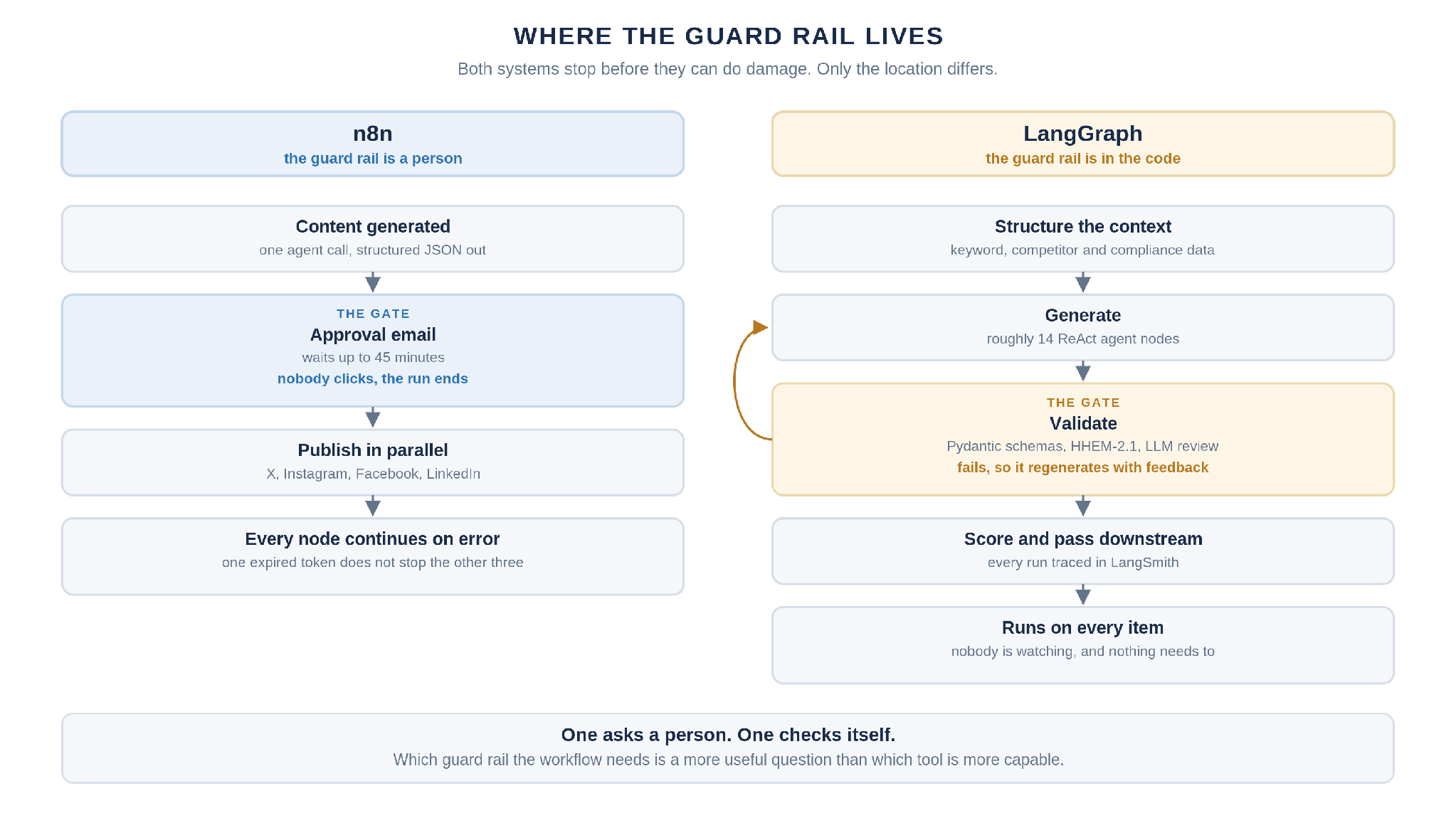
Two systems we run make the difference concrete, because both stop before they can do damage and the stop is built in completely different places.
On the LangGraph side, the IPG pipeline traces every node and LLM call through LangSmith, screens generated content against the verified source data with HHEM-2.1 hallucination detection, and enforces schemas at each validation node. When a check fails, the node returns targeted feedback and regenerates until the output passes. The guard rail sits inside the agent, written in code, and it runs on every item without anyone watching.
On the n8n side, our social publishing workflow pauses and emails a human before anything reaches a company account. The reviewer gets formatted posts with Approve and Disapprove buttons, the run waits up to 45 minutes, and if nobody answers it ends rather than publishing. Separately, every publishing node is set to continue on error, so an expired LinkedIn token does not stop the posts going out to X, Instagram and Facebook.
Both are correct for their job. The LangGraph version validates thousands of items nobody will read individually. The n8n version asks a person, because the cost of one wrong post on a corporate account is higher than the cost of waiting. Which guard rail your workflow needs is a more useful question than which tool is more capable.
Winner: LangGraph - purpose-built for deep AI observability, traceable agent execution, and nuanced human oversight. n8n handles basic operational monitoring and simple approval flows well, but is less suited to production workflows where trust, audit, and transparency are central requirements.
Decisive Factor 5: Cost Model, Hosting, and Scaling in 2026
Hosting and pricing impact not just financial planning but also architectural choices, whether you run on your own infrastructure, how you handle scaling, and what trade-offs you accept between managed convenience and operational control.
n8n's options:
Community Edition: Self-hosted on your own servers, free to run aside from infrastructure costs. Fair-code license allows internal use with source-available customization. Full control over data residency and deployment.
Cloud tiers (since 2025): Execution-based billing with tiers (Starter, Pro, Business, Enterprise) offering increasing included workflow executions, features like SSO, Git version control, and audit logs. Starter tiers begin at modest monthly costs for low thousands of executions; Business and Enterprise tiers scale significantly higher.
LangGraph's options:
Core libraries: Free, MIT-licensed for Python and TypeScript. You run them on your own infrastructure-Kubernetes, serverless, bare metal. But running LangGraph in production requires setting up checkpointing databases, managing uptime, deploying the graph runtime, and handling concurrency. Infrastructure cost plus engineering overhead.
LangGraph Platform / LangSmith: Commercial pricing with per-seat charges (e.g., Developer plan with 100,000 node executions per month free, Plus plan at $39/seat/month plus per-node-execution charges) and features like hosted deployment, Graph Studio, monitoring dashboards, and debugging tools.
Scaling characteristics:
n8n: Each node invocation adds some orchestration overhead-visual canvas processing, node-level logging, retention of execution history. Strong for moderate workloads and integration-heavy flows, but very high-throughput, fine-grained agent steps (many internal nodes per user request) may become costly or add latency. Self-hosting with Redis-backed worker and queue mode helps with throughput for data pipelines and high-volume automated processes.
LangGraph: More efficient for dense AI reasoning because everything runs as code inside one service, with no visual canvas overhead per node. But infrastructure engineering costs are higher: you manage checkpointing storage, long-running runtimes, and concurrency control. For thousands of production workflows per hour, LangGraph with properly scaled infrastructure can offer better cost efficiency for compute-heavy agent workflows, while n8n Cloud may be cheaper for low-volume, integration-centric business automation.
Winner: Tie, depending on use case - self-hosted LangGraph minimizes framework overhead for compute-heavy multi-agent workflows, while n8n Cloud can be significantly cheaper for low-to-moderate volume, integration-centric ai automation where engineering overhead is the bigger cost.
n8n vs LangGraph: Which Should You Choose for Your Production AI Workflows?
Across the five decisive factors, a clear pattern emerges. n8n wins on developer experience for mixed teams and integration breadth; LangGraph wins on state management, observability, and human-in-the-loop depth; costs are roughly comparable depending on workload profile. Neither tool is universally better, and the right choice depends on where your workflow complexity lives.
Choose n8n if:
Your top priority is quickly connecting ai models to many SaaS tools and external APIs.
You have limited engineering capacity and want non-developers to maintain and optimize workflows.
Your AI tasks are relatively short-lived (seconds to minutes) and event-driven-n8n is best for deterministic, linear business process automation.
You need to automate repetitive tasks across multiple services and want rapid prototyping with a visual interface.
Choose LangGraph if:
You are building complex ai agents that must maintain state across many steps or sessions.
You have a developer-heavy team comfortable with Python/TypeScript and CI/CD.
You need deep observability, reproducibility, and human-in-the-loop inside the ai logic itself.
LangGraph excels in AI-heavy applications requiring memory, multi-agent collaboration, and complex branching logic.
Consider a hybrid strategy if:
You need both deep agent orchestration and broad business integrations. The common pattern: LangGraph runs the agent backend as a service (via API), while n8n handles triggers, routing, integrations, and post-processing. This separates concerns, so business users change orchestration in n8n without touching agent code, while engineers iterate on complex agent logic in LangGraph independently.
This hybrid approach is worth the added complexity when multiple business units share a common agent core, many external systems need connecting, or when you need both visual orchestration for business workflows and code-first control for ai agent development.
This is the split we run ourselves. Agent-heavy client systems like the IPG listing pipeline live in LangGraph, where the validation loop and the tracing belong. Marketing and content workflows, from rank tracking on Search Console data to blog-to-social publishing, live in n8n, where the value is reaching a dozen services quickly and letting a non-engineer change the schedule. The boundary is not about which tool is better. It is about whether the hard part of the workflow is the reasoning or the plumbing.
For most engineering-led teams building production AI agents, LangGraph should be your starting point. For most operations-led teams automating business workflows with AI components, n8n will get you to production faster with less engineering overhead.
Not Sure Which Half of Your Stack Needs Which Tool?
We build both. LangGraph multi-agent systems for Fortune 400 clients where every output has to be validated and traced, and n8n workflows where the value is reaching a dozen services fast and letting an operator change them afterwards. Tell us what the workflow does and where it currently breaks, and we will tell you which side it belongs on.
Frequently Asked Questions About n8n vs LangGraph for Production AI
These are the practical questions teams typically ask once they've shortlisted both tools and are planning their production architecture.
Can n8n and LangGraph Be Used Together in the Same Production Workflow?
Yes, and this is a common architecture in practice. The typical pattern: an external event arrives → n8n (via webhook, schedule, or API trigger) handles routing, business logic, and calls to external systems → n8n invokes a LangGraph agent endpoint running as a separate service for multi-step reasoning and multi-agent coordination → LangGraph performs agent execution and returns results (or streams them) → n8n handles post-processing: updating the CRM, sending emails, triggering alerts, or routing to the next business process.
Advantages include separation of concerns (workflow automation in n8n, complex agent logic in LangGraph), a reusable agent backend, and the ability for business users to change orchestration without touching agent code. Operational considerations include securing inter-service communication (authentication, rate limits), maintaining common tracing across both systems so monitoring covers the full data flow, and ensuring version alignment between the n8n workflow and the LangGraph agent API.
Which Tool Is Better for Enterprise Security and Compliance?
Both can be self-hosted behind corporate controls, with security posture depending largely on your existing infrastructure. n8n provides role-based access control in its UI, encrypted credentials, SSO/SAML in paid tiers, and audit logs in cloud offerings, so restricting who can edit workflows and inspects execution history is a settings change. n8n allows self-hosting for data privacy and control.
LangGraph, as application code, inherits your existing backend security stack. The open-source core has no built-in user or role management; compliance is handled via your infrastructure, secrets management, logging configuration, and LangSmith/hosting choices. If your team already secures microservices effectively, LangGraph fits naturally. If you prefer a controlled workflow UI with built-in access control, n8n may be simpler to govern.
How Hard Is It to Migrate from n8n to LangGraph (or Vice Versa)?
Migration typically involves translating visual flows (nodes and edges) into LangGraph code, or breaking code-based graphs into n8n nodes. Integration points need refactoring: native n8n nodes versus custom LangGraph tools and HTTP calls. AI prompts, high-level custom logic, and data contracts can generally be reused, but execution semantics-state persistence, error handling, conditional logic-will differ substantially.
The recommended approach is to start with a small slice of the workflow when migrating, compare observability and performance, and iterate. Community feedback shows teams often start with n8n to get initial business automations running, then add LangGraph for advanced agent functions as workflow complexity grows.
Is Either n8n or LangGraph Overkill for Simple AI Use Cases?
Yes. If your use case is a single LLM call (text translation, a one-shot classification, a static prompt and response) then direct API calls from your app backend are sufficient. Neither n8n nor LangGraph adds value for trivial cases.
Signs you need one of these tools: multiple LLM calls with branching and retries, need for non-engineers to modify agent behavior, multi-step or multi-system coordination, monitoring and SLA requirements, or long-lived sessions requiring persistent memory. The pragmatic progression is: start with app backend and hardcoded logic → adopt n8n for workflow orchestration and business integrations → adopt LangGraph as your agentic core when the complexity of agent logic, state, and observability demands grow.
How Do These Tools Relate to Other AI Frameworks (LangChain, AutoGen, etc.)?
LangGraph builds on LangChain, and it is the orchestration layer for LangChain-based ai agents. LangChain v1.0's high-level agent APIs (like create_agent) are built directly on top of LangGraph. LangGraph is beneficial for developers creating autonomous AI systems within this ecosystem.
n8n can call any framework (LangChain, AutoGen, custom backends) via HTTP or dedicated nodes. Its strength is visual orchestration and business automation rather than defining reasoning logic. The decision isn't n8n versus LangChain/LangGraph in isolation; rather, LangGraph often lives inside an AI stack where n8n handles the business-side agent orchestration, triggers, and integrations. The right combination depends on how much of your logic you want in code versus visual workflows, and how many collaborating agents your production systems ultimately need to support.