n8n vs LangGraph for Production AI Workflows: Which Should You Use?
When to use n8n vs langgraph for ai builds based on your stack, dev team, and more.
Katarzyna Rojewska
September 29, 2026
Most lists of n8n marketing automation use cases are hypotheticals: things the author is fairly sure n8n could do. This one is different. With 79% of businesses already running some kind of marketing automation, the question is no longer whether to automate but which workflows actually pay for themselves, so we are walking through five n8n workflows we run daily for ourselves and our customers: an AI content engine, a rank tracker built on your own Search Console data, a data-driven SEO optimizer, a product content enrichment pipeline, and a blog-to-social repurposer. Every one of them is a real template you can download from our GitHub repo and import into n8n today.
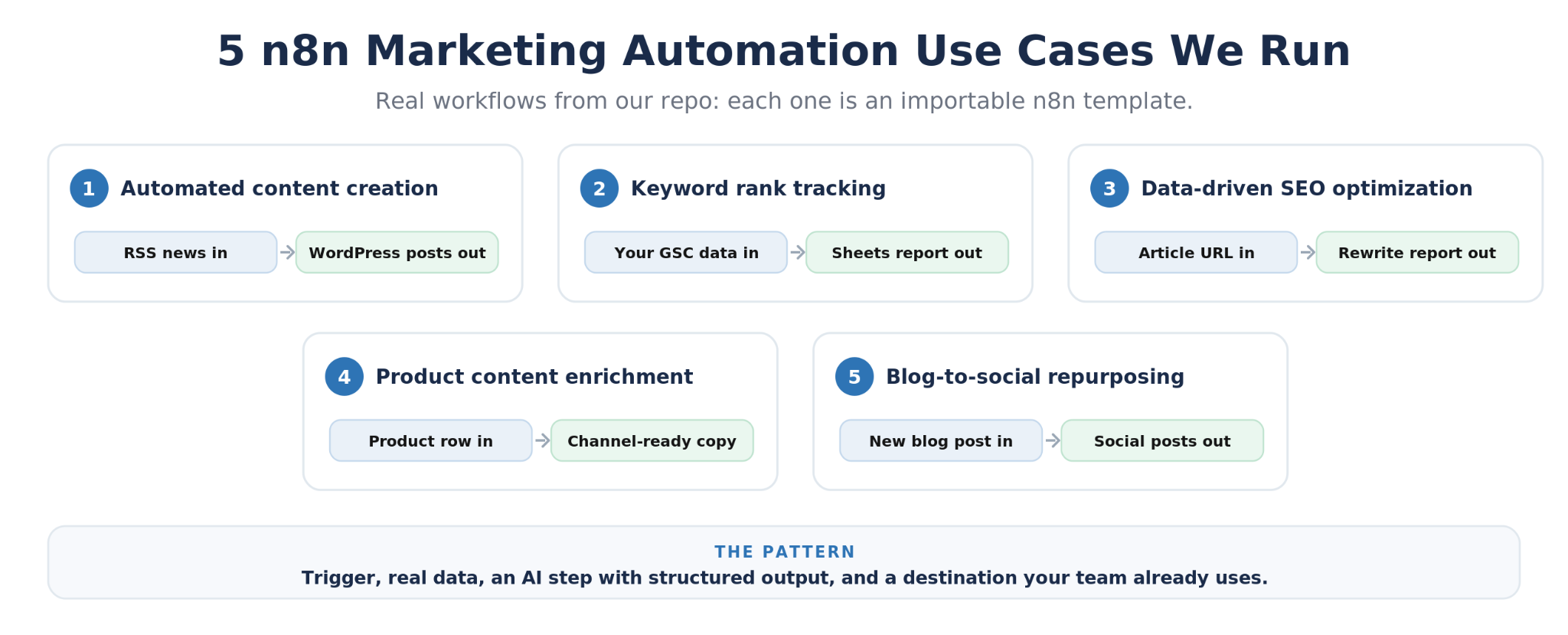
The short version:
n8n earns its place in a marketing stack for three reasons. First, it treats AI as a native building block: LLM nodes, agent nodes, and structured output parsers sit on the same canvas as your triggers and spreadsheets, so 'add an AI step' is a drag, not a development project. Second, the HTTP Request node talks to any API, which means your workflows can use the exact tools you already pay for rather than the short list an automation vendor supports. Third, you can self-host it, so high-volume workflows do not rack up per-task fees, and every workflow lives as a JSON file you can version, share, and import, which is why we can hand you ours.
This is the biggest workflow in the repo, a daily content engine that turns industry news into publish-ready articles. A schedule trigger fires each morning and reads a curated list of RSS feeds. Every story is normalized and run through an AI text classifier that scores whether it is relevant to the site's niche, so the pipeline only spends tokens on stories worth covering. Relevant stories get researched: the workflow fetches the full article HTML, converts it to clean text, and hands it to a chain of AI agents with structured output parsers that handle the steps a human writer would: angle and outline, drafting, and SEO title and meta description. MongoDB sits underneath as the memory, tracking every story already processed so the same news never becomes two posts. The finished draft gets a generated featured image, uploaded through the WordPress REST API with meta tags set, and the post lands in WordPress ready for review.
The value prop is cadence without headcount: the site publishes consistently on its niche while a human only reviews and hits publish. It fits company blogs that ride industry news, niche publications, and content teams that want first drafts waiting in the CMS every morning instead of a blank page.

Most teams pay a rank tracker to scrape Google and estimate what Google will tell you for free. This rank tracker workflow runs weekly on a schedule, reads your tracked keyword list from a Google Sheet, and queries the Search Console bulk export in BigQuery for the last 28 days of your own data: average position, the URL actually ranking, clicks, impressions, and CTR for every tracked keyword. A second branch pulls your top-ranking queries and the striking-distance keywords sitting just off page one, so the sheet surfaces opportunities you were not tracking yet. Everything writes back to dated tabs in Google Sheets, and one config node handles multiple domains, so an agency can track every client site from a single workflow.
The value prop is first-party truth at zero marginal cost: positions come from Google's own export rather than scraped SERPs, history accumulates in a spreadsheet you own, and adding a domain or fifty keywords costs nothing. It fits agencies, in-house SEO teams, and anyone whose weekly reporting still starts with copy-pasting from a rank tracker UI.

This SEO optimization workflow is the refresh engine for content that has stopped growing. You paste an article URL into a form trigger. The workflow scrapes the page with crawl4ai and converts it to markdown, while a BigQuery branch pulls the page's Search Console history and compares the last 30 days against the 30 before: clicks, impressions, CTR, and position per query, with each query tagged Gaining, Declining, or Stable. Both streams merge into an AI step that reads the article next to its real query data and produces an optimization report: existing passages rewritten to naturally integrate the queries the page already earns impressions for, five title options, five meta descriptions, net-new passages for queries the article never addresses, and a table of the queries it used. The report saves to Google Drive as HTML, and the raw performance data lands in a dated sheet for the audit trail.
The value prop is optimization grounded in evidence instead of hunches: every suggested edit traces to a query with real impressions, which is the difference between refreshing a page and redecorating it. It fits content refresh programs, CTR rescue on declining posts, and agencies that need to show clients exactly why each edit was made.

For ecommerce marketing teams, the product enrichment workflow turns a bare product row into channel-ready copy. Start with what a merchandising system usually has: a title, an MPN, and a brand. The workflow sends that to Pumice's Universal Search endpoint, which finds the best live source page for the product, then Smart Scrape extracts the title, full description, specifications, and image URLs from that page using a plain-language prompt instead of brittle selectors. A code node assembles the scraped data with your customer rules (keep titles under 80 characters, match the brand tone, never invent specs that are not in the source), and three generation endpoints produce the title, description, and bullets in sequence. The output is one enriched record per product, and swapping the sample trigger for a Google Sheet, database, or webhook turns it into a catalog-scale pipeline.
The value prop is grounded product copy at scale: every generated field traces back to scraped source data and passes through your rules, so PDPs, feeds, and marketplace listings get filled without a copywriter per SKU or hallucinated specifications. It fits new SKU onboarding, marketplace expansion, and any catalog where thin product content is holding back organic and paid performance.

The blog-to-social workflow makes sure nothing you publish dies on the blog. An RSS trigger watches your own feed, and when a new post appears, the workflow fetches the page, strips it down to clean article text, and sends it to an AI step with one structured prompt: write a three-to-five tweet thread and a LinkedIn post that match the article's tone, each with platform-appropriate hashtags and the link worked in naturally. The response comes back as JSON, gets formatted into a readable message, and posts to a #content channel in Slack. A human reads it there, tweaks a line if needed, and ships it.
The value prop is distribution as a default: every article automatically produces its social variants in minutes, while the Slack step keeps a human between the AI and your brand account. It fits content teams, founder-led brands, and newsletters, and the same skeleton extends to more platforms, duplicate detection, and scheduled posting through a tool like Buffer.

Every workflow above is a JSON file: download it from the repo, import it into n8n (self-hosted or cloud), and attach your credentials, which are OpenAI, Google, Slack, or Pumice depending on the workflow. Each template ships with a sample trigger or sticky-note setup instructions, so the pattern is always the same: run it once manually against a test input, check the output, swap the sample source for your real one, then activate the schedule.
If you want an order, start with blog-to-social: it is a five-minute setup with an immediate, visible payoff in Slack. The rank tracker comes next, since its only real prerequisite is turning on the Search Console bulk export to BigQuery, and the SEO optimizer builds on that same export once it is flowing. Save the content engine for last; it has the most moving parts (MongoDB, WordPress credentials, feed curation, prompt tuning) and benefits from the n8n fluency you build shipping the smaller ones first. They compound quickly once the credentials are in place.
What separates these five n8n marketing automation use cases from the hypothetical lists is that each one earns its keep on a specific, measurable task: posts published, rankings tracked, pages refreshed, SKUs enriched, articles distributed. The architecture behind them is repeatable far beyond marketing, but these five have proven themselves in production for us and our customers. Import one this week, point it at your own accounts, and you will have a clearer picture of what n8n can automate for your team than any list of ideas can give you.
Width.ai is an n8n certified expert partner that builds custom n8n and AI automation systems for marketing and ecommerce teams: the five templates above are starting points, and we extend them with your data sources, your prompts, and production-grade error handling. Book a call and we will walk through your manual workflows and which ones automation can take off your plate.

Yes, with a caveat about fit. n8n excels when marketing automation means custom data flows: AI content steps, your Search Console data, product catalogs, and APIs a template tool does not support. If your needs stop at email sequences and form-to-CRM zaps, a dedicated email platform or Zapier is simpler. The five use cases above are exactly the kind of work where n8n is the stronger tool.
Three differences matter here: n8n has native AI agent and LLM nodes with structured output, it allows real code nodes and branching for logic like relevance scoring and dedupe, and it can be self-hosted so a workflow that runs thousands of times a month does not carry per-task pricing. Zapier is faster to learn; n8n is what these five workflows actually need.
Yes. All five templates in this post are in our public GitHub repo as importable JSON files. You supply your own accounts and API keys (OpenAI, Google, Slack, Pumice), and the Pumice enrichment workflow requires a Pumice API key for its endpoints.
To import and run these templates, no: credentials and a test run are the whole setup. To adapt them, light JavaScript helps, since code nodes handle the parsing and formatting steps. For fully custom builds, prompt tuning, or wiring workflows into internal systems, that is the work we do for customers.

