Claude for Research: Cowork, Claude Code and Claude Science, Matched to the Work (2026)
Four people open Claude for research on the same morning. A UX researcher has twenty interview transcripts and a readout due Friday. A strategist wants a Monday briefing that remembers what last Monday said, and a social scientist has an analysis that lives in Stata. A biologist needs every figure in a paper to trace back to the code that made it.
All four will get an answer from Claude in minutes, and all four answers will read well. The trouble starts when part of one is wrong: a citation that does not say what the summary says, or a theme drawn from four interviews instead of twenty. Fluent text gives no sign of which parts were checked.
That is not a flaw in one model. Claude now comes as four research tools, each built for a different shape of work and a different way of showing its sources. Using the wrong one for the job, or skipping the check at the end, is where research goes wrong.
The useful question is which Claude product fits your kind of research, and how you validate what it finds against sources you can trust. We use these tools every day at Width.ai, and when research has to run on a private corpus, we build the agent ourselves.

Key Takeaways
- Research mode answers one question from many sources and cites them inline. I find the citation part very useful.
- Claude Cowork handles desk research on your own files and apps, including scheduled research that reruns in the cloud.
- Claude Code fits research that is really code and data, with the project's rules kept in a CLAUDE.md file. I am always working on adjusting the rules/schema in the CLAUDE.md file.
- Claude Science is a beta workbench for lab research where every output keeps its code, environment and history. I’ve used it a bunch for deep ai research and its very easy to understand.
- Validate every finding: open the cited source, prefer primary sources, add a reviewer pass and keep the method so it can be rerun.
- When research runs on a private corpus and every answer must cite its source, a custom research agent is the next step.
Claude for Research: Which Claude Product Fits Which Kind of Research
Claude for research means picking the Claude product that matches the shape of the work, then checking its sources. The four products overlap less than their names suggest.
If you are new to Claude for research, start with Research mode on one real question you already know the answer to. Compare its report with what you know, then move to Cowork or Claude Code once the work starts to repeat.
Most readers need only one row.
Claude Deep Research (Research Mode): One Question, Many Sources
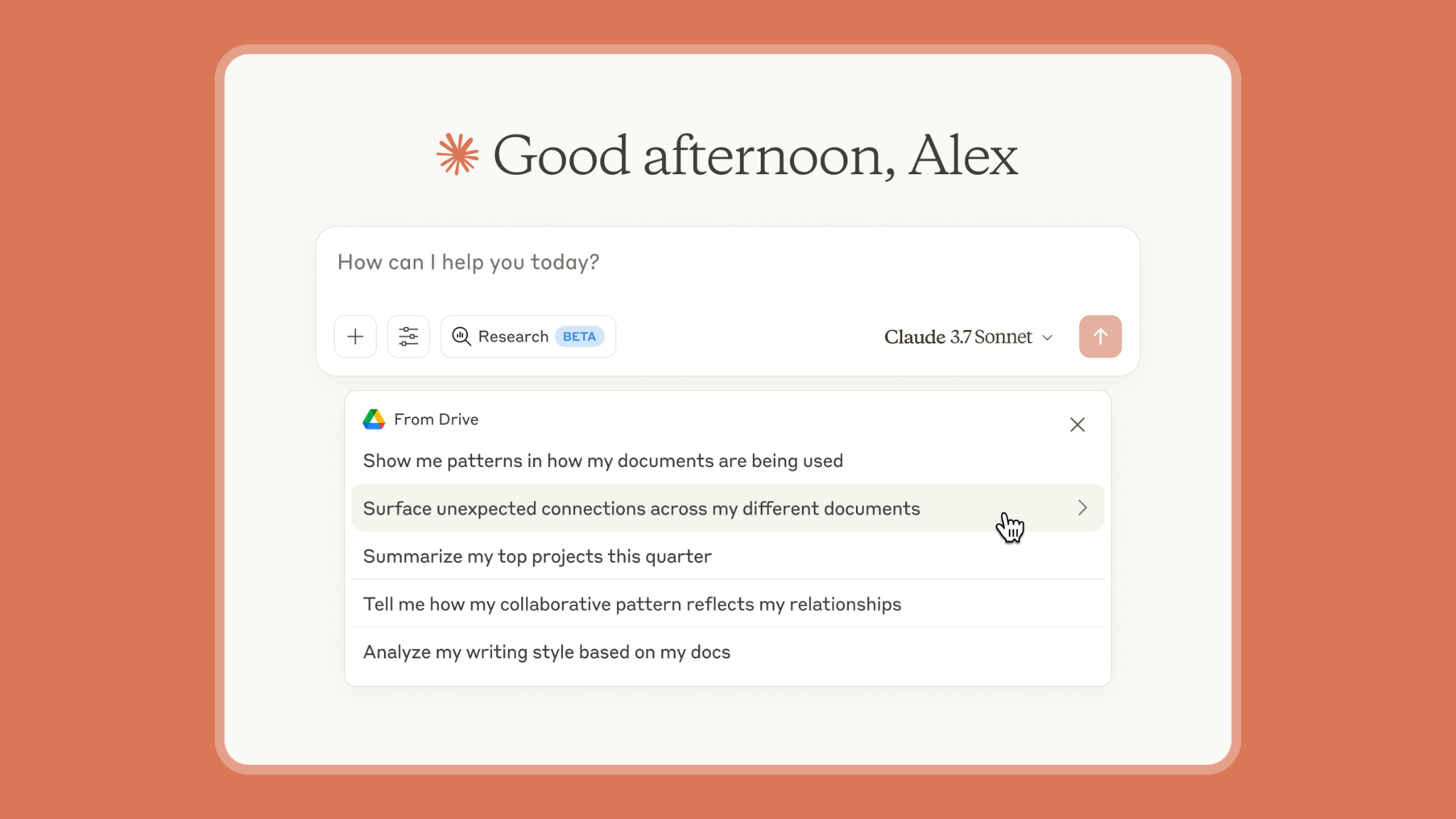
Claude deep research, which Anthropic calls Research, runs several searches that build on each other and decides what to look into next. It reads across the web and your connected apps, such as Google Workspace, and writes a report. Anthropic's Research launch post promises inline citations "that you can use to verify the source" and answers in minutes.
According to Anthropic's help article on Research, it is available on Pro, Max, Team and Enterprise plans, on the web, desktop and mobile apps, and web search must be on. It uses your connectors without asking each time, cannot use local MCP servers, and on mobile it uses only web search, not your connectors. It runs on Claude Opus 5.5, falling back to Opus 4.8, whatever model the chat is set to, and it uses up your limits faster than a normal chat. I’ve found that the Pro plan is plenty for these tasks. I rarely hit limits.
Research mode is enough for a scoped question or a first scan of a literature. It is the wrong tool for anything that recurs, anything that runs over thousands of your own files, or anything you need to rerun and get the same answer. Its strength for validation is the inline citation, because every claim points at a page you can open.
How to Get a Better Research Report
Scope the question before you send it. Name the period, the region and the kinds of sources you trust, such as peer-reviewed papers, government data or company filings. Ask for a short table of sources at the end, with the sentence each claim relies on.
Then ask what Research could not find. A report that lists its gaps is easier to trust than one that sounds complete, and the gaps tell you where to look next.
Claude Cowork for Research: Desk Research on Your Own Files
Claude Cowork brings the agent behind Claude Code to people who do not work in a code terminal (non tech guys, small business owners, general teams). Our Claude Cowork guide says it uses "the same agentic architecture that powers Claude Code, with no terminal required" for its work. On the desktop it reads and writes the folders you connect, uses your connected apps, and splits larger jobs into parallel subtasks. It is available on Pro, Max, Team and Enterprise plans.
Anthropic has been merging Cowork into ordinary Claude conversations, starting with Pro and Max, so on those plans everything Cowork does is available from any chat. For many teams, this is where Claude for research turns from a one-off question into a weekly habit.
A Recurring Research Agent
The best public build I've seen is Wyndo's research operation in The AI Maker. He runs three modes from Cowork: a daily briefing of 5 to 10 minutes, a deep research run of 10 to 15 minutes, and a weekly trend review. Each topic gets its own subagent, Tavily handles live web search, and a CLAUDE.md file of about 250 lines holds the operating instructions.
Memory is what lifts the quality of his research. Before Cowork, every run of his old pipeline "starts from zero," in his words. His agent now keeps three layers, his preferences, a running trend index and daily logs, so each run builds on the last. By Day 7, he writes, "It connected dots I missed," and it flagged a contradiction with an earlier report.
Two Anthropic features make this practical. Scheduled tasks now run in the cloud on all paid plans, so they keep their cadence while your computer sleeps, unless a task needs local files or apps. Dispatch lets existing users on some Pro and Max plans send a task from their phone while the desktop does the work, but it is not open to new users.
How to Set Up a Research Folder
Cowork works best on a folder with a clear layout. Keep sources in one subfolder, your method and rules in a short notes file, and outputs in another subfolder that Cowork writes to. Ask it to name the file and passage behind every theme or claim, so each finding points back to its source.
Turn the method into a skill once it works. A skill holds your steps and your output format, so the next study runs the same way and two researchers get comparable results.
Interview and Desk-Research Synthesis
User research is the other common Cowork job: a folder of transcripts and notes, a skill that encodes your synthesis method and output format, and a readout at the end. Nikki Anderson's Claude Cowork 101 for User Researchers is written for UX teams. Before you trust a synthesis skill, run it on a study your team already synthesized by hand and compare the themes.
Participant data still needs consent and your institution's rules, because Cowork acts on whatever files you connect. The synthesis is only as good as the method you encode, so spot-check every theme against the transcripts it came from. Scheduled tasks that need local files also run only on your computer, so keep it on for those.
Claude Code for Research: When the Research Is Code and Data
Claude Code for research fits work where the research is code and data: an analysis pipeline, a scraper, or scripts that turn raw files into tables. It runs in your project folder and terminal, writes and runs code, and reads the errors. A CLAUDE.md file gives it persistent instructions, and skills add repeatable workflows.
Our own Claude Code guide for research shows the social-science version. Claude writes a Stata do-file, runs it, reads the log and fixes what broke, all in one session. The same guide sets the rule that keeps it safe, to "share structure and code, never raw data," and approves Claude for public and internal data only.
Writers and analysts use the same pattern for reading. This Writer-Researcher's Guide to Claude Code in The Generalist describes separate research agents for his own archive, for articles and for podcast appearances. They sit on top of a personal search system over more than 45,000 chunks of his writing, transcripts and highlights.
A few lines in CLAUDE.md turn these habits into rules Claude loads in every session. A research project might start with something like this:
# Research project rules
  - Raw data stays in /data. Share structure and code, never the data itself.- Every figure and table is produced by a script in /analysis. Never edit outputs by hand.
  - Keep every source in sources.md as author, year, title and DOI or URL.
  - Before reporting a number, rerun the script that produces it and quote the output.
The same setup works for writing-heavy research: a folder of notes and drafts, a source file, and a skill that checks each draft claim against it before you edit.
The last rule is the validation step written into the project: a number should come from code that ran in the session, not from memory. CLAUDE.md is context rather than enforcement, so check that the rule held, or use a hook when an action must always be blocked.
We run our own SEO research this way. Our keyword research skill, described in Real Claude Skills for Marketing, pulls data through the Ahrefs connector, web search and live scraping.
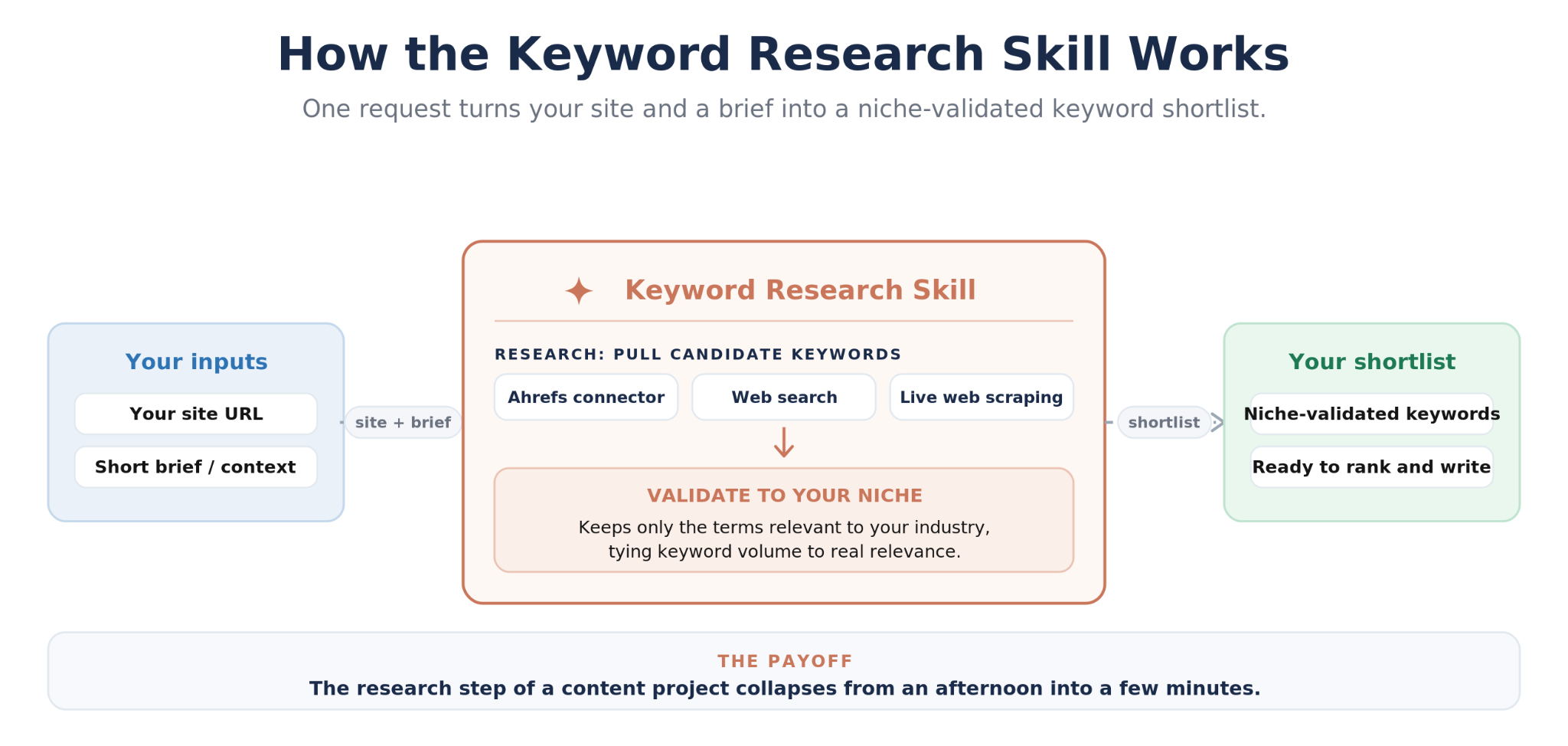
It then checks every keyword against the niche we give it, so terms that do not fit are filtered out before a person sees the list.
Claude Code also handles large folders well, because it searches files and text the way a developer would. That is the agentic retrieval pattern we explain in our agentic RAG guide. You still own the code review and the data governance.
Claude Science (Claude for Science): The Workbench for Lab Research
Claude for Science is Anthropic's AI workbench for scientists, released in beta on June 30, 2026. It brings literature search through PubMed, Jupyter, R and cluster terminals into one app, running locally or on a remote machine. Anthropic sums up the design in one line: "Every output carries an auditable history of how it was made, so you can validate and reproduce the results."
Figures and manuscripts come with the code and environment that produced them, a plain-language method and the full message history. The app connects to more than 60 scientific databases, including UniProt, PDB, Ensembl and ChEMBL, and offers over 60 curated skills and connectors. Compute goes to your own HPC cluster over SSH or to Modal, and Claude drafts a plan and asks before reaching new resources.
Two features matter most for validation. A reviewer agent checks citations and calculations and flags errors, and you can fork a session to compare two approaches without losing the original. Data stays on the lab's own infrastructure, and only the context each step needs is sent to Claude.
The customer results are concrete. At the Allen Institute, Jérôme Lecoq built a review pipeline of about 20 custom skills, with a separate reviewer agent checking accuracy and citation fidelity. His team now has about 10 reviews, many over 100 pages, where one review once took up to two years. At UCSF, Stephen Francis's group ran germline workups in roughly one-tenth the time and validated the results independently.
Claude Science is in beta on macOS and Linux for Pro, Max, Team and Enterprise plans. Anthropic's expanded support for scientists opens 10,000 free or discounted seats on the Team plan for scientists, for principal investigators at academic and nonprofit institutions. Standard seats are free, premium seats with five times the usage cost $15 a month, and the AI for Science program offers up to $50,000 in credits per project. Researchers in biology and chemistry are limited to Opus-class models for now.
Getting started depends on the plan. On a regular Team or Enterprise plan, an admin has to turn Claude Science on, while the Team plan for scientists has it on by default. Labs applying for that plan can add 1 to 25 seats per group, and most applications are reviewed within seven business days.
The Same Research Job in Four Claude Products
Take one job, a literature review, and run it four ways.
Research mode: a cited overview of one question in minutes, useful for deciding what to read first.
Claude Cowork: a folder of PDFs plus a scheduled weekly briefing that remembers what it found last week.
Claude Code: a scripted pipeline that screens thousands of abstracts against inclusion rules kept in a CLAUDE.md file, with a review skill at the end.
Claude Science: the Allen Institute approach, where agents draft and a separate reviewer agent checks accuracy and citations.
Each step up adds structure and a better way to check the work. Research mode gives you citations, and Cowork gives you memory across runs. Claude Code gives you code you can rerun, and Claude Science gives you an auditable history with a reviewer built in. None of them removes the need for a person to read the sources that matter.
The time cost rises with each step too. Research mode takes minutes and no setup. Cowork and Claude Code take an afternoon to set up and then rerun cheaply. Claude Science asks for a lab plan and pays off on work that has to hold up in review.
How to Validate Claude's Research Findings With Reliable Sources
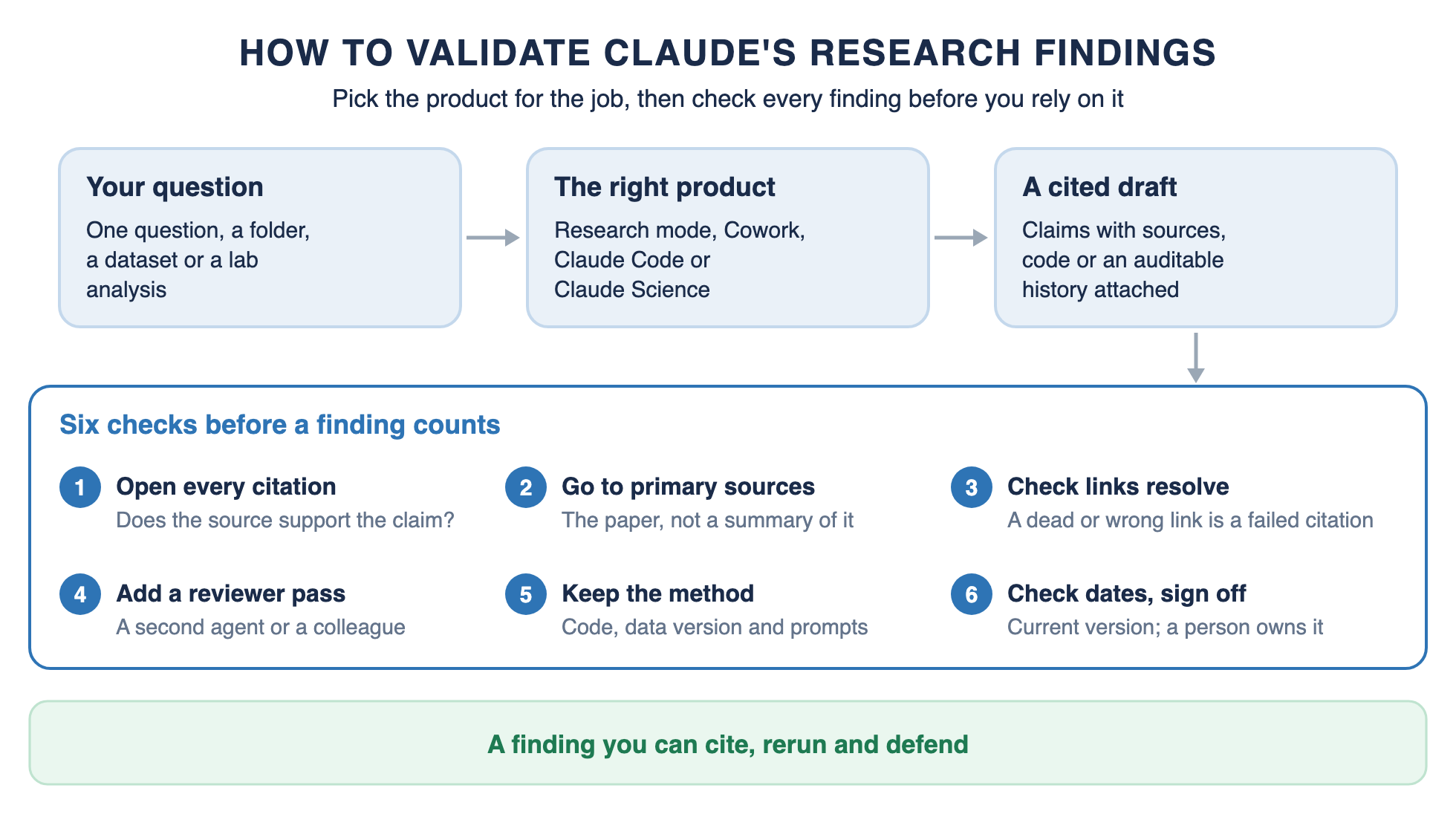
Every Claude research workflow should end with a validation pass, whichever product wrote the draft. Citations make checking possible. They do not make it unnecessary.
In a 2026 study of AI research tools, Rao, Wong and Callison-Burch found that 3 to 13% of citation URLs were hallucinated. Those URLs had no record in the Wayback Machine and likely never existed. On one benchmark, Claude 3.5 and 3.7 Sonnet with search had the lowest hallucinated rate measured, 3.0 to 3.2%, yet 7.8 to 8.5% of their cited URLs did not resolve. On a second benchmark, 9.38% of Claude Sonnet 4.5's cited URLs did not resolve, more than the Gemini and GPT models tested there.
The first three checks catch most problems in minutes. Open each citation, confirm the page says what the claim says, and prefer the paper over a summary of the paper. The PubMed and Consensus connectors in Claude's directory keep a search inside published research from the start.
The last three checks are what make a finding hold up later. A reviewer pass, whether Claude Science's reviewer agent, a review skill or a colleague, catches errors the author cannot see. Keeping the code, data version and prompts lets someone rerun the result.
Checking dates catches the most common silent error, a source that was correct before it was superseded. A person still signs off, because a person stays responsible for what gets published.
How to Validate in Each Claude Product
Research mode: open the inline citations, starting with the ones behind your most important claims.
Claude Cowork: ask for the file name and passage behind every theme, then read a sample of those passages yourself.
Claude Code: rerun the script behind each number, and keep sources and code under version control so changes are visible.
Claude Science: read the reviewer agent's flags first, then the auditable history of any figure you plan to publish.
A Validation Prompt You Can Reuse
You can make Claude do the first pass of checking its own work. Paste a prompt like this after any research report, in any of the four products:
For each claim in the report above:
1. Open the cited source and quote the sentence that supports the claim.
2. Give the URL or file name and the publication date.
3. Mark the claim Supported, Partly supported or Not found.
List every source you could not open, and every claim with no source.
Read the claims marked Partly supported or Not found first. They are where a report is most likely to be wrong, and they show you which sources to open yourself.
Where Off-the-Shelf Claude Stops: Private Corpora and Production Research Agents
Claude for research covers most needs without any custom work. Most researchers can stop at the sections above. Research mode, Cowork, Claude Code and Claude Science cover a scoped question, desk research, research in code and lab science, and none of them needs a custom build.
The signs that a team has outgrown off-the-shelf Claude usually show up in the validation pass. Answers cite the wrong version of a document, searches miss pages that use different wording from the question, or a person spends more time checking than the tool saved.
A build starts to pay when three things are true: the corpus is private, the answers must cite exact sources, and the same kinds of questions come back every week. That is where we have built production research agents for clients.
Tax law. A tax research agent searches IRS code, regulations, rulings and a firm's internal memos, and answers with citations to the exact pages it used. It ranks the current version of a document above the versions it superseded, and it scales past 30,000 pages. The firm's earlier chatbot had failed for a reason the case study states plainly: "Embeddings do not work in complex domains as the only retrieval tool."
Litigation. A case and depositions agent answers questions across a folder of transcripts, keeps each witness's testimony distinct, and points to the source pages so every fact can be verified.
Sales research. Our Sales Search & Insights framework searches HubSpot, Gmail and Google Drive from one plain-language question. A review agent checks the results for gaps before a response agent answers with sources and a confidence score.
Each of these agents returns a written answer, the list of sources behind it and, for the document agents, a small usage summary. That makes the validation pass a quick read of the cited pages rather than a fresh search.
The machinery behind them is planning, agentic retrieval and merging context from several searches, the same pattern as the agentic RAG guide linked earlier. Is Agentic RAG Worth It? covers when that cost pays off. A build takes weeks, so it is worth it only when accuracy and repeatability matter at scale.
How to Choose a Claude Product for Your Research
Choose by the shape of the research, not by the product name.
Choose by the Shape of the Research, Then Check the Sources
Claude for research is four tools, not one. Pick Research mode for a question, Cowork for desk research on your files, Claude Code when the research is code, and Claude Science when the work has to reproduce.
Then validate: open the sources, prefer primary ones, add a reviewer and keep the method. When your research runs on a private corpus and every answer has to cite its source, talk to us. To see a working research skill first, start with our keyword research skill on GitHub.
Have a Claude For Research Workflow? We’ll deploy it for free
We will set up your first claude workflow for free, only pay if you decide to keep it. Don’t like it? No cost.
Frequently Asked Questions
Is it okay to use Claude for research?
Yes, as long as you follow your institution's data rules and check the sources Claude cites. Keep participant and confidential data out unless your setup is approved for it, and treat Claude's output as a draft that a person verifies.
Which is better for research, Claude or GPT?
It depends on the job and the product more than the brand. Claude's research products cover single questions, your own files, code and lab work, each with sources you can check. Every model tested in a 2026 study of AI citations produced some failed citations, so check sources whichever you use.
Is Claude free for researchers?
Claude has a free plan, but Research mode, Cowork and Claude Science need a paid plan. Principal investigators at academic or nonprofit institutions can apply for the Team plan for scientists, which has free standard seats. The AI for Science program offers up to $50,000 in credits per project.
How to properly use Claude for research?
Match the product to the job, give it your sources and rules up front, and check its output against primary sources before you rely on it. A reviewer step and a saved method make the finding repeatable.
Can Claude AI do research?
Yes. Research mode runs multi-step searches and writes cited reports, Cowork and Claude Code research across your files and code, and Claude Science runs reproducible lab analyses. A person still decides which findings hold.
Does Claude cite its sources?
Yes, in Research mode and web search, which add inline citations you can open. In Cowork, Claude Code and Claude Science, ask it to name the file, passage, dataset or script behind each finding, and it will report them in the output.
How accurate is Claude research?
Accurate enough to draft from, not accurate enough to skip checking. In a 2026 preprint, older Claude 3.x models with search hallucinated 3.0 to 3.2% of citation URLs, while 7.8 to 8.5% of their cited URLs did not resolve. Claude Sonnet 4.5 had 9.38% of cited URLs fail to resolve on a second benchmark.
