ETL Testing: Types, Process, Automation and Where AI Fits in 2026
Will AI replace ETL testing?
It is one of the first questions people ask about the topic now, and the short answer is no. AI changes who writes the tests and what they can check. It does not change what a test is for: proving the data arrived complete, correct and on time.
Some ETL testing tools are sold the other way, with promises of tests without SQL and checks written by generative AI. In our experience, teams running production pipelines keep their pass and fail decisions in plain, repeatable checks, and use AI to write those checks faster and to read inputs no rule can parse.
We build validation layers for pipelines that ingest vendor files and documents, and we hold them to a measured false-positive rate. The same rule holds across every layer of ETL testing: AI can write and explain checks, but plain, repeatable checks decide what passes.
Key Takeaways
- ETL testing proves that data moved from source to target complete, correct, consistent and on time.
- The core checks are completeness, transformation, data quality, metadata, reference data, incremental loads, regression, integration and performance.
- Automate in three layers: deterministic tests in CI, statistical monitoring, and AI assistance.
- AI drafts tests, explains failures and validates messy inputs, but deterministic checks still decide pass or fail.
- Pipelines that ingest PDFs and vendor files need validation at the input stage, where rules break down.
- Measure any AI validator on a labeled set, and tune it on its false-positive rate.
What Is ETL Testing?
ETL testing is the process of checking that data extracted from source systems, transformed by business rules and loaded into a target arrives complete, correct, consistent and on time. It runs every time the pipeline or its data changes.
ETL stands for extract, transform and load, the data integration process that feeds most enterprise data warehouses. Each stage can cause data loss or damage: data extraction misses rows, a transformation applies the wrong rule, a load truncates a field. ETL testing helps catch each one before it reaches downstream systems.
Why ETL Testing Matters More Than It Used To
A data warehouse used to feed a few business intelligence dashboards. Now the same tables feed forecasts, machine learning models and AI agents that act on what they read. A bad value no longer waits for an analyst to notice it. It flows into a model, a price or an automated email.
The number of data sources has grown too. A single pipeline may pull from databases, SaaS APIs, partner files and scanned documents, each with its own failure modes. More sources mean more places for data inconsistencies to creep in, and less chance anyone spots them by eye.
ETL testing vs database testing: database testing checks the objects inside one database, such as tables, procedures and constraints. ETL testing checks data in motion, from a source to a destination system. Both borrow from software testing and quality engineering, but the thing under test is the data, not the code.
ETL testing vs data observability: ETL tests are assertions you plan in advance. Observability watches production data for changes nobody planned for. You need both, and the automation section shows how they fit.
ETL vs ELT: ELT is common on big data platforms, where the data lands in the warehouse or a data lake first and is transformed there. The checks are the same; they simply run after the load instead of before it.
In practice, ELT moves most tests into the warehouse itself. Raw tables get completeness and contract checks as they land, and transformed data gets rule and quality tests before anyone reads it. The same nine types apply, in a slightly different order.
ETL Testing Types and the Checks Behind Each
ETL testing breaks down into nine types, each proving one thing about the data. The table below gives an example check for each type and the automation layer it usually lives in.
Data transformation testing verifies that each rule did what the mapping says, and it comes in two styles. White-box tests read the transformation logic and check the business logic applied by each rule. Black-box tests ignore the code and compare expected outputs with actual outputs for known inputs. Many teams use both: white-box for complex rules, black-box for regression testing.
Two checks catch a lot of problems for little effort, and each takes only a few lines of SQL. A completeness check is a simple data comparison of row counts:
-- Completeness: do source and target agree on row counts for this load?
  SELECT  (SELECT COUNT(*) FROM source.orders WHERE load_date = '2026-10-21') AS source_rows,  (SELECT COUNT(*) FROM warehouse.orders WHERE load_date = '2026-10-21') AS target_rows;
A quality check looks for invalid data, values that should never exist:
-- Quality: keys present and unique, totals in range (counts each bad row)
SELECT COUNT(*) AS bad_rows
FROM warehouse.orders
WHERE order_id IS NULL
      OR order_total < 0
      OR order_id IN (SELECT order_id FROM warehouse.orders GROUP BY order_id HAVING COUNT(*) > 1);
Either query should return a result your test can compare against an expected value, so the check passes or fails without manual testing.
Incremental Loads and Late-Arriving Data
Most pipelines do not reload everything every night. They load only what changed since the last run, and that is where subtle bugs hide. A row updated twice in one window, a record that arrives a day late, or a deleted source row that never disappears from the target will all slip past a simple count. Each one leaves duplicate records or missing data that row counts alone will not show.
Test incremental loads with targeted test scenarios. Insert a late row and confirm it lands in the right partition. Update a row twice and confirm the target keeps the latest version. Delete a source row and confirm the target handles it the way the design says it should.
Performance Testing at Volume
A load that works on a sample can fail on a full day of data. Performance tests run the pipeline at the high data volumes it sees in production and check that it finishes inside its window, with headroom for growth. Stress testing goes further, pushing large data volumes through to find where a load breaks, and the results become performance benchmarks for later runs. Track run time per load over weeks, because slow drift leaves time for performance tuning and a sudden miss does not.
The ETL Testing Process: From Mapping Document to Sign-Off
Most ETL testing work follows the same sequence. The mapping document, which says which source field becomes which target field under which rule, is the starting point for nearly every step. Followed in order, the eight steps below work as an ETL testing tutorial for any pipeline.
- 1. Requirements and mapping: collect the source-to-target mapping and the business rules behind it. Automation can parse the mapping; AI can draft tests from it.
- 2. Test plan: decide which types of testing each table needs and what counts as a pass.
- 3. Test data: build masked production samples plus edge cases such as nulls, duplicates and late-arriving rows.
- 4. Test cases: define test cases with one or more checks per mapping and per business rule.
- 5. Execution: run the checks in a test environment on every pipeline change and in the production environment on every load.
- 6. Defect triage: trace each failure to its source, transformation or load step. AI can suggest likely causes from logs and lineage.
- 7. Regression: rerun the full suite whenever code or upstream data changes.
- 8. Sign-off: record the results and release only when the agreed checks pass.
Building Test Data
Good test data is the part many teams underinvest in. Start from masked production samples, so the data has real shapes and real mess. Then add edge cases on purpose: nulls in required fields, duplicate keys, values at the limits of each range, unusual characters and rows that arrive out of order.
AI can help here. A model can read a schema and a mapping document and suggest edge cases a person would miss, or generate synthetic rows that follow the same rules. Review what it produces, and keep generated data clearly labeled so it never leaks into production.
The order matters less than the habit. Automated testing on every change catches more than a thorough suite that runs once before go-live.
How Do I Automate ETL Testing?
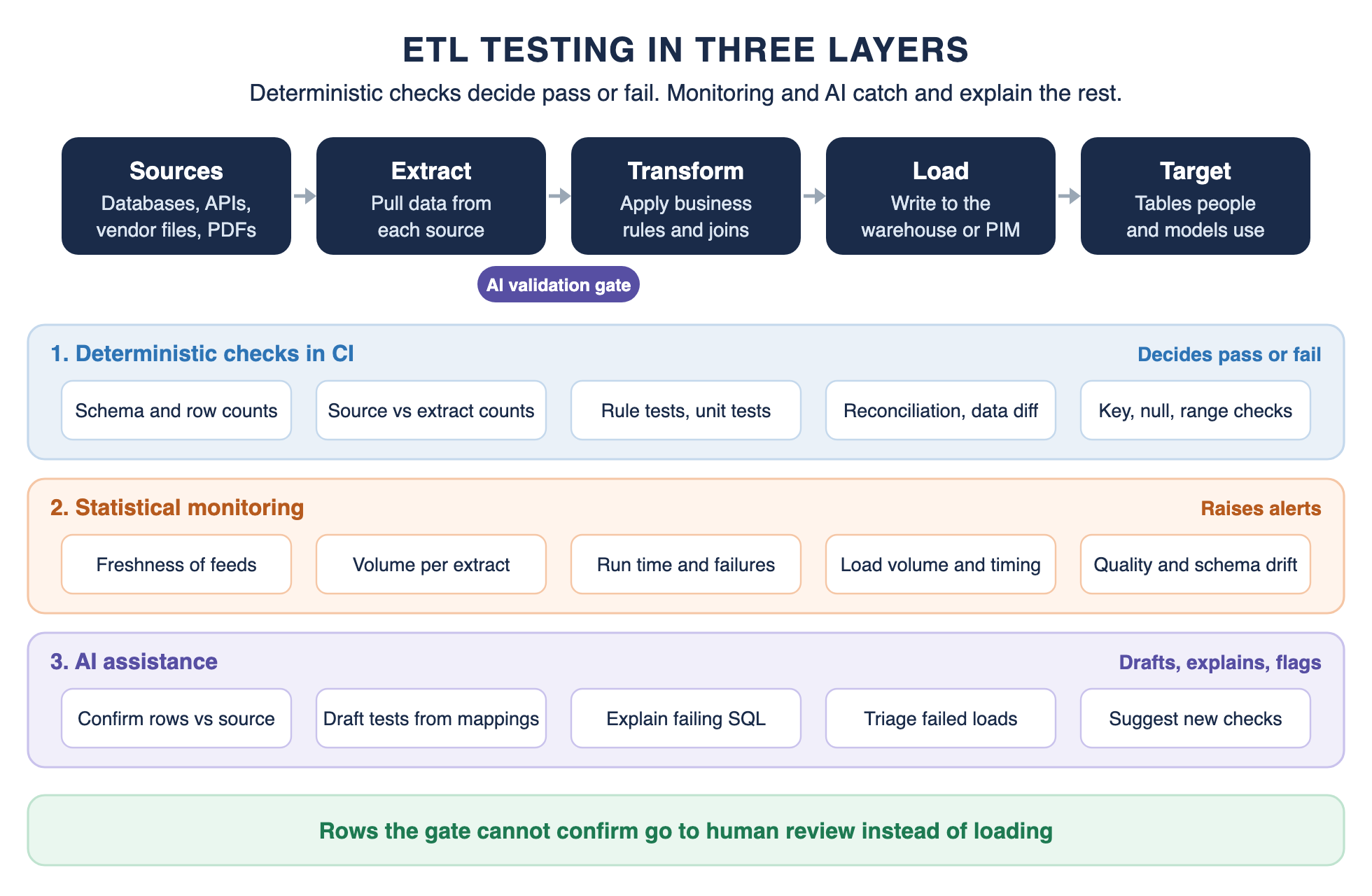
Automate ETL testing in three layers. Deterministic checks run in CI and decide pass or fail. Statistical monitoring watches production for what no rule anticipated. AI assistance speeds up both and validates inputs that rules cannot read.
Layer 1: Deterministic Checks in CI
Write your checks as code, like any other data engineering work, and run them on every change. In dbt, data tests are assertions about your models, and four generic tests ship out of the box: unique, not_null, accepted_values and relationships. Unit tests, available from dbt 1.8, check transformation logic on a small set of static inputs before anything reaches production.
Outside dbt, GX Core is an open-source Python library for data validation, and Soda's SodaCL writes checks in YAML. Add reconciliation queries between source and target as integration tests, and value-level data diffs on pull requests, so a reviewer sees exactly which rows a change affects.
Run all of it from your orchestrator, on every load as well as every deploy. Apache Airflow 3, released in April 2025, is one common choice. Fail the pipeline when a contract breaks, rather than loading bad data and alerting afterward.
What to Automate First
You do not need every check on day one. Start where a failure costs the most and a check costs the least.
- Row counts and key checks (not null, unique) on every table the business reads.
- Rule tests on the transformations that touch revenue, pricing or compliance, where ensuring data accuracy matters most.
- Freshness checks on every feed, so a stopped source is caught the same day.
- Reconciliation between source and target totals for the most important tables.
- Data diffs on pull requests, once the basics run reliably.
Layer 2: Statistical Monitoring
Monitoring works best on the tables the business reads most. Start with freshness and volume on those, then add data quality checks on the columns that drive decisions, such as prices, totals and identifiers. Alert thresholds that fire every day get ignored, so tune them until each alert is worth a look.
Rules only catch what you thought to write down. Monitoring tools catch the rest: a table that stops updating, a load half its usual size, a column whose null rate jumps, and other data quality issues no rule anticipated. Watch five things on every important table: freshness, quality, volume, schema and lineage. That short checklist works whichever tool you use.
Monitoring alerts; a person decides. Treat each alert as a candidate for a new deterministic check, so the same failure is caught by a rule next time.
Data Contracts With Source Owners
Many pipeline failures start upstream, when a source team renames a column or changes a format without telling anyone, and data consistency breaks downstream. A data contract fixes that by writing down what each source promises: the columns, their types and expected format, the allowed values and how fresh the data will be.
Test the contract during extraction, so you know the data was correctly extracted before anything transforms it. When a source breaks it, fail the run and tell the source owner, rather than quietly patching the transformation. Over time the contract becomes the most useful test you have, because it catches problems before they enter your pipeline at all.
Layer 3: AI Assistance
The third layer makes the first two cheaper and reaches inputs they cannot. It is covered in its own section next, because it is where most of the change in 2026 is happening and where most of the risk is.
Test Data, Scheduling and Alerting
Automation fails on the boring parts more often than on the clever ones. Keep test data masked and versioned, schedule checks with the loads they guard, send alerts to the people who own each table, and record every result in a centralized repository, so a trend is visible before it becomes an incident.
Where AI Fits in ETL Testing in 2026
AI is useful in ETL testing in five places. Each one comes with a limit, and the limits matter more than the features.
Generating Tests From Mapping Documents
A mapping document already describes what each test should check, so turning it into SQL is a natural job for a language model. QuerySurge's launch announcement for QuerySurge AI claims it converts mappings into tests in the data store's native SQL. The same release puts manual test creation at about an hour per mapping, across 250 to 1,500 mappings in a typical warehouse project. Those are the vendor's figures, not a benchmark.
The limit: a generated test is code, and it needs the same review as code. A test that checks the wrong thing passes forever.
Drafting and Explaining SQL Checks
Language models are fast at drafting a reconciliation query or explaining why a diff failed. They are not reliable enough to trust unchecked. On Spider 2.0, a benchmark of real enterprise text-to-SQL tasks, the authors' best agent, built on o1-preview, solved only 21.3% of them when the benchmark was published. Scores have risen since, but not to the point of trusting a query unread.
Run every drafted check against a known-good sample before it joins the suite.
Triage and Root Cause
When a load fails at 3 a.m., the slow part is finding why. Was it the source, a code change, a schema change or a bad batch of rows? A model that reads the failing check, the recent changes and the lineage can suggest the likely cause in seconds. The limit: it suggests, and an engineer confirms before anything is changed.
Triage gets better with context. Give the model the failing check, the last few successful runs, recent commits and the lineage graph, and keep a log of which suggestions turned out right. That log tells you whether the assistant is saving time or adding noise.
Validating Inputs That Rules Cannot Read
Modern pipelines ingest more than tables. Vendor spreadsheets, PDF line sheets and scanned documents arrive with missing fields, mixed units and identifiers that may or may not match. Rules cannot parse them, and this is where AI does work nothing else can.
In our supplier catalog ingestion agent, a validation agent compares each retrieved record against the incoming row on identifiers, brand, model and the distinguishing attributes for that category. On a 120,000-SKU catalog, it confirms correct matches at 97.57%, with a 0.07% false positive rate. If it cannot fully confirm a match, the data does not flow into generation, and the row goes to a review queue.
Document pipelines need the same discipline at field level. In intelligent document processing, extracted data is checked field by field for schema conformance, type, format and range, then for cross-field consistency, with a confidence score per field. Systems we run in production report 95.6% accuracy on invoice line items and 96.5% on legal cover sheets, measured against human-verified ground truth.
Agents That Check Their Own Changes
AI coding agents now write pipeline code, and the newest tools let them test it too. Datafold's MCP server gives agents such as Claude Code, Cursor or Windsurf access to its data-diff tools, so an agent can see which rows its change affects before a person reviews it.
How to Evaluate an AI Validator
An AI validation gate is a model, so test it like one. Build a labeled set from your own inputs, with the correct answer for each record checked by a person against the source. Include the hard cases: near-duplicate products, missing identifiers, conflicting sources.
Then measure two numbers. The confirm rate tells you how much of the work the gate takes off your team. The false-positive rate tells you how often it lets a wrong record through, and that is the number to tune first.
Set the threshold on cost, not on a round number. Every point of extra confidence sends more rows to review, and every point less lets more errors load. Size the review queue to match, and rerun the labeled set whenever the model, the prompt or the inputs change.
The Rule: Deterministic Checks Decide
Across all five uses, the pattern is the same. AI drafts, explains and flags; deterministic checks decide pass or fail. Our post on whether robotic process automation is AI draws a similar distinction between fixed rules and learned judgment.
When AI does make a call, as a validation gate does, measure it on a labeled set and tune it on the false-positive rate. A miss costs coverage and shows up in a queue. A false positive writes a wrong value into a record that looks finished, and nobody traces it back.
ETL Testing Tools in 2026: Build, Buy or Combine
ETL testing tools fall into five categories. Most teams combine two or three rather than buying one suite.
The landscape shifted in 2026, so check ownership and licensing before you standardize.
- dbt Labs and Fivetran: the two companies completed their merger on June 1, 2026.
- Great Expectations: FICO agreed to acquire GX Cloud, which stopped being publicly available on June 1, 2026. GX Core stays open source, and Fivetran announced plans to steward it.
- Soda Core: its license moved from Apache 2.0 to the Elastic License 2.0. It remains source-available and free to use.
- Datafold: the open-source data-diff project has not been actively supported or developed since May 2024; the commercial product continues.
Where to start depends on your stack. If your transformations live in dbt, start with its tests and add monitoring. If you test many legacy sources from mapping documents, a dedicated suite fits better. Whatever you choose, run the tests as part of your CI/CD pipeline.
Questions to Ask Before You Buy
- Can it run inside our CI pipeline and fail a deploy, or only report afterward?
- Does it work with our warehouse, orchestrator and transformation tool as they are today?
- Where do its AI features run, what data do they see, and can we review every generated test?
- How does it handle sources that are not tables, such as files and documents?
- Who owns the project next year, and under what license?
Common ETL Testing Mistakes
Many ETL testing failures are not missing tools. They are habits that let bad data through even with good tools in place.
- Testing only before go-live: source data changes every day, so data quality testing that ran once tells you little about tonight's load.
- Counting rows but not values: matching counts can hide data corruption: wrong values, shifted columns and truncated text. Pair counts with value checks.
- Alerting without failing: a check that only sends an email lets bad data load anyway. Block the load when a critical check fails, so data integrity holds in the target.
- Trusting generated tests unread: an AI-written test that checks the wrong column passes every time. Review generated tests like any other code.
- Ignoring the input stage: pipelines that ingest files and documents need validation before extraction, not only after load.
A Worked Example: Testing an Ingestion Pipeline With an AI Validation Gate
Here is our supplier catalog ingestion pipeline described as an ETL pipeline, with the tests at each stage.
Extract: suppliers send what they have, such as an ERP export in Excel, a PDF line sheet or a dealer portal login. Deterministic checks confirm each file was properly extracted: it parsed, counts match and required columns exist.
Research and identify: the system researches each product and retrieves a matching record for each incoming row. Matching rows to the right product is its own problem, which our post on data matching software covers.
Validate: the AI gate compares each retrieved record with the incoming row and lets through only what it can confirm, confirming correct matches at 97.57% with a 0.07% false positive rate. Unconfirmed rows go to a review queue instead of moving on.
Transform: confirmed records get their attributes generated and fitted to the client's categories, with deterministic checks that each record was transformed correctly, covering required fields and allowed values.
Load: records export as CSV or through an API into the client's PIM or ERP. Deterministic checks confirm counts, required fields and schema at the target system.
The review queue is an essential component of the design, not an afterthought. Rows the gate cannot confirm wait for a person who can check the source, and each decision they make becomes another labeled example for the next round of evaluation.
Notice where the AI sits. It handles the one stage rules cannot, confirming the identity of a messy record before anything is generated, and every other stage keeps its deterministic checks.
What Untested Upstream Data Costs
The cost of untested data shows up later, and it is expensive. In our LTV prediction project, the training data held failed refund attempts recorded as negative revenue, plus fraudulent and void transactions the original SQL never filtered out. Removing them took out 1.7 million records, roughly half the data.
That cleanup was the part of the project that mattered most, and it involved no machine learning at all. Rule checks for negative revenue and void or fraudulent transaction types at load time could have flagged it early.
Conclusion: ETL Testing Keeps the Pass or Fail Decision in Plain Checks
ETL testing in 2026 runs in three layers: deterministic checks in CI, statistical monitoring in production, and AI assistance across both. AI writes tests faster, explains failures and validates inputs rules cannot read.
It does not decide what passes. Keep that decision in checks you can read and rerun, and hold any AI validator to a measured false-positive rate.
When Your Pipeline Ingests What Rules Cannot Check
If your pipeline ingests documents, vendor files or other inputs that rules cannot validate, we build the validation layer and hold it to a measured false-positive rate.
• Field-level checks: schema, type, range and cross-field consistency
• Identity gates that confirm each record against its source
• Confidence routing: confirmed rows flow, the rest go to review
• Measured on your own data before anything ships
Frequently Asked Questions about ETL Testing
What are the 5 steps of the ETL process?
The standard definition has three phases: extract, transform and load. Five-step versions usually split out cleaning and analysis, for example extract, clean, transform, load and analyze.
Is SQL used for ETL?
Yes. SQL is the most common language for transformations and ETL tests on SQL Server, Snowflake, BigQuery and most other warehouses. Tools such as dbt build entire transformation layers from SQL select statements.
Will ETL be replaced by AI?
No. AI drafts tests, explains failures and validates messy inputs, but deterministic checks still decide whether data passes.
Is Excel an ETL tool?
Partly. Excel includes Power Query, which Microsoft describes as a data transformation and preparation engine that can perform extract, transform and load processing.
How often should ETL tests run?
On every pipeline change and every load. Checks that only run before go-live miss the failures that come from changing source data.
Is ETL testing manual testing?
ETL testing can be done by hand, but most of it should be automated. Manual testing still helps when you explore a new source or review a mapping for the first time. The checks that decide pass or fail should run on their own, in CI on every change and in the orchestrator on every load. A good habit is to turn each useful manual spot check into an automated test.
How to validate flat files in ETL testing?
Validate a flat file in two passes before it loads: the file first, then the rows. At file level, confirm it arrived on time with the expected name, that the delimiter and encoding parse, that the header matches the agreed columns, and that the row count matches the trailer or control total when the sender provides one. At row level, check that required fields are filled, types and formats match the contract, keys are unique and values sit inside allowed ranges. Load only the files that pass, and move the rest to a quarantine folder with the failing check recorded.
