LinkedIn Job Scraper: Automate Your Entire Job Search with Ai (2026)
Build a LinkedIn job scraper in 20 minutes with n8n and Apify. Ai scores each job against your skills. Free template included.

Matt Payne
March 25, 2026
If you've spent any time researching automation technologies, you've likely encountered the question: is robotic process automation AI? The answer matters more than you might think. Confusing these two technologies can lead to misaligned investments, unrealistic expectations, and stalled digital transformation efforts. This guide breaks down what robotic process automation and artificial intelligence actually are, where they differ, how they complement each other, and how to build an automation strategy that leverages both.
Robotic process automation RPA is a software technology that uses software robots (or bots) to automate rule-based, repetitive digital tasks by mimicking human actions like clicks, keystrokes, and screen navigation. Think of RPA bots as tireless digital workers that perform tasks exactly the way a person would, only faster and without breaks.
RPA operates at the user interface level. It interacts with existing systems (screens, forms, web applications like SAP or Oracle) without modifying backend code or databases. This makes RPA tools attractive for organizations that need automation without expensive system overhauls.
Concrete examples include automating invoice processing in accounts payable, copying customer data between a CRM and an ERP, or sending confirmation emails in banking. RPA can handle tasks like data entry and invoice processing with consistent accuracy. In healthcare, Walgreens implemented Blue Prism RPA in HR shared services and achieved a 73% improvement in transactional task efficiency.
Classic RPA requires predefined rules and workflows configured by business analysts or citizen developers using low-code or no-code software tools. There is no learning, no judgment, just precise execution of manual tasks that have been scripted in advance.
RPA thrives on high-volume, standardized business processes. Back-office operations like billing, claims processing, report generation, and processing transactions are ideal candidates.
Artificial intelligence refers to AI systems designed to simulate human intelligence (learning, reasoning, pattern recognition, and decision-making). Unlike RPA, AI is data-driven: it draws conclusions from data rather than following a fixed script.
Key AI techniques used in business automation include:
Real-world examples from the 2020s include customer service chatbots handling inquiries in natural language, fraud detection models scanning card transactions in real time, and predictive analytics forecasting inventory demand based on historical data.
AI excels at processing unstructured data like text and images, content that RPA simply cannot interpret. AI systems can infer patterns and make predictions, and they continuously improve performance as more data arrives. AI uses machine learning models to adapt and make decisions over time, in contrast to RPA's static behavior.
The key distinction: AI's outputs are probabilistic and adaptive. RPA's outputs are deterministic and rules-based. AI focuses on cognition; RPA focuses on execution.
No, traditional robotic process automation is not the same as artificial intelligence. RPA is not AI; it follows explicit instructions without learning. It is a process-driven automation technology, while AI is a data-driven technology that learns patterns and makes predictions.
RPA is process-driven while AI is data-driven. This is the fundamental divide. RPA bots do exactly what they are told, the same way, every time. AI systems analyze data, recognize patterns, and adjust their behavior based on what they discover.
Confusion arises because vendors market "AI-powered RPA" or "intelligent automation," where RPA platforms are bundled with AI capabilities such as document understanding, anomaly detection, or NLP. In those cases, RPA becomes part of a larger stack, but the RPA component itself still does not learn.
RPA can run with zero AI. A bot copying fields from a spreadsheet into an accounting system is pure process automation, no machine learning involved. Conversely, AI typically needs some orchestrator (often RPA bots or APIs) to act on its insights inside real business processes. An AI model that detects fraud is useless if nothing blocks the suspect transaction or alerts a human.
Industry analysts since around 2019 have treated RPA and AI as complementary layers in enterprise automation, not interchangeable terms.
RPA automates structured tasks while AI handles unstructured data. RPA automates repetitive tasks while AI handles complex decisions. Here is a systematic comparison:
Intelligent automation, also called intelligent process automation, is the combination of RPA, AI, and integration tools to automate entire, end-to-end business processes. Intelligent process automation combines RPA and AI technologies into a unified approach. It also combines RPA and AI for efficiency, enabling organizations to handle processes that involve both structured and unstructured data, human judgment, and execution across digital systems.
In this model, AI does the "thinking" (classification, prediction, processing unstructured data) and RPA does the "doing" (executing tasks, navigating user interface elements, updating enterprise systems). Combining RPA and AI enables intelligent automation for complex tasks that neither technology could handle alone.
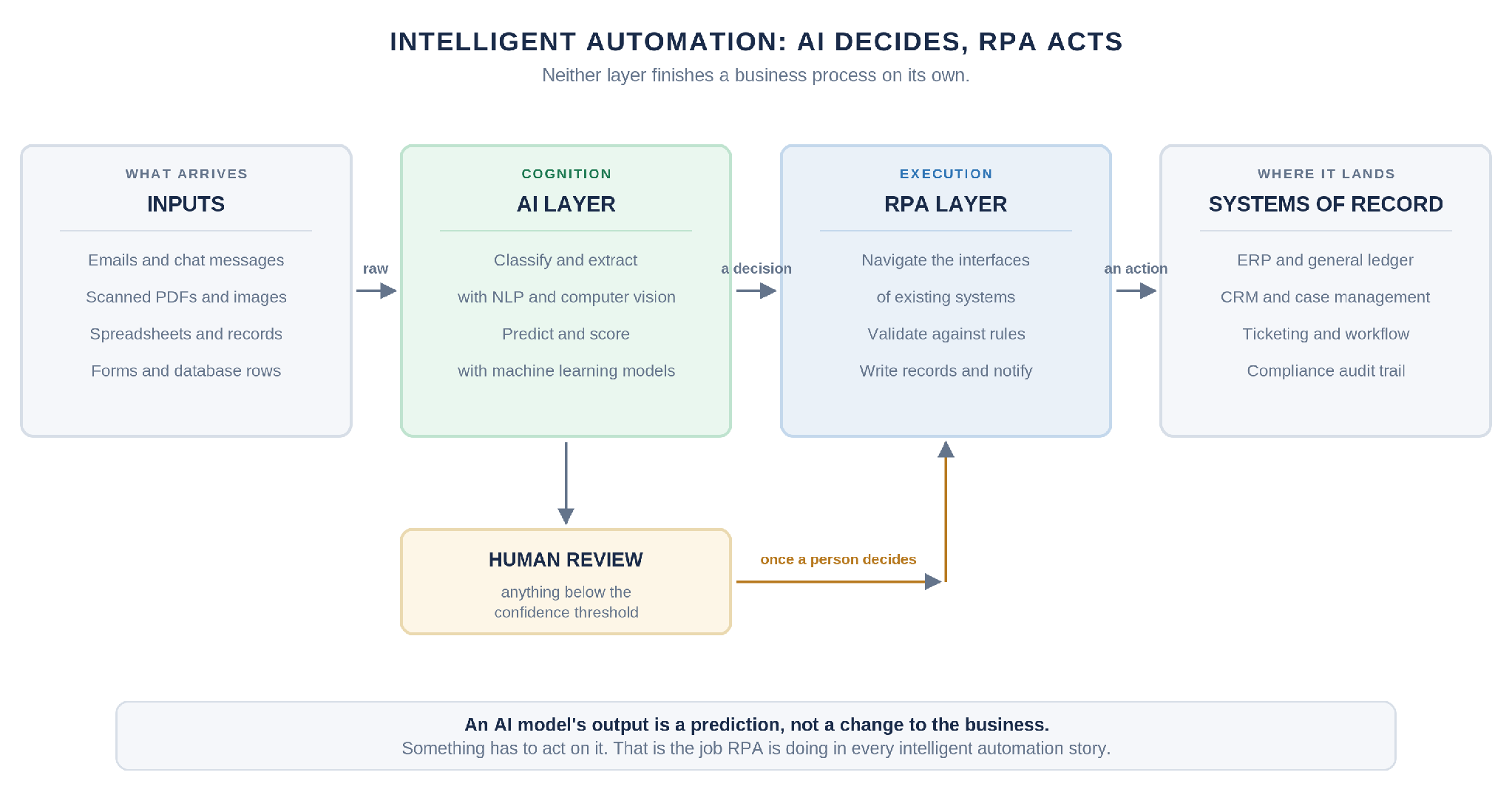
Two quick examples:
Intelligent process automation streamlines end-to-end business processes and enhances efficiency and decision-making. It moves organizations beyond task automation toward full enterprise automation spanning finance, HR, supply chain, and customer service. It also lays the foundation for more advanced capabilities like autonomous agents orchestrating multi-step workflows. Our sales search and insights framework is one worked example: a plain-language question about a deal is decomposed into a plan, executed by agents that query HubSpot, Gmail and Google Drive in parallel, then checked by a review agent that looks for gaps and sends the plan back for another pass before answering with a confidence score.
Most successful "AI automation" stories from the 2020s are actually combinations of AI services and RPA orchestrating actions across existing systems. Here is how RPA and AI collaborate in practice:
Fraud detection: AI models scan transactions for anomalous behavior, flagging suspicious patterns in real time. RPA bots then automatically block suspect accounts, send alerts to compliance teams, and gather supporting documents from multiple systems, all without human intervention. AI enhances RPA by adding learning and decision-making capabilities to what would otherwise be a purely reactive workflow.
Invoice processing: AI-powered document processing extracts relevant data from PDFs, scanned images, and emails. RPA validates extracted fields against purchase orders, resolves discrepancies using predefined rules, and posts approved entries to the ledger. In our own deployments the AI side also performs three-way matching across purchase orders, invoices and receipts, and maps line items to the correct general ledger codes, while a per-invoice confidence score decides which documents a person still has to look at. RPA can process over 40,000 documents in 14 days when paired with AI extraction.
Customer lifetime value prediction: AI forecasts what a customer is worth over a set horizon, broken out by acquisition channel, demographics and geography. RPA and scheduled jobs act on that forecast, pushing revised bids to each ad platform, moving customers between segments, and triggering retention effort where a cohort is predicted to lapse. Our own LTV prediction model runs daily and drives bidding across Meta, Google Ads, Microsoft Ads and Taboola. It is also the clearest reminder here that an AI layer is only as good as what feeds it: two model architectures failed before we found that roughly half the training data was accounting noise, including failed refunds recorded as negative revenue and void transactions the original query never excluded. Removing 1.7 million bad records mattered more than any change to the model.
Customer support: AI chatbots interpret natural language from customer inquiries, classify intent, and resolve straightforward issues. For complex business processes, the chatbot escalates to a human agent while RPA updates CRM records, raises cases, and triggers downstream workflows. This approach lifts customer satisfaction by reducing response times and improving first contact resolution.
This AI integration converts siloed automations into coherent, end-to-end business processes that reduce manual handoffs and eliminate human error at critical junctions.
Choosing between pure RPA, pure AI, or combined intelligent automation depends on the nature of your tasks and data.
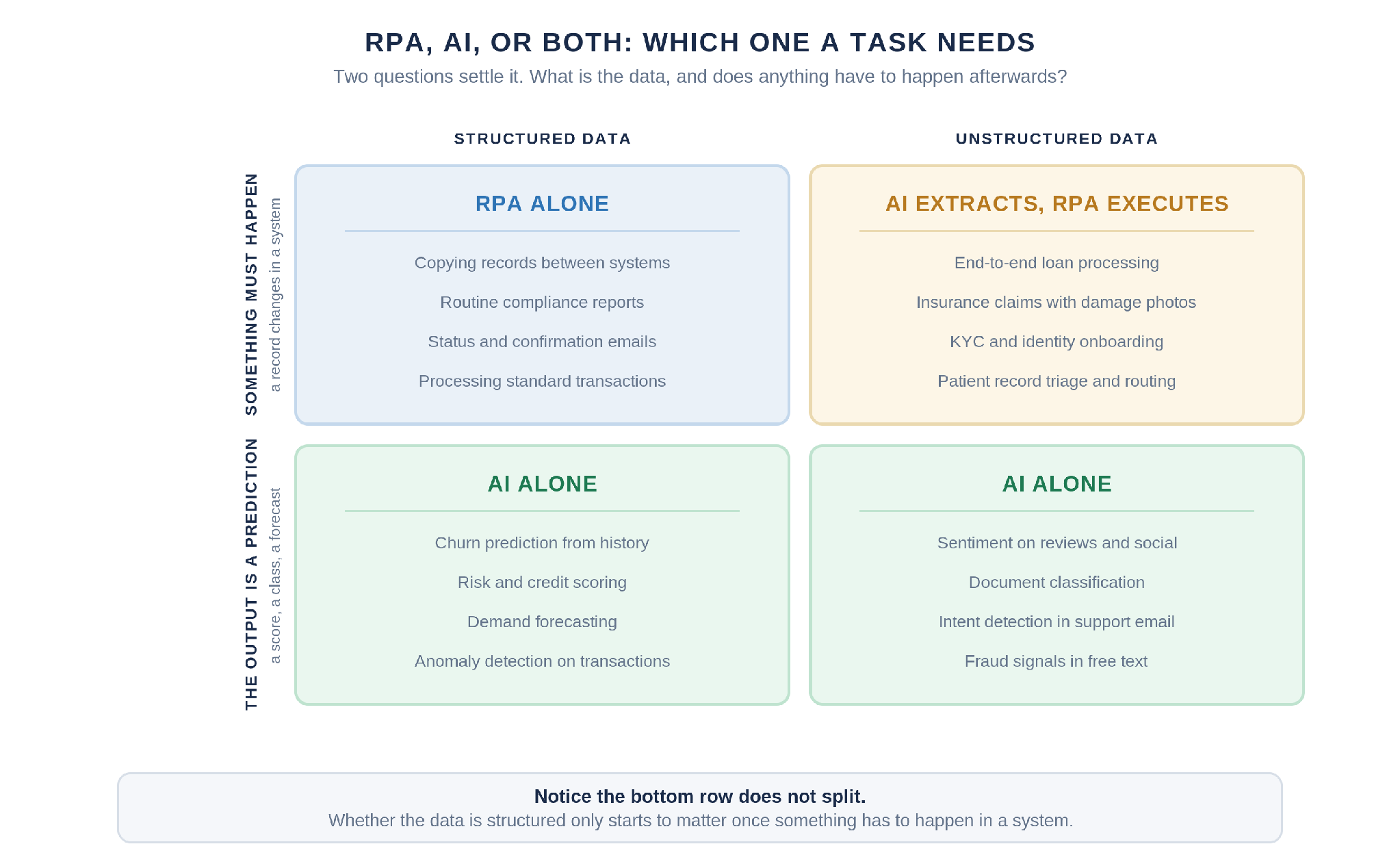
RPA-only scenarios:
AI-only or AI-led scenarios:
Combined intelligent process automation:
Industry data reinforces these patterns: 36% of RPA use cases are in finance and accounting. RPA can save healthcare organizations 7,000 hours per year on administrative work. RPA improves operational efficiency in retail and customer service by eliminating bottlenecks in order fulfillment and returns processing.
Start with clearly measurable, high-volume use cases to demonstrate ROI before scaling across the enterprise.
RPA and AI are building blocks in a broader enterprise automation and business automation strategy, not isolated tools you deploy once and forget.
Start by mapping critical business processes (order-to-cash, procure-to-pay, hire-to-retire) and identify which steps are best suited to RPA, AI, or human oversight. Not every step needs automation; some require human intelligence and judgment that neither technology can replicate.
Since around 2020, organizations have shifted from counting bots to tracking outcome metrics: cycle time, error reduction, regulatory compliance improvements, and cost per transaction. Organizations need 100 active robots for advanced RPA programs, but bot count alone does not indicate maturity.
Governance is essential. A lack of governance can lead to automation inconsistencies, security gaps, and compliance failures. Audit trails, access control, and alignment with regulations must be baked in from the start. Enterprises often lack visibility into process nuances and bottlenecks, which makes process discovery and documentation a prerequisite for scaling.
Design an automation roadmap that anticipates future AI integration, even if you begin with simple RPA solutions to automate tasks. And remember: 52% of customers struggle with scaling RPA programs. Planning for scale from day one (with standards, reuse patterns, and a center of excellence) avoids that trap.
Mature enterprise automation often includes orchestration platforms that coordinate RPA bots, APIs, AI services, and human approvals in one unified fabric, enabling you to streamline operations across departments and regions.
Understanding the tradeoffs helps you invest wisely.
Core RPA benefits:
RPA limitations:
Benefits of adding AI:
Cost dynamics: RPA offers quick wins for well-defined manual tasks. AI investments pay off as data volumes grow and models are reused across multiple processes. RPA can be augmented with AI capabilities to handle complex tasks that pure rules-based bots cannot touch.
For most mid- to large-sized organizations in 2026, the highest gains come from combining both automation technologies within a governed intelligent automation program.
If you already have RPA software running or are evaluating your first deployment, here is a practical path to layering in AI.
Most stalled automation programs hit the same wall: the bots handle the clean records and a person still handles everything else. Width.ai builds the AI layer that clears the exception queue, from document understanding and classification to the models that decide what happens next. Tell us which process is stuck, what share of it falls out to manual review, and what the exceptions actually look like.
In strict technical terms, RPA is not AI. However, in vendor marketing, "AI-powered RPA" describes RPA platforms that embed AI components like NLP or machine learning. Regulators and standards bodies typically treat them as separate software tools that can be combined under broader intelligent automation programs. It is perfectly acceptable to discuss AI integration with RPA, as long as you understand the conceptual difference between rule-based task automation and learning systems.
RPA and AI primarily target repetitive, low-value tasks such as keying data, reconciling records, and simple status updates. These technologies can reduce certain clerical roles, but organizations typically create new positions in automation design, data quality, exception handling, and analytics. Companies should pair their automation strategy with upskilling programs so existing staff move into process ownership, human oversight, and improvement roles rather than being displaced.
High-quality data significantly improves AI performance, but modern RPA tools with AI capabilities like intelligent document processing and natural language processing can extract structure from semi-structured emails and documents. Start with one domain, such as invoice processing or customer correspondence, where data quality is manageable. RPA can also help enforce data standards by validating fields and rejecting incomplete records, which over time raises overall data quality and provides the necessary data for AI models.
APIs are ideal when enterprise systems expose reliable, well-documented endpoints. RPA is useful for legacy or third-party applications that only offer a graphical user interface. A hybrid approach works best: prefer APIs where available for robustness and performance, and use RPA for UI-level interactions or to bridge digital systems without modern interfaces. Many automation platform solutions orchestrate both APIs and RPA bots in a single workflow alongside AI services.
While early RPA deployments around 2016–2018 were concentrated in large banks and insurers, cloud-based RPA solutions and low-code platforms have made automation accessible to mid-sized firms and even small businesses. Smaller organizations should start with a narrow set of high-impact processes, such as invoice processing, customer onboarding, or simple inventory management, to keep risk and complexity low. Scaling can be gradual: begin with basic RPA to automate repetitive tasks, then add AI for document understanding or predictive analytics once foundational automations are stable.
