Most businesses mean to reply to every Google review. In practice the replies come days late, or they reply with a generic response. Customers notice both.
We built a free n8n workflow to automate Google reviews with AI replies for small local businesses. It checks your profile every 15 minutes, writes a short reply that is personalized to each reviewer, and posts replies to 4 and 5 star reviews on its own. Lower ratings go to Slack, where a manager posts, edits or skips the draft. You can download the workflow file and use it for free.
Automate Google Reviews With AI Replies: What the Workflow Does
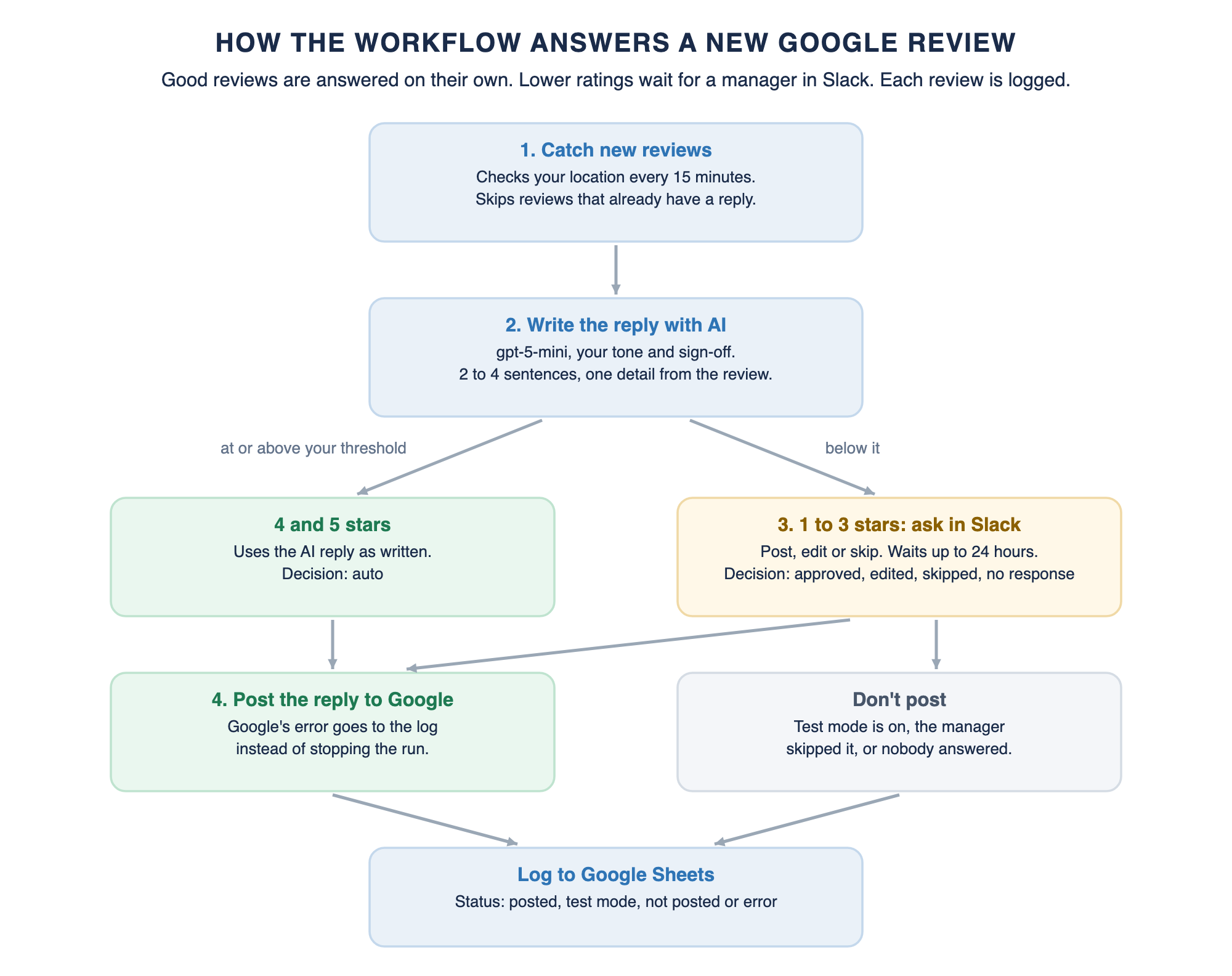
The workflow watches one Google Business Profile location. When a new review comes in without a reply, an AI model writes a unique reply in your voice. The reply thanks the reviewer, mentions one specific thing they said, and ends with your sign-off.
What happens next depends on the stars, which stand in for the review's sentiment. Reviews at or above your threshold, 4 stars by default, are posted straight to Google. Anything lower waits in Slack until a manager decides. Every review it handles then lands in a Google Sheet, a single dashboard with the draft, the final reply, the decision and whether it was posted.
At a glance:
- Trigger: checks one location for new reviews every 15 minutes.
- Posted automatically: 4 and 5 star reviews by default. You can change the threshold.
- Sent for approval: lower ratings, in Slack, with a form to post, edit or skip the reply.
- AI assistant: OpenAI's gpt-5-mini by default. Any chat model n8n supports can replace it.
- Log: one Google Sheets row per review, matched on the review ID.
- Safety: test mode is on by default, so nothing reaches Google until you turn it off.
- Credentials: four: Google Business Profile, OpenAI, Slack and Google Sheets.
How Much Time and Money It Saves
Replies matter to customers and potential customers more than most owners think. In BrightLocal's 2026 Local Consumer Review Survey of 1,002 US consumers, 89% expect business owners to respond to reviews. 80% are likely to use a business that responds to all of its reviews, and 42% are unlikely to use one that never replies.
Speed matters too, for customers and for local SEO. In the same survey, 19% expect a reply on the day they post, up from 6% a year earlier, and 81% expect one within a week. Generic or templated replies put off 50% of consumers, so the copy-pasted thank-you many businesses use does not solve the problem.
When you automate Google reviews with AI replies, you save time and manual work in three places. Nobody has to log in and check for new reviews. Positive feedback takes no staff time at all. Negative reviews arrive in Slack with a draft already written, so a manager reads, edits and clicks instead of writing a thoughtful response from a blank page.
Here is our data for one location. We saw 80% of reviews are 4 or 5 stars. A positive reply takes 3 minutes by hand, a careful negative one takes 12, and checking for reviews takes 5 minutes a working day. With the workflow, a Slack approval takes about 2 minutes, plus 15 minutes a month reading the log, and staff time costs $40 an hour.
This is our data, so trade the numbers for your own employees and steps taken. A business with five locations at 60 reviews each would save about 30 hours a month.
Running costs are small. OpenAI lists gpt-5-mini at $0.25 per million input tokens and $2.00 per million output tokens. A reply uses roughly 600 tokens in and 400 out, so each one costs about a tenth of a cent. n8n Cloud Starter is $20 a month billed yearly for 2,500 executions, or you can self-host n8n with no license fee.
For comparison, NiceJob includes AI Replies only in its Pro plan at $135 a month, per its pricing page. Its product FAQ says replies go out once a day in the evening and the tool is designed to send automated responses to positive reviews. Our workflow checks every 15 minutes, posts positive replies right away, and drafts the negative ones for a manager to approve in Slack. Cheaper and faster.
Key Use Cases It Solves
Replying to Every Review Within Minutes
Reviews at or above your threshold get a reply within about 15 minutes, day or night, with nobody watching the profile. Lower ratings reach a manager in Slack right away, so a same-day reply only needs a quick approval. That covers the 19% of customers who expect one.
Keeping a Human on Negative and Mixed Reviews
A 2-star review is where a bad reply does real damage to a positive online reputation. The workflow never posts those on its own. A manager sees the review and the draft in Slack, fixes anything that sounds wrong, and posts it, which we estimate takes about 2 minutes.
Sounding Like Your Business
You set your business name, brand voice, sign-off and a contact line for unhappy customers once. Every reply uses them, so your brand's messaging stays the same. The AI also has to mention one detail from the review, which adds a personal touch and keeps replies from reading like a template.
Staying Within Google's Rules
Google's content policy bans reviews posted because of an incentive and asks that personal information is not shared without consent. The AI is told never to offer discounts, refunds or gifts in exchange for a review, and never to include order numbers, last names, addresses or health details.
A Record of Every Review and Reply
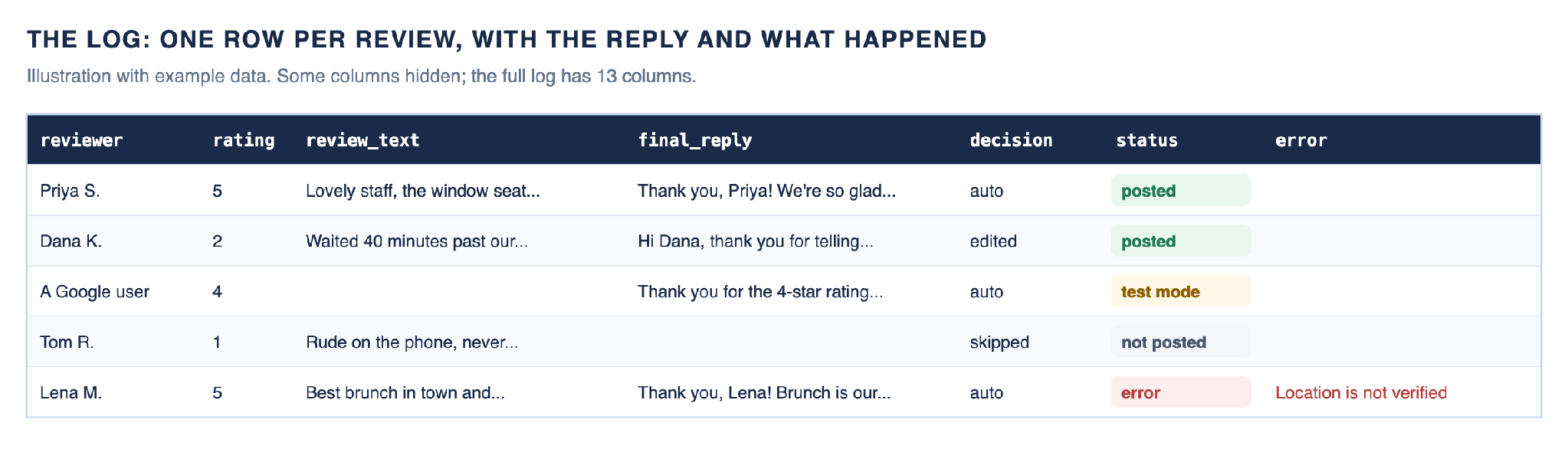
The log shows each piece of customer feedback, the AI draft, the reply that went out, the decision and any error from Google. You can see which replies were edited or skipped, and how long each posted reply took after the review was written.
Multi-Location Businesses and Agencies
Each copy of the workflow watches one location, and replies always go to the business location the review came from. Agencies can run one copy per client, each with its own tone and Slack channel. One n8n instance can run those copies next to other n8n marketing automation use cases, such as turning blog posts into social drafts with a Slack review step.
How the Workflow Works, Step by Step
The workflow has 16 working nodes in four numbered sections, plus notes on the canvas. All the values you fill in live in one Settings node:
business_name          Your Business Name
tone                   warm, friendly and professional
sign_off               The Your Business Name Team
unhappy_contact        an email and phone for unhappy customers
extra_instructions     e.g. "Never mention prices"
auto_post_min_rating   4   (6 = approve every reply, 1 = post every reply)
test_mode              true   (nothing is posted to Google)
Step 1: Catch New Reviews
The New Google Review trigger checks your location every 15 minutes. It starts a run when the total review count goes up, and passes on that many of the most recently updated reviews. The first check after you publish only records the count, so your existing reviews are left alone.
Read Review turns each review into clean fields: the star rating as a number, the reviewer's first name, and the review text. Anonymous reviewers show as "A Google user". Needs a Reply? then drops reviews that already have a reply or have no star rating.
Step 2: Draft the Reply With AI
Write Reply sends the first name, the rating and the text to gpt-5-mini, set to low reasoning effort. The model follows these rules:
- Reply in the same language as the review, in 2 to 4 sentences and under 90 words.
- Use the first name only if one is given, and mention one specific comment from the reviewer.
- For 1 to 3 stars, apologize without arguing, making excuses or admitting fault, and offer your contact line.
- For 4 and 5 stars, be warm and invite them back. Rating-only reviews get a 1 or 2 sentence thank-you.
- No incentives, private details, promises, hashtags or emojis, and no links unless your contact line has one. End with your sign-off.
Check Draft removes stray quotes and caps the reply at 4,096 characters, in line with Google's 4,096-byte limit. It then marks which reviews need approval and moves the rest to the front, so a good review never waits behind a bad one.
Step 3: Approve Low Ratings in Slack
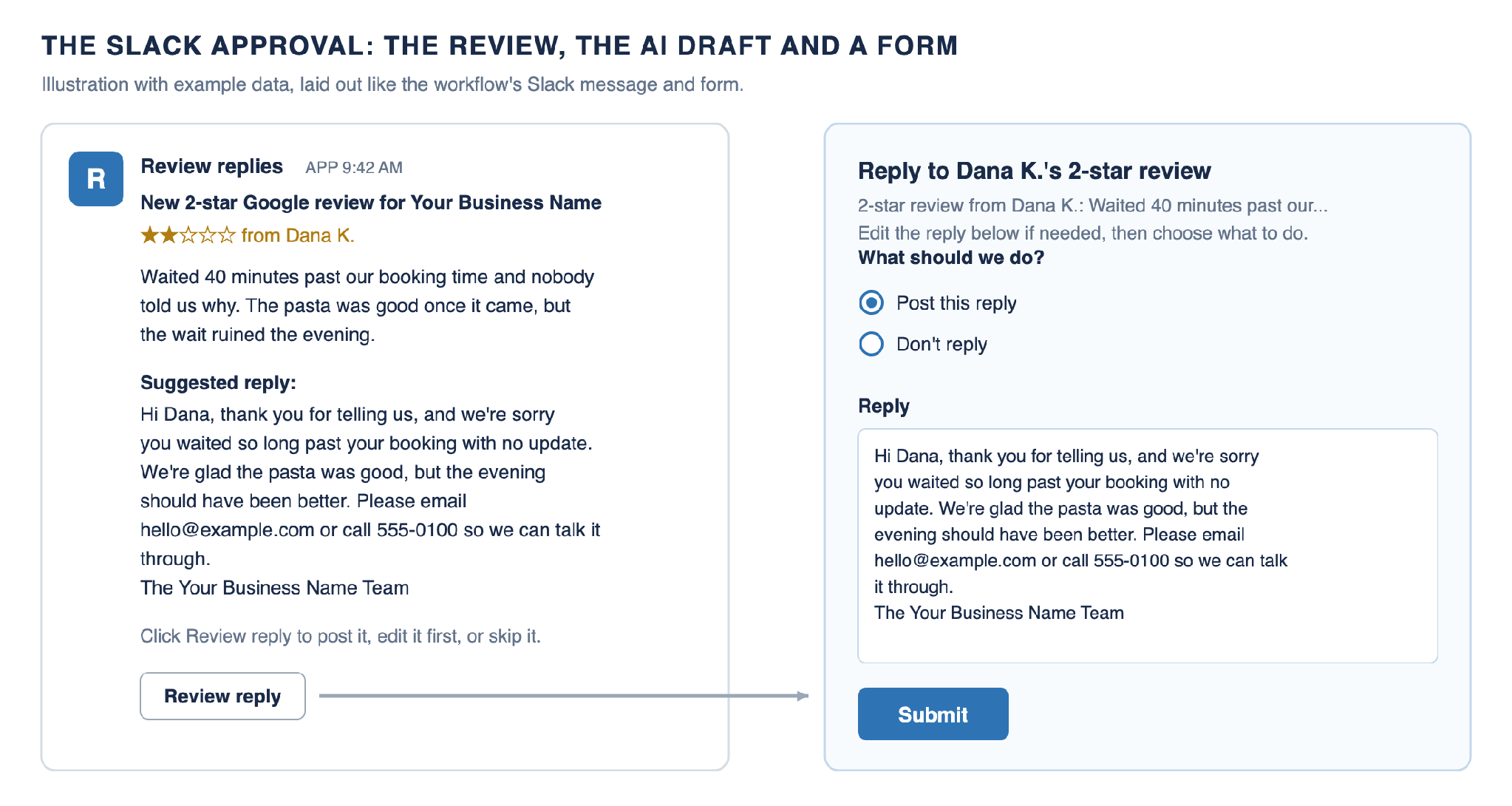
Reviews below your threshold, and any review where the AI returned nothing, go to Slack one at a time, even when many reviews arrive together. The message shows the stars, the review and the suggested reply, with a Review reply button. The button opens a form with the draft filled in and two choices: Post this reply or Don't reply.
The workflow waits up to 24 hours. The decision is logged as approved, edited, skipped, or no response if nobody answered. Nothing is posted in the last two cases. Reviews at or above the threshold skip Slack and are logged as auto.
This is the same approval gate we use in our social media automation workflow, where drafts wait for a yes before anything is published.
Step 4: Post the Reply and Log It
Route Reply sends the reply to Google, or straight to the log if test mode is on or the manager chose not to reply. If Google rejects a reply, the error goes to the log instead of stopping the run. Per Google's help page on replies, most replies are checked within 10 minutes, but some can take up to 30 days to appear.
Each review becomes one row in Google Sheets, added or updated by review ID. Its status is posted, test mode, not posted or error, and the log has 13 columns in all.
How to Set It Up
Plan on about 30 minutes to automate Google reviews with AI replies once Google has approved your API access. Google does not say how long approval takes, so start there.
Setup Step 1: Request Business Profile API Access
Google must approve your Google Cloud project before it can read or reply to business reviews. Per Google's prerequisites page, your profile must be verified, active for at least 60 days, and list the business's website. Submit the Business Profile API contact form, choose Application for Basic API Access, and include your project number.
Use an email that owns or manages the profile. To check the result, open the Business Profile API quotas in the Google Cloud Console. 0 requests per minute means you are still waiting, and 300 means you are approved.
Setup Step 2: Enable 3 APIs and Create an OAuth Client
In the same project, enable the Google My Business API, the My Business Account Management API and the My Business Business Information API. Then set up the OAuth consent screen. If it is an External app, publish it, because Google expires logins for apps left in testing after 7 days.
Create an OAuth client ID of type Web application. Add the redirect URL shown in n8n's Google Business Profile credential, then copy the client ID and secret.
Setup Step 3: Import the Workflow and Connect 4 Credentials
In n8n, choose Import from File and select the workflow JSON. Create a Google Business Profile credential with your client ID and secret, and sign in as an owner or manager of the profile. Add your OpenAI API key, a Slack bot token with the chat:write and channels:read scopes (add groups:read for a private channel), and your Google Sheets connection.
Setup Step 4: Pick the Location, Channel and Sheet
In New Google Review, choose the account and location. In Ask in Slack, choose the approval channel and invite your Slack app to it. In Log to Google Sheets, pick the spreadsheet and a tab, which can be blank.
The Review reply button links to your n8n instance, so approvers' browsers must be able to reach it. On a self-hosted instance, set the WEBHOOK_URL environment variable to your public n8n address.
Setup Step 5: Test in Test Mode, Then Go Live
Fill in Settings and leave test_mode on. Click Fetch Test Event on the trigger, which returns your latest review, and run the workflow. Check the draft, the Slack message if the rating is low, and a new row marked test mode.
If that review already has a reply, the run stops early. Pin test data with a review that has no reply instead. When you are happy, set test_mode to false and publish the workflow.
The setup guide on GitHub that ships with the workflow file lists every node, every log column and the exact credential values.
Customize the Workflow
- Approve everything, or nothing: set auto_post_min_rating to 6 to send every reply to Slack, or to 1 to automatically reply to every review. A review with an empty AI draft still goes to Slack.
- Check more or less often: change the poll time in New Google Review. Every 15 minutes is quick without using much of Google's quota.
- Wait longer for approvals: change Limit Wait Time in Ask in Slack. Other reviews from the same check wait behind an open approval.
- Use a different model: OpenAI now marks gpt-5-mini as deprecated, so swap in another OpenAI model, or Anthropic, Gemini or OpenRouter, in the OpenAI Chat Model node.
- Watch multiple locations: duplicate the workflow and pick a different location in each copy.
- Approve somewhere else: replace Ask in Slack with the send-and-wait step of Microsoft Teams, Gmail or Telegram, then update Read Decision. If your team already lives in Slack, the same channel can carry other alerts, like the GoHighLevel events we send to Slack.
Troubleshooting
- Every Google call fails with a quota or 429 error. Your project is not approved yet, so its quota is still 0. See setup step 1.
- The account or location list in n8n is empty, or shows 403. One of the two My Business APIs is not enabled, or you signed in with an account that does not manage the profile.
- The Google credential stops working after about a week. The consent screen is an External app in testing. Publish it and reconnect.
- The Slack button opens a page that will not load. n8n is not reachable from that browser. Set WEBHOOK_URL to your public n8n address.
- Every reply is logged as an error. The location is not verified, or the signed-in account does not manage it. Google only accepts replies for verified locations.
- A new review was missed. The trigger compares the total count. If a review is deleted between checks, a new one may not change the count. Reply to it by hand.
Conclusion
To automate Google reviews with AI replies safely, you need speed on the easy reviews and a person with full control on the hard ones. This free workflow gives you both, plus test mode and a full log. By our estimate it saves 3 to 16 hours a month per location, for about a tenth of a cent of AI per reply.
Start automating google review replies for free
Our offer is simple. We’ll set this workflow up completely for free. Chat with us to see if you’re a fit, and we’ll get everything set up!
We build custom review and reputation workflows on n8n: one setup for every location, replies routed by topic and sentiment, and reports your team will actually read.
• Every location in one workflow and one log
• Complaints routed to the right manager by topic
• Weekly summaries of what customers praise and dislike
• Built on your tools, your tone and your rules
Common questions about automating google review replies
Can I use AI to respond to Google reviews?
Yes. Replies are posted under your business name for customers and search engines to see, and the person who left the review is notified. The safe way is to let AI tools draft, post the positive replies automatically, and have a person approve the negative ones, where customer satisfaction is most at risk, as this workflow does.
Can Google reviews be AI generated?
AI generated responses are allowed, but reviews themselves must come from real customers. Google's policies do not allow fake engagement and remove it. This workflow only writes replies to reviews your customers have already left. It never writes or requests reviews.
Is there a way to automatically respond to Google reviews?
Yes, you can auto reply through the Google Business Profile API once Google approves your project. To automate Google reviews with AI replies, this workflow checks for new reviews every 15 minutes, writes a reply and posts it, with Slack approval for lower ratings.
How to trigger an AI review response in Google?
Use an automation that watches your profile for new reviews and calls an AI model when one arrives. Here the New Google Review trigger starts the run, Write Reply drafts the response and Post Reply to Google sends it. If a reply ever needs research or several decisions, such as checking an order before answering, that is where n8n and LangGraph part ways: n8n suits fixed steps tied to your tools, while LangGraph suits stateful agents that reason over several steps.
