How Is AI Changing Ecommerce? The Full Picture in 2026, From the Storefront to the Supply Side
How Is AI Changing Ecommerce? The Full Picture today, From the Storefront to the Supply Side

Matt Payne
October 17, 2026
An online shopper opens your website, excited to buy new clothes. Her excitement soon turns to frustration as she can't filter by the lightweight material she's looking for. She probably won't buy anything this time. Not many casual shoppers have the patience or time to go through a dozen product descriptions hunting for clues about the aspects they're looking for, especially if the competitors outline this data clearly. Your site could be losing out on potential revenue due to its lack of fine-grained details and search for some categories.
Elsewhere, an automotive procurement manager is on their supplier's portal but is unable to shortlist parts based on crucial tensile strength requirements. Key search filters are missing. They'll need to read about 15 brochures to figure out the right ones. What should have taken 30 seconds from search to purchase order will now take 2 hours. A frustrated procurement manager is probably bad news for that supplier's future prospects.
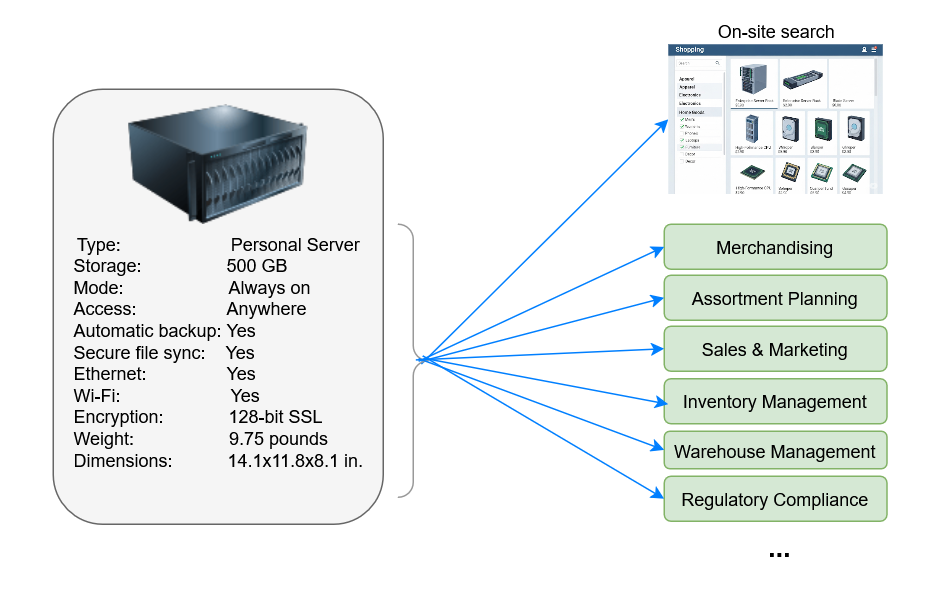
Product tagging isn't a back-office data hygiene task. It's the infrastructure layer that every downstream discovery surface runs on — site search, faceted filters, product finders, configurators, recommendations, AI shopping agents, marketplaces, paid ads, and SEO. When tags are accurate and granular, every one of those surfaces gets better. When tags are sparse or wrong, every one of those surfaces silently leaks revenue.
For ecommerce teams managing thousands or millions of SKUs, the math of manual tagging is impossible. The work is slow, inconsistent, and prone to human error. But the cost of bad tagging is even higher than the cost of the labor: traffic you paid to acquire goes wasted when shoppers can't find what they're looking for, search bars hit dead-end zero-result pages, and AI shopping agents skip over your catalog entirely because the underlying data isn't structured enough to cite.
In this article, we explain the challenges and benefits of product tagging and show how Pumice.ai automates it end to end.
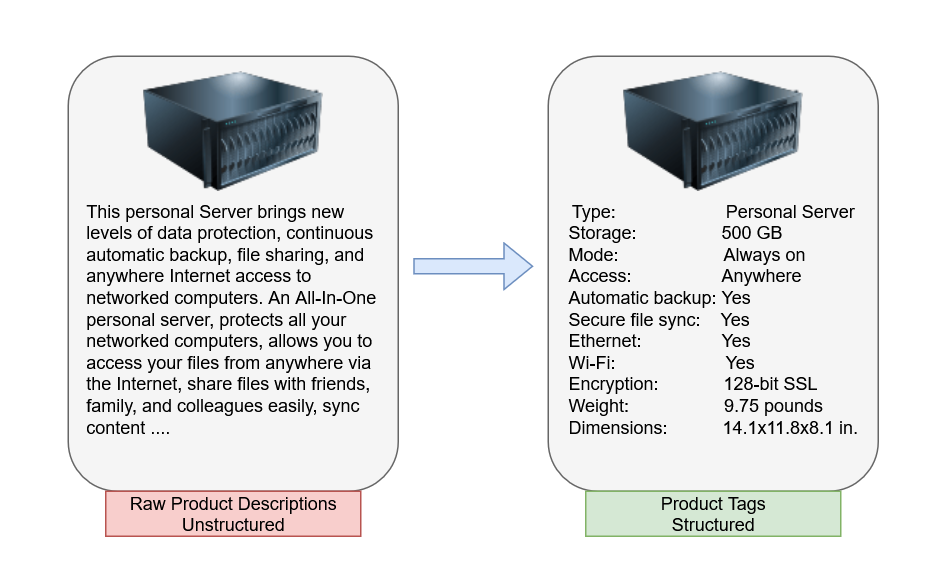
Product tagging extracts useful key-value attributes about products from descriptions, brochures, PDF catalogs, and other details provided by manufacturers, distributors, and third-party data providers.
Product details are often a mix of free-form text, imagery, semi-structured information with ad hoc schemas, and marketing speak, all formatted and presented for human readers. Product tagging transforms that into much more structured attribute metadata that is computer-friendly with consistent schemas, standard/custom tag names, and well-defined tag values.
Those tags are what downstream systems, your ecommerce platform, search engine, PIM, MDM, ERP, recommendation engine, and AI shopping agents read to do their job.
The conventional approach to product tagging mirrors what's in the vendor data: spec sheets, technical attributes, taxonomy categories. That's not wrong — but it's incomplete. The catalog is built around what the product physically is. The shopper is searching around what they need it for.
A pair of running shoes has tags for size, material, brand, and color. But the shopper isn't searching "size 10 EVA midsole black." They're searching "running shoes for flat feet," "best shoes for treadmill use," "trail shoes that survive wet weather." The gap between what the catalog says and what the shopper asks is where conversions get lost.
Modern AI-driven product tagging closes that gap by extracting needs-based attributes alongside the standard spec-based ones. Needs-based attributes describe the product in terms of how shoppers think about using it:
Both layers matter. Spec-based tags power faceted filters and technical-buyer evaluation. Needs-based tags power natural-language search, AI shopping agents, recommendation engines, and the long tail of intent-rich queries shoppers actually type — the queries that don't match catalog vocabulary but absolutely match shopper intent.
Pumice extracts both layers by default. The AI engine doesn't just parse vendor data into a structured schema — it understands the use cases, occasions, audiences, and shopper-language framing each product fits, and tags accordingly. Custom rules let your team layer on category-specific needs-based attributes that matter for your business: "flag every footwear product with its suitability for plantar fasciitis," "tag every kitchen product with the cooking method it supports," "tag every B2B fastener with its compatible substrate types."
These are some key benefits of product tagging (both manual and automated):
For a long time, product tagging was entirely done manually by workers going through product descriptions, manufacturer catalogs, and relevant websites and extracting relevant tags using some guidelines. This work usually requires a data entry team that works closely with the copywriting team.
Some challenges of manual tagging:
A more productive approach is to use software with programmatic custom rules for tagging.
While it may address some of the drawbacks of manual tagging, it brings some new challenges and drawbacks:
In 2026, you should be using modern Ai systems for product tagging. They address all the drawbacks of the other approaches.
Pumice.ai is an SKU onboarding and product data enrichment automation SaaS platform that uses our powerful ai endpoints for automating all your product data enrichment tasks at scale with APIs.
These include powerful APIs for product tagging. Pumice handles the following:
Let's look at some demos of Pumice's automated tagging APIs.
The demos below show how developers can get started with Pumice.ai product tagging APIs for end-to-end tagging.
For these demos, you need the following prerequisites:
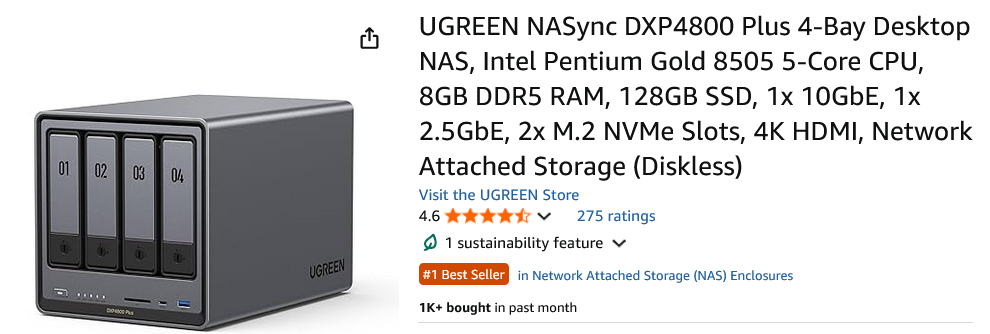
The steps below demonstrate end-to-end tagging for consumer electronics using the product below as an example.
Step 1: Optionally download details from a product website
If your product details are on some web page, you can download them in various ways depending on your use case:
For this demo, we'll use Pumice's built-in smart scraper service to fetch initial details like titles and descriptions directly from the web. The service endpoint is: https://app.pumice.ai/scraper/smart-scrape
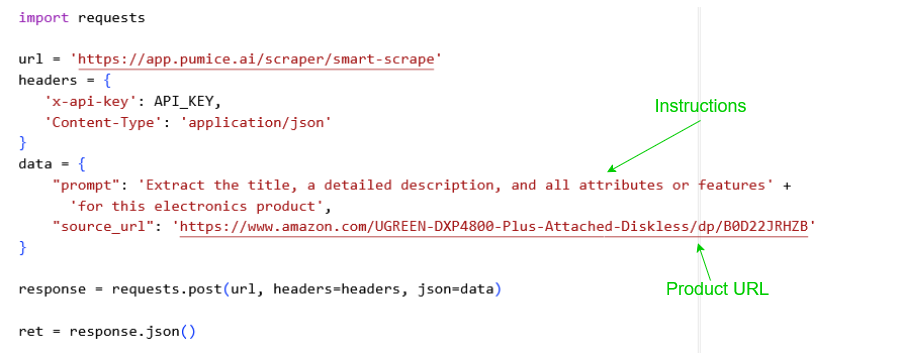
The smart scraper fetches a raw title and description and an initial set of product attributes.
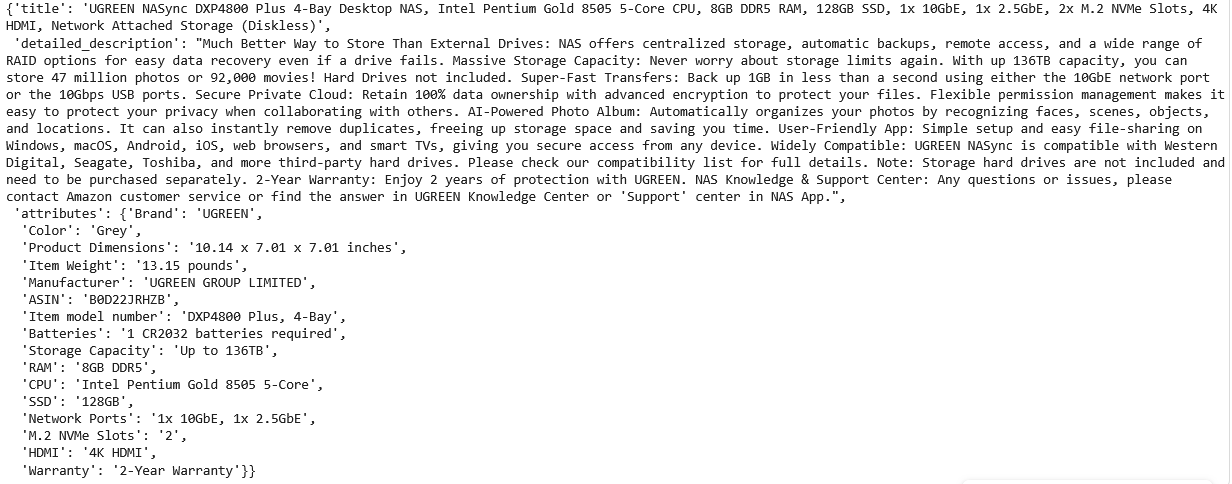
Step 2: Extract detailed product tags
Use the attribute extraction API (https://app.pumice.ai/attribute_extraction) to extract a detailed set of product tags from some product content.
You can use this API on public content from web pages or internal / proprietary content like:
In the code snippet below, we extract tags from the details previously downloaded from the product website:
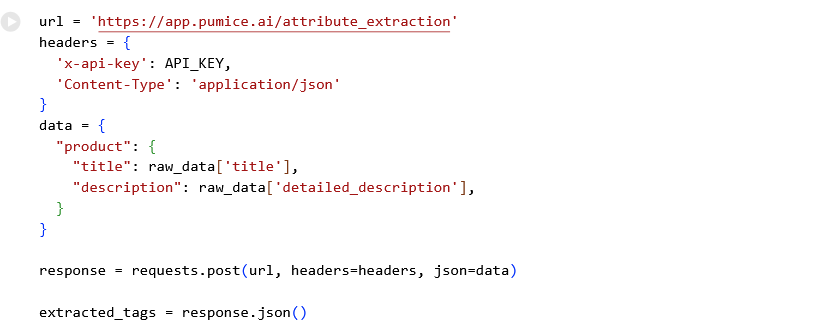
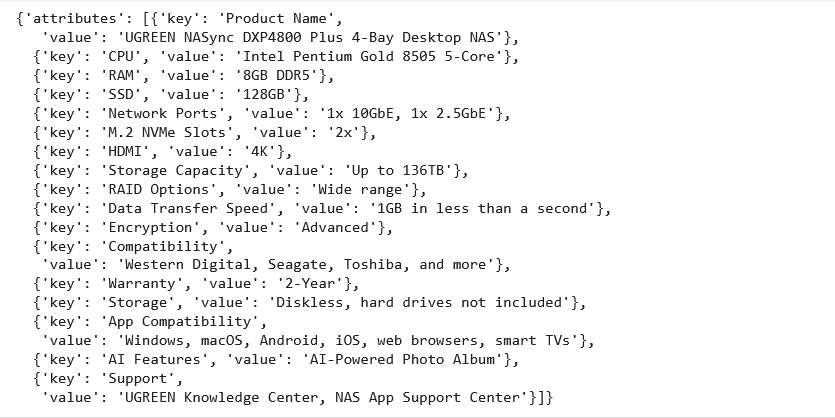
The attribute extraction API extracts product tags that are detailed and fine-grained:
Let's see end-to-end tagging for a typical lifestyle product like this:
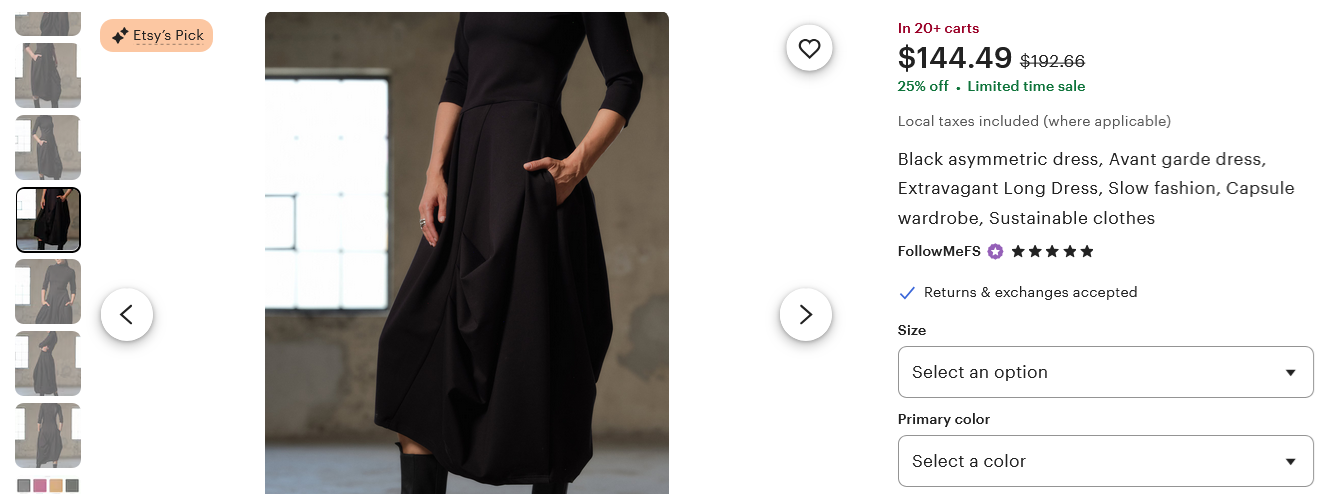
Step 1: Optionally download the details from its web site
If your product is online somewhere, you can download its raw details using the smart scraper API:
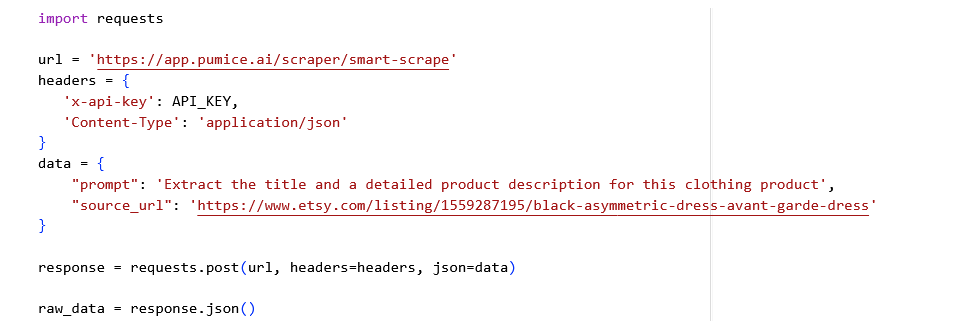
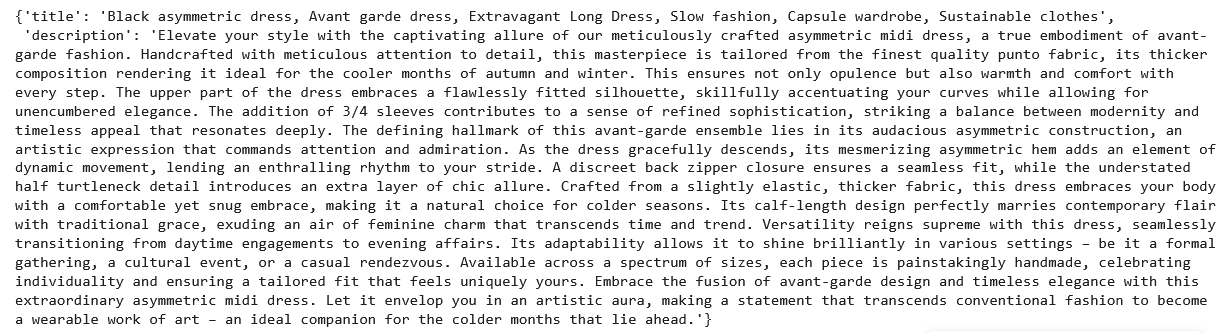
The identified title and detailed description look like this:
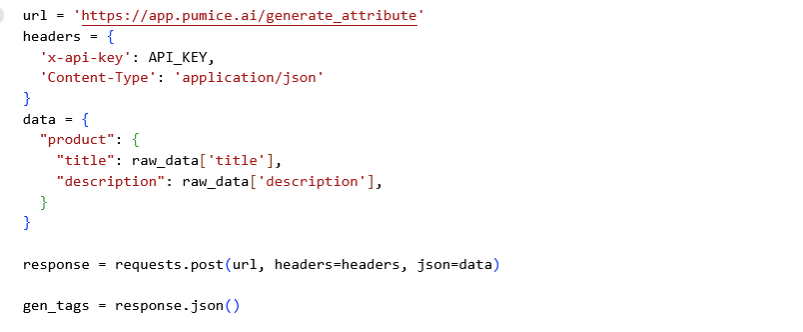
Step 2: Generate attributes based on the product category
You can use the attribute generation API (https://app.pumice.ai/generate_attribute) to identify category-wide generic attributes.
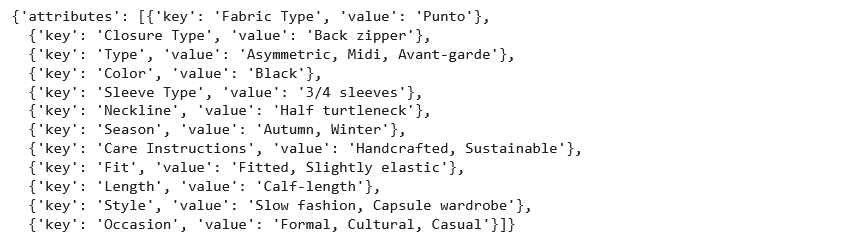
While the attribute extraction API extracts tags directly from some content, the generation API identifies the product category and category-wide tags based on that content. Such tags can help you generate product comparison pages to enable users to compare different products in the same category.
It identifies the following category-level tags:
Step 3: Extract product tags from the given content
Use the attribute extraction API to identify product tags from the given content. In the example below, tags are extracted from downloaded website content:
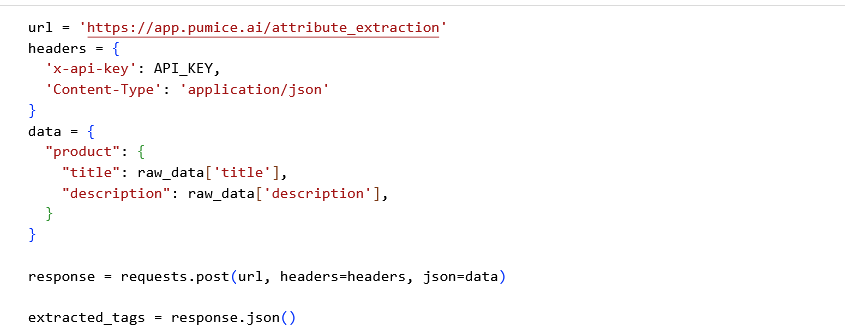
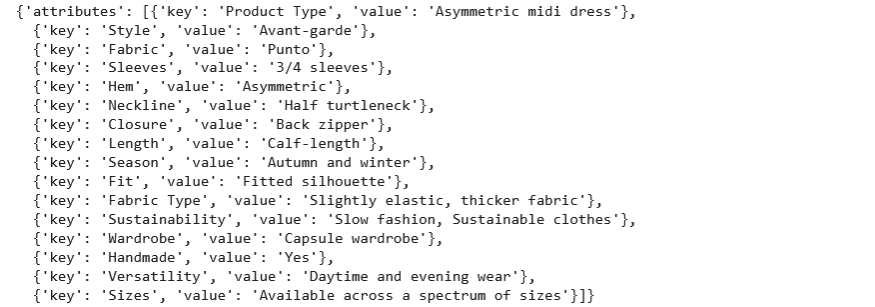
The API extracts these tags:
The attribute extraction and generation APIs support an "attributes_list" argument to restrict the attributes to only the ones you want. The API engine is smart enough to map the attribute names that you specify to the given product details.
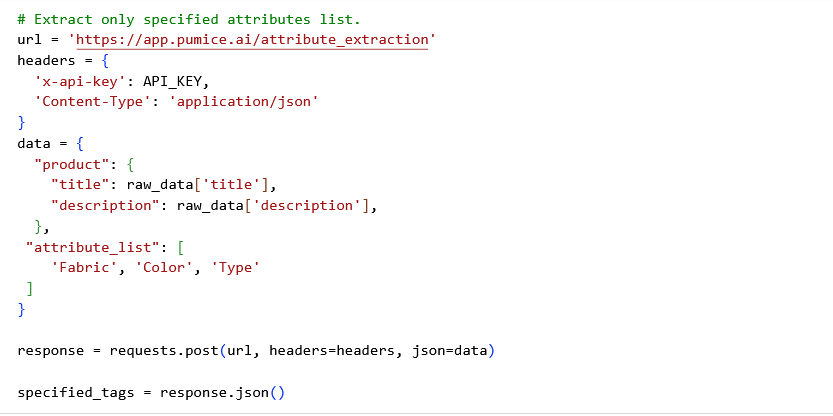
The API returns just the specified attributes:

You can supply multiple custom rules to the attribute extraction API to extract more fine-grained tags.
For example, in the previous demo, the "sizes" tag is vague and not fine-grained enough for implementing faceted search or product comparison pages:

However, you have more fine-grained details in a product brochure or internal database as shown below:
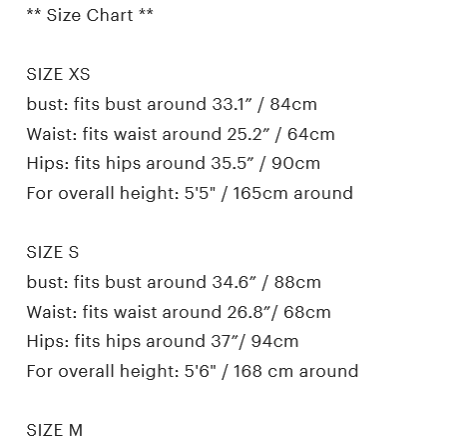
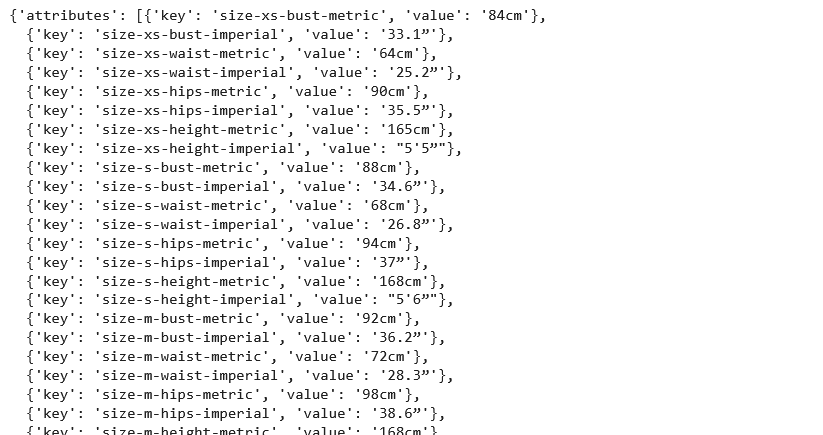
You can convert such additional content into fine-grained product tags using custom rules like these:
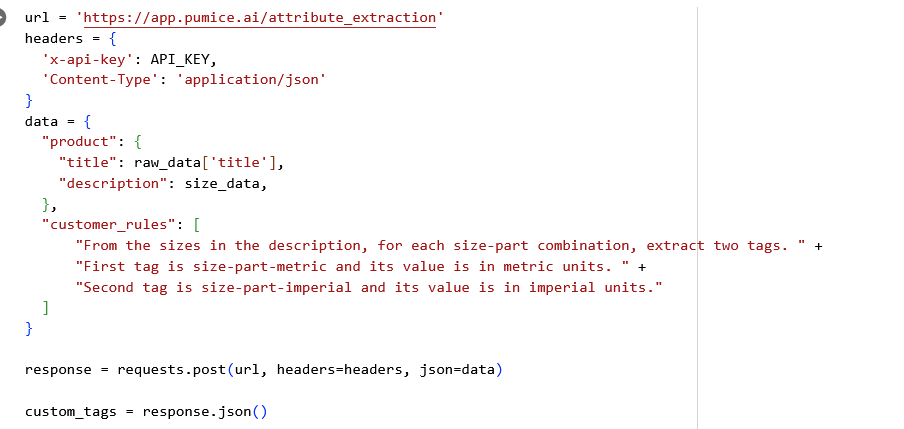
These are the fine-grained product tags generated by our custom rule:
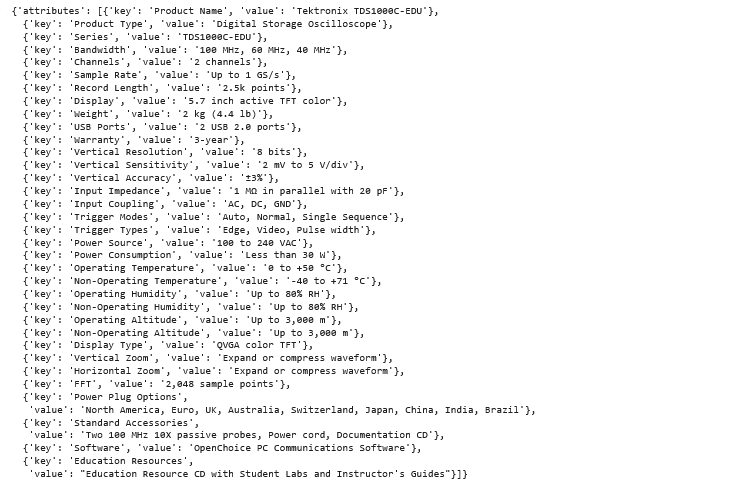
Often, important tags must be extracted from sources like datasheet documents or product information databases. This demo shows how to extract tags from such sources using the example of a datasheet for a piece of industrial equipment.
Step 1: Read the document or database
In this example, we use the PyMuPDF Python package to read a large datasheet PDF:

The document's contents and size are shown below:
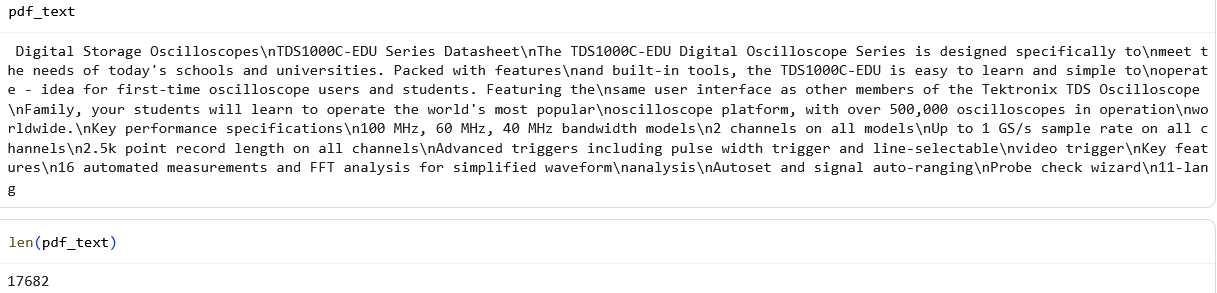
Step 2: Extract product tags from the document
Next, use the attribute extraction API to extract tags from the datasheet's contents:
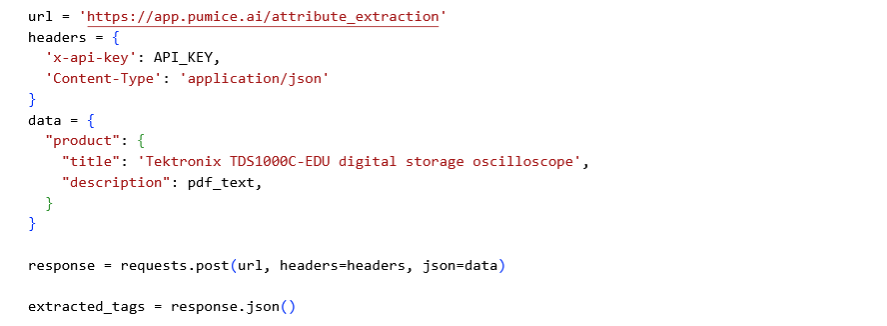
The following tags are extracted:
In the following sections, we explain product tagging use cases for various ecommerce players.
If you are a brick-and-mortar retailer, here are some business / operational / marketing / sales ideas for your teams based on product tags extracted from real products using Pumice.
Micro-Seasonal Planning for Your Assortment Teams
Your assortment teams need granular data to build coherent profitable assortments of products to stock and sell. Pumice extracts several product tags that facilitate their work.
For example, clothing products get tags like these.
These are needs-based attribute tags, they describe how the product fits into a shopper's life, not just what it physically is. That's what makes them usable for assortment planning, for occasion-based merchandising, and for the natural-language queries shoppers actually run on your site.
Using such tags, assortment teams can improve their planning:
Feature-Based Assortment Balancing
For a pair of running shoes, Pumice extracts these feature product tags:
For some winter gloves, it reports this tag:
Such fine-grained feature tags enable your assortment team to cater to different customer needs. For example, based on the "pronation control" tag, they can stock shoes for both neutral runners and overpronators.
They can set targets like "20% of the winter footwear assortment must be Gore-TEX waterproof" or "60% of winter gloves must have 3M Thinsulate insulation." This enables your store to stock credible offerings for serious athletes, customers with particular care needs, and customers planning for specific weather conditions, justifying higher price points and preventing assortment gaps.
Store-in-Store and Visual Merchandising
For the above clothing example, your merchandising team can set up catchy visual merchandising for "Cruise Wear," like displaying them in a store-within-store.
Streamline Store Operations like BOPIS and Curbside Pickup
Pumice extracts several tags that enable your teams to manage day-to-day operations easier. For example, Pumice extracts product and package dimensions like these:
These tags can help your teams create planograms, the detailed visual schematics that guide product placement on shelves, displays, or fixtures in your store.
When a "buy online, pick up in store" (BOPIS) order is received, your order management system can use these dimensions to direct your staff. For example:
Guidance for Loss Prevention and Product Handling
Pumice extracts care and handling tags like these:
Such tags are useful for loss prevention and proper handling by your store and customers.
Your visual merchandising team can create rules like: Any item tagged "hand wash only" or made with delicate materials must be displayed on higher fixtures, not densely packed racks, to minimize handling damage."
Similarly, watches with a "Crystal: Sapphire" tag can be designated for placement inside locked glass cases, as they are higher value and more prone to shattering than watches with a "Crystal: mineral" tag.
Also, if customers ask for care tips, store employees can use their handhelds to instantly look up these tags and provide accurate product-specific answers. This improves customer satisfaction and perception of your store.
Streamline Supply Chain, Logistics, and Fulfillment Operations
Pumice product tags can streamline your backend operations too.
For example, these are some of the extracted tags for a luggage set:
Such tags can facilitate kitting and inbound/outbound workflows:
Package dimension and weight tags also facilitate automated warehouse slotting and pick path optimization. The WMS uses them to automatically assign storage locations ("slotting"). Lightweight items would be assigned to a small, high-density bin and bulky items to larger bins. The WMS then uses such location data to create the most efficient pick paths for employees fulfilling orders, minimizing travel time within the warehouse and increasing labor productivity.
Targeted Product, Brand, and Lifecycle Marketing
Pumice product tags equip your marketing teams for better lifecycle marketing and sharper micro-targeting of potential customers through social media.
For example, a pair of pants has the following tag:
Based on this style, your marketing teams can build a specific audience segment on platforms like TikTok and Instagram for users interested in "Punk," "Gothic," and other subcultures. Highly relevant ads can be served featuring these specific products, leading to higher click-through and conversion rates. Product tags enable your marketing teams to speak the niche language of specific customer groups.
Many of the brick-and-mortar workflows above — assortment, supply chain, fulfillment, store operations, and marketing — are relevant to online retail too.
But online retail has many unique workflows. Let's talk about some that Pumice product tagging can help.
Empower Your Customers and Teams With Accurate Product Information
Two major problems that reduce conversion rates are: 1) Not satisfying a buyer's search intent and 2) Decision paralysis due to feeling overwhelmed by too many choices.
But there's a third problem, a post-conversion one, you may be ignoring: buyer's remorse. Your customer is initially happy with your help in buying a product that they thought would satisfy their search intent. But, after buying, they start feeling that reality doesn't quite match the descriptions and promises. That buyer's remorse can mean lost future sales, bad reviews, poor ratings, negative word-of-mouth, and other intangible damage to your business.
You can preempt all three problems by providing extremely granular product tags and search filters based on them.
Pumice ensures high granularity by default. For example, Pumice extracted this informative tag for a watch accessory:
Notice that this isn't a spec, it's a needs-based answer to "will this work with what I already own?" That's the kind of tag that resolves the most common pre-purchase question buyers have, and it's the kind of tag manual tagging consistently misses.
A buyer of wearable technology can use this tag to ensure that they're buying the right accessory.
Your merchandising teams also benefit from accurate details. For example, when deciding to stock this accessor, they can cross-reference the compatibility list with Fitbit sales data. If they sell a high volume of Fitbit Versa 2, this tag gives them the confidence to procure this accessory, knowing it will be relevant to their existing customer base and can be merchandised next to the primary device to increase basket sizes.
In addition to such high granularity information, Pumice provides custom rules to ensure high accuracy too for that information. Custom rules are explained in a later section.
Better Inventory Management
Product tags can aid in more granular inventory management at the SKU level.
For clothing products, size tags like these are identified:
The inventory management system can create a separate SKU for each size variant. This enables more granular inventory tracking, reordering, sales, and clearance strategies. If the "M" size sells out, it can trigger a reorder for just that size. If size "S" remains in stock for 120+ days, it can be flagged for a targeted promotion, markdown, or clearance to clean up the inventory.
Improve Online Shop's Content, Navigation, and Search
Pumice extracts product tags like:
Such tags can help you improve your online shop's user experience:
Wisen Up Your Customer Segmentation, Digital Marketing, and Ad Spend
Product tags enable hyper-targeted advertising and personalized email campaigns by creating specific audience segments based on product attribute affinities.
For example, Pumice extracts tags like:
Your marketing teams can use them to:
Make Your Data Analytics More Effective Through Granular Product Tags
The highly granular feature attributes that Pumice extracts — like rise style, fit type, lacing system, and more — serves as features for your machine learning models to more accurately predict sales trends, forecast demand, and power product recommendations. These models can predict things like:
As another example, take this category tag for an electronics product:
Your electronics merchandising can use this to analyze the performance of a small, niche market who buy TV-DVD combos. They can run a report on all products tagged "TV-DVD Combos" to determine the sub-category's profitability, sales velocity, and return rates. This data helps them decide whether to continue supporting this niche, expand it (e.g., for dorm rooms or RVs), or phase it out in favor of more popular TVs.
Analysts can identify non-obvious product relationships using market basket analysis. They might discover that customers who buy items tagged with "Title: Baby Crib..." also frequently purchase products tagged as "Specific Uses: personal computers." This means new parents are a key demographic for home computing products, an insight that can be passed to the marketing team for a new campaign.
Such insights allow you to proactively manage your inventory, merchandising, and marketing. They also guide your vendors about future product development.
Ease Your Regulatory Compliance Burden
With tariffs set to become a major component of trade, your assortment teams, as well as risk and compliance teams, need to pay attention to every product's country of origin for accurate cost modeling. Pumice extracts tags like the following to help them:
Such tags allow them to factor in current and potential future tariffs, calculate international freight lead times, and assess geopolitical supply chain risks. This information is crucial for setting the final retail price and ensuring that margin targets are met.
Some products require special handling during shipping and fulfillment to comply with safety regulations.
For example, a product with a high-capacity lithium battery includes this product tag:
This tag informs your supply chain and fulfillment team to do the following:
Compared to retail, B2B ecommerce is often very different in just about everything — procurement, vendor due diligence, negotiations, fulfillment, compliance, and more. It's not by chance that many B2B ecommerce websites tend to be very utilitarian rather than flashy.
While product tags are not usually essential, they can nevertheless help streamline the above functions for buyers and vendors.
Pumice product tags facilitate these departments to decide which products to buy, from whom, and at what price. They are responsible for building a profitable and relevant product catalog.
1. Calculating Total Cost and Profitability
When deciding whether to stock some industrial equipment, procurement teams don't just go by the wholesale price. They first calculate inbound freight costs based on tags like:
Next, they calculate tariffs, customs fees, applicable rules of origin, and potential ocean freight delays based on tags like:
Totaling up these costs gives the total landed cost, a critical number needed for setting competitive sales prices with acceptable profit margins.
Procurements teams use such calculations for shortlisting competing products from several vendors.
2. Strategic Sourcing and Vendor Management
Pumice extracts tags like these:
Using such tags, your merchandising team can analyze sales and returns data grouped by "Manufacturer." If products from a manufacturer consistently have low return rates and high margins, they can be flagged as a preferred vendor for future procurement.
They can use the tags like "Standards" as a non-negotiable requirement during vendor selection for certain categories.
A "Refurbished By" tag enables a whole new product category of certified used equipment, allowing them to source products outside of traditional manufacturer channels to offer lower-priced alternatives.
Pumice extracts product tags that can help streamline your supply chain, warehouse management, transportation, and logistics operations.
1. Warehouse Slotting and Safety Protocols
A WMS uses tags like these to automate storage:
A product above some threshold weight is assigned to a floor-level pallet rack location. Its product profile is flagged as requiring a "two-person lift" or "forklift required" for all internal movement to ensure worker safety and prevent damage.
Tags like "Power Source" are used to segregate items containing lithium batteries or other flammable components that have special fire-suppression storage requirements.
2. Optimize Outbound Shipping
Your transportation management system (TMS) uses tags like "Product Dimensions," "Item Weight," and "Pack Size: 50" to select the cheapest shipping option (e.g., USPS First Class instead of UPS Ground). Tags like "pack size" enable it to know how many physical boxes to pack, ensuring accurate shipping quotes for the customer and preventing costly fulfillment errors.
Pumice product tags can improve your online storefront workflows like product discovery, customer experience, and conversion.
Improve Your Technical Faceted Search and Navigation
Technical specifications are often the most critical filters for a B2B customer. Reduce the friction for your customer's engineers and create highly positive perceptions of your customer experience using Pumice tags. Pumice can extract highly granular technical tags, like these:
Even in B2B, where buyers know the specs cold, they often search by use case first — "oscilloscope for educational labs," "high-pressure pump for chemical injection," "torque wrench rated for automotive assembly." Pumice tags both the spec and the use case, so technical filter queries and natural-language queries both resolve to the right SKU.
Incorporate such information into your faceted search UI, chatbot knowledge base, product recommendation pages, and product comparison pages.
Boost Your Cross-Selling and Recommendations
Pumice comes up with useful product tags that can help your teams brainstorm novel cross-selling and marketing strategies.
For example, look at these tags from different products:
The "Recommended Use" tag can be used to create a "Complete Your Kit" recommendation, automatically suggesting the purchase of a compatible tensioner.
Tags like "Package Contents" and "Includes" can be used to prevent unnecessary "You might also like" suggestions for accessories already included. They can also be used to suggest additional or replacement accessories.
1. Comply With Government and Military Procurement Rules
Pumice identifies tags that are critical for government and military procurement:
This is a key identifier for selling to NATO government or military entities. The compliance team can use it to ensure all necessary paperwork (e.g., FAR/DFARS compliance) is in place for those specific products.
Other tags like "Country of Origin" can help your customers ensure national security by avoiding procurement from hostile countries, reducing the risks of dependencies or sabotage in future.
2. Automatically Issue Certificates of Conformity
Your QA, risk, and compliance teams can use Pumice tags like these to ensure that all products meet regulatory, safety, and industry standards:
Using such tags, you can generate certificates of conformity for customers in industries like manufacturing, food service, and marine applications. This saves significant manual effort and is a critical service for customers that have stringent quality control processes.
3. Manage Shipping Restrictions and Tariffs
Tags like "Country of Origin" are also critical for complying with import restrictions, customs duties, and tariff policies.
Pumice product tags can help your data teams uncover new business insights, track performance, and inform business strategy.
1. Product Lifecycle and Category Performance Analysis
Tags like these can enable a variety of analyses and insights:
Your analytics teams can use such tags to:
2. Identify Value Drivers
Data analysts can correlate key-value attributes that drive conversions.
For example, they might discover that for strapping supplies, "corrosion resistance" in the "Features" is highly correlated with sales in coastal regions.
Similarly, a long "Warranty" period can be tested as a key driver for higher-priced or refurbished equipment, informing future merchandising and marketing strategies.
Pumice supports custom rules in its generation and extraction endpoints. Despite the name, custom rules are not a rule-based approach based on domain-specific programming rules.
Instead, custom rules are actually custom prompts in plain English that guide the tagging AI into producing more granular, more accurate product tags suited to your needs.
You can pass many custom rules with each attribute extraction or generation API call. Each custom rule has access to:
A custom rule can add, modify, or delete any product attribute added by Pumice before returning the final list of attributes.
If you're specifying multiple custom rules, each of them can rely on the outcomes of other custom rules without requiring a logical order.
Let's look at some uses of custom rules.
Use custom rules for cleaning up the attribute keys or values, or for any desired standardization / normalization.
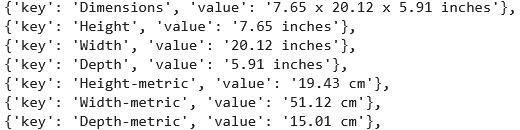
For example, product dimensions are often extracted as: "Height x Width x Depth in imperial units":

The custom rule below can split them into 3 separate new attributes and standardize their values in metric units as 3 more new attributes:

The resulting attributes will be:
Custom rules can use the power of large reasoning models for in-depth quality checks. They can look for inconsistencies in the product description and attribute values that may confuse buyers or your storefront systems.
For example, this custom rule asks Pumice to check for inconsistencies and report the results in a "Quality checks" tag:
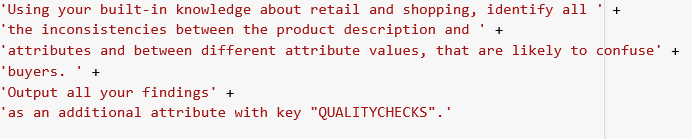
It produces produce-specific suggestions you can use in your data cleaning pipeline:

Pumice follows any conditions specified in custom rules and any dependencies between different rules. Think of custom rules as programmatic data cleaning steps, except they are expressed in plain English.
You can use the same set of rules on large sections of your catalog to standardize attributes of different types of products, a process often needed for faceted search.
Example:

Sometimes, key details, like colors, are mentioned in the description but may not be extracted.
Use a custom rule to explicitly identify such details and include them as additional tags.
For example, these are the default tags for a clothing product. Although the title and description mention the color ("black"), it's not extracted by default.
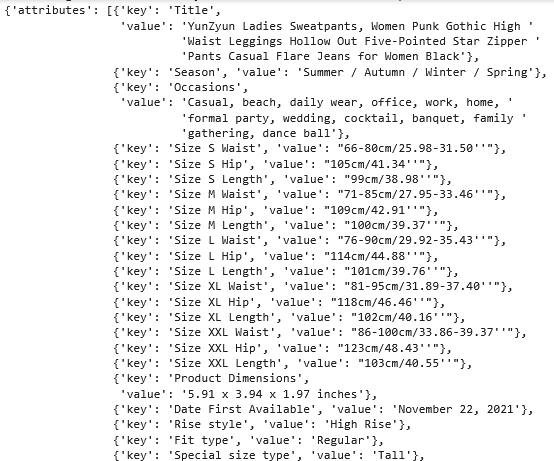
Use a custom rule like this to always include your desired tags:

Now the updated tags include "color":
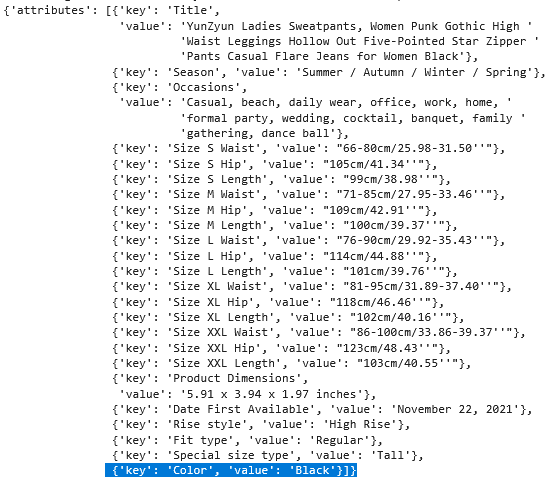
Locations are important information for regulatory compliance, tariffs, import duties, inter-state sales tax calculations, and more.
You can extract location tags from product descriptions using custom rules.
For example, this is a rule to extract the country of origin if it's present in the description:

It adds the following two tags to an industrial product:

For many compliance workflows, you need standardized values like ISO-3166 alpha-2 or alpha-3 country codes. Custom rules can add such codes as additional tags.
For example, this is from an industrial product:

We specify this custom rule:

The resulting product tag:

Width engineers assist your IT teams to seamlessly upgrade your existing systems to use Pumice tagging workflows.
The bar to clear is no longer "do we have tags?" It's "do our tags describe what shoppers need, in the language they actually use?" Pumice extracts needs-based attributes by default and lets you shape them with custom rules — so your catalog gets found the way your customers search, not the way your vendor flat file was formatted.
Request a demo to see Pumice.ai tagging in action.

