Amazon captured about 40% of US retail ecommerce sales in 2025 (eMarketer), which means the prices, titles, ratings, and reviews on its product pages are the reference dataset for almost every ecommerce decision. Getting that data out is the hard part, and it is why teams go looking for the best scraping api for amazon product data instead of writing another fragile script. Most tools solve only half the problem: they fetch pages reliably, then hand you raw HTML to parse yourself.
Rather than ranking random tools and unknown githubs, this guide defines what a scraping API has to do to be useful for product data work, shows where generic tools stop short, and walks through the Research Phase in Pumice.ai, which pairs a Universal Scraper for finding Amazon pages with a Smart Scraper for extracting the exact fields you need as structured data.
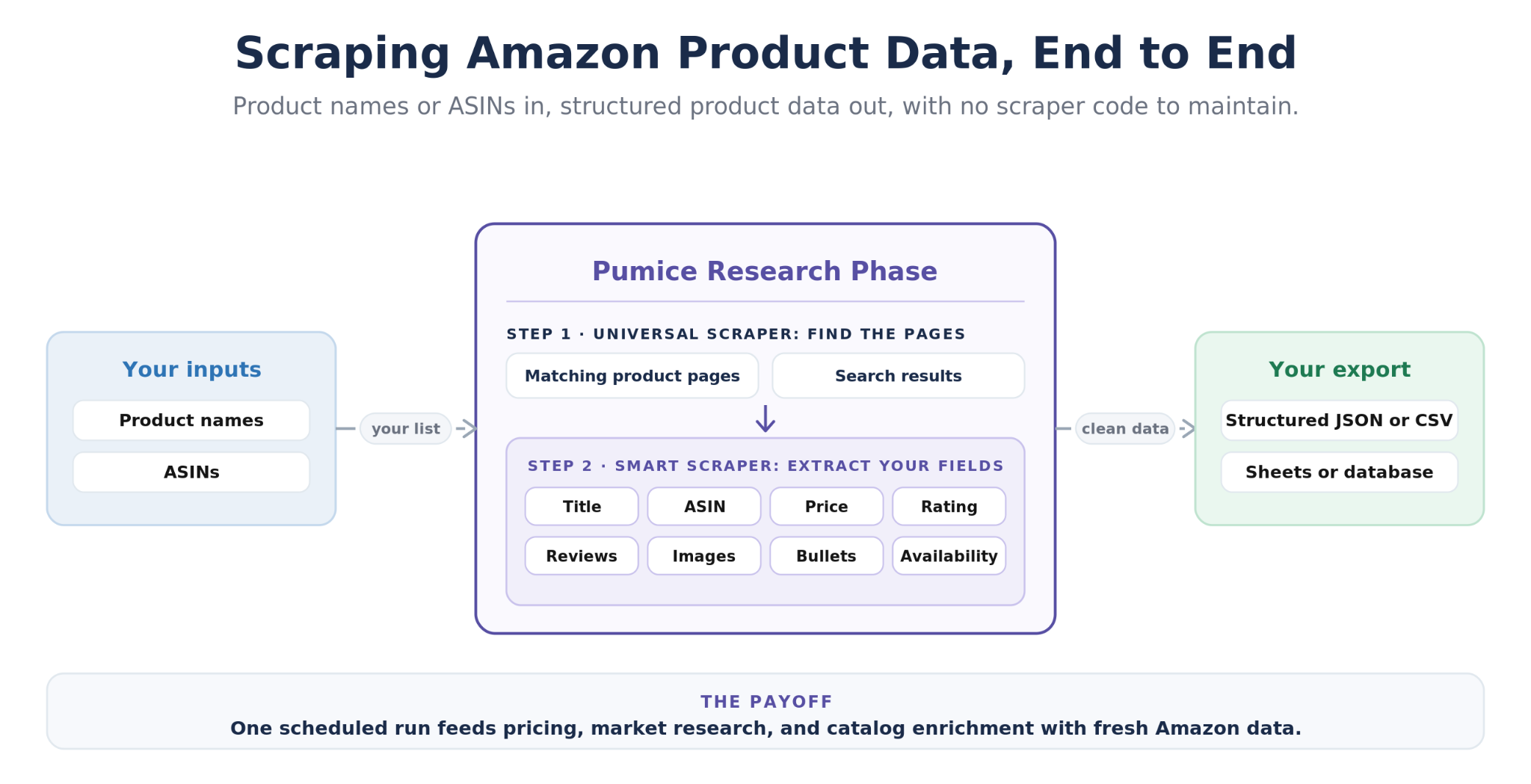
The best scraping API for Amazon product data, end to end: inputs are product names or ASINs; the Pumice Research Phase runs the Universal Scraper to find the matching product pages and search results, then the Smart Scraper to extract the defined fields (title, ASIN, price, rating, review count, images, bullets, availability); output is structured JSON or CSV exported to Google Sheets or your database, feeding pricing, market research, and catalog enrichment.
Here is the short version of everything below:
A scraping API is only as good as its output: the best scraping API for Amazon product data returns structured data in a consistent JSON format, not raw HTML you still have to parse.
A generic web scraping API (Bright Data, Zyte API) solves access with proxy rotation, CAPTCHA handling, and JavaScript rendering, but leaves discovery and field extraction to you.
The Pumice Research Phase covers the full job: the Universal Scraper finds Amazon product pages from a product name or ASIN, and the Smart Scraper extracts the exact fields you define in plain language.
Because you describe fields instead of writing CSS selectors, your output schema stays stable even when Amazon changes its HTML.
The scraped Amazon data exports to a CSV file, structured JSON, or Google Sheets, and can flow straight into the pipeline's generation step to enrich your own listings.
✂️ Definition
The best scraping API for Amazon product data is one that returns structured, complete product data instead of raw HTML. It should find product pages from a product name or ASIN, extract the exact fields you define (title, price, rating, review count, images, bullet points, availability), handle Amazon's anti-bot measures automatically, and export structured JSON or CSV at catalog scale. The Pumice Research Phase does this with two tools: the Universal Scraper for discovery and the Smart Scraper for extraction.
What Makes the Best Scraping API for Amazon Product Data?
The best scraping API for Amazon product data is the one that gets you from a list of products to reliable data in your database with the least work in between. Fetching a page is table stakes for any Amazon scraper API. When you evaluate Amazon scraping APIs against your actual data needs, six capabilities separate the useful tools from the ones that just move the maintenance burden around:
Anti-bot handling built in. Amazon defends its pages with AWS WAF, rate limits, and device fingerprinting. The API should manage proxy rotation, premium proxies, CAPTCHA handling, and JavaScript rendering behind the scenes so a blocked request is the vendor's problem, not yours.
Discovery, not just extraction. Most APIs require a product URL. Real catalogs start from product names or ASINs, so the tool should find the right product page, search results, and product category pages for you. Competitor research also doesn’t start from a single URL, but an ASIN list that needs to pull all competitor listings.
Structured output in your schema. The response should be structured data in a JSON format that matches the fields you asked for, ready to load into a spreadsheet or database, not raw HTML or a fixed schema you have to reshape.
Stability when Amazon changes its HTML. Amazon ships layout changes constantly. If the API depends on hand-written selectors, your data quietly goes empty; the best tools absorb HTML changes and keep the output consistent.
Localized data by marketplace. Prices and availability differ by region, so you should be able to set the Amazon domain per run (amazon.com, amazon.co.uk, amazon.de) and get localized data back.
Flexible export. The data exported should land wherever the work happens: a CSV file, structured JSON, Google Sheets, or cloud storage your pipeline reads from.
Those six criteria are the difference between extracting data once in a demo and retrieving reliable data every week at catalog scale.
Why Generic Scraping APIs Fall Short on Amazon
Generic scraping APIs fall short because they solve access to pages, not real data analysis. The typical journey starts with a DIY script: import requests, add BeautifulSoup, and parse the page. Python libraries like these work for a handful of products, but Amazon's anti bot measures block bare scripts quickly, and keeping every CSS selector current can require significant effort. That pain is what pushes teams toward a web scraper API in the first place.
Tools like this scrape from a single URL, not a full search of the Amazon catalog. They also return all data, not just the data you need in the format you need it in
Infrastructure-grade web scraping API tools like Bright Data and Zyte API fix the access problem well. You send a product URL with your API key, and their unblocking layers, premium proxies, and JavaScript rendering return the page HTML with consistent access, even under high volume scraping. What they return though, is still mostly raw HTML or generic auto-extracted fields. You still have to know the URL in advance, write and maintain the parsing logic for every page type, and reshape the output into your own schema.
Specialized APIs with dedicated Amazon endpoints go a step further and return parsed product details in a fixed structure, but two gaps remain. First, discovery: these API endpoints expect an ASIN or product URL as input, so matching your catalog's product names to Amazon listings is still your job. Second, flexibility: the moment you need a field outside the vendor's schema, such as a spec buried in the description or specific seller information, you are back to parsing raw HTML. So data teams end up gluing together a search tool, a scraper, and a parser, which is exactly the sprawl a scraping API was supposed to remove.
The Pumice Research Phase: A Scraping API Built for Product Data
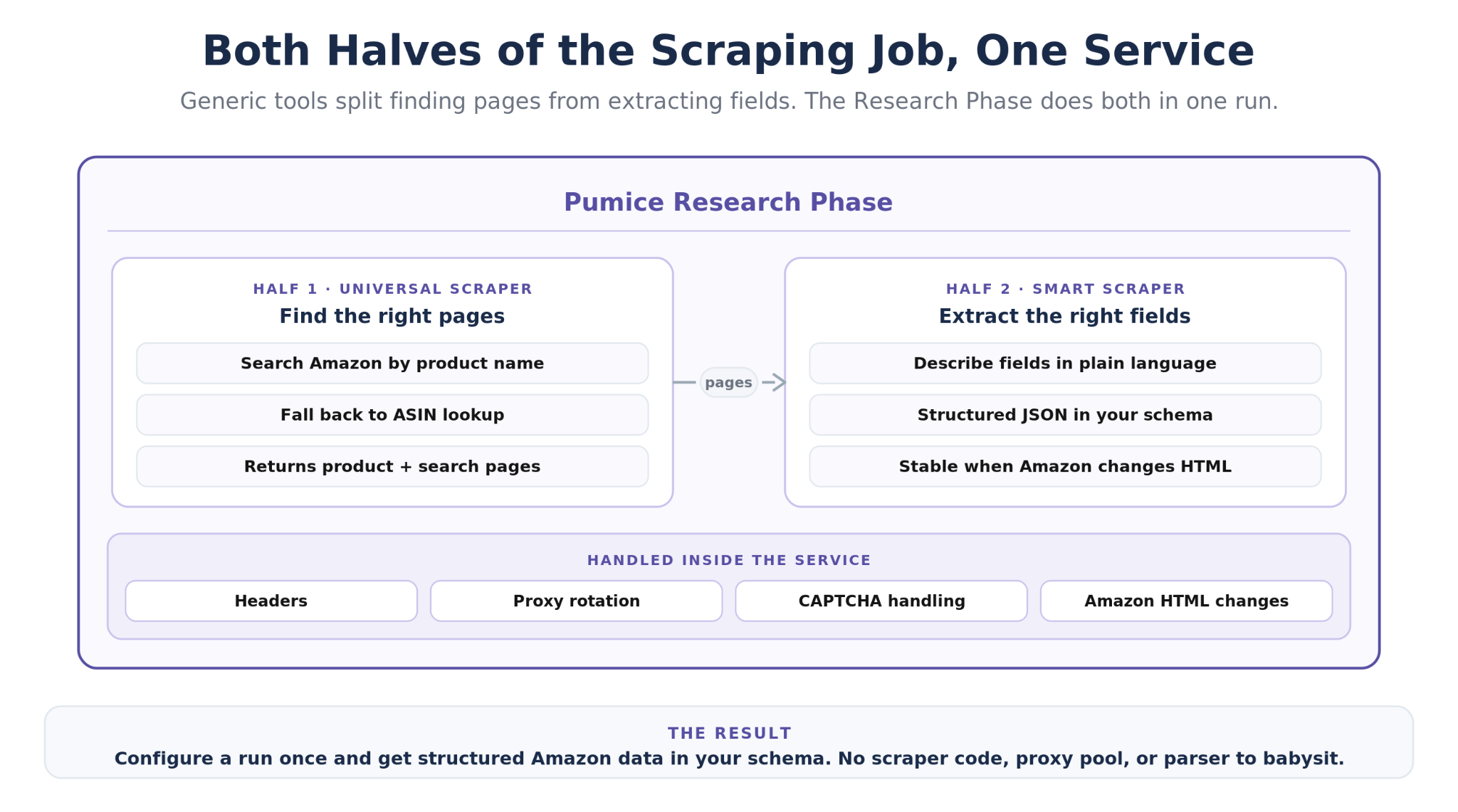
The Research Phase is the data collection stage of the Pumice Merchandising Pipeline, and it is built around the two halves of the job that generic tools split apart: finding the right pages and extracting the right fields. You configure a run once, point it at your product list, and it returns structured amazon data in the schema you defined. Headers, proxy rotation, CAPTCHA handling, and Amazon's HTML changes are handled inside the service, so there is no scraper code, proxy pool, or parser for your team to babysit.
Universal Scraper: Find the Right Amazon Pages
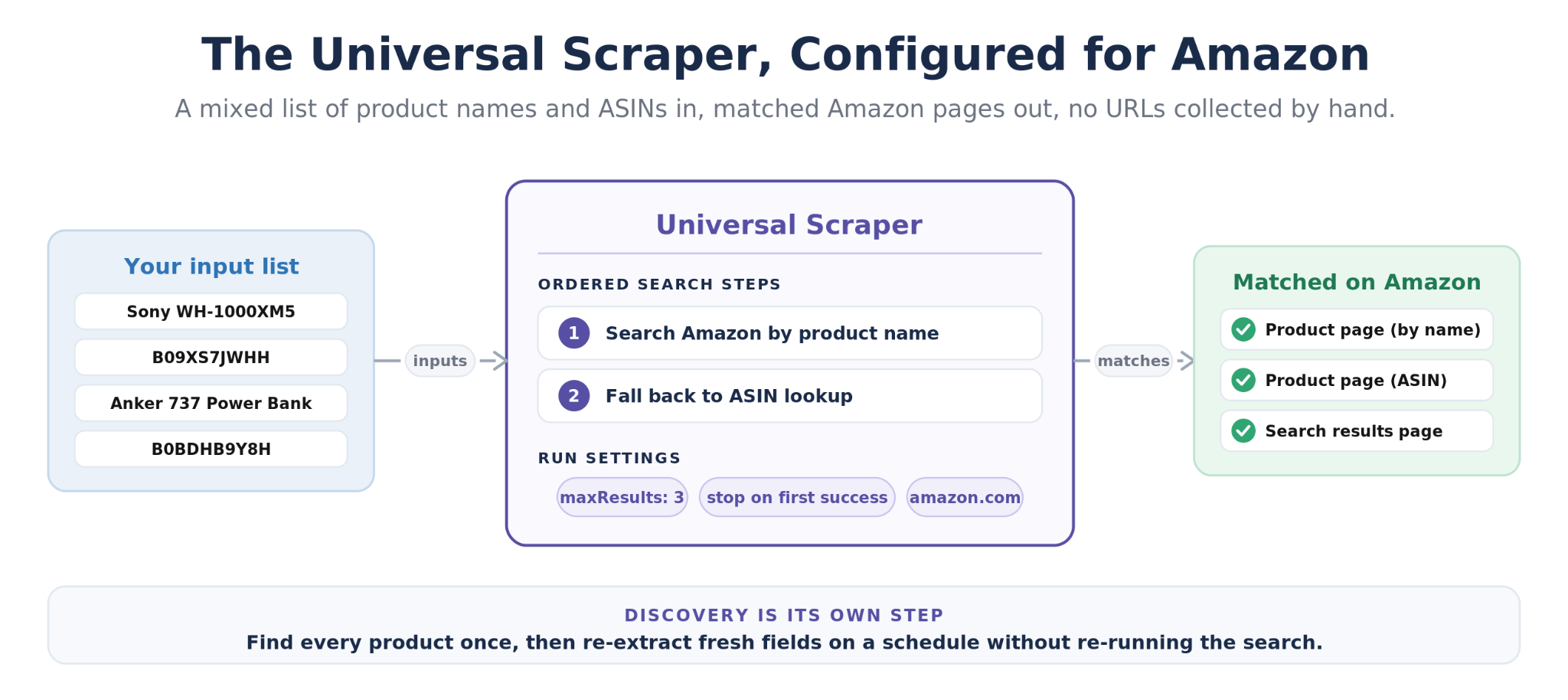
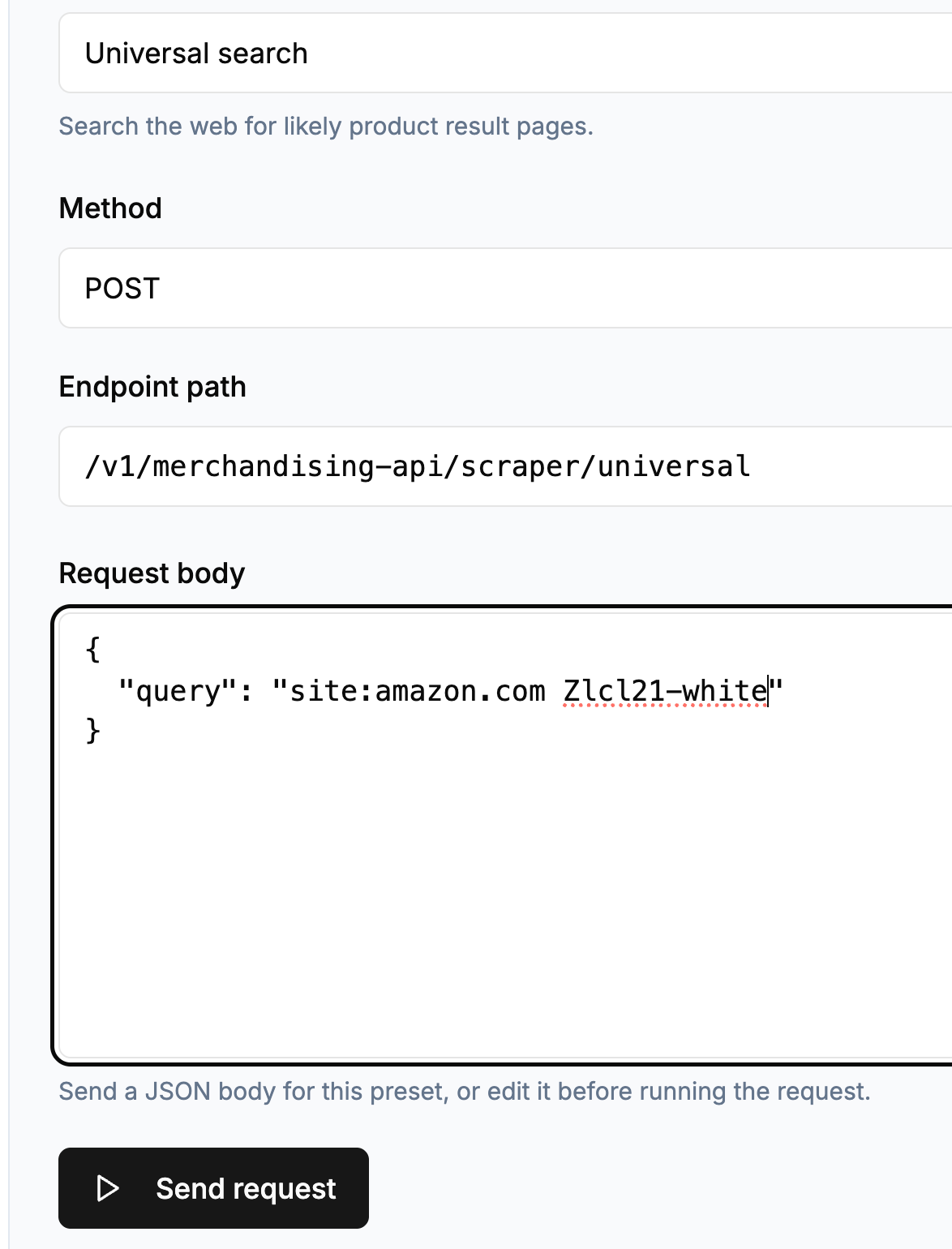
The Universal Scraper handles discovery. Give it a product name or an ASIN and it finds the matching Amazon product page, along with amazon search result pages and category pages when you want breadth. This is the step almost every other amazon scraping api skips: you start from the stored product names and ASINs in your own catalog rather than a clean list of URLs. A search for wireless earbuds can return the ranked search page and its related searches, the fastest way to build a wide dataset before pulling full product details on each item. Because discovery is its own step, you find products once and re-extract fresh fields on a schedule.
The Pumice Universal Scraper configured for Amazon: an input list of product names and ASINs, the ordered search steps (search by name first, fall back to ASIN lookup), and the matched Amazon product pages and search results it returns.
Smart Scraper: Turn Product Pages Into Structured Data
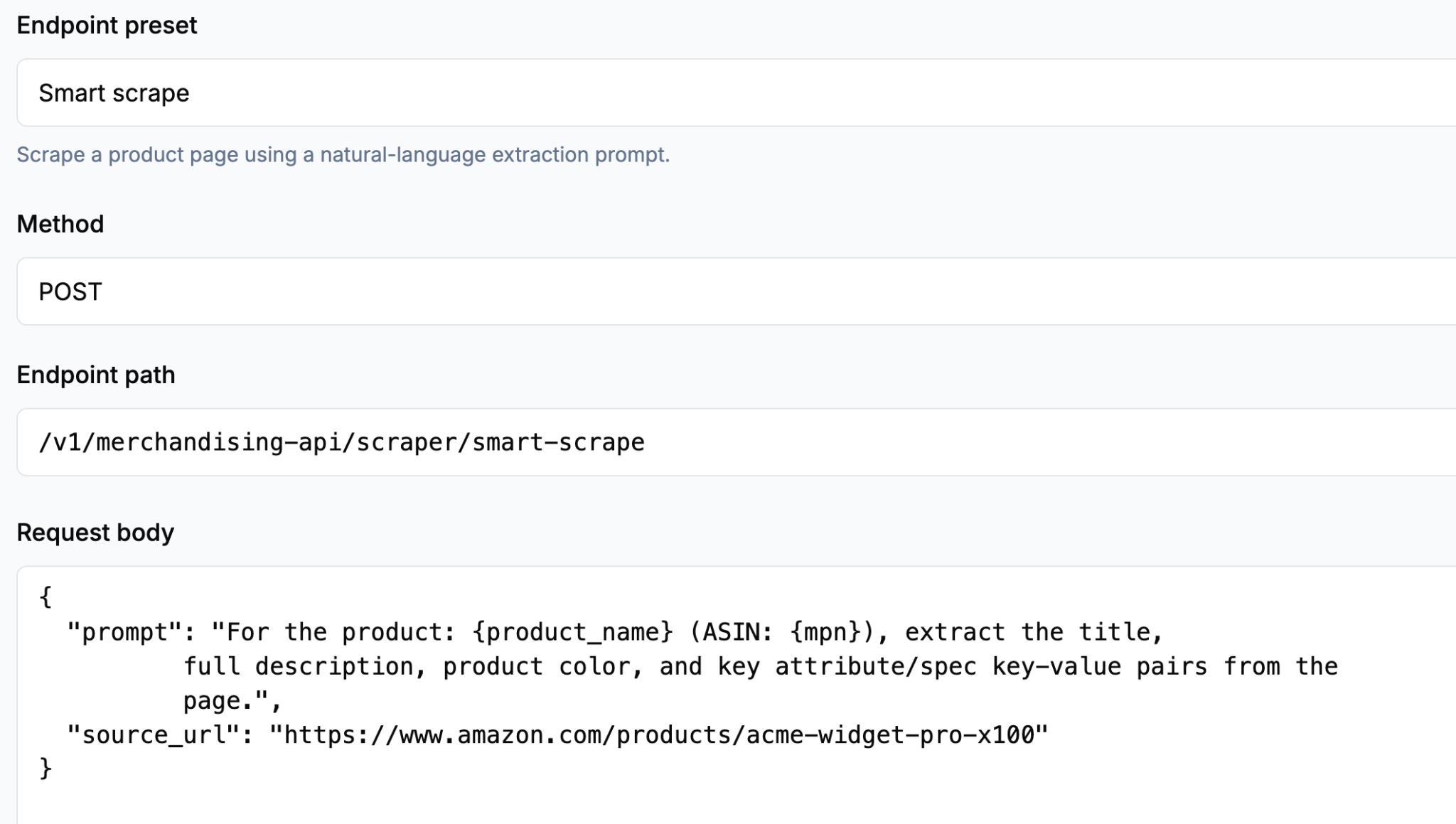
The Smart Scraper handles extraction. Instead of writing selectors in a programming language, you describe the fields you want in plain language: product title, ASIN, product price, availability, rating, review count, image URLs, bullet points, description. It reads each page and returns structured JSON in that exact shape, every time. Because the extraction process is described rather than hard-coded, Amazon changing a div or renaming a class does not break your feed, and adding a new field is a one-line change to the prompt rather than a parsing project.
The Pumice Smart Scraper field configuration: a plain-language prompt listing the exact fields to extract, next to the input URL from Amazon.
Configure, Run, and Export at Catalog Scale
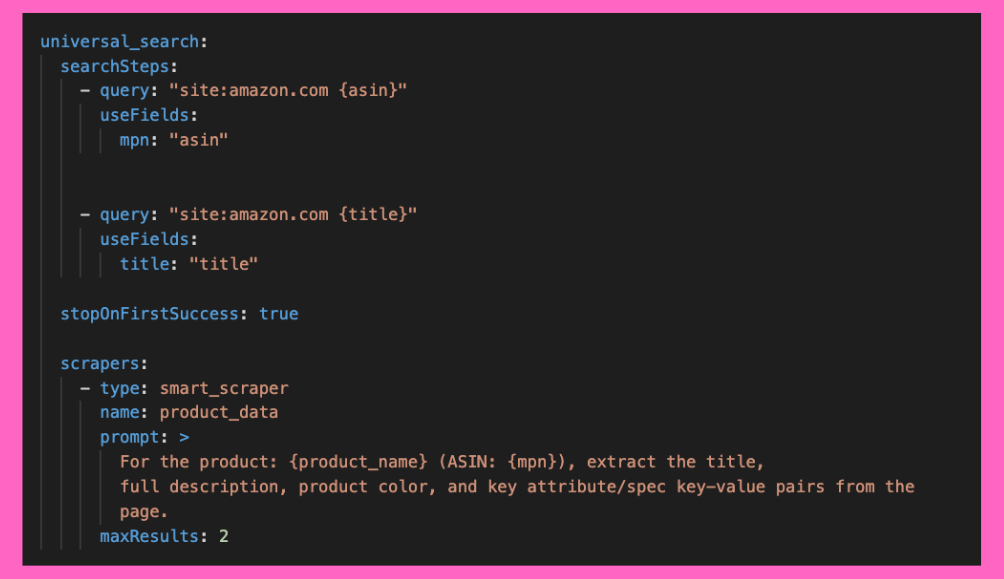
A Research Phase run is configuration, not code: the search steps and their order, a maxResults cap, stop-on-first-success, and the amazon domain per run so each marketplace returns localized data. The output exports as a CSV file, structured JSON, or straight to Google Sheets, and one export per marketplace and scrape date gives you a clean history for tracking price changes. Scheduled runs turn it all into a feed: daily for dynamic pricing, weekly for catalog enrichment and availability, monthly for market research.
A configuration file that is uploaded to run the Research Phase end to end. Uses the universal scraper to search all of Amazon for the ASIN, with a fallback search using the product title. Then those results (that are validated as the same product are scraped with that prompt.
While this is the configuration file you upload in the dashboard, this same workflow you can set up with the APIs above.
From Scraped Data to Channel-Ready Listings
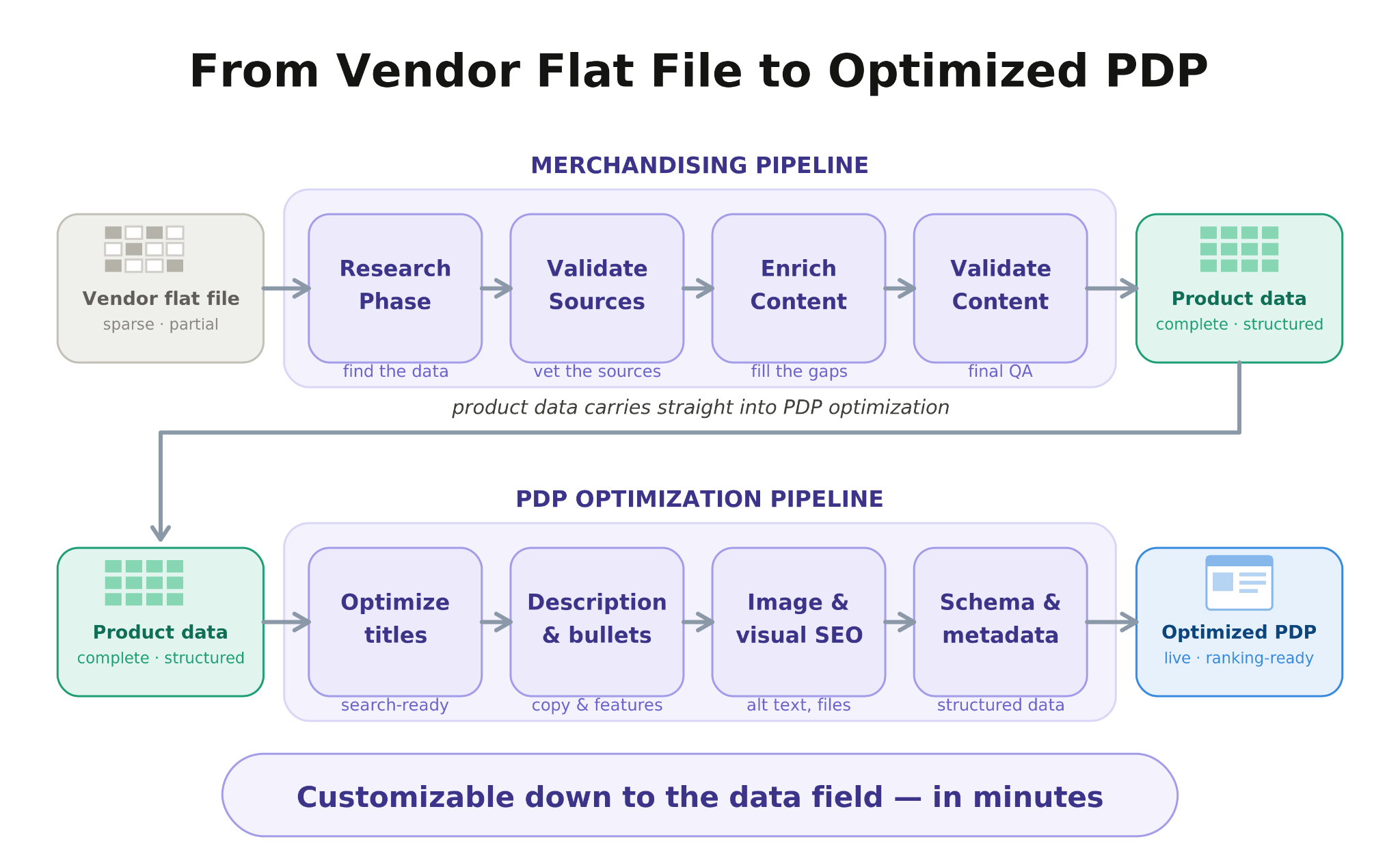
Because the Research Phase is the front half of the Merchandising Pipeline, the product data from Amazon does not have to stop in a spreadsheet. The same run can hand its structured data to the pipeline's generation step, which uses your rules and examples to write enriched titles, descriptions, and attributes for your own product pages. Competitive research and catalog enrichment become one workflow: the fields you scrape today are the inputs to the listings you publish tomorrow.
How to Get Structured Amazon Data With the Research Phase
To get structured Amazon product data with the Research Phase: build an input list, configure the two scrapers, verify a sample, then run and export.
Build the input list. Start from what you have: a column of product names from your catalog, a list of ASINs you track, or both. No product URLs required.
Configure the Universal Scraper. Set the search steps (run an Amazon search by product name first, fall back to an ASIN lookup), the maxResults cap, and stop-on-first-success. Pick the Amazon domain for the marketplace you want.
API format for Universal Scraper. No configuration file if using the API.
Define fields in the Smart Scraper. List the exact fields to extract in plain language, from the product price and rating down to bullet points and any spec you care about.
Verify with a sample response. Run one product and check the structured JSON. Adjust field descriptions until the sample response matches what your downstream tools expect.
Run the full list. Launch the run across the whole input list to retrieve data for every product; anti-bot handling, retries, and page changes are managed inside the service. Results from the API will be a JSON output.
Export and schedule. Send the data exported to a CSV file, JSON, or Google Sheets, then schedule recurring runs to retrieve data on a cadence, so price changes and availability stay current without anyone re-running the job by hand.
A good first test is a hundred products: big enough to surface messy name matches and missing fields, small enough to review by eye before you scale to the full catalog.
What Amazon Product Data You Can Pull
The Smart Scraper extracts any field that is publicly available data on the Amazon website, so the practical question is what data from Amazon your workflow needs. Core product data covers the title, ASIN, product URL, price, availability or stock status, rating and review count, image URLs, bullet points, and the description. Seller data adds the seller name, seller ratings, and Buy Box information for marketplace analysis. Ratings and review counts give you customer feedback signals at a glance, and search results pages contribute rank positions and related searches for demand and market research. Keyed on ASIN, those fields are enough to drive dynamic pricing, competitor tracking, assortment analysis, and the catalog enrichment work downstream. And when you need more data later, adding a field is a prompt edit, not a new parser.
Get Structured Amazon Product Data Without the Scraper
The Pumice Research Phase finds your products on Amazon with the Universal Scraper and extracts the exact fields you define with the Smart Scraper: structured JSON or CSV, no proxies, parsers, or HTML maintenance. Point it at a handful of product names or ASINs and see your first structured export in minutes. Get started today by reaching out and letting us get you set up in under an hour.
Frequently Asked Questions
Is there an official Amazon API for product data?
Yes, the Product Advertising API, but official Amazon APIs are built for affiliates, not data teams. Access depends on an approved Associates account, request limits scale with the sales you refer, and the schema is fixed. It works for building shopping widgets; it does not work for competitor monitoring or catalog-scale Amazon data extraction, which is why scraping APIs exist.
Is it legal to use a scraping API on Amazon?
Scraping Amazon product data that is publicly available, like titles, prices, and ratings, is generally permissible in many jurisdictions, but Amazon's Conditions of Use restrict automated access, so the main risk is contractual. Stick to public data, stay away from anything behind a login, never collect personal data, and review Amazon's terms and robots.txt before you start. This is not legal advice; consult a lawyer for large-scale operations.
How does a scraping API get around Amazon's anti-bot systems?
Managed Amazon scraping APIs combine rotating residential proxies, realistic browser fingerprints, CAPTCHA handling, JavaScript rendering, and automatic retries, and they adjust those anti detection measures continuously as Amazon's defenses change. That ongoing adjustment is most of what you are paying for: in the Research Phase, a blocked request is retried and resolved inside the service.
Can I just build my own Amazon scraper in Python?
For a one-off pull of a few dozen products, yes: import requests, add BeautifulSoup, and you can scrape Amazon for a usable dataset. DIY web scraping breaks down on a schedule and at scale, when proxies, CAPTCHAs, pagination caps, and Amazon's frequent HTML changes turn a homemade web scraper into a permanent maintenance job. If the data feeds a real workflow, a managed scraping API is cheaper than the engineering time.
Can the Research Phase scrape sources other than Amazon?
Yes. The Universal Scraper is universal by design: the same run can pull from manufacturer sites, other retailers, and ranking pages, then merge everything into one structured record per product. That matters for enrichment work, where Amazon has the market signals but the manufacturer page has the deepest specs.
Conclusion: Pick the API That Ends at Structured Data
Most Amazon scraping APIs for automated extraction can fetch a product page. The difference is where they stop: generic tools stop at raw HTML, specialized APIs stop at a fixed schema, and a DIY scraper stops working the week Amazon changes its layout. The Pumice Research Phase stops where the work actually ends, with structured amazon data in your schema, found by the Universal Scraper, extracted by the Smart Scraper, and exported to wherever your pricing, research, or enrichment workflow lives. Scraping product data at catalog scale becomes a configuration choice rather than an engineering project.