Product title optimization is the process of rewriting product titles so they rank higher in the search engine results page and convert more customers on the product page. This guide walks through the workflow in three steps and shows the two methods real brands use to optimize titles at scale and ground them in real product data.
Both methods covered here run on Pumice.ai, our SKU onboarding and product data enrichment platform built to take products from a sparse vendor flat file to fully optimized product pages. Generate content for your own catalog or third party channels (Amazon, Walmart, Ebay) in just a few clicks.
The Pumice merchandising pipeline handles SKU research and data augmentation, and the product page optimization playbook handles the SEO focused enrichment. Brands use both to generate thousands of optimized product titles that rank in Google and update when competitors change their listings.
What Is Product Title Optimization?
Product title optimization is the practice of rewriting an ecommerce product title so it ranks for the right keywords in search, gets clicks from customers searching for those product titles, and accurately describes the item to potential buyers.
The Two Focus Areas of Product Title Optimization
The goal is usually two parts:
first, help search engines and shopping algorithms understand exactly what you are selling and surface listings to high intent buyers so your product listing surfaces for relevant keywords.
Second, help on site shoppers find what they want fast so they click your listing instead of leaving your site to go to a competitor's product page.
SEO Visibility and On-Site Conversion
The SEO side is about ranking higher in search results, driving better advertising results, and pulling more purchase intent traffic from Google Shopping and AI search tools. A major search engine like Google uses your product title as one of the strongest ranking signals for the listing. If the title is missing the main keyword, missing important features, or missing the format competitors use, your product listing falls down the SERP.
The on-site side is about helping customers find the right product on your site and click with confidence. Clear structured titles that include relevant information like inseam length, material, fit, or use case match the specific search query and help customers evaluate fast. Better product titles improve click through rate (CTR) for customers from search and Google Shopping ads, and they reduce bounce rates, lower bounce rates further, and improve customer dwell once a customer lands on the product page.
Our Two Methods for AI Product Title Optimization
There are two different methods for using AI to do product title optimization, and the right method depends entirely on how complete your existing product data is. You can run both methods as different versions of the workflow, one after the other for the same catalog, and many brands do, but it is easier to understand them on their own first.
Method 1: SEO Optimization When Product Data Is Complete
Method 1 uses the Pumice product page optimization playbook. Use it when you already have a usable product title, a real description, and full product details like color, material, and key features. The optimization process here is a focused SEO pass. You feed the existing product data and the main target keyword to our Ai Agent System, the various agents run gap analysis, competitor analysis, SEO keyword analysis, and on site metrics against the top ranking competitors, and you get back a structured brief that tells you exactly what to change in the title to improve the SEO rankings.
This is the right path when the data quality is good but the product page is underperforming for SEO. The agent does not invent facts or generate any new data. It restructures and enriches what you already have by providing you data driven recommendations.
Method 2: Merchandising Pipeline When Product Data Is Sparse
Method 2 uses the Pumice merchandising pipeline. Use it when your catalog is thin. Short titles, empty descriptions, missing attributes, weak product images, and no structured specs are the common signals. Optimizing a title in that state means optimizing on top of bad data, and the output is shallow, generic, and easy for search engines to ignore.
The merchandising pipeline runs a research step first. It searches the web, finds the manufacturer or retailer page, scrapes the real specs, validates the source, then generates a new title from enriched data. After it finishes you can feed those products back into Method 1 if you want the SEO playbook on top.
Below is a workflow that takes both of these into account based on your current data structure.
The 3 Steps of AI Product Title Optimization
This workflow breaks down into three steps that apply to both methods. The steps run in the same order whether your data is complete or sparse, and the difference between Method 1 and Method 2 is just whether Step 1 includes live web research.
Step 1: Research Phase for Product Data Augmentation
The research phase focuses on augmenting the product data we have for a specific product listing. The goal is to enrich our available product information so our new title is more complete, without allowing Ai to hallucinate product specifications. The pipeline pulls live product pages, ranked competitor titles, keyword volume, and search visibility signals so the generation step has real facts/specifications to work with when creating our new title.
The Pumice research phase is fully configurable per run through a YAML configuration file. You define which search steps to run, the order they run in, and which fields from the CSV row get filled into each query. A typical first query is a tight site search like site:manufacturer.com plus the SKU and product title, and the placeholders for domain, MPN, and title pull straight from the matching columns in your CSV row.
Fallback search queries chain into the same configuration. If the narrow site search returns nothing, the next query drops the site restriction and searches the broader web for the same SKU and title. You can chain as many fallback steps as the catalog demands. The stopOnFirstSuccess setting tells the pipeline to stop the moment one query returns useful results, so you never waste compute running a broader search after a narrow one already worked.
The configuration also controls how the scraper reads the pages it finds. The smart_scraper accepts a custom prompt that tells it exactly what to extract from each product page, whether that is the title and full description, the complete spec list, or a specific set of attribute key-value pairs. A maxResults setting caps how many pages get scraped per product, which keeps the pipeline fast and prevents diminishing returns on near duplicate sources.
For catalogs that came with manufacturer PDF catalogs, the research phase can actually use the PDF catalog alongside the web scraper for additional grounded product data. Pumice breaks the PDFs into a readable format, extracts the product data, and feeds it into the same generation steps. A focus block in the configuration lets you tell the title writer which source to trust when sources disagree, with options for webscrape (prefer the live page), domain (prefer specific trusted websites you list), or pdf_catalog (prefer the uploaded catalog).
Because every part of the research phase lives in the configuration file, you can change the approach on a per run basis. Some runs need an aggressive web scrape with multiple fallback queries. Some need a single PDF catalog parse against a vendor file. Some need a hybrid where the search prefers a brand domain first and falls back to the open web. The same Pumice pipeline handles every variation without code changes, which is what makes the workflow scale across very different catalogs.
Step 2: Generate the New Title Using Rules, Examples, and Validation
The generation step is where the new title gets created. The system can create thousands of titles per run. The generator receives the existing product title, the existing description, any enriched research data from Step 1, the rules you define, the examples you provide, and the validation thresholds you set.
Rules That Shape Title Format
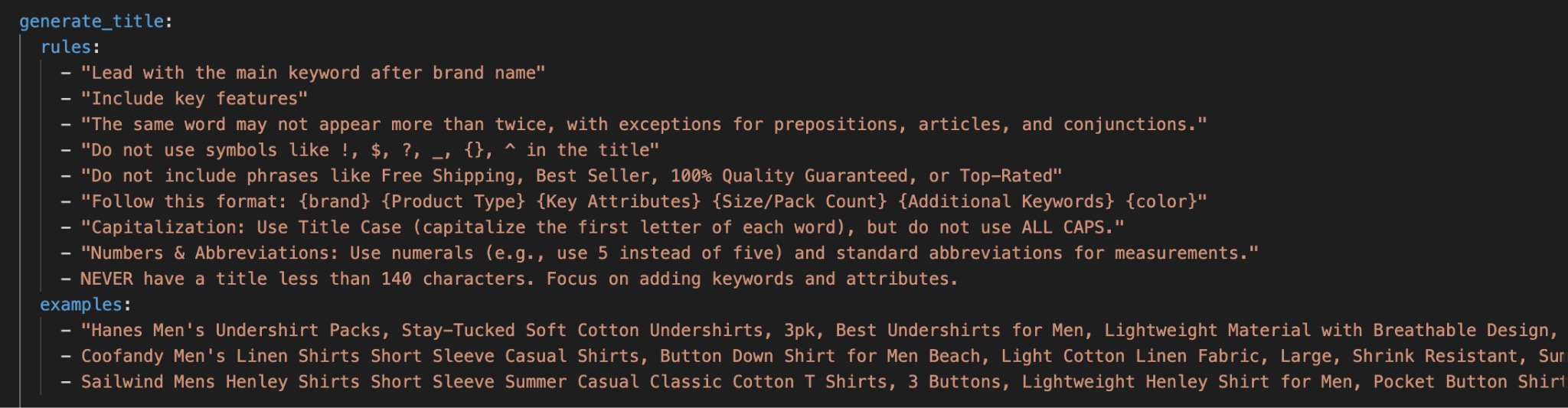
Example rules from a configuration file.
Rules are plain language instructions that tell the model how to create the title. They read like a brief you would give a copywriter and shape every part of the output.
Good examples include rules like 'lead with the main keyword,' 'include color and size in the title,' 'avoid all caps and promotional text,' and 'include keywords at the end that explain product features.' You can write as many or as few as you need. Some brand teams write forty rules because they have a strict structured title format. Others get strong results with five.
Examples That Teach the Model What Good Looks Like
Examples are sample product titles that demonstrate what a good output looks like for your catalog and brand voice. Where rules describe the target in words, examples show the model the actual shape. A concrete example like 'Nike Men's Dri-FIT Short-Sleeve Black Top' teaches the model the order. A pattern example like '{brand} {product} {color} {feature keywords}' teaches the model the template.
Mix concrete and pattern examples for the best results. Two finished titles plus one template gives the model a polished target and a clear structure to follow.
Validation That Enforces Character Limits
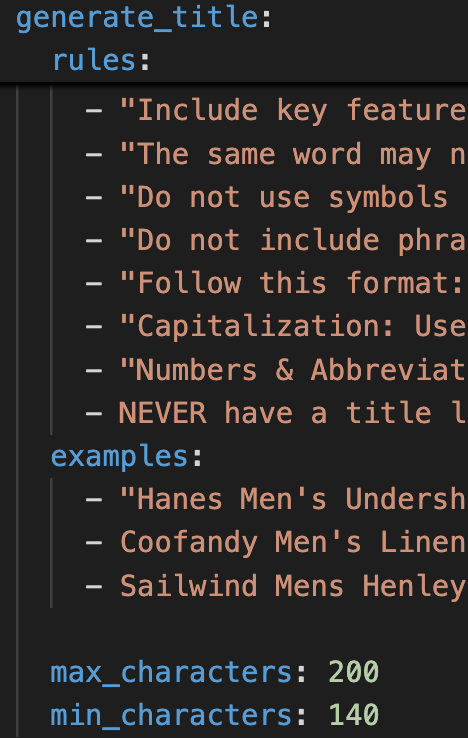
Provide the minimum and maximum characters for your product title to enforce those limits.
Validation runs after the title is written and enforces hard rules the model must obey. The most common validation rules are character limits. A maximum of 60 characters keeps the title from getting truncated in Google Shopping ads. A minimum of 10 characters prevents thin, useless outputs.
Character limits depend on where the title appears. Amazon allows 150 characters. Google search results truncate around 60 characters on desktop and shorter on mobile devices.
The Retry Loop That Forces Better Output
The retry loop is automatically built in and ensures any validations defined are followed if the first generated title does not fit the requirements.
Step 3: Optimize the Title in the SEO Playbook
The Pumice optimization playbook turns generated product content into a publish ready, SEO focused optimized title. It produces a marketing brief like you would get from an agency, in minutes instead of weeks.
Playbook Output and Action Items
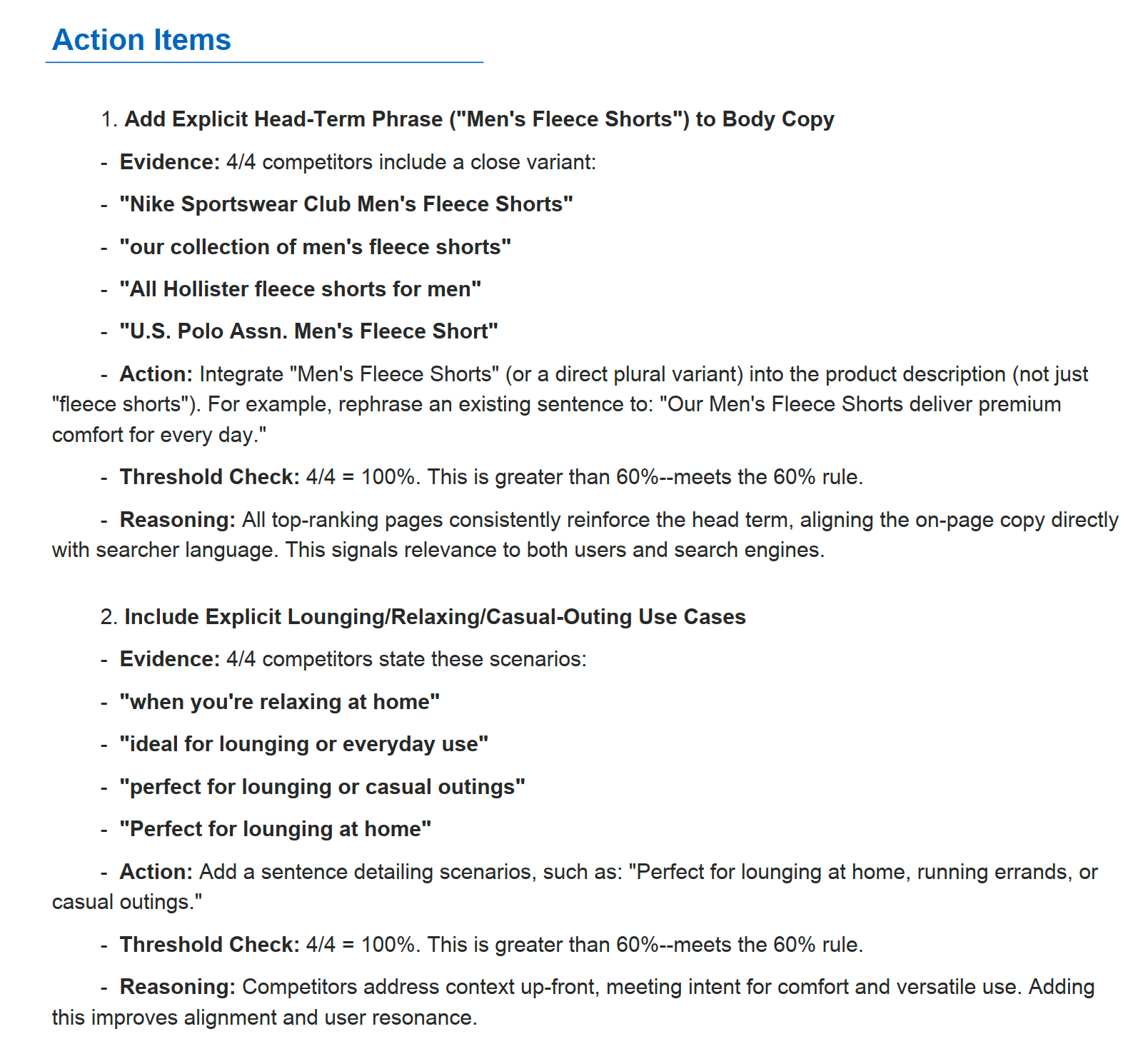
The playbook output is a structured PDF that breaks down your current product data, the competitor data from the first google results page, the gap analysis between the two, and a list of specific action items. It includes keyword distribution analysis showing which ranking terms and search terms appear in the search engine ranking competitor titles, images, listings, and which appear in yours.
Action items always carry four pieces of information. The action to take, the evidence behind it, the threshold check that shows how many competitors actually do this thing, and the reasoning. Common action items include adding the brand or retailer name, adding qualifiers beyond the core keyword, including specific specs like inseam length or material, and switching to separators like pipes or commas.
Method 1 in Practice: Optimizing a Men's Fleece Shorts Title
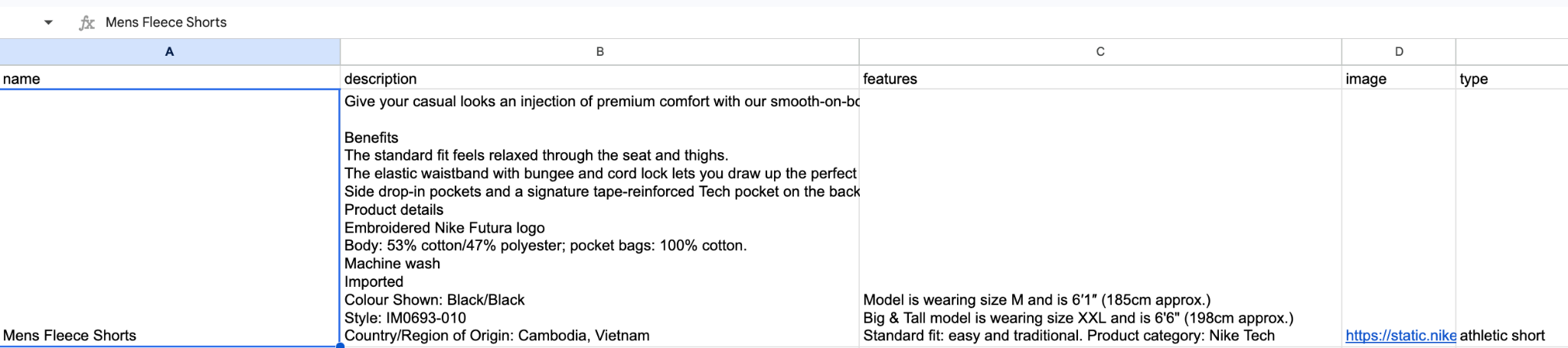
Walking through a real product example makes the method concrete. For this real product example, the starting product is a pair of men's fleece shorts with a thin title and a basic description. The target keyword is men's fleece shorts.
Example product from the catalog.
We can see the product data quality is really good and there's not really a need for augmentation.
Loading the Product Into the Optimization Playbook
Open the Pumice product page optimization playbook and paste in the existing title, description, and key features or attributes. Enter the main target keyword, hit pull traffic to see search volume and difficulty, and confirm it is worth chasing.
You can use this feature to perform lightweight keyword research and explore long tail keywords
Enter your own domain so the system excludes your pages from competitor analysis. It then runs gap analysis, keyword analysis, competitor analysis, and title analysis in the background using our customer Agentic Framework.
Reading the Data Analysis Output
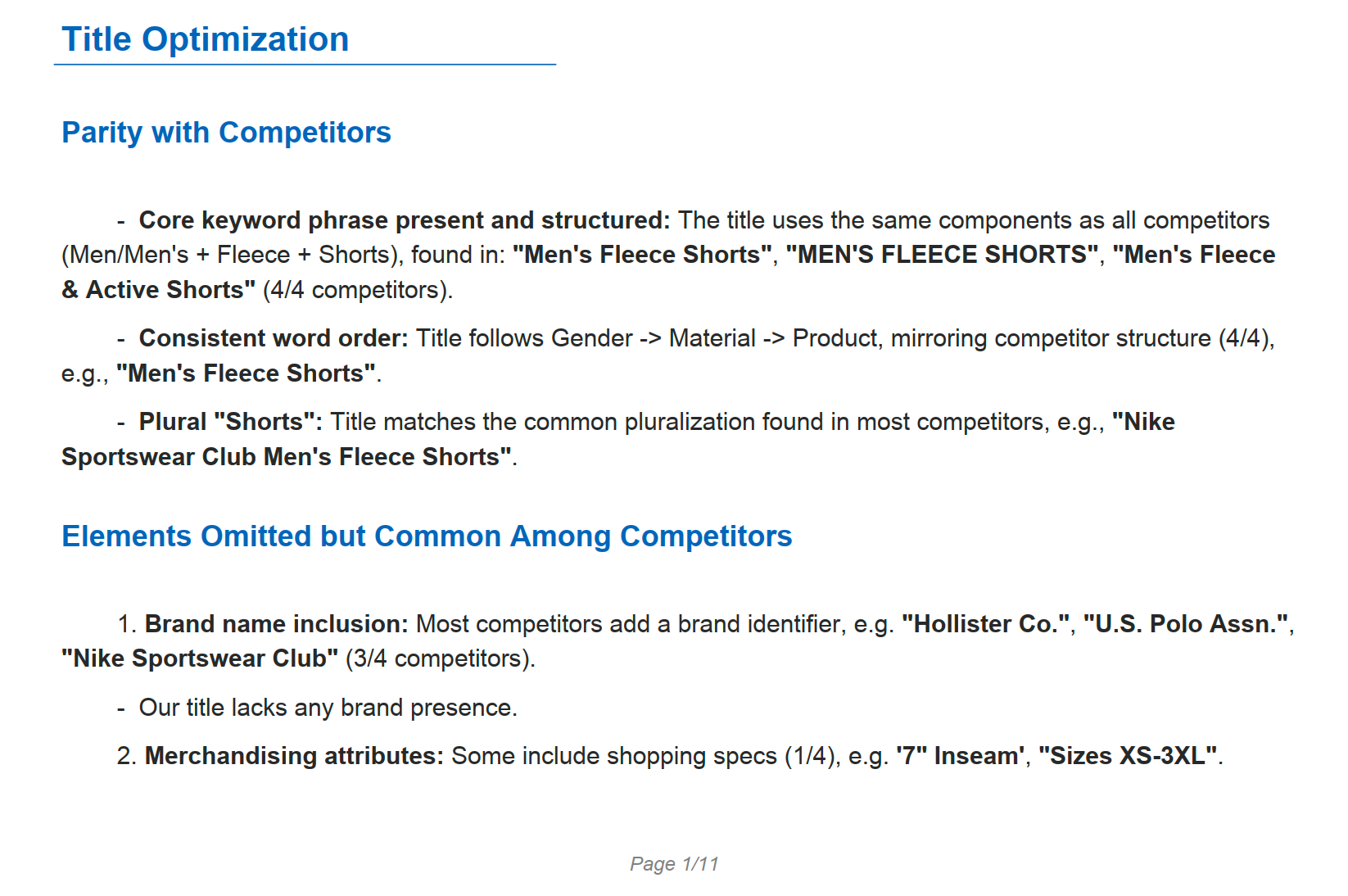
Understand what other competitors are already doing to speak to the target audience
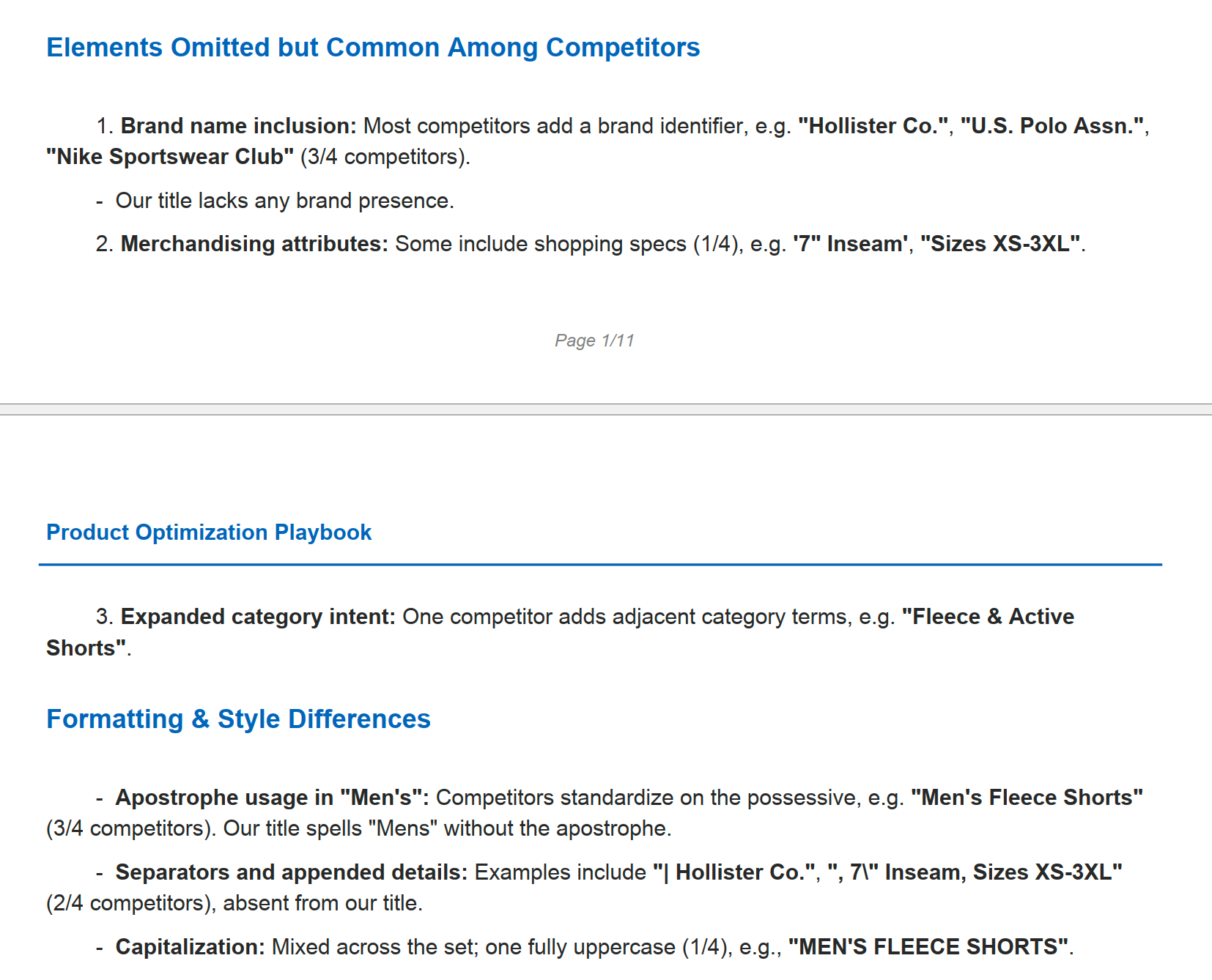
The playbook returns an 11 page PDF per product. The shared frequency section confirms competitor titles all include the core keyword, the word order matches, and the title is an exact keyword match. That is the baseline.
The interesting part is the differences. Three of four competitors include brand names. Most include inseam length, size, and color. Some use pipes or commas to structure a longer title. The current minimal title has none of that, and the playbook flags every gap.
Applying the Title Recommendations
The recommendations section translates the gaps into changes. Add an apostrophe to men's, include a brand or retailer name, use style qualifiers like fleece or active. Add an inseam length and richer images. Use a structured title format with pipe separators. Each recommendation includes a threshold check showing how many of the top competitors actually do it.
Apply the changes, rerun the playbook to confirm the new title closes the gap, and the product is ready to publish. The same workflow scales to thousands of pieces of product content and product titles without losing the per product specificity.
Method 2 in Practice: Running the Merchandising Pipeline To Enrich First
Method 2 starts with a CSV file of products from your ERP and a configuration file. The pipeline reads each row, runs research, validates the source, and generates a new optimized title backed by the enriched data.
A look at sparse data coming from a vendor in a flat file. Some fields are empty, some are different lengths, only one has an image.
Mapping the CSV and Configuration File
Each CSV row represents one product. The pipeline needs a current title column, a current description column, and a main product identifier like a SKU or MPN. A domain column is also recommended as this allows you to decide the exact sites to pull data from. This is commonly manufacturer or vendor websites that have correct data.
The configuration file is a YAML file that controls what the Pumice pipeline does each run. It defines the generation endpoints that should run, the rules for each output field, the examples that demonstrate the format, and the validation thresholds for length. A simple example configuration might run web scrape research and then generate a title, a description, and an extracted attribute list based on that new data.
Configuration file for generating new titles for Amazon listings. Amazon has very specific rules and requirements for the information you can use in your titles.
How the Research Phase Searches and Validates
The research phase runs search queries to locate the same product on a trusted source. The first query is usually a tight site search such as site:manufacturer.com plus the SKU and title. If that finds results, the pipeline stops searching and moves to scraping. If the narrow search returns nothing, the pipeline falls back to a broader query without the site restriction.
Once the search finds pages, the scraper opens up to three of them, extracts the title, description, and key attribute pairs, then runs a validation check against the CSV row. The check confirms the page is the same product before data flows into generation. Without it, the pipeline could enrich a product with attributes from a different SKU.
Generating the New Title From Enriched Data
After the validated research data lands, the title creator runs with rules, examples, and validation just like Method 1. The difference is that inputs now include the enriched data from the live product page, so the generator has more facts to work with.
An example before and after might go from 'Men's Fleece Shorts' to 'Fleece Shorts Men Black Drawstring Pockets 7 Inch Inseam Active.' Every element is grounded in a real product page.
Best Practices for a Well Optimized Product Title
The best selling practices below show up across nearly every catalog that ranks. Whether you create product titles with Method 1, Method 2, or both, these on-page best practices apply to the final title you publish.
Lead With the Primary Keyword and Key Specs
Lead with the primary keyword (main keyword) for the product. Search engines weigh the first words of a title more heavily, and customers scanning the search results page do the same. If the keyword is men's fleece shorts, the title should not start with the brand or with the color.
Include and highlight key features and important features in the title when they vary by SKU. Color, size, material, fit type, and use case give customers the information they need to click with confidence. An example title that says 'Fleece Shorts Black 7 Inch Inseam' beats a short form title that just says 'Fleece Shorts' on click through rate every time.
Add Brand Authority and Avoid Keyword Stuffing
Three of four ranking competitors include a brand or retailer name. Brand authority is a click signal. Even if your product is unbranded, a keyword rich category descriptor like 'active' or 'training' helps increase sales and gives the listing weight for selling more units.
Keyword stuffing hurts both rankings and conversions. Adding too many keywords to your product titles signals to Google that you are gaming the rankings, and search engines penalize keyword stuffing aggressively.
Stay Within Character Limits for the Platform
Different platforms have different character limits. Google search and Google ads and Google Shopping ads typically truncate around 60 to 70 characters. Amazon allows up to 200 chars per listing. Keep the most important keywords for the SKU in the first 60 characters of the optimized title characters no matter which platform you publish to.
Frequently Asked Questions
What is the ideal length for a product title?
The ideal length depends on the platform but stays between 90 to 150 characters in most cases. Google Shopping ads truncate around 70 characters on desktop and shorter on mobile, so keep the primary keyword and key product attributes in the first 60. Amazon allows up to 200 characters and rewards titles that include detailed specs.
How do you optimize product titles for Google Shopping?
To optimize product titles for Google Shopping, place the primary keyword in the first 70 characters, include high intent attributes like brand, color, size, and material, use a structured title format with separators when competitors use them, and feed management through the merchant center. Run gap analysis against the top feed data listings for your target keyword and copy the structural patterns they share.
Can Ai write effective product titles that actually rank?
Yes, Ai can create product titles that rank when the titles are grounded in real product data and built using gap/competitor analysis against the top ranking competitors for given keywords. AI fails when it hallucinates specs or generates generic product titles without research. The methods in this guide ground every generated title in scraped product data and competitor analysis, which is why they perform. I went deep into the issues that Claude and ChatGPT have with hallucinating product data in this guide (product data enrichment).
How does Ai ground product data in real product information?
Our Research Phase focuses on grounding product data from real, verifiable sources so you can validate where the data comes from.
Conclusion and Next Steps
The workflow comes down to three steps applied in order. Research the product and the competitors. Generate a new title using rules, examples, and validation. Run the title through the SEO optimization playbook for gap coverage and action items. Choose Method 1 when your product data is already complete and Method 2 when your catalog needs enrichment first.
As a next step example, run the workflow on a single SKU and compare the new optimized title against the original product titles. Pick a top selling product where you know rankings are weak, follow the three steps end to end, and measure the change in search visibility, click through rate, and conversion rates over the next 30 days.
These systems work exactly the same for any piece of the product data page you want to optimize:
Pumice.ai runs the full research, gap analysis, and title generation workflow described in this article. Free trial available, no credit card required. Get a hands-on look at the marketing brief output, the merchandising pipeline, and the optimized product output file. Reach out today: https://www.pumice.ai/contact-us