Learning how to connect Claude to HubSpot takes about two minutes. You open Claude's settings, find HubSpot in the connector directory, log in and pick your permissions. A minute later you can ask which deals are slipping this quarter and get an answer from your own CRM.
Then the next request comes in. Someone wants the Monday pipeline review written before the meeting, every Monday. RevOps wants 3,000 records with missing owners fixed, and a developer wants to build an internal tool on top of the CRM.
The chat connector is the wrong tool for those jobs. It works inside a conversation, edits at most 10 records at a time and never deletes anything. Those are the right limits for a chat and the wrong ones for scheduled or bulk work. For that work, Claude has three other ways to reach HubSpot.
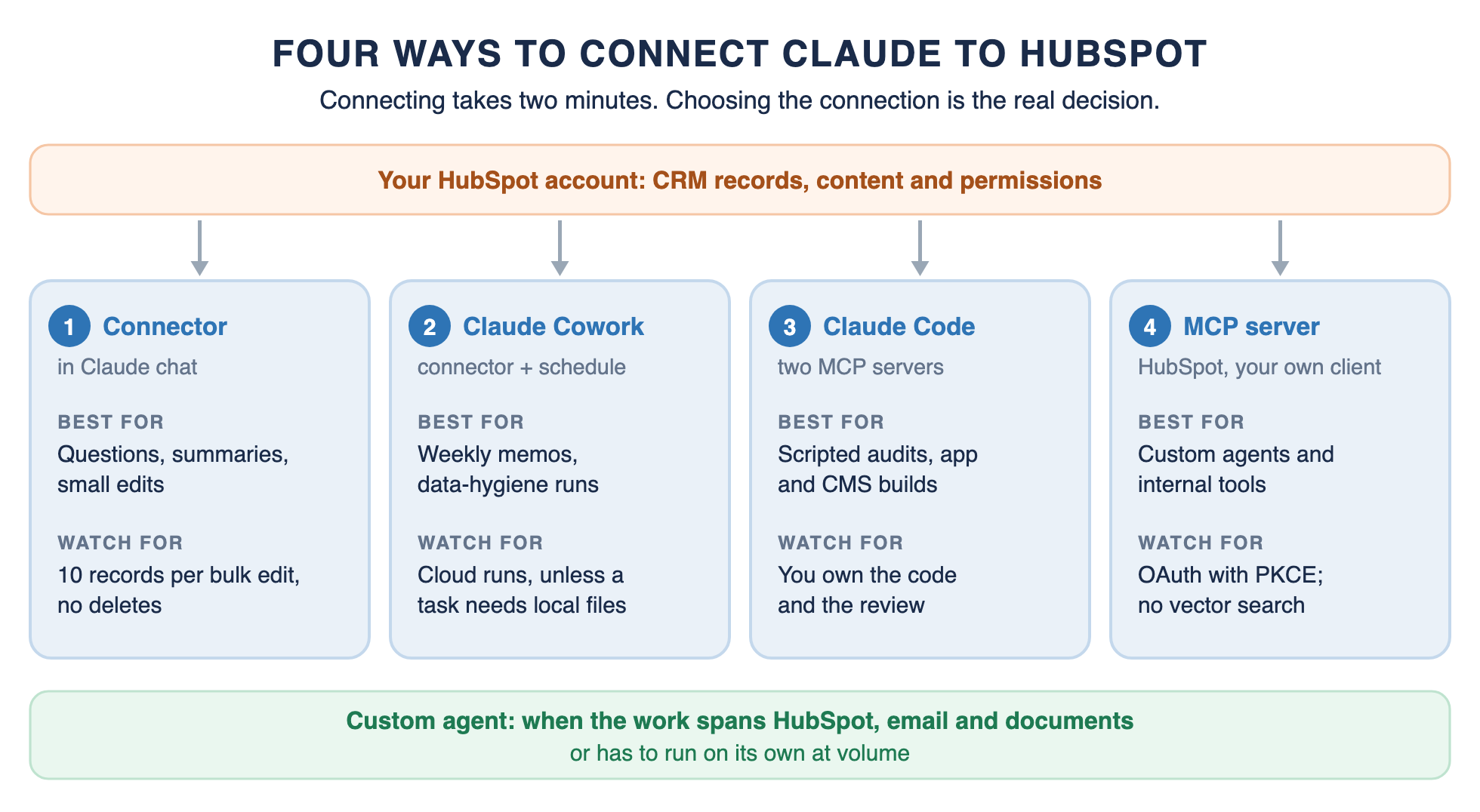
The connection to pick depends on the work: the connector, Claude Cowork, Claude Code or the HubSpot MCP server. Each has its own setup, its own limits and its own jobs.
Key Takeaways
The HubSpot connector takes about two minutes to set up on any HubSpot plan, with a paid Claude plan.
It follows each user's HubSpot permissions, edits at most 10 records at a time and cannot delete anything.
Claude Cowork runs the same connector on a schedule, in the cloud, for CRM work you repeat every week.
Claude Code connects to HubSpot's remote MCP server for scripted CRM work and to its Developer MCP server for building apps and CMS assets.
The HubSpot MCP server at mcp.hubspot.com is how you build your own agent or internal tool on HubSpot data.
Set write tools to Needs Approval before anyone on your team connects.
How to Connect Claude to HubSpot: The Short Answer
To connect Claude to HubSpot, install HubSpot's connector from Claude's connector directory.
✂️ The short answer
How do you connect Claude to HubSpot?
To connect Claude to HubSpot, open Claude, go to Settings, then Connectors, click Browse, search for HubSpot and click Connect. Log in to your HubSpot account, choose the permissions to allow, then turn the HubSpot connector on from the + menu in a chat. You need a paid Claude plan and any HubSpot plan, and a Super Admin may need to approve the connector first.
1. In Claude, click your profile icon in the bottom left, then Settings, then Connectors.
2. Click Browse, search for HubSpot and click Connect.
3. Log in to the HubSpot account you want to use, choose the permissions to allow, and click Connect app.
4. In a chat, click + in the bottom left, then Connectors, and turn HubSpot on.
You need a paid Claude plan (Pro, Max, Team or Enterprise), and the connector works with every HubSpot product and plan. Super Admins and users with App Marketplace Access can connect right away. Everyone else needs a Super Admin to approve the connector first.
If HubSpot Does Not Appear or the Connection Fails
If the connector does not show up or will not connect, check four things. First, confirm you are on a paid Claude plan, because the connector requires one. Second, if you are not a Super Admin, ask one to approve the connector or give you App Marketplace Access.
Third, open a chat, click +, then Connectors, and make sure the HubSpot switch is on for that conversation. Fourth, if Claude cannot see a record or property, check your own HubSpot permissions, whether the page or post is published, and whether Sensitive Data is turned on in your account. Claude can only see what you can see.
Claude HubSpot Integration: Four Ways to Connect, and Who Each Is For
A Claude HubSpot integration can mean four different setups. They share your HubSpot data and permissions, but they run in different places and suit different work.
Claude HubSpot integration
Four ways to connect Claude to HubSpot
Path
Where it runs
Setup
Best for
Key limits
HubSpot connector
Claude on web, desktop and mobile
Settings, Connectors, HubSpot: about two minutes
Questions, summaries and small edits
10 records per bulk create or update; no deletes; one HubSpot account
Claude Cowork + connector
Cowork, now merging into Claude chat on Pro and Max
Same connector and permissions; tasks run in the cloud unless they need local files
Claude Code + HubSpot MCP servers
Your terminal
Remote server via an MCP connector and OAuth; Developer MCP via hs mcp setup
Scripted CRM audits; building HubSpot apps and CMS assets
You own the code and the review; MCP tool limits apply
HubSpot MCP server, your own client
Any MCP client or your own app
Create an MCP connector in HubSpot; OAuth with PKCE
Custom agents and internal tools on HubSpot data
No vector search; Sensitive Data blocks activities; revenue objects in beta
When the work spans HubSpot, email and documents, or must run on its own at volume, a custom agent is the fifth option.
Four ways to connect Claude to HubSpot, and where a custom agent starts.
Most teams need the first two. The connector covers questions and quick edits, and Cowork covers the CRM work that repeats every week. Claude Code and the MCP server are for people who build.
Which Path Fits You
You want answers and small edits in chat: use the connector.
You repeat the same CRM report or cleanup every week: use Cowork with a scheduled task.
You want to script audits or build HubSpot apps and CMS assets: use Claude Code with HubSpot's MCP servers.
You are building your own agent or internal tool: use the HubSpot MCP server directly.
Whichever row fits, the first step is the same: install the connector and set its permissions. There is a fifth option for work none of the four handles well, a custom agent on the HubSpot API, covered near the end.
The HubSpot Claude Connector: Setup, Permissions and Limits
The HubSpot Claude connector is HubSpot's own integration, listed as Anthropic verified in Claude's connector directory. It works in Claude on the web, desktop and mobile. HubSpot launched it in July 2025 as a read-only connector, and it now reads, creates and updates records.
What a Super Admin Decides
When a Super Admin approves the connector, they choose which optional data permissions it gets and who in the account can install it. Claude then follows each user's own HubSpot permissions, so it can only see and change what that person can. HubSpot recommends one more setting: open the connector's tool settings in Claude and set Write tools to Needs Approval, so Claude asks before every change.
What Claude Can Read and Change
Claude can read, create and update contacts, leads, companies, deals, tickets, custom objects, line items, products and pipelines. It can do the same with calls, meetings, notes, tasks and emails, and with landing pages, website pages, blog posts and marketing emails. Invoices, orders, payments, subscriptions and segments are read-only.
Nothing can be deleted. HubSpot's guide says the connector does not support delete operations, which is the right default for a CRM.
The Limits to Know
Bulk creates and updates are capped at 10 records at a time. Claude sees only published pages and posts, and when Sensitive Data is turned on in your HubSpot account, it cannot access any engagement data. You can connect one HubSpot account per Claude account, and all use counts against HubSpot's API limits.
What a Good First Session Looks Like
Start with questions that only read data. Ask Claude to summarize your open deals by stage, sorted by close date, or to list open tickets assigned to you by priority. Check a few answers against HubSpot itself before you trust the rest.
Then try one change on one record, such as updating a deal stage, with write tools set to Needs Approval. Approve it, then find the change in HubSpot's audit log, where it appears under both your name and the Claude connector. Once that works, you know the permissions, the approval step and the logging all behave the way you expect.
Prompt Tips From HubSpot
HubSpot suggests first-person phrasing, such as "my team" or "my direct reports," for your own context, and wording like "our sales team" for wider analysis. It also recommends testing a change on one record before running it on several, and reviewing every proposed change before you confirm it. For harder analysis, HubSpot recommends the latest Claude models with Extended Thinking turned on.
Claude Cowork and HubSpot: Recurring CRM Work on a Schedule
Claude Cowork runs the same HubSpot connector, and it adds files, skills and scheduled tasks. Since September 16, 2026, Anthropic has been merging Cowork into regular Claude chat, starting with Pro and Max, so on those plans these features live in every conversation.
The feature that matters for CRM work is scheduled tasks. A scheduled task runs a prompt on a cadence, using any connectors you have set up, and it runs in the cloud even when your computer is asleep. Tasks that need local files or apps still run on your computer. Scheduled tasks are available on all paid plans.
How to Set Up a Scheduled HubSpot Task
Make sure the HubSpot connector is connected first, because a scheduled task uses the connectors you already have. Then create the task from the Scheduled section of the sidebar with New task, or describe the task in a conversation and choose Schedule. Write the prompt the way you would in chat, choose the cadence, and say where the output should go.
Run the prompt by hand once before you schedule it, and read the output closely. A prompt that works once will usually work every week, and a prompt that is vague once will be vague every week.
Three Weekly HubSpot Jobs for Cowork
Monday pipeline memo. Every Monday morning, summarize open deals by stage and close date, flag deals with no activity in two weeks, and write the memo to a doc your team reads before the meeting.
Weekly data-hygiene list. Find likely duplicate contacts, records with no owner and deals past their close date, then list the fixes for a person to approve. Assume the connector's 10-record cap and your approval setting still apply.
Daily call prep. Before the first call each day, pull recent activity for each account you are meeting and write a short brief for each one.
How HubSpot's Own Team Uses Cowork
HubSpot runs this way itself. In Anthropic's HubSpot customer story, hundreds of HubSpot marketers use Cowork, and multi-week internal builds were compressed to three hours. For strategy memos and decision docs, one HubSpot product leader saw the time from idea to reviewable draft drop from two hours to twenty minutes.
Scheduling is what separates a chat connector from a recurring CRM workflow. Chloe Tambe, HubSpot's Director of AI Transformation, put it simply: "Cowork gives us the ability to schedule and run tasks even when people are offline."
Package the Routine as a Skill
Once a routine works, save it as a skill so it runs the same way every week. HubSpot offers a Sales plugin for Claude with skills such as Call Prep, Daily Brief, Follow-Up and Pipeline Pulse. Our guide to Claude skills for marketing explains what a skill file is and when a custom one is worth building.
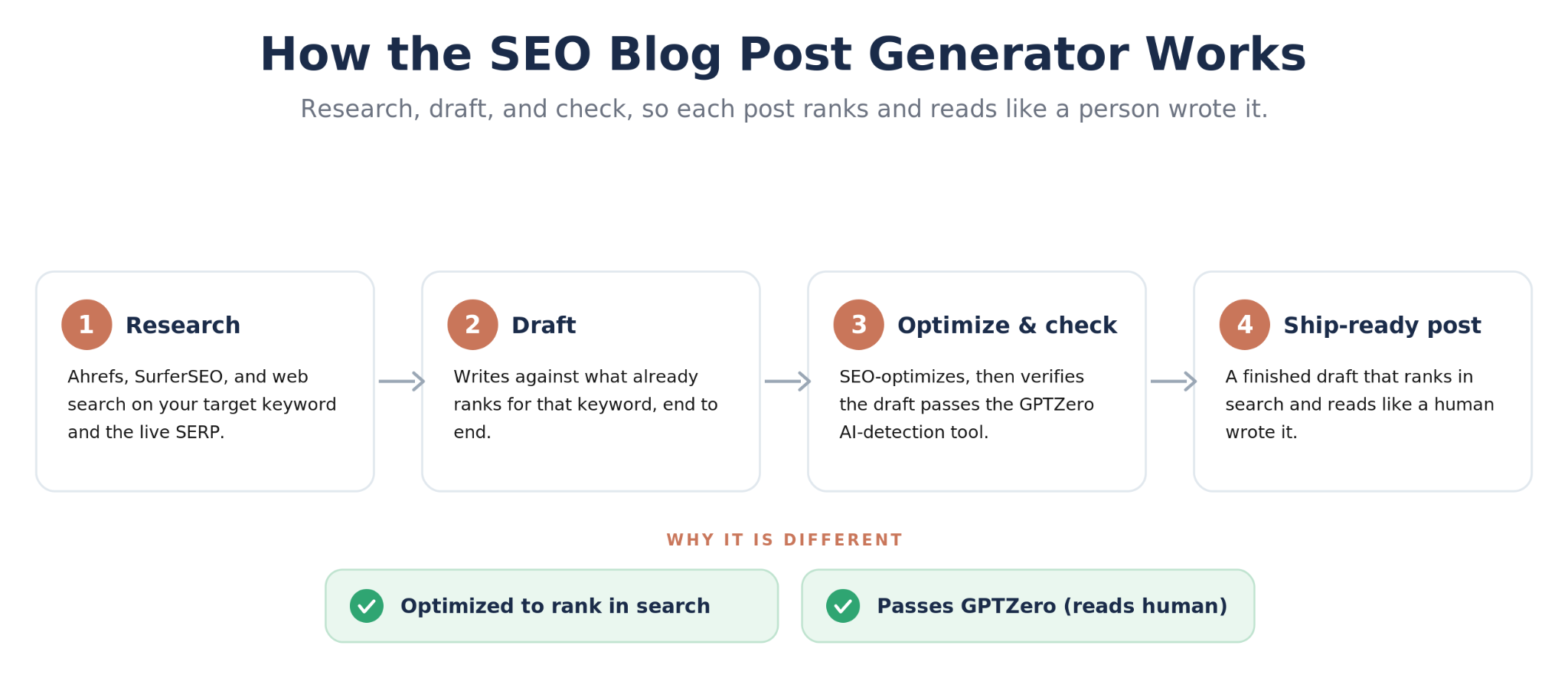
Our SEO blog post generator framework for Claude
For work beyond the connector, HubSpot's Agent CLI, in beta, is built for agents including Cowork and signs in with your HubSpot login or a service key. Treat the service key as the higher-risk route, because it can carry broad scopes and, per HubSpot, does not provide a per-user audit trail.
Claude Code and HubSpot: The Remote MCP Server and the Developer MCP Server
Claude Code connects to two different HubSpot MCP servers, and they do different jobs. The remote HubSpot MCP server works on your CRM data. The HubSpot Developer MCP server helps you build HubSpot apps and CMS assets.
The Remote MCP Server for CRM Work
Use this path for work that would take dozens of chat turns. Examples include auditing every deal in a pipeline, exporting a filtered set of records for analysis, or checking how properties are used across objects. The server needs an OAuth app you register in HubSpot, and Claude Code supports pre-registered OAuth credentials for exactly this case.
1. In HubSpot, go to Development, then MCP Connectors, and click Create MCP connector. Set the redirect URL to http://localhost:8080/callback, then note the client ID and client secret.
2. In your terminal, add the server with that client ID. Claude Code asks for the secret and stores it in your keychain.
3. In Claude Code, run /mcp and log in to HubSpot in the browser.
4. Ask Claude to call get_user_details to confirm the connection works.
Once connected, a scripted audit is one request. For example, ask Claude Code to list every open deal with no activity in 30 days, group the deals by owner, and write the result to a CSV file in your project. Search returns up to 200 records per page, so for a large pipeline ask Claude to page through all of the results. You can rerun the same request next month.
HubSpot's docs give the server URL and the connector setup, and Anthropic's docs give the Claude Code flags. Neither documents the pair step by step, so test the setup on a sandbox account first.
The Developer MCP Server for Building
The HubSpot Developer MCP server, generally available since February 19, 2026, works with Claude Code, Cursor, VS Code, Codex and Gemini CLI. It helps you build apps, CMS themes, templates, modules and serverless functions, and it can query app analytics and help troubleshoot.
Set it up with the HubSpot CLI, version 8.2.0 or later, by running hs mcp setup and selecting Claude Code. HubSpot's setup guide then has you run /mcp in Claude Code and select HubSpotDev to confirm it is connected.
hs mcp setup
If you would rather not install the CLI globally, HubSpot also documents a standalone mode that runs it through npx @hubspot/cli.
When to Use the HubSpot API Instead
Some jobs outgrow MCP tools, and the HubSpot API is the better fit for them. The MCP server acts on behalf of a signed-in user and has no delete tool, so an agent that starts from a trigger with nobody signed in, or one that deletes or merges records, needs the API. The API also reaches activity data when Sensitive Data is turned on, which HubSpot blocks only through the MCP server.
The HubSpot MCP Server: What It Exposes and How to Build on It
The HubSpot MCP server is HubSpot's implementation of the Model Context Protocol, the open standard AI tools use to call other systems. It runs at mcp.hubspot.com and has been generally available since April 13, 2026, with write access to core CRM records and activities and read access to marketing content.
Claude's directory lists the HubSpot connector itself at mcp.hubspot.com/anthropic, with 36 tools. Building your own client puts HubSpot's MCP tools inside your own app instead of inside Claude.
Who Should Build on the HubSpot MCP Server
The MCP server suits developers, RevOps engineers and agencies building internal tools on HubSpot data, such as a deal-review assistant inside your own app or a reporting agent for a client portal. Because scopes follow each user's grants, every user signs in with their own HubSpot account, and the tool can only reach what that user's HubSpot permissions allow. If you only need answers inside Claude, the connector already does this for you.
How Access Works
Any MCP client can connect, including your own app. You create an MCP connector in HubSpot under Development, then MCP Connectors, which gives you a client ID, a client secret and a redirect URL. Authentication uses OAuth with PKCE, which is required.
You do not pick scopes by hand. They follow the tools available when the user installs the connector and the permissions that user grants, and users must reinstall to pick up new ones.
HubSpot MCP Server Tools Worth Knowing
get_user_details: confirms the connection and the signed-in user. HubSpot recommends calling it first.
search_crm_objects: searches records with up to five filter groups of six filters each, returning up to 200 results per page.
get_crm_objects: fetches up to 100 records by ID.
manage_crm_objects: creates and updates records, with explicit user confirmation before any write.
query_crm_data: runs SQL-style queries for reporting. Call tool_guidance first, and expect no joins or subqueries.
AEO tools: get_aeo_metrics, manage_aeo_prompts and manage_aeo_recommendations, which need Marketing Hub Professional or Enterprise.
Limits and Testing
The server is built on HubSpot's CRM search, so there is no vector search. Sensitive Data settings block activity and conversation data through the MCP server, and revenue objects such as carts, invoices and orders are in beta.
Test before you build. HubSpot's integration guide for the MCP server walks through connecting MCP Inspector and calling get_user_details. Unofficial community servers also exist on GitHub, so check how any of them handles authentication and permissions before you use it.
Modern Use Cases for Claude and HubSpot, by Team and Path
Most teams start with the connector, and the jobs that stick move to Cowork. The table maps common Claude and HubSpot use cases to the team that runs them and the path that fits.
Use cases by team
What teams use Claude and HubSpot for, and which path fits
Team
Use case
Path
What it looks like
Sales
Deal-risk review
Connector
Open deals closing this quarter with no activity in 14 days, sorted by amount
Sales
Call prep
Cowork, daily
A short brief on each account before the day's calls
Sales
Contact reactivation
Connector
Follow-up drafts for contacts who went quiet
RevOps
List and segment criteria
Connector
Filter ideas for a new list, checked against your properties
RevOps
Weekly data-hygiene run
Cowork, scheduled
Duplicates, missing owners and stale deals, with fixes queued for approval
RevOps
Workflow blueprints
Connector
A lead-routing workflow drafted before anyone builds it
Marketing
Campaign follow-up
Connector
Contacts who opened the last campaign but did not click
Marketing
AEO prompts and recommendations
MCP server
AEO tools on Marketing Hub Professional or Enterprise
Service
Ticket triage
Connector
Your open tickets, sorted by priority, oldest first
Leadership
Monday pipeline memo
Cowork, scheduled
A pipeline summary written to a doc or a Slack channel
Developers
HubSpot app and CMS builds
Claude Code + Developer MCP
Scaffold a CMS module or a serverless function
Some jobs do not fit any of the four paths. Deleting records, enriching thousands of records at once and working with Sensitive Data all fall outside what the connector and the MCP server allow, so plan those through HubSpot itself or a custom build.
Two habits make every use case safer. Start with read-only questions until the team trusts the answers, and queue changes for a person to approve rather than writing them automatically.
Prompts to Copy for Each Use Case
Each prompt below works in Claude chat with the HubSpot connector turned on. Fill in the brackets, and run the ones that only read data before the ones that propose changes. The two Cowork prompts go into a scheduled task as written.
Deal risk review (connector). “Show me my open deals with a close date this quarter that have had no logged activity in the last 14 days. For each one, list the deal name, amount, stage, close date and last activity date, sorted by amount. Do not change any records.”
Contact reactivation (connector). “Find contacts I own who have had no logged activity in 90 days and were associated with a deal in the last 12 months. Pick the 10 contacts with the largest deal amounts and draft a short check-in email for each, based on their most recent note or deal. Show me the drafts and do not send or save anything.”
Segment ideas (connector). “I want to build a list of [type of buyer] for [campaign]. Look at the contact and company properties we actually use and suggest three segment definitions, each with the exact property filters and an estimate of how many records it would include. Do not create any lists yet.”
Data cleanup (connector, or Cowork weekly). “Check my contacts and deals for likely duplicate contacts with the same email domain and a similar name, contacts with no owner, and open deals whose close date has passed. Return one row per record with the fix you recommend. Wait for my approval, then make no more than 10 changes at a time.”
Workflow blueprint (connector). “Draft a HubSpot workflow that routes inbound demo requests. Include the enrollment trigger, branches by country and company size, the owner assignment rule for each branch and a follow-up task for the rep. Use property names that exist in our account and flag any we would need to create, because I will build the workflow myself.”
Outreach sequence (connector). “For contacts in the [segment or list name] segment, draft a three-email outreach sequence. Tailor the opening line to each contact’s job title and their company’s industry, keep each email under 120 words and space the emails three business days apart. Group the drafts by job title and do not send anything.”
Monday pipeline memo (Cowork, weekly). “Summarize all open deals by stage, with the deal count and total amount for each stage. List deals whose close date has passed and deals with no activity in 14 days, with the owner of each. Write it as a one-page memo for this morning’s pipeline meeting.”
Daily call prep (Cowork, daily). “Find the meetings logged in HubSpot for me today. For each company I am meeting, summarize the last 30 days of activity, open deals and open tickets in five bullet points or fewer.”
Security and Governance: What to Set Before You Connect
Connecting Claude to HubSpot is safe when you use the controls HubSpot provides. Set these five before anyone on your team connects.
Permissions mirror HubSpot: Claude can only see and change what the signed-in user can.
Write tools on Needs Approval: Claude asks before every create or update.
Audit log: every create and update through the connector is logged and attributed to both the user and the Claude connector.
Data handling: EU-hosted accounts route through HubSpot's EU data center, and Anthropic does not use data shared through the connector to train its models except in certain instances.
Account control: Claude Enterprise admins can stop users connecting HubSpot to Claude accounts outside the organization, and turning on Sensitive Data keeps engagement data out of reach.
Read the security answers in HubSpot's setup guide before rollout, and decide who may install the connector before anyone does.
A Simple Rollout Plan
Start with a small group of users who know the CRM well, and let them use read-only questions for the first week. Then turn on writes with approval for that group, and review the audit log together after a few days. Widen access once the team trusts the answers and the changes.
Whichever path you choose, a safe rollout comes down to these settings more than to the connection itself.
When to Build a Custom HubSpot Agent
Most teams should stop at the connector and Cowork. They cover questions, small edits and recurring reports, and they inherit HubSpot's permissions and audit log at no extra cost.
Before you commission a build, use the connector and Cowork for a month. The gaps you hit along the way tell you exactly what a custom agent would need to do.
A custom agent starts to pay when the work crosses those limits. The work spans HubSpot, email and documents, or it has to start from a trigger rather than a person or a schedule. It changes more than 10 records at a time, or it needs to search call notes and documents by meaning, which the MCP server cannot do.
That is what we built in our Sales Search & Insights framework. It puts HubSpot, Gmail and Google Drive behind one plain-language question, so a rep can ask whether anyone followed up after a demo and get an answer drawn from every system. A review agent checks the results for gaps, and the answer comes back with its sources and a confidence score.
Knowing how to connect Claude to HubSpot takes two minutes. Connecting is the easy part, so start with the connector for questions and small edits, move the work you repeat every week to Cowork, and use Claude Code and the HubSpot MCP server when you build.
When the work spans HubSpot, email and documents, or has to run on its own at volume, that is a custom agent, and that is what we build.
When the Work Spans HubSpot and More
If your CRM work spans HubSpot, email and documents, or needs to run on its own at volume, we build the agent around it.
• One question answered across HubSpot, Gmail and Google Drive
• Answers that come back with their sources
• A review step that checks results for gaps
• Built on your data, your permissions and your workflows
Custom HubSpot agents
When the Work Spans HubSpot and More
If your CRM work spans HubSpot, email and documents, or needs to run on its own at volume, we build the agent around it.
One question answered across HubSpot, Gmail and Google Drive
Answers that come back with their sources
A review step that checks results for gaps
Built on your data, your permissions and your workflows
Frequently Asked Questions about Claude to Hubspot
Is it safe to connect Claude to HubSpot?
Yes, with the right settings. The connector follows each user's HubSpot permissions and logs every create and update in HubSpot's audit log. Set write tools to Needs Approval so Claude asks before every change.
Does HubSpot have an MCP server?
Yes. HubSpot's remote MCP server at mcp.hubspot.com has been generally available since April 2026, and a separate Developer MCP server helps you build HubSpot apps and CMS assets.
What is an MCP vs MCP server?
MCP, the Model Context Protocol, is the open standard for connecting AI tools to other systems. An MCP server is one system's implementation of it, such as HubSpot's, which exposes tools an AI client like Claude can call.
Can Claude update or delete HubSpot records?
Claude can create and update records through the connector, up to 10 at a time, but it cannot delete anything. Set write tools to Needs Approval so it asks before each change.
Does the HubSpot connector work on free HubSpot?
Yes. The connector works with all HubSpot products and plans, but you need a paid Claude plan: Pro, Max, Team or Enterprise.
Can Claude Cowork update HubSpot on a schedule?
Yes. Cowork scheduled tasks use the connectors you have set up, so a weekly task can read HubSpot and propose or make updates. Treat the connector's limits as still in force: 10 records per bulk change, no deletes, and approval if you set write tools to Needs Approval.
Do I need to code to connect Claude to HubSpot?
No. The connector and Cowork need no code at all. Claude Code and the HubSpot MCP server are the paths for developers, who use them to script CRM work or build their own tools.
Can I connect more than one HubSpot account?
Not at the same time. HubSpot allows one connected HubSpot account per Claude account.