Most FAQ chatbots are at their best on launch day.
Launch day is when someone loaded the current answers, tested the obvious customer questions, and watched the bot handle them well. Then the business keeps moving. The return window changes, a new plan tier ships, customers start asking about a feature that did not exist last quarter, and people phrase the old questions in ways nobody tested. The bot keeps answering exactly the way it did on day one, a little more wrong every week.
Every one of those misses leaves a trace. The customer who asked the same thing twice in different words. The fallback that fires on one question over and over. The conversation that ended with a hand-off to a person, who answered it in a single line. What the bot needs to learn is already sitting in its own logs, and in most setups it stays there until someone finds an afternoon to read transcripts and edit the knowledge base by hand.
We build custom ai FAQ chatbots that actually improve over time. Every turn is recorded: whether it resolved, whether the fallback fired, whether it escalated, how the person rated it, and whether they asked again in different words. Those signals feed back into how the bot retrieves, which examples it answers from, when it hands off, and which gaps get drafted as new answers for a person to approve. The data does the editing, so the bot changes every week instead of whenever someone has the time to manually update.
Here is how we build them, component by component, including which parts of the loop run on their own and which still wait for a human signature.
Key Focuses
What it is. A chatbot that answers frequently asked questions in conversation, from approved answers or the documents behind them.
Three kinds. Rule and keyword bots, off-the-shelf LLM bots on uploaded documents, and custom systems that learn from logged outcomes.
Why off-the-shelf plateaus. Improvement is a person reading transcripts on a schedule. The metrics the platforms recommend get read by people, not by the bot.
What drives the loop. Six signals per turn: resolution, fallback, escalation, confidence, rephrasing and downstream outcome.
The build in one line. Prepared knowledge, retrieval that is not similarity alone, examples re-picked every turn, confidence-gated hand-off, live tool calls, and a metrics store with scheduled jobs.
When to buy instead. Under about a hundred FAQs, one channel, no integrations, and nobody who will own the numbers.
What Is a FAQ Chatbot?
What is a FAQ chatbot?
A FAQ chatbot is software that answers a business's frequently asked questions in conversation, by matching what a person asks to approved answers or to the documents those answers come from.
The distinction that matters is whether it is maintained, meaning a person reads the logs and edits the knowledge base, or whether it learns, meaning logged outcomes like resolution, fallback and escalation automatically change how it retrieves, answers and hands off.
FAQ chatbots come in three kinds, and the gap between the second and third is what this article is about.
Rule and keyword bots. A menu with a text box. They match buttons or keywords to canned answers, which is predictable and breaks the moment someone phrases a question in a way nobody anticipated.
Off-the-shelf LLM bots. Upload your documents and a language model retrieves the relevant passage and phrases the answer. Far better at handling wording. Improvements mostly come from a person updating the uploads.
Custom learning systems. The same starting point, instrumented on every turn, with outcomes feeding back into retrieval, prompting, hand-off thresholds and the knowledge base on a schedule.
The first two are maintained. The third learns. Both kinds can be accurate on launch day, so the difference only shows up over time: a maintained bot is exactly as good as its last edit, and a learning bot is as good as its last month of conversations.
It also helps to answer the more basic question underneath. A FAQ, short for frequently asked questions, collects the answers a business gives most often so people can find them without contacting anyone. A FAQ chatbot is an AI chatbot doing the same job in conversation, which matters most when the person does not know which question they should be looking for.
Why Off-the-Shelf FAQ Chatbots Plateau
None of the platforms are building bad products. The plateau comes from the shape of the product, and four failure modes show up again and again.
1. One bot only stretches so far. Botpress publishes a rule of thumb from building hundreds of assistants: keep one FAQ bot to twenty topics and a hundred FAQs, and past that, split the work across a delegation architecture of several bots. It is a sensible rule, and it says something about the shape. Past a fairly small size, even the platform recommends splitting one bot into several to keep the content maintainable.
2. "Iterate" means a person. chatbot.com describes its product as improving with every interaction, and its own best-practices section still puts a person in charge of the improving: review the conversations monthly, then update the knowledge base. Botpress's final build step says the same. The work is real, and it only happens when someone has time for it.
3. Uploads go in unprepared. The build steps ask you to upload PDFs, manuals, CSVs or URLs, and retrieval over that content leans on semantic similarity. A clean DIY tutorial shows the floor: embed each stored question, take the single closest match, and return its answer if the similarity score clears 0.7. That fails when someone's wording has little in common with the stored question. A tax firm's vendor-built chatbot, which we later replaced, failed the same way at scale: questions that shared almost no wording with the provision that answered them came back empty or wrong, and it could not tell current documents from superseded ones.
4. The metrics are named, then handed to a person. Botpress's own FAQ lists the right numbers to watch: resolution rate, fallback rate, satisfaction, session length and drop-off. chatbot.com lists resolution, satisfaction, time to resolution and escalation. Both are right about what to measure. Neither guide describes the bot acting on those numbers itself; both describe a person reading them.
The metrics exist. What consumes them is a person with a calendar reminder.
What "Learns From Real Data" Actually Means
Learning is an overloaded word in chatbot marketing, so here is what it means in a system we build: specific signals, logged on every turn, each changing one specific component on a known schedule.
What Gets Logged on Every Turn
Resolution. The explicit version is a thumbs up or down where one is offered. The implicit version tends to be more reliable: did the person ask again in different words, give up, or move on satisfied.
Fallback. Whether the bot said it could not answer.
Escalation. Whether the conversation went to a person, and at which turn.
Confidence. The score the system gave its own answer before sending it.
Retrieval hits. Which pages or stored answers it pulled, and in what order.
Downstream outcome. A deflected ticket, a completed order, a booked call, wherever the system can see it.
What Each Signal Changes
Logging is the easy half. The part that makes it a loop is that every signal is wired to a component, so a pattern in the data turns into a change in behavior without waiting for someone to notice it.
What each logged signal changes
Signal
What it changes
Typical cadence
Who signs off
Resolved vs unresolved, by retrieved page
Retrieval ranking: which source comes back first
Nightly
Automatic
Ratings and resolution, by example conversation
The pool of examples the prompt is rebuilt from
Pool nightly, selection every turn
Automatic
Confidence score vs actual outcome
The threshold below which the bot hands off
Weekly
Automatic, within set bounds
Fallbacks and rephrases, clustered
A drafted answer for each gap in the knowledge base
Weekly
A person approves
Escalations, by intent
Routing: which questions go to a tool or a person first
Weekly
A person approves
Accumulated resolved conversations
A fine-tuned model, evaluated before release
Quarterly, or once there is enough data
Evaluated, then approved
Anything that changes how the bot uses approved content runs on its own and can be rolled back. Anything that changes what the bot says waits for a person.
Where the Line Between Automatic and Reviewed Sits
The split is deliberate. Re-ranking, example selection, and confidence threshold changes alter how the bot uses content that has already been approved, so they can run unattended, and every change is versioned so it can be rolled back if resolution moves the wrong way. A new answer alters what the bot says to customers, so it goes into a queue and waits for a person.
The example pool follows the same rule. It only holds past conversations that resolved and whose answers came from approved content, so refreshing it changes which approved answers the bot models itself on, not what it is allowed to claim.
Letting a system rewrite a customer-facing knowledge base on its own is a liability, and we would not ship it. The honest description of a learning FAQ chatbot is one where the data proposes and the tuning runs itself, while new words still get a human signature.
How We Build a Custom FAQ Chatbot: Architecture Walkthrough
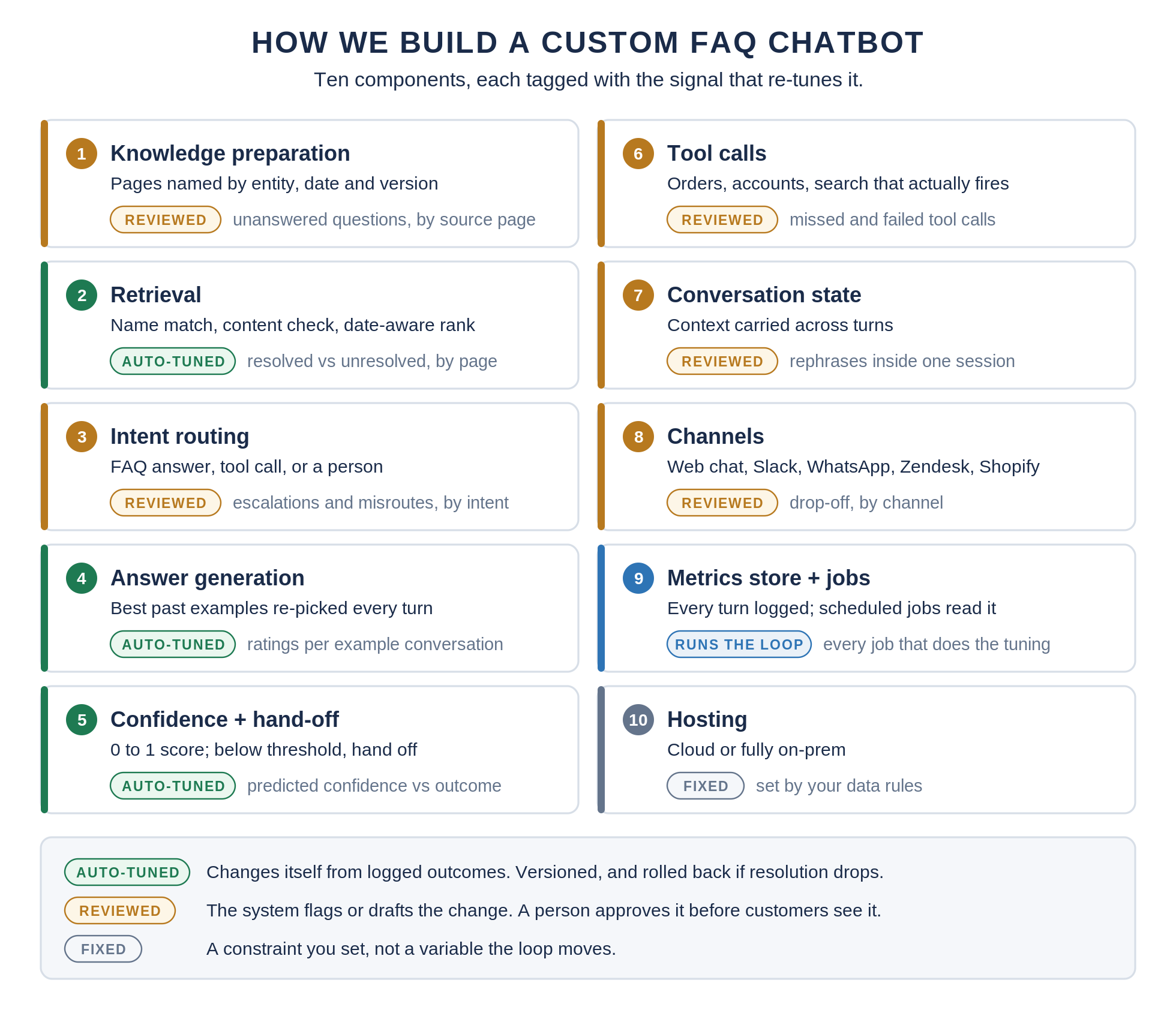
Ten components, in roughly the order a question passes through them. Each one is tagged with the signal that re-tunes it, because a component with no signal attached is a component that will never get better on its own.
The ten components of a custom FAQ chatbot, each tagged with the signal that re-tunes it.
1. Knowledge Preparation
Source documents are split at the page or answer level, and each piece gets a descriptive name carrying the entities, dates and versions it covers, with related pieces linked. Where two versions of a policy exist, the newer one wins by metadata rather than by whichever happens to rank higher. This is the approach from our tax-law build, which replaced a system that could not tell current rules from superseded ones.
Tuned by: unanswered questions traced back to the page that should have answered them. Fixes are drafted and reviewed.
2. Retrieval
Not similarity alone. Retrieval combines name matching, a check that the content actually answers the question, and date-aware ranking. For harder questions the system searches, reviews a shortlist, reads a few pieces and refines, which we cover in our write-up on why our RAG chatbots work.
Tuned by: resolved versus unresolved outcomes per retrieved page, which re-rank what comes back first. Automatic, nightly.
3. Intent Classification and Routing
Every request gets a decision: answer it from the knowledge base, call a tool, or go to a person. Most "FAQ" traffic is partly not FAQ at all, like order status or an account change, and routing it correctly is most of the experience. See our custom intent classification post for how we train the router.
Tuned by: escalations and misroutes by intent. Routing changes are reviewed.
4. Answer Generation With Per-Turn Examples
Example conversations that went well are stored, and at every turn the system picks the ones most relevant to the current conversation and rebuilds the prompt around them. We described the technique in our GPT-3 chatbots post, and Microsoft AI lead Kevin Tupper called it a "brilliant technique" (quoted here). Answers cite the page they came from and say the answer is not in the documents rather than guessing.
Tuned by: ratings and resolution per example conversation, which decide what stays in the pool. Automatic.
5. Confidence Scoring and Hand-Off
Every response is scored from 0 to 1 against a rubric before it is sent. Below the threshold, the conversation goes to a person with the full transcript attached. Our sales search framework returns every answer with its sources and a confidence score, and a review step can send weak answers back for another pass.
Tuned by: predicted confidence compared with what actually happened, which recalibrates the threshold. Automatic, within bounds you set.
6. Tool Calls for Live Data
Order status, account state and availability are the questions a static FAQ cannot answer, and they are usually what people actually want. Web search can sit here too, and it has to be checked to be trusted: the tax build validates tool selection inside the loop because the system it replaced never invoked its own search tool.
Tuned by: tool calls that failed, plus the misses where a call should have happened. Reviewed.
7. Conversation State
Context carries across turns, so a follow-up question means something, and when a question could mean two things, the bot asks a clarifying question instead of guessing. This is the piece the DIY baseline lists as missing, and it is most of the difference between a lookup and a conversation.
Tuned by: rephrasing inside a single session, which points at context the bot dropped. Reviewed.
8. Channels
One API behind the chat widget on your website, Slack, WhatsApp, or the tools and workflows a support team already lives in. We have written up builds inside Zendesk, Salesforce, Shopify and WordPress.
Tuned by: drop-off by channel. Reported and reviewed.
9. The Metrics Store and Scheduled Jobs
Every turn is written to a database with its signals attached, and scheduled jobs read from it. This is the component that does the tuning for everything above, and the next section covers it in detail.
10. Hosting
Cloud, or entirely on-premises when the data cannot leave. Our medical records system serves a fine-tuned model through Ollama inside the client's own environment, and our guide to self-hosted AI chatbots covers the tradeoffs. Hosting is a constraint set by your data rules, not something the loop tunes.
The Learning Loop in Production
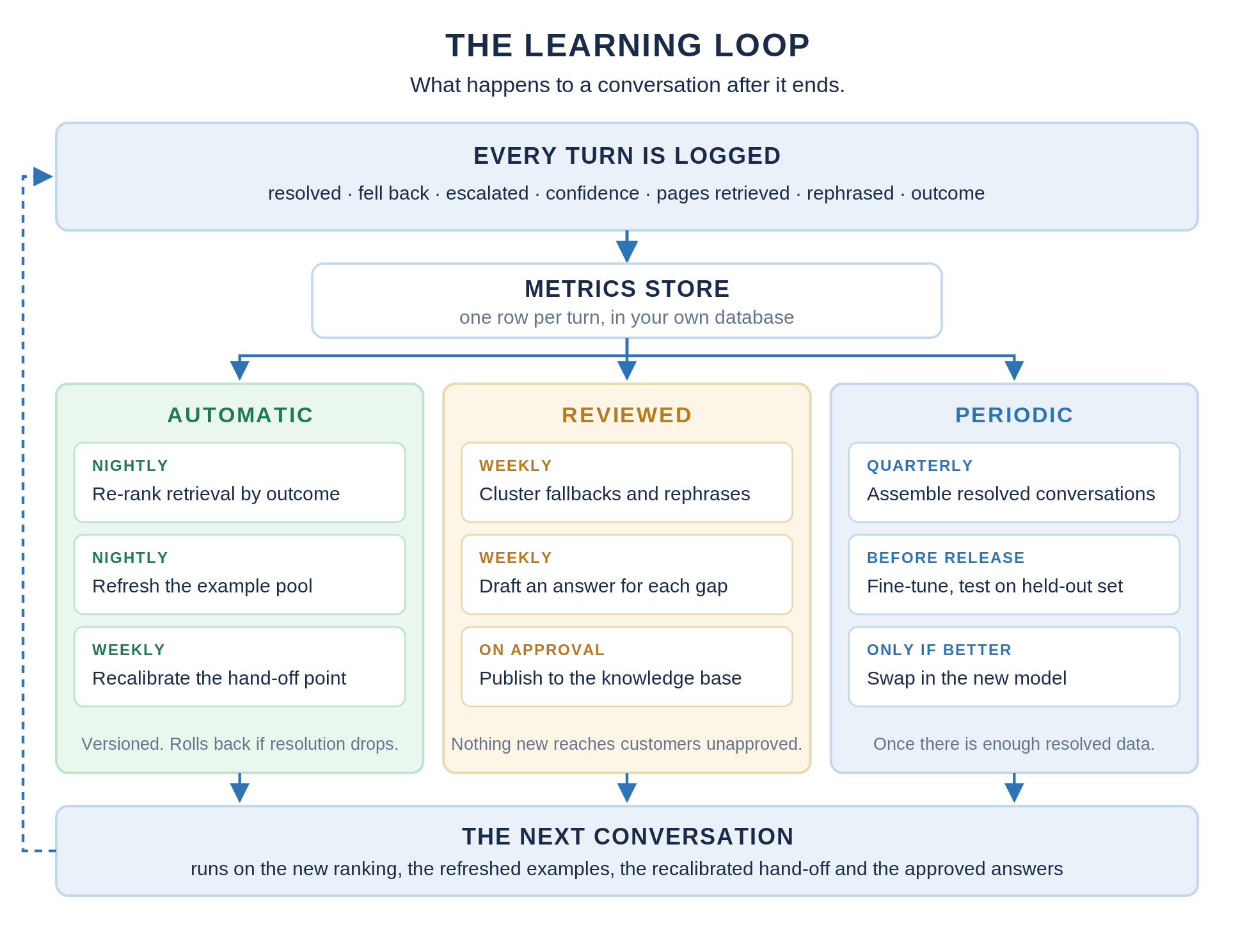
The table above says which signal changes which component. This section is the machinery: where the data sits, what reads it and when, and where a person steps in.
What happens to a conversation after it ends: logged, stored, consumed by three kinds of job, and fed into the next conversation.
Where the data lives. Each turn becomes a row in your own database: the question, the retrieved pages, the answer, its confidence score, and every outcome signal that follows. Our sales search framework persists every session, plan step, tool call and token count the same way, which is what makes any of the tuning possible.
What runs automatically. A nightly job re-ranks retrieval using which pages led to resolved conversations, and refreshes the pool of examples the prompt draws from. A weekly job compares predicted confidence against outcomes and nudges the hand-off threshold inside limits you configure. All three are versioned, so a bad week is one rollback away.
What waits for a person. A weekly job clusters fallbacks and rephrased questions into the things people are actually asking, and drafts an answer for each gap from your source material. Drafts land in an approval queue. Nothing new reaches a customer until someone signs it off.
What runs periodically. Once enough resolved conversations accumulate, they become training data for a fine-tune. The mechanics are the ones in our Llama 2 chatbot build, which fine-tuned an open model on a bank's FAQ of about 250 questions; in the loop, the training set is your own resolved conversations instead of a fixed list. Our guides to training on MosaicML and RLHF cover the rest. We test each candidate on held-out conversations and only swap it in if it beats the current model.
What We've Built
Each of these maps to one or more of the ten components in the architecture walkthrough. The numbers are the ones we have published, linked at the source.
NILES. A custom conversational system for the NeuroLeadership Institute, serving more than 10,000 customers including Fortune 500 companies, with a separate knowledge base for each organization and both voice-to-text and voice-to-voice agents (details, live product). That is knowledge preparation at scale: every tenant's answers stay inside that tenant.
A tax-law system over 30,000+ pages. A firm's previous vendor bot failed four ways: wrong answers, no way to tell current rules from superseded ones, nothing returned for questions worded differently from the source, and a web search tool that never fired. The replacement prepares documents page by page with versions as metadata, cites the page behind every answer, and validates tool selection inside the loop. That covers knowledge preparation, retrieval and tool calls.
A sales search framework. HubSpot, Gmail and Google Docs behind one natural-language interface, delivered in Slack. A review step can send an answer back for up to two more rounds, and every answer returns with its sources and a confidence score from 0 to 1, scored against a written rubric. Every session, plan step, tool call and token count is logged. That is confidence scoring and hand-off, plus the per-turn logging the metrics store is built on.
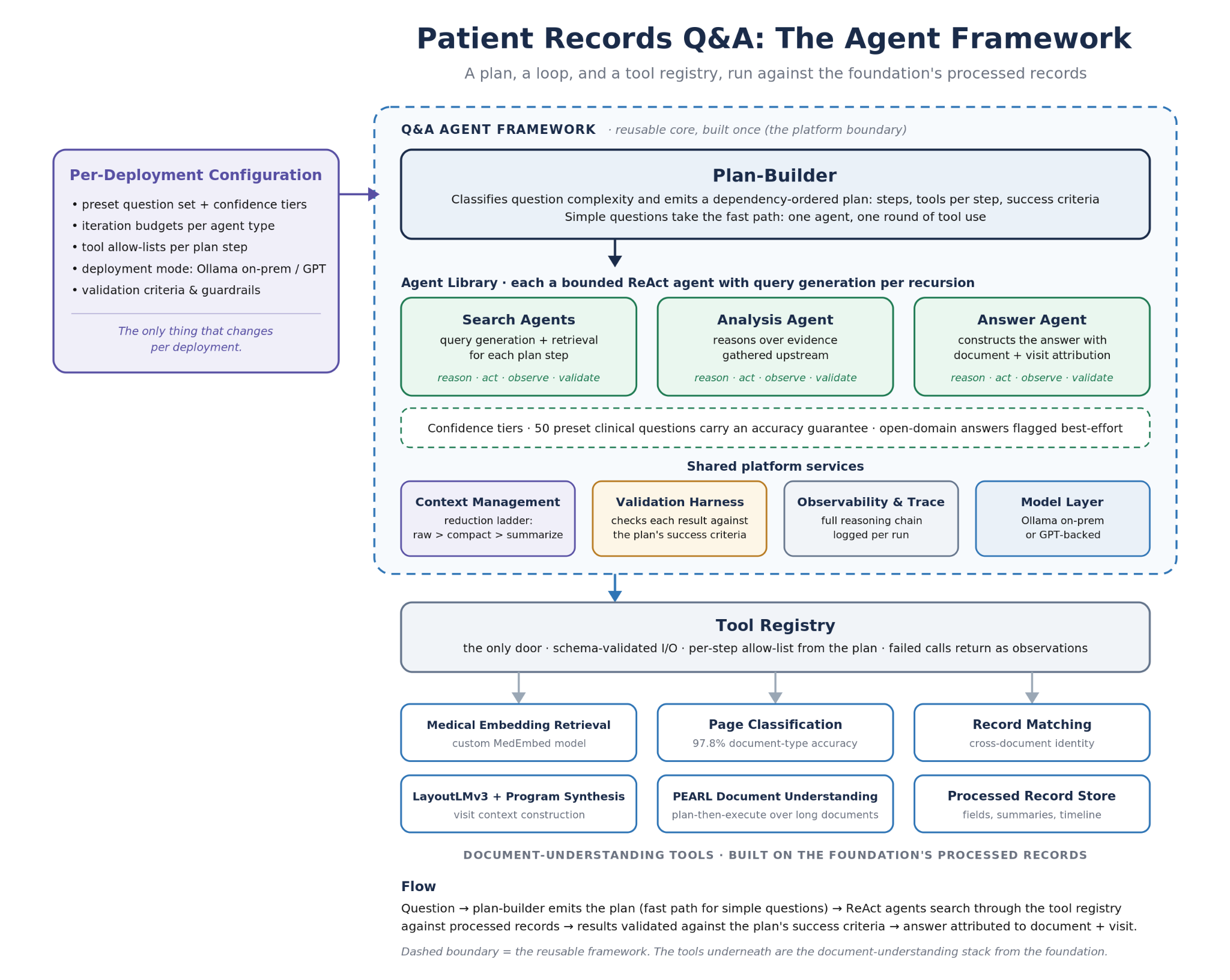
A medical records system. Over 96% extraction accuracy on the ten most important medical fields and over 90% across all fields, and over 91% on the 50 preset clinical questions the Q&A system was built to answer, with a fine-tuned model served through Ollama on-premises or in the client's private cloud. The client raised its Series A on the extraction foundation. That is the hosting component, where the data stays under the client's control.
FAQ Chatbot Examples
Four shapes we build most often, each with the signal that matters most for it.
Internal employee FAQ. HR policies, benefits, IT fixes and onboarding, with access control so each team sees only its own documents. Per-organization knowledge like the NILES build fits here. The signal to watch is escalation to HR or IT by topic, because every avoidable ticket is the point.
Customer support FAQ with order tools. Returns, shipping and account questions, where half the traffic needs live data. Tool calls answer order status directly. The signal is deflected tickets, plus the tool calls that should have fired and did not.
Product and pricing FAQ that hands off to sales. Feature and plan questions, with routing that notices buying intent and books a call instead of answering another question. This is the direct answer to the common complaint that chatbots only do FAQ stuff and never help anyone buy. The signal is booked calls, by the question that led to them.
Legal, tax or policy documents with citations. Answers where being wrong is expensive, so every answer names the page it came from and says so when the documents do not cover it. The tax build is this shape. The signal is unresolved questions by page, which shows exactly where the source material is thin.
When an Off-the-Shelf AI Chatbot Is the Right Call
Most readers do not need a custom build, and saying so is the only way the rest of this article is worth trusting.
Botpress makes the same point from the other side: for a simple FAQ, an LLM-based bot is the right choice, and it is simple enough to set up yourself on a platform. They are right. If you have under about a hundred FAQs, a single channel like web chat, no systems to integrate, and nobody who will own the numbers, use Botpress, chatbot.com or Workativ, and be live within days.
It is also worth asking whether you need a chatbot at all. Our research roundup on chatbots versus menus summarizes a travel-booking study in Computers in Human Behavior that found chatbots produced lower user satisfaction than menus, with menus doing worse only when the task was open-ended. Twenty predictable questions may be better served by a well-organized FAQ page than by any bot.
Custom starts to pay for itself when any of these are true: you are past Botpress's twenty-topic, hundred-FAQ guideline; the right answer depends on live systems like orders, accounts or a CRM; the data is regulated or has to stay on-premises; or the requirement is that the bot improves without someone editing it every week.
Getting Started: The 27-Day POC
Every proof of concept we build is scoped to 27 days (how we work). For a FAQ chatbot, that means a defined body of FAQs and source documents, one channel, and the metrics store and dashboard running from the first day, so the learning loop is measurable before anyone commits to a production build.
The fastest way to see whether it is worth it is to look at your own data. Send us your top hundred FAQs and a month of chat logs, and we will show you what the loop would have changed: the questions that fell through, the answers that were missing, and the conversations that should have gone to a person sooner.
Send Us Your Top 100 FAQs and a Month of Chat Logs
We will show you what the learning loop would have changed on your own conversations, then scope a 27-day proof of concept with the metrics dashboard running from day one.
27-day proof of concept
Send us your top 100 FAQs and a month of chat logs
We will show you what the learning loop would have changed on your own conversations, then scope a proof of concept with the metrics dashboard running from day one.
The questions that fell back or got rephrased, clustered by what people were really asking
The gaps in your knowledge base that a drafted answer would have closed
Where the bot should have handed off sooner, and where it handed off for nothing
Whether you need custom at all, or an off-the-shelf builder will do the job
A FAQ chatbot answers a business's frequently asked questions in conversation, using approved answers or the documents behind them. Simple ones match keywords to canned replies, most current ones use a language model over uploaded documents, and custom ones also learn from logged outcomes like resolution and escalation.
How do I build a FAQ chatbot?
Gather your most common questions and the documents that answer them, prepare that content so each piece is clearly named and dated, and connect it to a language model through retrieval. Add routing for questions that need live data or a person, a confidence threshold for hand-off, and per-turn logging from the first day. A platform handles the first half in an afternoon; the logging and the loop are what a custom build adds, and they live in code rather than in a settings screen.
What is the difference between a FAQ chatbot and a FAQ page?
A FAQ page makes the person find the right question, which is exactly where people have trouble; a FAQ chatbot takes the question in their own words and finds the answer for them. The page is better when the questions are few and predictable. The chatbot is better when people phrase things unpredictably, need a follow-up, or need live information like an order status.
Can a FAQ chatbot learn on its own?
Partly, and the honest answer is in the split. Retrieval ranking, example selection and hand-off thresholds can re-tune themselves from logged outcomes without anyone touching them. New answers should not: the system can detect the gap and create a draft answer, but a person should approve anything new a customer will read.
How many FAQs can a chatbot handle?
Botpress's rule of thumb is twenty topics and a hundred FAQs per bot, with a delegation architecture beyond that. With prepared knowledge and retrieval that is not similarity alone, a single system can go much further: our tax-law build scales past 30,000 pages.
Should I use an off-the-shelf FAQ chatbot or build a custom one?
Off-the-shelf, if you have under about a hundred FAQs, one channel, no integrations and nobody to own the metrics. Custom, if you need live data, regulated or on-premises hosting, more than one knowledge base, or a bot that improves without weekly editing.
How much does a custom FAQ chatbot cost?
It depends on the size of the knowledge base, the number of channels and which systems it has to reach. We scope every proof of concept to 27 days and price it after a scoping call, so you see the loop working on your own data before committing to a full build.