How Is AI Changing Ecommerce? The Full Picture in 2026, From the Storefront to the Supply Side
How Is AI Changing Ecommerce? The Full Picture today, From the Storefront to the Supply Side

Matt Payne
October 17, 2026
You already run the business on real tools: QuickBooks for the books, HubSpot for leads, PayPal or Square for payments, and Gmail for everything else. Most days, the work that pays gets done.
Then it is 10 p.m. on the last day of the month. The books still need reconciling, Saturday's leads never got a reply, and the blog has been quiet since spring.
That pile is not a discipline problem. The work grows with every customer, but the hours do not, and no single job is big enough to justify a hire.
Claude for Small Business is Anthropic's answer to that gap. It launched on May 13, 2026, and in the launch announcement Anthropic co-founder and president Daniela Amodei said small businesses have "never had the resources of bigger companies," and that "AI is the first technology that can finally close that gap." Her summary of the product was shorter: "People run the business, and Claude helps take the late-night work off their plates."
For lean teams, the useful question is which hours you can hand back, inside the tools you already use, and at what cost against hiring. The answer differs by department. Finance, sales, customer service and marketing each get their own workflows and connect to their own tools, and each stops at a different place. Where they stop is where we build at Width.ai.
Claude for Small Business is a plugin, not a new plan. You turn it on inside Claude, connect the tools you already pay for, and pick the job. There is no separate charge for the plugin; you pay for the Claude plan underneath it.
It is built for a big group. Small businesses account for 44% of U.S. GDP and employ nearly half the private-sector workforce, according to Anthropic. In the AI boom so far, their AI adoption has lagged behind large enterprises and often stops at the chat window.
The plugin launched with 15 workflows, 15 skills and 7 connectors. By September 15, 2026, Anthropic had grown it to 43 workflows and 37 partner connectors, and it had been installed more than 900,000 times.
Each connected tool handles a specific job. The core connectors are QuickBooks, PayPal and HubSpot. Gusto, Shopify, Salesforce, Square, Stripe, Xero, Canva, Docusign, Google Workspace, Microsoft 365, Slack and Zapier are on the plugin's connector list too.
With no connectors at all, most workflows still run from an uploaded spreadsheet or statement. Anthropic's advice is to connect one or two of your existing tools first and add more when the plugin asks for them.
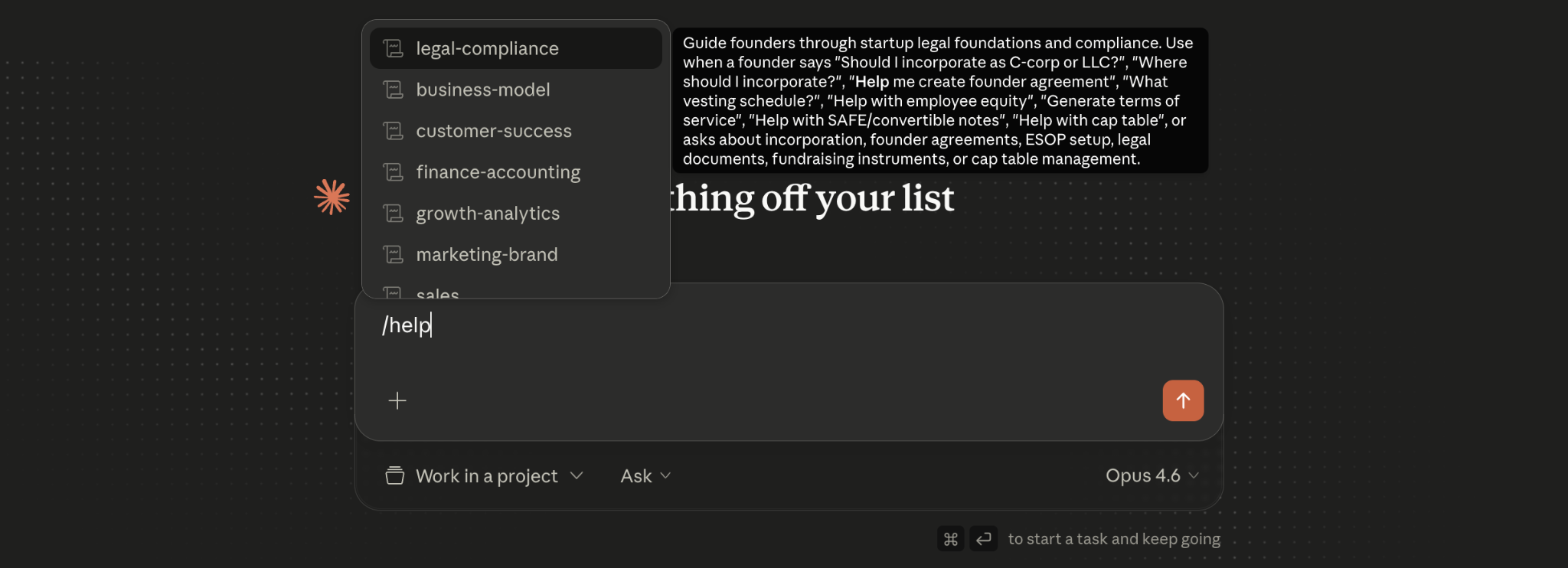
You do not need to memorize commands. The plugin includes a router that understands plain English, so "I'm stressed about making payroll" or "a customer is angry" sends you to the right workflow. Run /smb-onboard first, and Claude asks about your business, helps connect your tools and sets a weekly check-in.
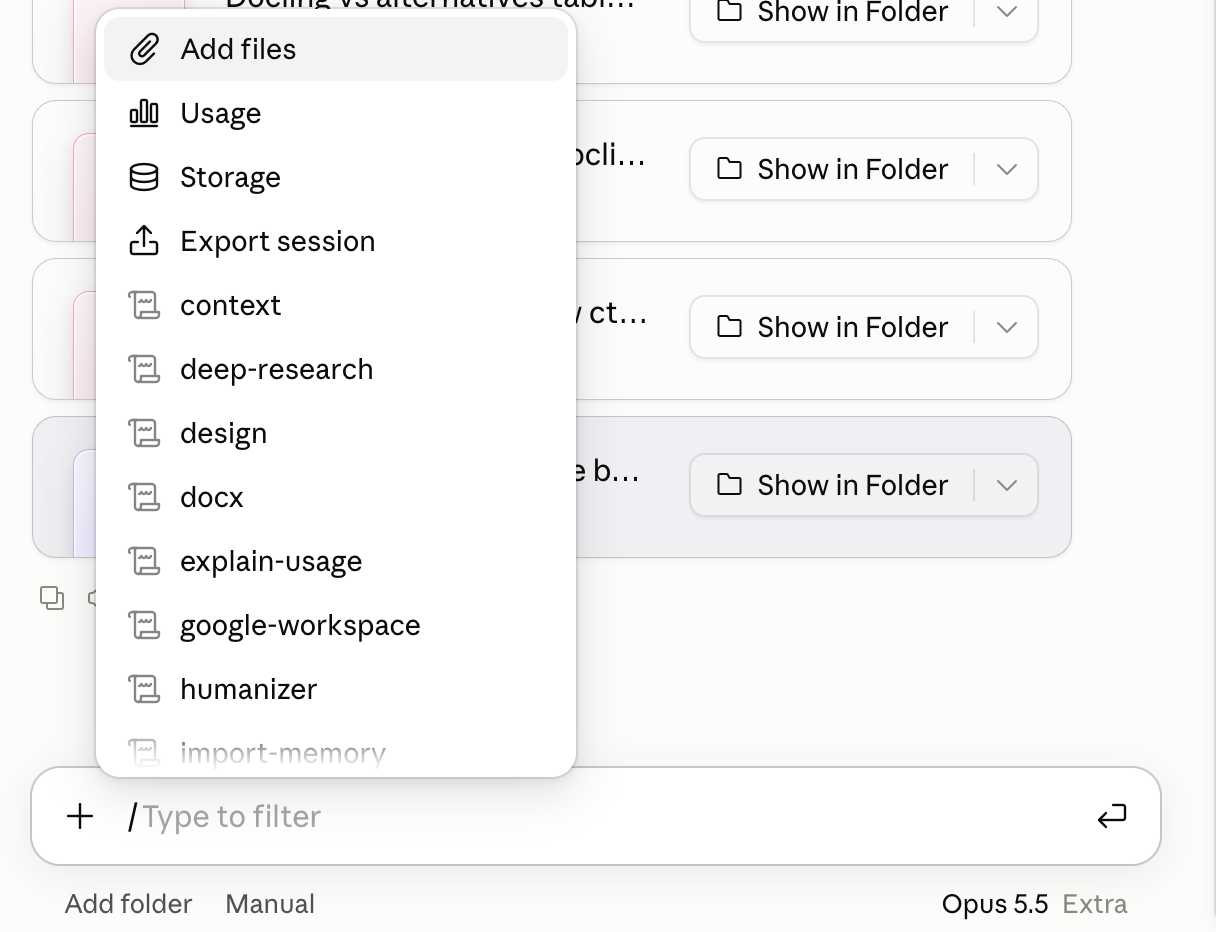
It is not free on its own, because plugins need a paid Claude plan: Pro, Max, Team or Enterprise.
Claude Cowork is the part of Claude that does work instead of only answering questions. It carries a multi-step job across your connected apps, and it can run that job on a schedule. Since September 16, 2026, Anthropic has been folding Cowork into Claude itself, starting with Pro and Max, with Team and Free to follow. It runs on the web and on mobile as well as in the desktop app.
For a small business, that changes the unit of work. You stop asking for a draft and start assigning a job: close the month, chase the overdue invoices, answer the weekend leads. You can describe the job in plain English or type its command.
A Cowork run also ends differently from a chat. A chat answer is text you still have to act on. A Cowork run ends with the work staged in your tools: invoice reminders drafted for PayPal, a close packet exported, calls blocked on your calendar. The desktop app is still needed for files on your computer, browser and computer use, and plugins that run local servers.
The weekly briefs are the easiest place to feel the change. /monday-brief puts your QuickBooks cash position, sales trend, pipeline movement, calendar and the one thing that most needs you on a single page. It can run on a schedule, so it is waiting before you sit down. For many owners, it is the report they never had time to build.
For many small business owners, handing over the books is a trust decision. In Anthropic's survey of owners, half named data security as their single biggest hesitation about AI. Every workflow starts in approval mode. Claude drafts and stages the work, then waits for your OK.
Once you trust a workflow, you can let it run on its own, one workflow at a time. Some workflows stop short of the last step on purpose, so payroll is staged in Gusto for you to submit. Scheduled workflows now run in the cloud, so a Monday brief can be ready before you open your laptop.
Your existing permissions also hold. People can only see through Claude what they can already see in QuickBooks or Google Drive, so customer data stays behind the access rules you already set. Anthropic also does not train on your data by default on its Team and Enterprise plans.
Owners quoted in the launch announcement describe the bigger change. Mike Beckham, CEO of Simple Modern, said: "What we used to think were the constraints are just not constraints anymore." Brian Ludviksen, COO of Purity Coffee, said it "showed me problems I didn't know I had."
Claude for Small Business costs nothing extra, but the plan underneath it does. As of October 13, 2026, Claude's pricing puts Pro at $20 a month ($17 billed annually), Max at $100 a month and up, and Team at $25 per seat ($20 billed annually).
Skills, public workflows and open-source libraries are free to use. That includes our skills and n8n workflow files on GitHub, the open-source humanizer, and Corey Haines' skills library. You only pay for the accounts they run on, like your Claude plan or an API key.
Anthropic does not publish hours-saved figures for these workflows, but owners using Claude more broadly report time back. One owner on Anthropic's small business page says Cowork is "saving me over 21 hours a week." HireEffect, a Dallas bookkeeping and payroll firm, built a Claude dashboard that pulls business data from five systems and cut a monthly task from two hours to 10 seconds.
Each department below follows the same pattern: the workflows in the box, the tools they connect to, and the system we add when a job falls outside them.
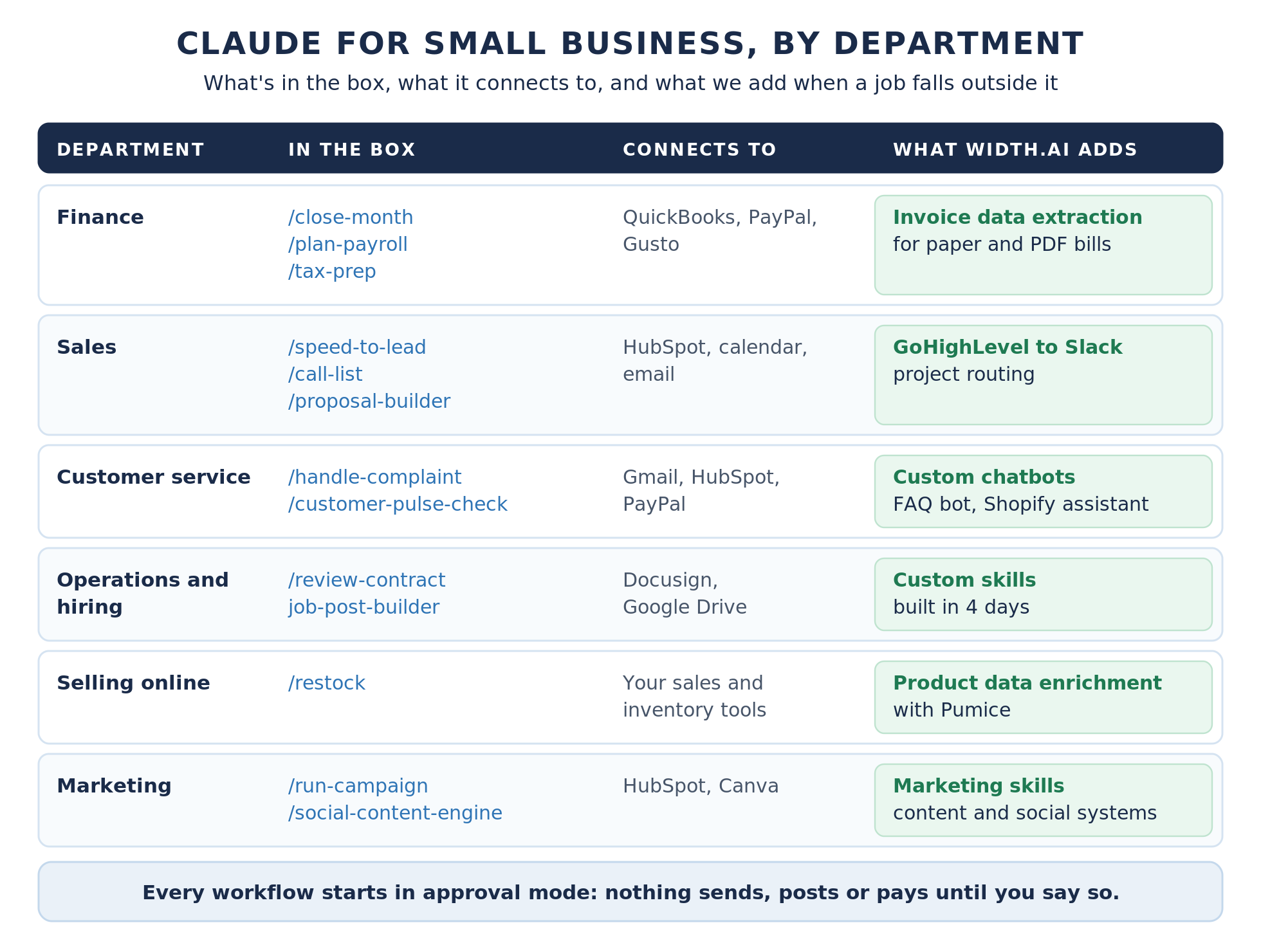
The month-end close is the clearest example of hours coming back, with fewer errors. Run the “/close-month” command and Claude reconciles QuickBooks against PayPal, Stripe or Square, flags the gaps, writes a plain-English P&L and exports a close packet for your accountant. No connectors yet? Upload your bank and processor statements, and it closes from those.
By hand, matching transactions can take an afternoon. With the workflow, it becomes a review: you read the flags, approve the packet and send it. HireEffect used Claude to isolate 16 transactions behind a $13,000 discrepancy buried in two and a half years of a client's books.
For payroll planning, /plan-payroll checks your cash against incoming PayPal settlements. With Gusto connected, it pulls the hours, flags anything off and stages the run for you to submit. /month-heads-up gives a 30-day cash flow outlook with early risk flags. The invoice chaser matches reminders for unpaid invoices to each customer's payment history and tone, and they go out through PayPal only after you approve them.
/tax-prep packages quarterly estimates or year-end 1099s for your accountant. /price-check shows margin by product with three pricing scenarios, which is the fastest way to answer "should I raise prices?" with your own numbers.
One gap is paper. If vendor bills arrive as scanned or PDF invoices, our invoice data extraction pipeline reads them and sends the fields to your accounting system. The close then starts from clean data. It handles paper and handwritten invoices in any layout, and it can match invoices against purchase orders and receipts.
Leads that wait lose interest, and a small team cannot watch the inbox all weekend. /speed-to-lead answers new inquiries from your website, email or chat on nights and weekends with real openings from your calendar, then logs them to your CRM. If you let it run on its own, the meeting is already booked when you check; otherwise the reply waits for your OK.
/grow-pipeline finds prospects that look like your best customers and writes outreach in your voice. /call-list scores HubSpot leads by engagement, fit and urgency, then gives you today's top five calls with talking points and time blocked on your calendar. /proposal-builder turns a two-minute voice memo from a job site into a branded proposal priced from your past jobs, and /crm-cleanup clears stale deals and duplicates in HubSpot.
The CRM skill also logs calls and notes when you tell it what happened, so updating HubSpot after a conversation takes one sentence instead of a form.
Service businesses that run on GoHighLevel can add one more step. Our GoHighLevel to Slack setup sends each new client request to the right teammate in Slack the moment the form comes in. No project waits on the owner to assign it. It routes by the kind of work requested, so a website job reaches your designer and an automation job reaches your builder, with the project details in the message.
/handle-complaint pulls the customer's context, drafts a reply in your tone, and suggests the operational fix behind the complaint. The ticket-deflector skill can answer "where's my order" and issue a PayPal refund once you approve it. /customer-pulse-check groups disputes, tickets and reviews into themes with response templates, plus a short list of three things to do this week.
Those workflows improve the customer experience by helping you answer faster, and /handle-complaint works even from a pasted email. They do not put an answer in front of a customer on your website at 11 p.m.
For that, we build customer-facing chatbots. Our FAQ chatbot answers from your own policies and improves from every conversation, sending unanswered questions back to you as draft answers to approve. Stores on Shopify can add a Shopify shopping assistant that helps customers find the right product and checks order status.
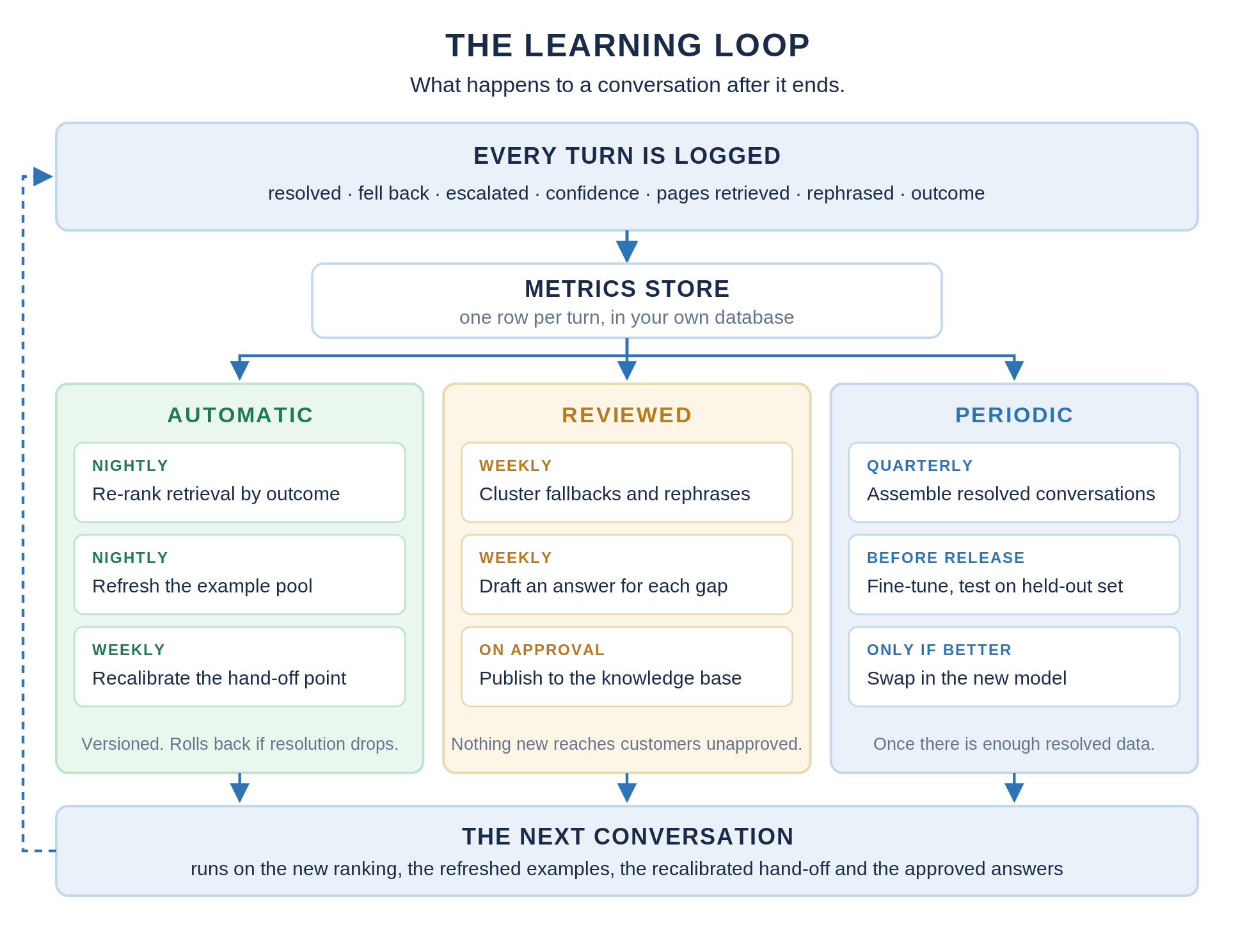
Most FAQ chatbots are at their best on launch day and drift as questions change. Ours log every conversation, re-rank their sources by what actually resolved questions, and hand off to a person when confidence is low. The Shopify assistant understands requests like "cardigans for formal occasions" that a filter cannot match.
/review-contract, the contract reviewer, reads an NDA or vendor contract in plain English, flags risky terms with a severity rating, and can mark up a redline copy. It works from an uploaded file, and Docusign adds your pending envelopes. /restock handles reorders. The job-post-builder skill writes a job post, an interview guide with a scoring rubric, and an offer letter template, and it can use Docusign and Google Drive when they are connected.
Clerical work like this is where the time comes back. Ryan Olson of MidCentral Energy said in the launch announcement that Claude is "freeing up things that used to be a lot of very tedious clerical work for more value-add tasks."
When a tool you rely on has no connector, build-connector links it through Zapier. The build-agent workflow turns a task you do by hand every week, like a supplier reorder check or a Friday timesheet reminder, into a workflow you can run by name or on a schedule. It is the simplest way to build your own AI agents for repeatable tasks, and a custom skill takes over once the job gets specific to your business or your operational systems.
Stores and distributors have one job the plugin does not cover: product data. Every new SKU needs a title, a description, attributes and specs before it can sell, and supplier files rarely include them.
The Pumice product data skill lets Claude call Pumice, the product data platform we built, to find the manufacturer's page, pull the real specs and write the fields. If you prefer automation, the product enrichment template in our free n8n marketing workflows starts from a product's title, MPN and brand, and swapping in a Google Sheet trigger runs it across a whole catalog.
Both follow the rules you set: a title length limit, your brand tone, and no specs that are not in the source. Pumice can also write channel-specific versions for Amazon, Walmart and eBay, and it enriches attributes in more than 40 languages. That one product record then feeds the listing, your site search, your shopping feeds and the answers AI assistants give about the product.
The plugin covers the planning side of marketing campaigns well. /run-campaign finds the slow stretch in your revenue, analyzes your HubSpot campaign performance, drafts the promo strategy and builds the Canva assets for your next send. HubSpot says its connector helps owners "segment smarter, run better campaigns, and drive more leads." /marketing-monday reports what is working each week, and /social-content-engine drafts next week's posts in your voice and stages them for approval.
What it does not do is the work that brings in search traffic: keyword research, long-form content that ranks, landing-page fixes and ad-account audits. Those are jobs for skills. A skill is a file that teaches Claude one job, and it installs in seconds. Anthropic publishes a Marketing plugin, and Corey Haines' open-source skills library has more than 54,000 stars on GitHub.
We cover the seven we use most in Claude Skills for Marketing. They are keyword research (our Ahrefs keyword research skill), competitor profiling, AI SEO, our SEO blog post generator, copywriting, conversion rate optimization, and paid ads audits. For copy that has to read like a person wrote it, our humanizer skill is open source.
Each one does a specific job. Keyword research runs through the Ahrefs connector and checks every term against your niche. Competitor profiling turns a list of competitor URLs into a side-by-side view of how they position and price. AI SEO structures pages so ChatGPT, Perplexity and Google's AI Overviews can quote them.
Our SEO blog generator is built to pass AI detection, with Ahrefs and SurferSEO wired in. The paid ads skill reviews a campaign export, or your Google Ads account through a Cowork connector, and finds wasted spend. Start with the one that matches the job you repeat most, because that is where a skill pays back its setup time fastest.
Those skills are pieces of a bigger system. We build a content automation system for small businesses that are short on content output: it researches, writes and publishes long-form content inside the marketing tools you already use.
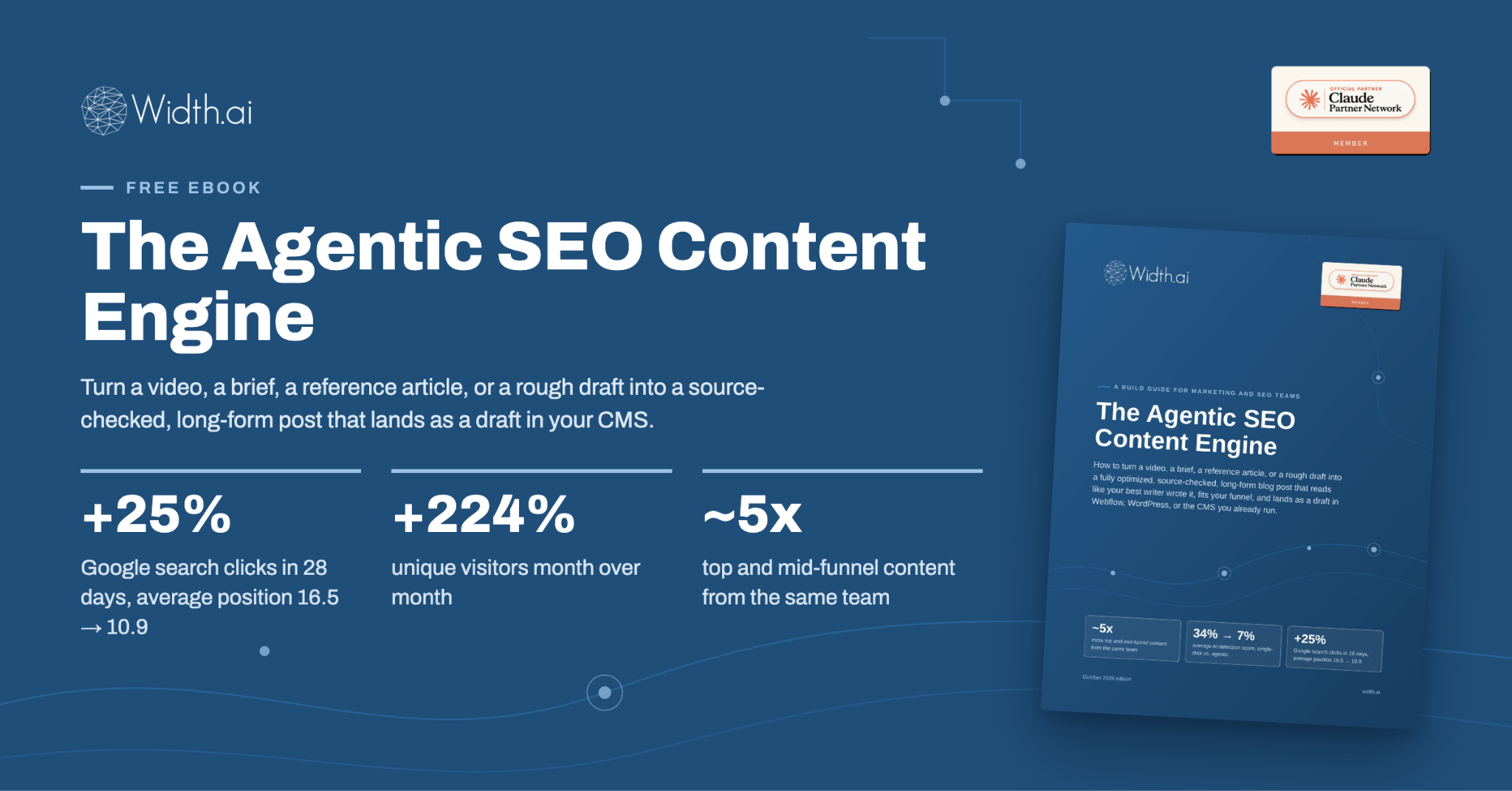
Our ebook breaks down exactly how we build these systems and achieve these results with an automated system.
Posting on seven platforms means seven writing jobs per topic, which is why posting schedules stall. Our n8n social media workflow turns one form into posts written for LinkedIn, Instagram, Facebook, X, TikTok, Threads and YouTube Shorts.
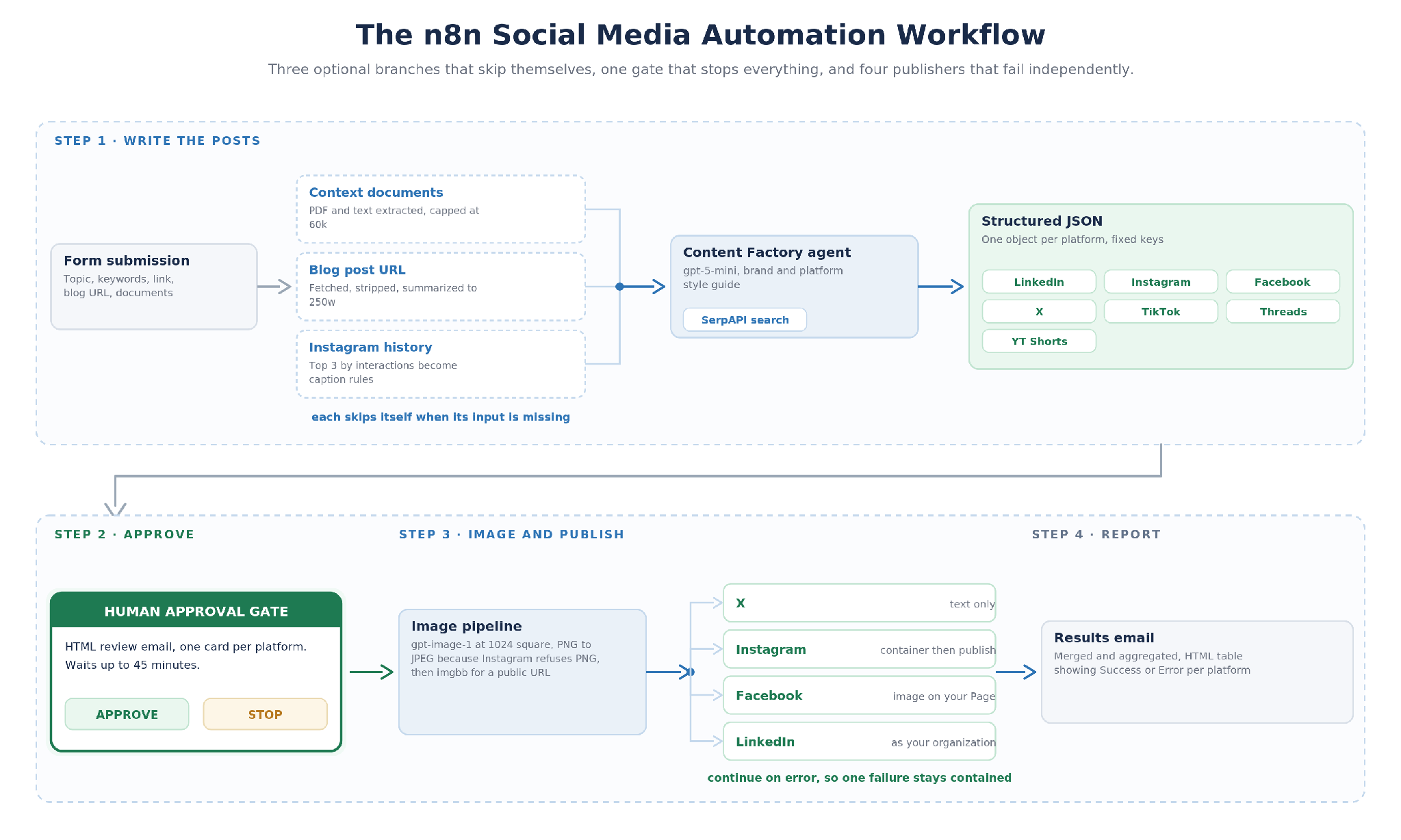
The form takes a topic and, if you want, keywords, a link, a blog post URL and your own documents. Uploaded documents become the source of fact, so a launch post uses your real specs instead of the model's guess.
Nothing publishes until you click Approve in an email, and the workflow waits up to 45 minutes for that click. Then it publishes to X, Instagram, Facebook and LinkedIn at once. Instagram captions follow rules learned from your own top three recent posts.
An expired login on one platform does not stop the other three, and a results email shows success or error for each. TikTok, Threads and YouTube Shorts get written posts but are not auto-published, because none of them offers a comparable publishing API.
The workflow file is free to import. As published, it uses OpenAI models for writing and images, and n8n also has an Anthropic model node if you want the writing done by Claude. It pairs well with the skills: Claude for planning and long-form work, and the n8n workflow for multi-platform posting behind an approval click.
When adopting AI, roll out Claude for Small Business one department at a time, so each workflow earns your trust before the next one starts.
Week 1: learn and connect. Take Anthropic's free online small business course, AI Fluency for Small Businesses, built with PayPal for small and medium-sized businesses and taught by owners such as Prospect Butcher Co. in Brooklyn. It covers Anthropic's 4D framework: Delegation, Description, Discernment and Diligence. Then connect one or two core tools, such as QuickBooks, PayPal or HubSpot, and run /smb-onboard so Claude learns how your business works.
Anthropic is also taking Claude for Small Business on the road. The Claude SMB Tour is a free, half-day AI fluency training and hands-on workshop for local business leaders. The Greater Cleveland Partnership and the National Talent Collaborative helped pilot it, and more cities are being added.
Anthropic, a public benefit corporation, ties the launch to its public benefit mission and to local communities. Alongside Claude for Small Business, it backs the Workday Foundation Solopreneurship Accelerator with the Local Initiatives Support Corporation, which gives solo entrepreneurs seed funding and an AI-first entrepreneurship curriculum. It also partners with three community development financial institutions that use AI in their own operations. One of them, Pacific Community Ventures, uses Claude in its Radiant Data Hub to gather voice-based feedback from its small business clients.
Week 2: one workflow per department. Start with /monday-brief and /close-month in approval mode, and read every draft before you approve it. Note which ones you would trust to run on their own.
Week 3: one marketing skill. Install the skill for the job you skip most, whether that is keyword research, copy or an ad audit, and run it on real work. This month's blog post or your top landing page is a good first test.
Week 4: one automation. Import the social media workflow, run one topic to the approval email, and connect one publishing account. If long-form content is the bigger gap, read the ebook and have us set up the content system instead.
After that, write down the weekly task that still has no workflow. That is a job for build-agent, a custom skill, or a build from our team. We will build one workflow for your business in 4 days, and if it isn't automated in 4 days, we work for free.
Claude for Small Business gives a small team the workflows of a much bigger one. The close, the follow-up, the replies and the reports get done in the gaps of the day, and you approve them. The skills and automations cover the rest of the week. Together they add up to more output from the same hours, at a fraction of the cost of hiring for each job.
Start with the plugin, because it comes with the plan you would pay for anyway. Add skills and automations where the bundled workflows stop. When a job is still left over, that is the one to have built.
See exactly how it works in the free ebook. We will set this up with no upfront cost, you only pay if you decide to use it.
It depends on your tools and the jobs you want done. Claude's case for small business is the plugin: 43 workflows that work inside QuickBooks, PayPal, HubSpot and Gusto, with approval before anything sends or pays. If your team already works in ChatGPT, compare the jobs rather than the brand; we break the models down in Which AI Is Best for Digital Marketing.
The Small Business plugin has no separate charge, but it needs a paid plan, because the free plan does not include plugins. Pro is $20 a month, or $17 a month billed annually, and Team starts at $25 per seat per month, or $20 billed annually. Max starts at $100 a month for heavier use, and every paid plan can run the workflows.
Yes, for writing-heavy work and for structured admin like the month-end close, invoice chasing and lead follow-up. Treat it as a fast assistant whose work you review, because the plugin does not give tax, legal or HR advice. Every workflow also waits for your approval until you decide to let it run alone.
The best AI for a small business owner is the one that works inside the tools you already run. Check which of your systems each assistant connects to, whether it can run on a schedule, and whether you approve its work before it goes out. Start with accounting, payments, CRM and email, because that is where most weekly admin lives.
It is a plugin. You turn it on inside Claude on a Pro, Max, Team or Enterprise plan, and it adds no separate charge. You install it from Anthropic's plugin directory and connect your tools from there.
Yes. You can install marketing skills, use build-agent to turn a weekly task into a workflow, or write your own skill file with Claude's skill creator. The build-connector workflow also links tools without a connector through Zapier. For jobs that need deeper connections to your systems, we build custom skills and automations.

