How Is AI Changing Ecommerce? The Full Picture in 2026, From the Storefront to the Supply Side
How Is AI Changing Ecommerce? The Full Picture today, From the Storefront to the Supply Side

Matt Payne
October 17, 2026
Onboarding a seller is a solved problem. There is software for every part of it. Registration forms, identity verification, sanctions screening, agreement e-signature, payout setup, tax collection. Pick a platform and most of that is configuration rather than engineering.
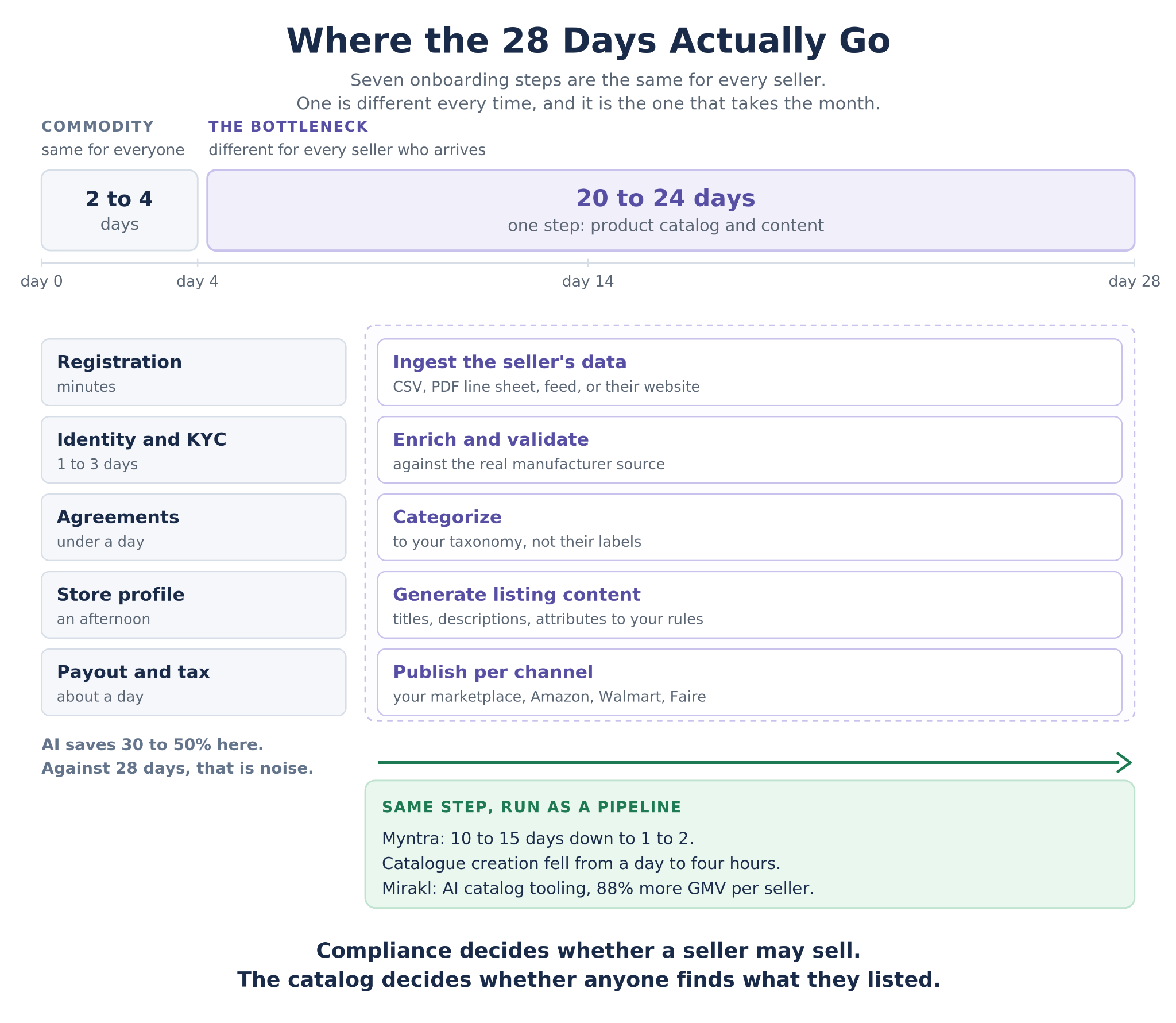
So the seller signs up on Tuesday, clears verification by Thursday, signs the agreement Friday, and then sits at zero live listings for the next three weeks. Mirakl's 2026 Seller Report puts the median at 28 days from start to selling, with the fastest under two weeks. The paperwork took four days. But another piece of the puzzle took 24 days.
That something else is the catalog onboarding. Getting a seller's products into your marketplace in a state where they can actually be found and bought is the step that nobody built good software for, because it is the only step that is different for every single seller who arrives.
It is also where the automation numbers stop being incremental. Myntra cut seller onboarding from 10 to 15 days down to 1 to 2, and the specific line worth reading twice is that catalogue creation fell from one day to four hours. Sellers upload a single product image and AI extracts up to 40 attributes, with catalogue experts reviewing rather than typing. Mirakl reports that sellers using its AI catalog transformer generate 88% higher GMV than sellers who do not.
Both of those are the same step. Not KYC, not agreements, not payouts. The product data.
That is worth stating plainly because the AI tooling aimed at seller onboarding mostly is not aimed there. Document verification demos beautifully. Identity screening returns a result in seconds and the before-and-after is easy to show on a slide. The catalog is unglamorous, different for every seller who arrives, and it is where three of the four weeks actually go.
The full eight-step process is worth walking, along with an honest read on which steps AI changes and which it merely speeds up. But the part that decides whether any of it is worth doing is what happens when the catalog step stops being the constraint on how many sellers you can activate in a quarter.
AI for seller onboarding means getting a third-party merchant from registration to revenue on your platform, whether that platform is a marketplace, a distributor catalog, or a retailer's supplier program. The unit of success is a seller transacting, not a seller approved.
Within that, the term covers more ground than it is usually sold as covering. Identity verification and document checks are the part that demos well, because progress is visible in seconds. The full definition runs from the registration form through verification, agreements, store configuration, product data ingestion, content generation, categorization, shipping and returns setup, payout and tax collection, and the first live listing. The last mile is the one that determines whether any of the preceding work produced a seller who sells.
The supply side is getting harder to grow. Marketplace Pulse reports that 165,000 new sellers launched a first listing on Amazon.com in 2025, the lowest annual total since tracking began in 2015, down 44% year over year and 73% off the 2021 peak. Fewer sellers are starting, which makes the ones who do start more expensive to acquire and more costly to lose.
Losing them is easy, because onboarding is where the attrition happens. A seller who has signed an agreement has already spent effort and has not yet made a dollar. Every day between signature and first sale is a day they can reconsider, and the abandonment is usually silent: no cancellation, just a seller account that never goes live and never gets chased.
The reason the gap is long is structural rather than operational. Identity checks, agreements and payout setup are the same for every seller, which is why they automate well. Product data is different for every seller: a different export format, a different attribute vocabulary, a different level of completeness, a different language in some cases. The work that is identical across sellers got automated a decade ago. The work that is unique to each seller is still being done by hand, usually by a catalog operations team that becomes the constraint on how many sellers the platform can add in a quarter.
Which produces the pattern every marketplace operator recognizes: onboarding capacity is measured in sellers per month, and the number is set by how many catalogs the ops team can process, not by how many sellers the sales team can sign.
The second-order costs are worse than the delay. Sellers stuck in the queue get chased by whoever is onboarding them faster. Ops teams under pressure to clear the backlog lower the bar on listing quality, which produces live listings that do not get found, which produces a seller whose first month is disappointing and whose second month is somewhere else. And because the bottleneck is staffing rather than software, the usual response is to hire, which works and does not scale and quietly makes seller acquisition a variable cost.
Most marketplaces run some version of the same sequence. Worth walking it once, with an honest note on each step about whether AI changes the economics or just shaves minutes. The distinction matters, because a roadmap that treats all eight as equal candidates for automation will spend its budget on the cheap ones.
Run a stopwatch across those eight on a real seller and the shape is consistent. Steps one through four and six through eight are hours or a day each, bounded by how quickly a provider responds or a person signs something. Step five is bounded by how many SKUs the seller has and how bad their data is, which means it is the only step that gets worse as the seller gets more valuable.
Seven of those eight are the same for every seller who ever signs up.
The reason most AI seller onboarding pitches underwhelm is that they are aimed at the commodity steps. Automating identity verification takes a two day task down to two hours, which is a real improvement against a 28 day cycle and also a rounding error against it.
Run the arithmetic on a typical onboarding. Registration is minutes. Verification is one to three days, mostly waiting on a provider. Agreements are a day if the seller is responsive. Profile setup is an afternoon. Payout and tax are a day. Call the whole commodity half four days on a good run. Against a 28 day median, that leaves roughly three weeks unaccounted for, and all of it sits in step five.
Catalog onboarding is more of a bottleneck for teams as it is the only step where the input is different every time. A seller arrives with an ERP export in their own column names, a PDF line sheet, a website, or all three disagreeing with each other. The attributes your taxonomy requires are not the attributes their system stores. Half the fields are empty, some are wrong, and the descriptions were written for a different channel, or by a manufacturer, or not at all.
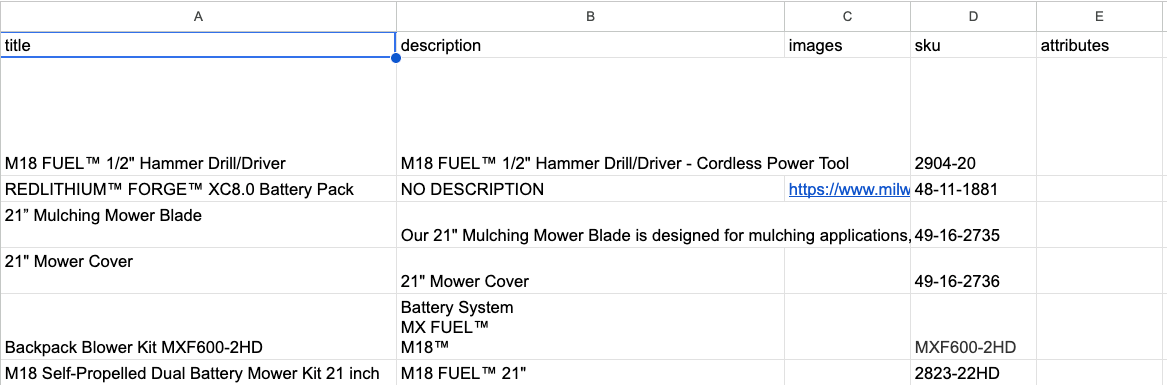
You get handed files like this: sparse data, missing fields, generic data
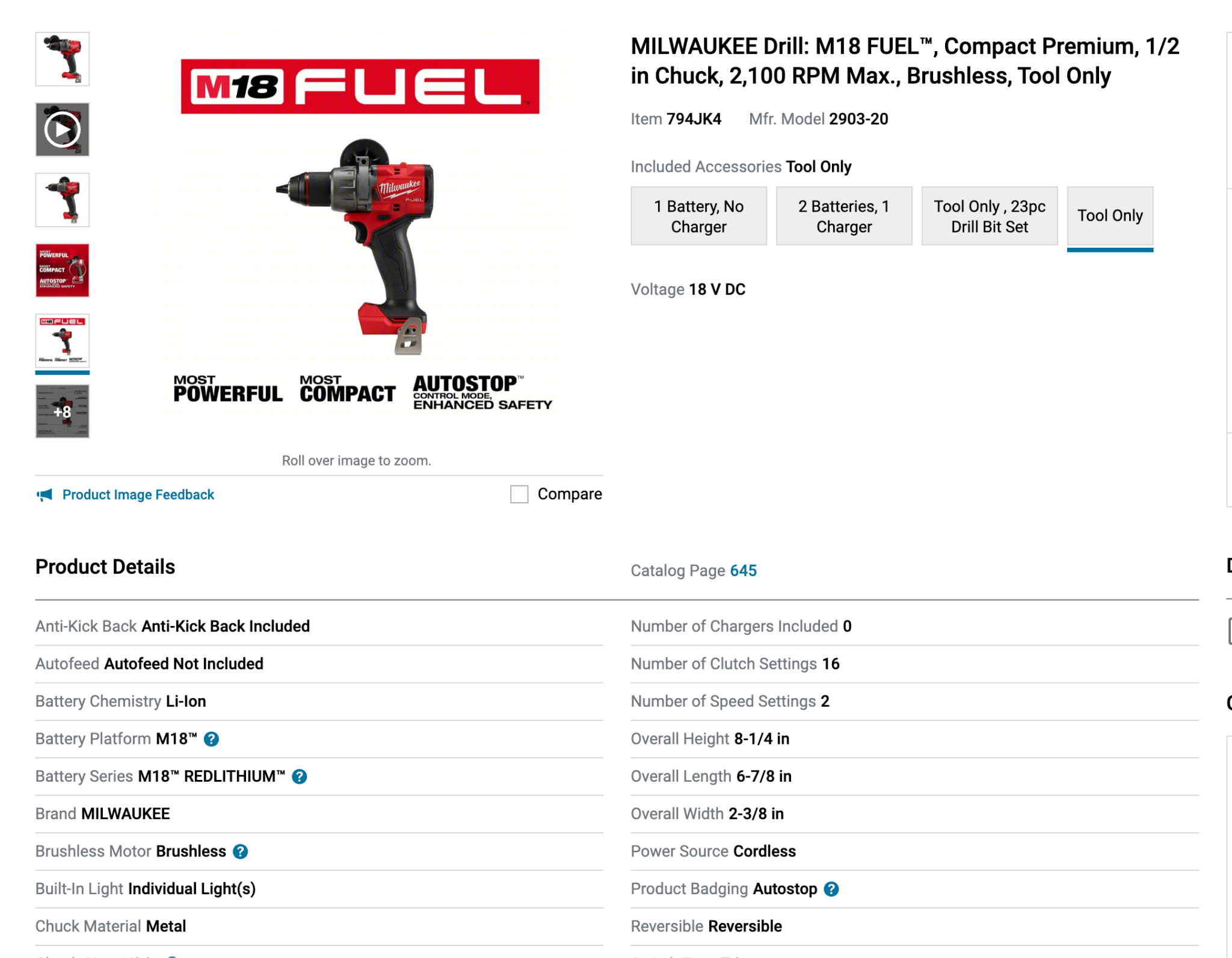
And have to turn it into a product page that looks like this.
This task is not hard to do, but requires a serious manual effort each time a new vendor comes on board, and there is no configuration screen that makes it go away. Which is why catalog operations headcount is the real constraint on how many sellers a marketplace can activate, and why the number of sellers you can onboard this quarter is a resource decision rather than a strategy one.
The focus turns to automating as much of the sku enrichment workflow as possible while ensuring the product data is grounded (sourced from the manufacturer), and follows your brand guidelines and compliance rules.
If you can reduce the amount of time it takes to onboard a catalog you can:
The platform Pumice.ai focuses on automating the process of going from basic ERP export sku data to fully enriched product data records for any catalog or channel, following your exact brand, compliance, and copy rules. It uses a research phase to gather first party sourced product data about each sku for the enrichment steps to use, so you know exactly how each field was created.
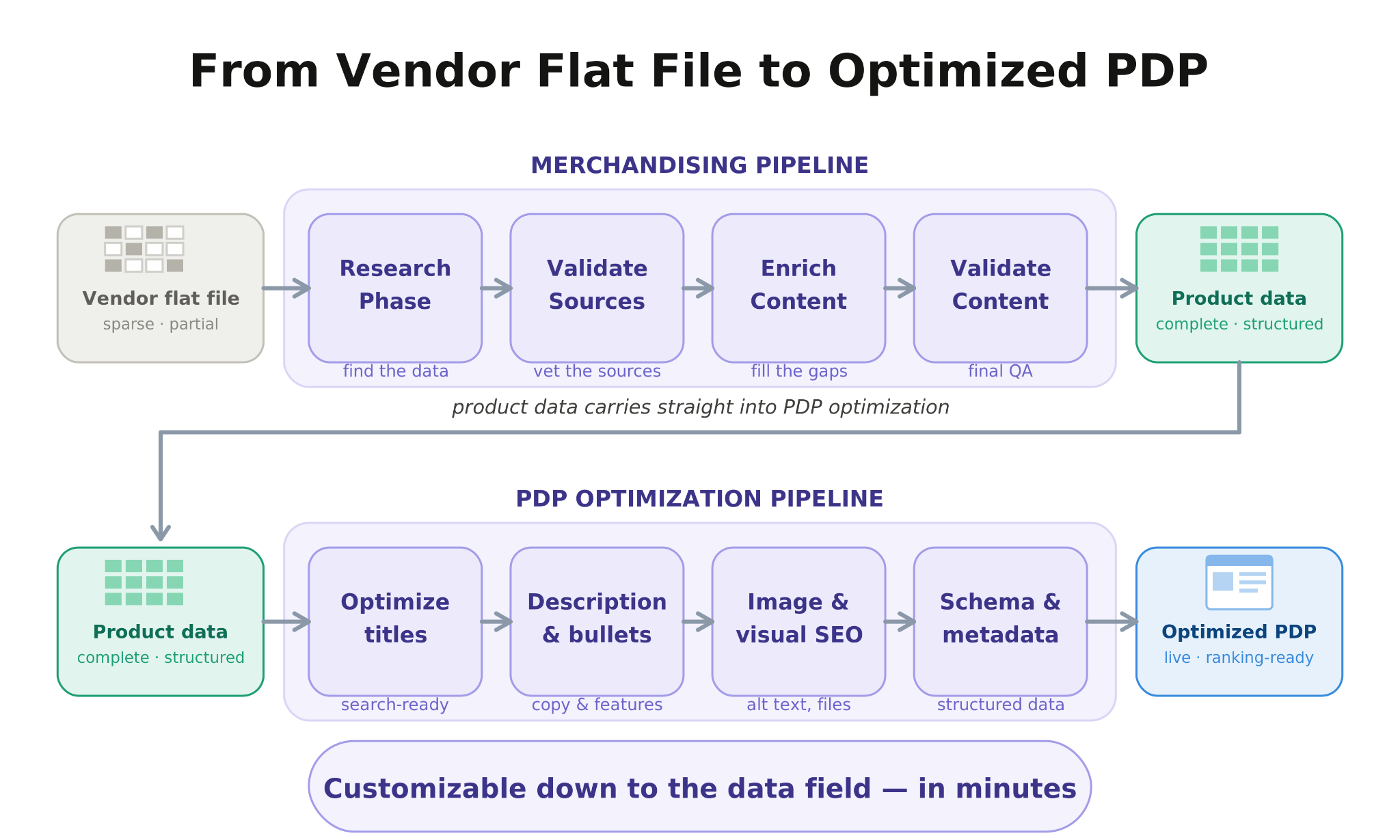
The ai agents run with two main pipelines, the merchandising pipeline and the PDP optimization pipeline. The merchandising pipeline focuses on enriching sparse/poor skus, then the PDP optimization pipeline focuses on optimizing existing product data for SEO.
The run starts with a sku research phase rather than right into field mapping or enrichment. Using the sku identifiers in the seller's file, the pipeline pulls product data from sources you define, typically the manufacturer site behind the SKU or a PDF line sheet the seller was sent by their own vendor. A validation agent confirms the retrieved data describes that exact SKU before any of it is used, which matters at onboarding specifically because a new seller's catalog is full of pack variants and near-identical model numbers you have no prior data on.
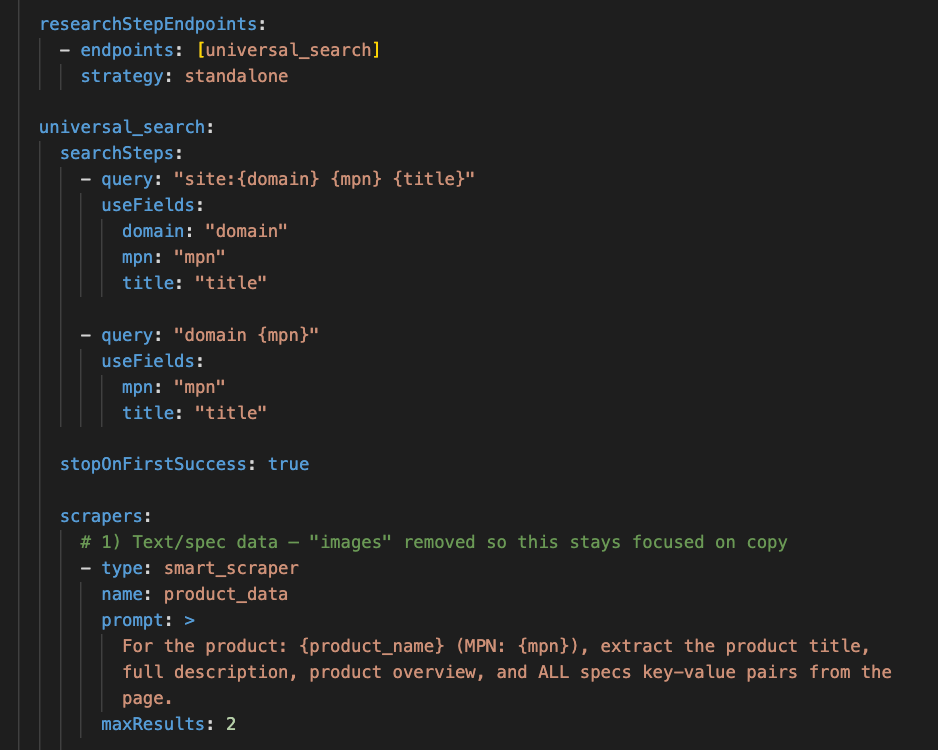
Generation then runs against your brand rules and PDP schema rather than the seller's. Titles in your format, descriptions that meet your content policy, the attribute keys your category requires, banned terms enforced. Categorization fits each product to your taxonomy rather than trusting the seller's own category labels, which is the single most common source of listings that go live and never get found.
Validation rejects anything that misses a required field or a character limit and sends it back with the reason, so a run finishes rather than halting. Rows that cannot be completed are flagged for a human instead of being published incomplete or dropped silently.
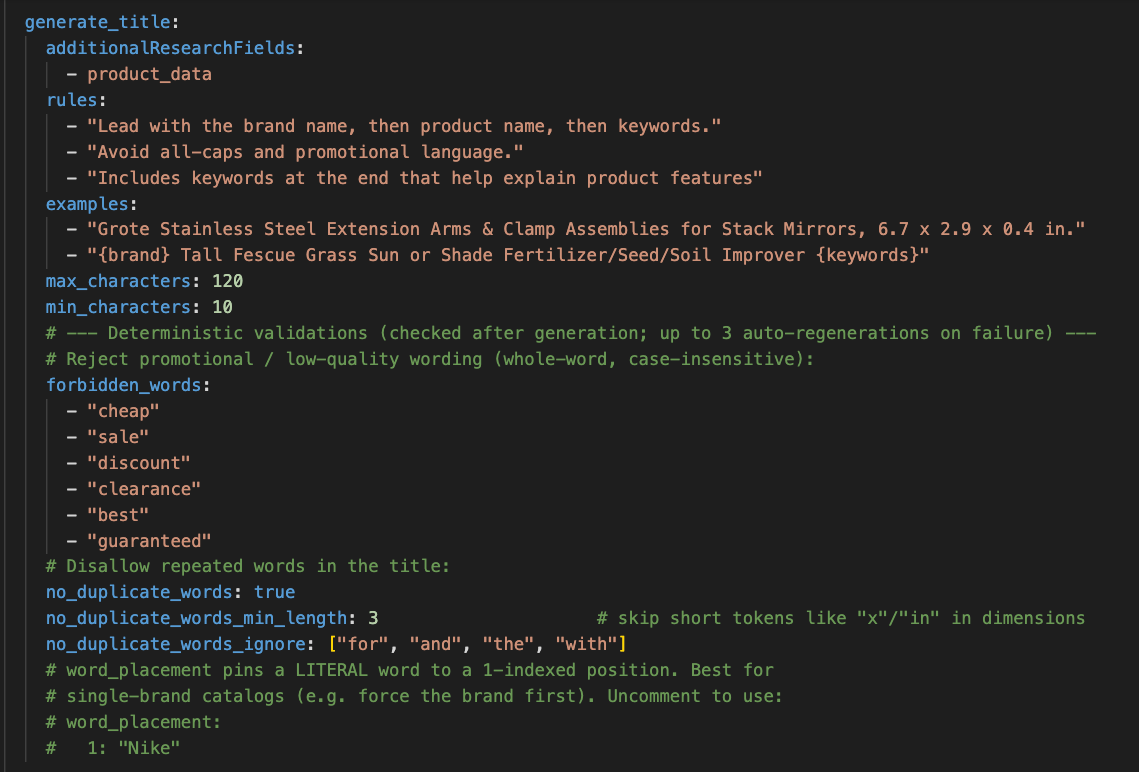
Two controls are worth setting deliberately at onboarding, because they are the ones that differ from a normal enrichment run. The first is source precedence per vendor: a new seller has no history with you, so you are deciding in advance whether their own site, their manufacturer's site, or the line sheet they sent wins when the three disagree. The second is the strictness of the identity gate, which in a category full of near-identical variants should start tight and loosen once you have seen what their catalog looks like.
What comes out is a set of records in your format rather than theirs, with the rows that could not be completed flagged rather than published half-finished. The review queue is the seller's exceptions, not the seller's catalog, and the difference in volume between those two things is the entire point.
For a distributor arriving with a 5,000 SKU ERP export, that is the difference between a catalog operations project measured in weeks and a job that runs overnight with a review queue in the morning.
“Product into catalog” activation is usually treated as the finish line, which is why so many sellers go live and fall flat. The listings that cleared your standards on day one are competing against listings that keep changing, and nothing about go-live makes them stay competitive.
The Product Optimization Playbook is the pass for that. Give it a SKU and a target query and it pulls the pages currently ranking, runs gap analysis against the seller's listing, and returns specific changes with the evidence behind each one. Run it on the seller's highest-revenue products 30 and 90 days after activation rather than once at launch.
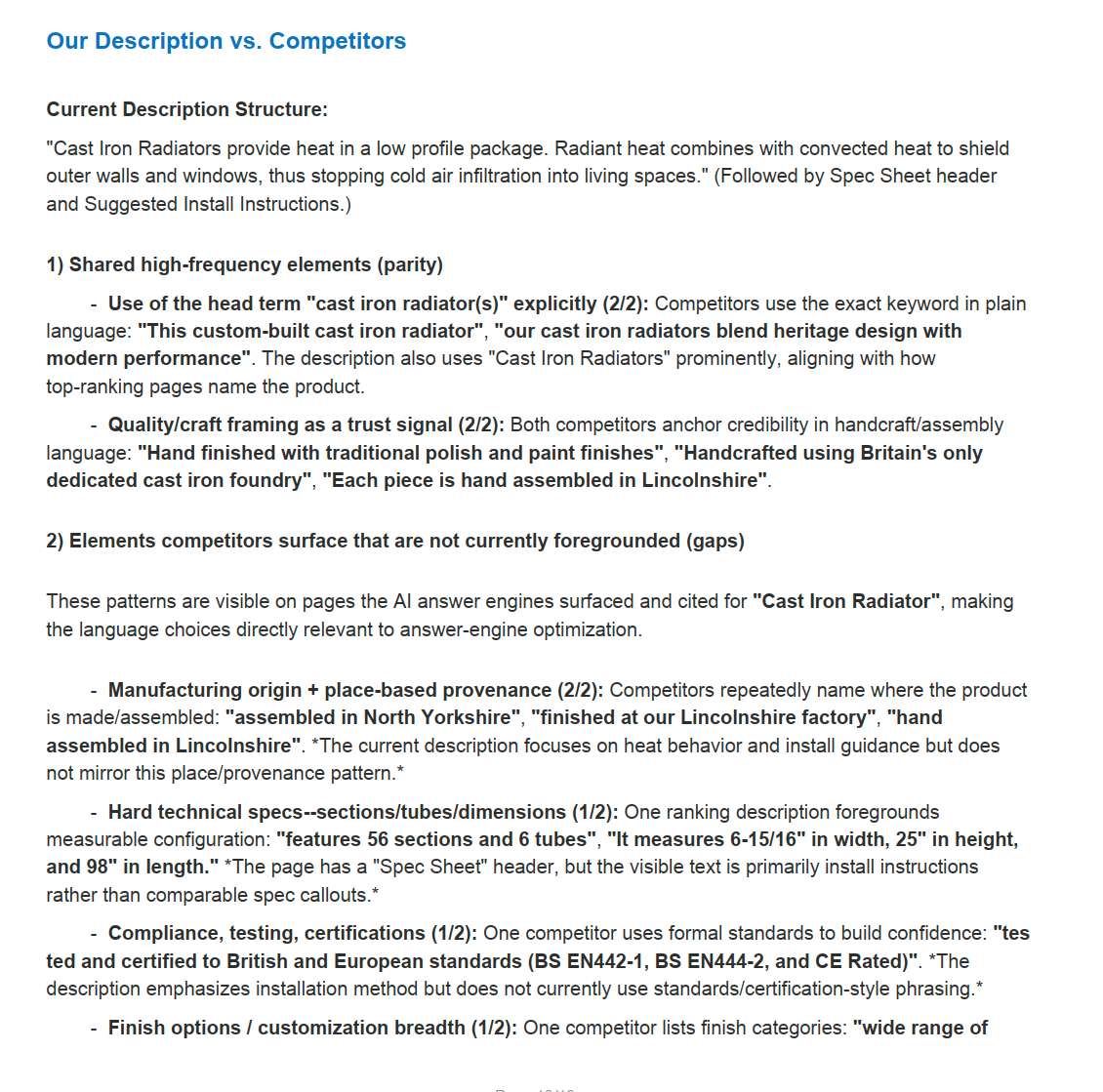
The reason this belongs in an onboarding use case rather than a separate one is that the two jobs share an input. The enrichment run that got the seller live produced structured records with real attributes in them, and that is exactly what the Playbook needs to compare against a live result page. A seller onboarded from a thin catalog has nothing to optimize later, which means the shortcut taken in week one becomes a ceiling in month three.
This is also the part that makes onboarding measurable in revenue rather than in elapsed days. A seller who went live in four days and sells nothing has not been onboarded, they have been processed.
Four numbers describe whether onboarding works, and only one of them is the one most teams report.
Track the first two weekly and the second two per cohort. Onboarding improvements show up as a cohort shifting, not as individual sellers moving, and any single seller is noisy enough to tell you whatever you were hoping to hear.
The one to avoid reporting on its own is sellers onboarded per month. It counts accounts that reached go-live, treats a seller with twelve live products the same as one with four thousand, and goes up when standards go down.
If onboarding is taking a month, the fix is almost never in the parts you have already automated. Verification is fast, agreements are fast, payouts are fast. The catalog is where the month goes, and it is also where the revenue difference shows up 90 days later.
A reasonable first pass: measure time from signature to first live listing rather than from registration, because that single change usually reveals where the time actually sits. Then take your next ten sellers and run their catalogs through enrichment instead of through the ops queue, and compare the cohort against the last ten on rejection rate and time to first order.
The reason to do it in that order is that the measurement usually settles the argument on its own. Most teams are surprised by where the days are, and once the number is on a slide the conversation about what to automate stops being a matter of opinion.
Compliance decides whether a seller is permitted to sell on your platform. The catalog decides whether anyone finds what they listed, and how much of it moves.
Bring a CSV from a seller you are onboarding now, the messier the better, and watch Pumice research, enrich, categorize and format it against your taxonomy and your content rules. Free to try, no credit card required. Bring the catalog your ops team has been putting off.
Using AI to compress the path from a seller signing up to their first live listing and first order. It spans identity verification, agreements and payout setup, but the highest-return application is the product catalog step: ingesting the seller's data, enriching it, categorizing it, and generating listing content to your standards.
Start with the subset the seller expects to sell, usually a few hundred SKUs across their strongest categories, and get those live properly rather than getting everything live badly. Then run the remainder as a batch once the rules are tuned to their data. Partial catalogs that sell beat complete catalogs that sit unfound, and the first cohort tells you what the rules need to be.
The product catalog. Every other step receives the same shape of input from every seller, which is why identity checks, agreements and payouts automated first and why the remaining gains there are small. Catalog data arrives different every time.
Myntra has published the clearest figures: a cycle that ran two weeks now finishes inside two days, with the catalogue portion falling to four hours. Treat that as the achievable end of the range for a platform that has invested in it, against the 28 day median Mirakl reports across marketplaces generally.
Mostly who the counterparty is. Seller onboarding usually means third-party merchants listing on a marketplace. Vendor or supplier onboarding usually means a company you buy from, with more emphasis on procurement, contracts and compliance. The catalog problem is identical in both.
Yes, and large catalogs are where it pays. The pipeline runs thousands of SKUs per job with validation on every row and a retry on anything that fails, and rows that cannot be completed are flagged rather than dropped. Manual review then goes to the exceptions instead of to everything.
No. It sits alongside it and handles the catalog step. Your platform keeps registration, verification, agreements, payouts and the storefront. Enriched records export back as CSV or through an API into whatever holds your product data.
