Claude for Small Business: More Output From the Same Hours, at a Fraction of the Cost of Hiring
Claude for Small Business explained for owners: 43 workflows by department, the tools they
Width.ai
November 6, 2026
The cool part about automating restaurant email marketing is that you already own most of the pieces.
Your POS or reservation platform came with campaigns already built: a welcome email, a we-miss-you email, a birthday note. Once they are switched on, they run while you work the line.
Then a regular who came in every other Friday stops coming. The we-miss-you email goes out on day 60, after she has already forgotten about coming in. Your lunch regulars get the same afternoon send as everyone else, and the guest who only orders delivery gets an invitation to book a table.
All of a sudden the fancy tools you signed up for don’t actually get the results.
Nothing is inherently broken. The sending cadence is an average across your whole list, and each platform sees only its own slice of the guest. The POS knows what she ate, the reservation system knows when she sat down, and the ordering app knows what she gets at home. None of them know the full picture.
So actually automating restaurant emails takes two layers. The first is the right campaigns, fed by the guest data your systems already collect. The second decides who hears from you and when, guest by guest. Put both in place, in that order, whether you run one room or several, and the return shows up in the two units an owner counts: covers and hours.
Let’s talk about the type of workflows we’ve seen that truly create ROI.
Restaurant email marketing automation is a set of campaigns that a guest's behavior triggers: a first visit, an order, a lapse, a birthday. Nobody on the team hits send. Every major restaurant platform can do this, and the campaigns look much the same everywhere.
That makes the first layer the easy part of email marketing for restaurants. The second layer decides who is in each segment, when each guest hears from you and what the email says. Platforms handle it with thresholds and timers, and it is where one restaurant's email starts to beat another's. Two restaurants can run the same welcome and win-back campaigns and get very different results, because one sends each email to the right guest at the right moment.
Both layers run on the same guest data, which is why the setup order matters. Campaigns come first, then the data that feeds them, then the decisions.
Seven restaurant email campaigns cover almost everything a guest needs to hear from you. Each one fires from something the guest did, and each needs one specific piece of data before it can fire at all. All of these can be automated and optimized to produce real ROI.
Switch on the welcome email and the win-back first. The welcome catches guests between a first and second visit, which is when a nudge matters most. The win-back recovers guests you are already losing, so its value shows up fastest.
Each campaign can only act on what your systems record. A reservation platform knows when a guest sat down and why. An ordering platform knows the online order but not the dine-in visit. A POS ticket only becomes a guest record once it is linked to a name and an email, through an emailed receipt, a loyalty sign-up or an online order.
Add the birthday, VIP, reorder and seasonal campaigns once the first two run cleanly. Then layer one-off restaurant email campaigns on top for a new menu, a holiday or a slow week. One to four one-off sends a month is a sensible range, because the automated campaigns do the steady work in between.
Give each automated email one job and one button. A welcome shows the menu and the fastest way to book or order. A win-back gives a reason to return, such as a new dish or a seasonal special, and a birthday email makes the booking easy. The fewer choices in the email, the more likely the guest takes the one that fills a seat.
Every cadence in that table is a default built for the average guest. Understanding that matters once you start looking at your regulars one by one, and want to optimize to different customer types.
Restaurant marketing automation has a problem areas like ecommerce email do not: one guest lives in several systems. The POS (Toast, Square, Clover) knows what they ate. The reservation platform (OpenTable, SevenRooms, Resy) knows who sat down and why, and the ordering platform (ChowNow, Olo, the delivery apps) knows what they order at home.
Each platform's automation sees only its own slice. A guest who books through the reservation system and orders takeout through the POS looks like two people, and each system emails the half it knows. Walk-in guests who never book or order online often show up in none of them.
Connecting the systems means one guest record for each person, with every visit from every system attached to it. Your POS, reservation and ordering tools can all share their guest lists, and whoever sets this up for you matches them into one. Each source adds something different:
Ask for one matching rule: match guests on email first, then phone number, and never on name alone, because two guests named Maria Lopez are two different people. A guest who uses two email addresses should still be one person in your records.
The records only need to update and sync once a day. Each morning, yesterday's visits, orders and bookings are added, so the emails that go out later that day know who came in last night.
Consent travels with the record. Your email platform decides who can receive marketing, and the POS only supplies the history. In the US, marketing texts generally need the guest's prior written consent, so keep SMS opt-in separate from email opt-in.
Capture guests at every door to make the record worth having: reservation forms, online checkout, QR ordering, Wi-Fi sign-in and emailed receipts. Every channel that links a visit to an email turns an anonymous ticket into a guest you can thank by name.
For a restaurant on Square and Mailchimp, this is how to automate restaurant email marketing end to end. Our custom workflow is free on our GitHub repo. Whoever handles your tech can install it, or we can set it up for you, and it runs two AI agents on your Square sales and sends through your own Mailchimp account.
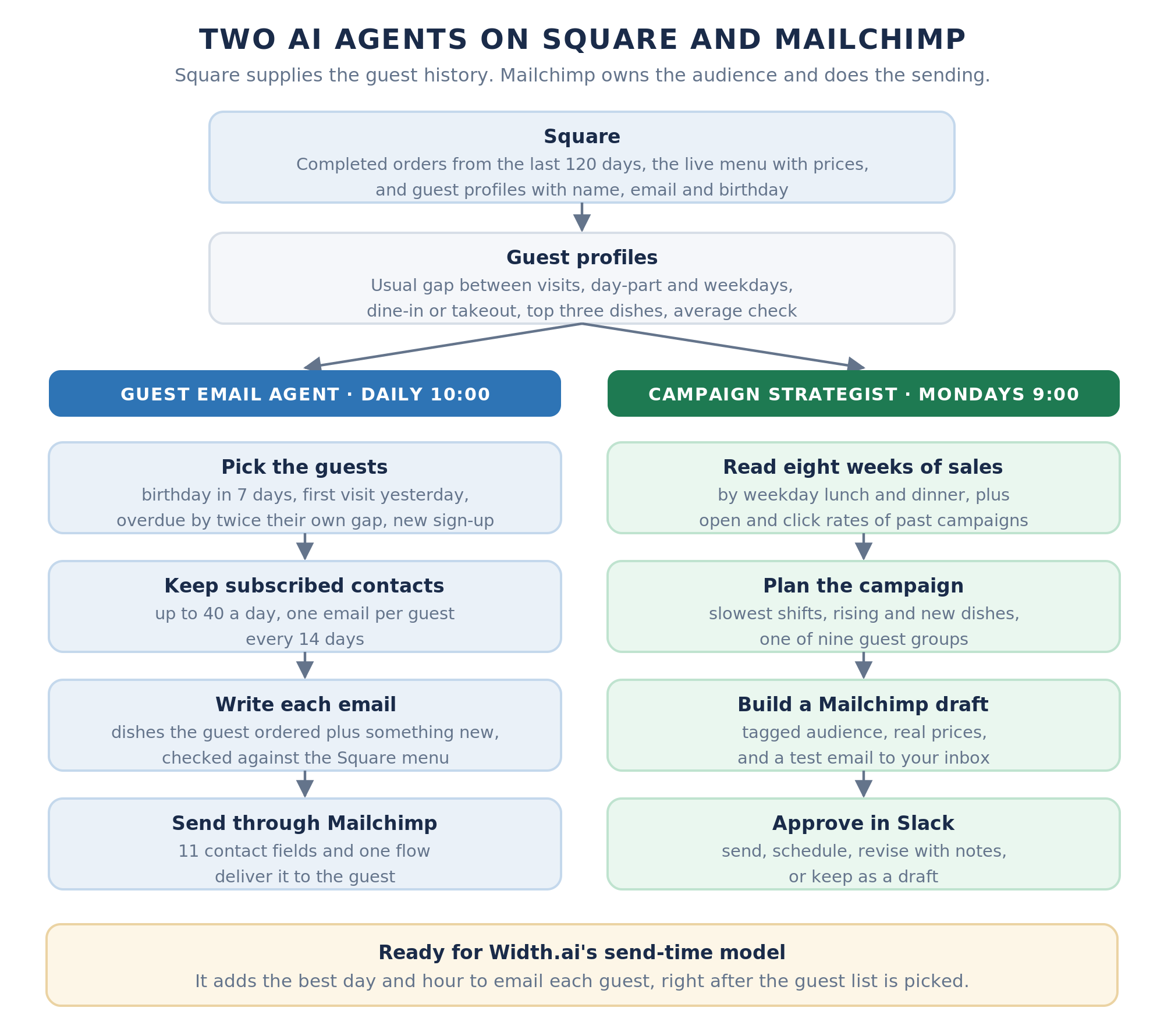
Setup takes about 40 minutes for whoever handles your tech, most of it in Mailchimp. It needs access to your Square, Mailchimp, AI model and Slack accounts, plus your details: restaurant name, links, brand voice, offers and limits.
This is what it does for you:
Every morning at 10:00, the Guest Email Agent looks through the last 120 days of Square sales and builds a profile for each guest. The profile holds their data like usual gap between visits, their usual day-part and weekdays, whether they dine in or order out, their top three dishes and their average check. Delivery orders from DoorDash, Uber Eats, Grubhub or Postmates that land in Square count as visits too.
Then writes completely personalized emails to each guest who qualifies.
Any email containing dishes, prices, events, or offers is checked and validated against your live Square menu.
The agent writes "your usual Friday dinner," never a visit count or a spend figure. It just reads better to an end user.
Guests get at most one email every 14 days and one birthday email a year, and only subscribed Mailchimp contacts receive anything.
Every Monday at 9:00, or whenever you fill in its form, the Campaign Strategist reads eight weeks of sales by weekday lunch and dinner. It finds your four slowest shifts, your top dishes and the ones that are rising or new. Then it picks one of nine guest groups, such as weeknight diners, lunch guests or lapsed guests.
It builds the campaign as a Mailchimp draft, sends a test email to your inbox and posts it to a notification channel of your choosing. You send it, schedule it for the suggested time, send it back with notes for a new version, or keep it as a draft. If nobody answers within 72 hours, it stays a draft.
Before anything reaches a guest, it gets tested on you. You are added as a test guest with a birthday next week, and the birthday email should land in your inbox the next morning. The ai agents validate this to ensure the process is complete.
You decide the parts that are yours: the brand voice both agents write in, the birthday and we-miss-you offers, how many emails go out a day and what the weekly campaign should focus on. Guest groups can be added too, such as brunch guests.
Three guardrails keep the owner in control: the AI cannot invent a dish, a price or an offer, Mailchimp keeps your audience, unsubscribes and reports, and you approve every campaign. It only reads from Square and never changes your sales data, and it can run on OpenAI, Claude or Gemini.
With the setup in place, the return shows up in two units: covers and hours.
Start with covers. OpenTable reports that its restaurants using email marketing average more than $900 in incremental monthly revenue, based on its own 2025 campaign data. Olo's data from more than 100 million guest records attributes 60% of restaurant revenue to repeat guests, the group these campaigns exist to keep.
Treat those as platform averages, not a forecast for your room. The cleanest way to find your own number is to count the bookings and orders that come in after each email, then compare month to month.
Then count hours, as the jobs the automation takes off your week. That means the monthly newsletter someone writes after close, the win-back list nobody pulls, and the birthday email that goes out with the same text to everyone. In the worked example, up to 40 personal guest emails go out each morning. A campaign planned around your slowest shifts takes as long to approve as a Slack message takes to read.
To put a number on it, ask what the monthly newsletter costs you in an evening, then multiply by twelve. That figure is yours, and it beats any average.
The covers side works the same way with your own numbers. Multiply the lapsed regulars who come back each month after a we-miss-you by your average check, and you have the win-back's monthly value. Do the same for birthday bookings, and you can see which campaigns earn their keep.
Measure three numbers each month, and ignore open rates. Count the bookings and orders that follow each campaign within a set window, such as seven days. Track the share of lapsed regulars who come back after a we-miss-you, and the new reviews that follow each thank-you email.
A timing model adds a measured increment to improve results further. Our email marketing date & time optimization system saw that click-through rose 12 to 17% and conversion rose 7.5 to 12.5% against fixed-schedule email sends.
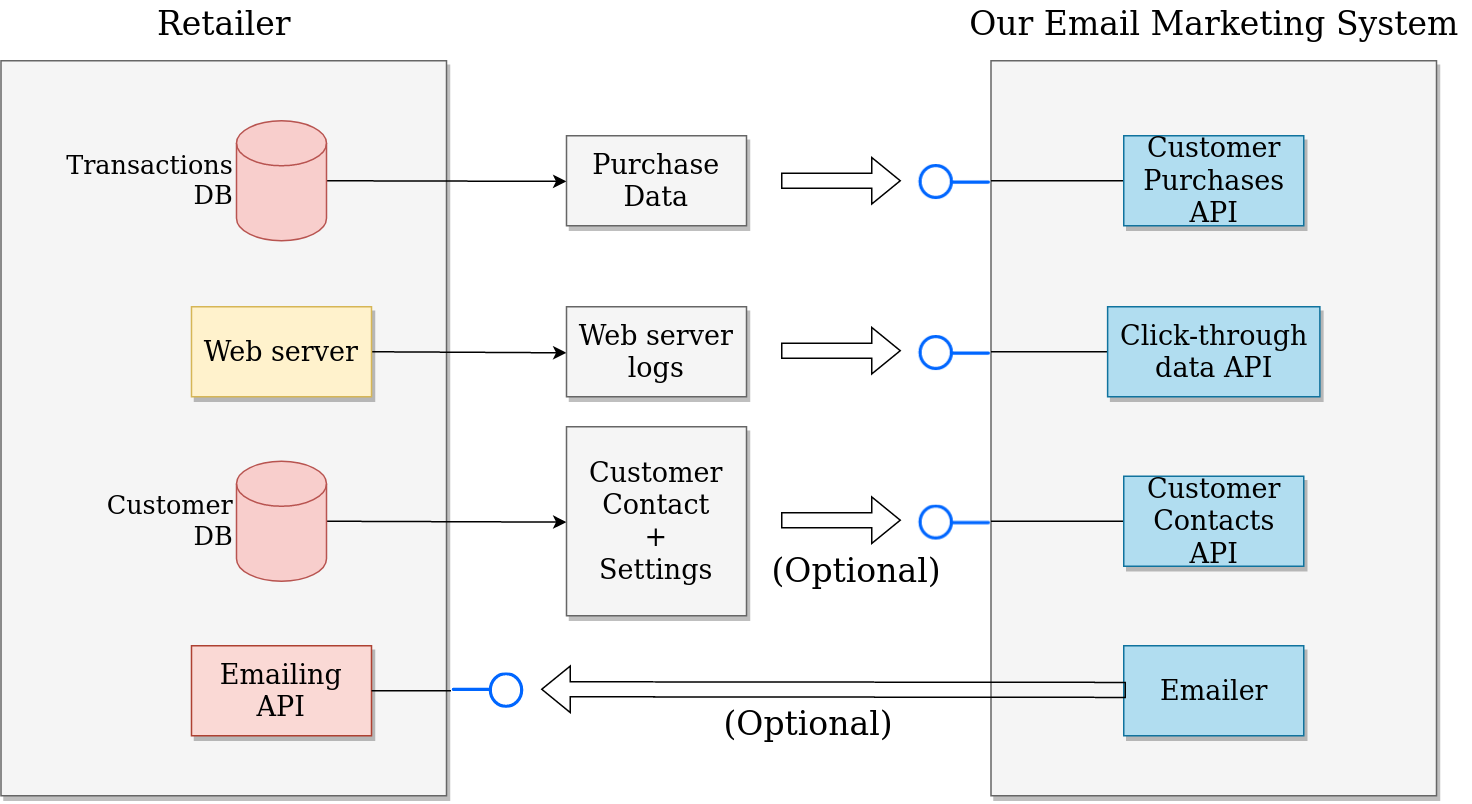
The ai system learns from your real data what the exact right time of day and date to send an email is to the different segments you have. Read our case study to understand how this model works.
Every return in the section above comes from rules set for the average guest. Four of those rules miss regulars.
The worked example already handles the first one, because it flags a regular as overdue at twice their own gap. The other three need a model. For a single-location room with a few hundred regulars, the platform's campaigns plus that workflow are enough, and you can stop here.
The decision layer is a model on your own guest data, and we have built a bunch.
Our send-time model predicts when each customer will buy next, then picks the day and hour to email them from their own history. We built it for a retailer's repeat buyers, and restaurant regulars follow the same pattern: a usual gap, a usual day and a usual time.
It runs on data a restaurant already has. Visit history comes from the POS, ordering and reservation systems, opens and clicks come from the email platform, and each guest's do-not-contact preferences come along with their record. Translated to a restaurant, the model does four things.
Here is what that looks like for one guest. Maria has come in for Friday dinner every week or so since September, with checks around $80. The model marks her as a regular in the high-value segment, expects her next visit on Friday, November 20, and picks Thursday, November 19 at 4 p.m. as the best time to email her.
If November 20 passes without a visit, she is overdue by her own pattern, not by a 60-day timer. The we-miss-you that follows can mention her usual Friday table instead of a generic "it's been a while."
Only guests with a predictable pattern get the model. Everyone else stays on the platform's defaults, which is the right treatment for a tourist who came in once.
The Square + Mailchimp workflow already has a place for it. Before an email goes out, the workflow can ask the model about that guest and get four answers back: whether the guest is a regular, their value segment, their likely next visit, and the best day and hour to email them.
Once we set the model up on your restaurant's data and switch that connection on, each guest email goes out on that guest's own schedule.
We connect the two-agent workflow to your Square/Toast and email sending software accounts, set your voice, offers and limits, and plan the first campaign with you. You only pay if you find value.
• Personal emails to regulars, birthdays and first-time guests every morning
• Lapsed regulars invited back on their own rhythm
• Campaigns aimed at your slowest shifts, approved in Slack
• More reviews from first-time guests
A regular newsletter is often the first piece of restaurant marketing to slip. Our newsletter workflow, free on GitHub, keeps your part to picking a topic and approving the draft. Every Tuesday morning, a Telegram message asks what the next issue should be about. You reply with the topic, anything you want to feature, such as a new cocktail or a wine night, and an offer if you have one.
An AI researcher then looks up what’s in season, what diners are talking about and what’s happening in your city, keeping a source for every fact. Claude plans the issue and writes each section in your brand voice. It only names dishes from the menu highlights you’ve given it, so it never invents a dish, a price or a deal.
The finished draft is built in Mailchimp, a test email lands in your inbox, and a summary with the sources arrives in Telegram. From your phone, you can send it, schedule it, send it back with notes for a new version, or keep it as a draft. Mailchimp still does the sending, so your audience, unsubscribes and reports keep working as they do now.
Setup takes about 20 minutes for whoever handles your tech. The Square + Mailchimp workflow writes personal emails to individual guests, and this one keeps the newsletter going out on schedule, so the two work well side by side.
Most email graphics are designed once and sent to everyone. Our graphic generator, free on GitHub, makes a different image for each guest, based on what they order, when they order and whether they’ve been checking your app or site without ordering. Your app, loyalty platform or email tool sends it one guest’s order history, your current menu prices and their recent sign-ins. A finished image comes back, ready to drop into that guest’s email.
An AI designer reads the guest’s history and picks the message most likely to bring them back. A lapsed regular might see their favorite dish with their name and today’s price, such as “Maria, your short rib awaits.” A guest who keeps browsing without ordering gets an easy yes, and a regular might get something new from a part of the menu they already like.
Prices always come from your price list, never from the AI. Before the image goes anywhere, every word and price in it is read back and checked against what should be there, and it is made again if anything is off. Each image also comes with a subject line, preview text and alt text to send with it.
Setup takes about 10 minutes for whoever handles your tech, and the look follows your brand’s colors, fonts and photo style.
Here is how to automate restaurant email marketing as a single list:
1. Capture guests at every door: reservation forms, online checkout, QR ordering, Wi-Fi sign-in and emailed receipts. Ask for a birthday at sign-up, because the birthday email depends on it.
2. Turn on welcome and win-back, then birthday, VIP, reorder and seasonal campaigns, using the platform defaults.
3. Bring your POS, ordering, reservation and loyalty data into one guest record, keeping each guest's email and text consent with it.
4. If you run Square and Mailchimp, get the two-agent workflow set up. It takes about 40 minutes for whoever handles your tech, or we will do it for free.
5. Measure the bookings and orders that follow each email, not opens, and check returning regulars and new reviews each month.
6. When your regulars' visits show a pattern, add the timing model, and compare it with the standard timers on win-back emails first.
7. Add value-based segments so your best regulars get the most attention.
8. Make sure the model relearns from new visits every month, and read a few of the weakest emails yourself.
How to automate restaurant email marketing comes down to a set order. Switch on the campaigns, bring the systems that hold your guests together and put a complete setup in place. Then count what comes back in covers and hours, and when your regulars' visits show a pattern, let a model time each email to the guest instead of the calendar.
The same order works for the rest of the business. Claude for Small Business adds 43 approval-first workflows for finance, sales, marketing and hiring, and it connects to Square.
We’ll set up our restaurant email workflows on your own accounts, tuned to your menu, your voice and your offers. You only pay if you find value.
The best AI for restaurant marketing depends on the job. A general model such as Claude or ChatGPT writes emails and campaign copy well, while timing and segmentation need a model trained on your own visit data. The two-agent workflow uses a general model for the writing and has a place for a send-time model.
The best marketing tools for a restaurant are the ones that connect to the systems you already run. Start with the email automation in your POS or reservation platform. Add an email platform such as Mailchimp for more control, and a CRM or a custom build once your guest data lives in several systems.
The 30/30/30 rule is a cost rule of thumb: about 30% of revenue goes to food, 30% to labor and 30% to overhead, leaving roughly 10% as profit. It is a budgeting guide, not an email rule. It does explain why filling a slow shift pays, because those covers use staff and space you are already paying for.
For a restaurant, common examples of marketing automation are a welcome email after a first visit, a we-miss-you email to lapsed guests and a birthday offer. A VIP thank-you and a reorder prompt after an online order are two more. More advanced examples include AI-written emails based on each guest's orders and campaigns planned around slow shifts, with the owner approving each one.
Most restaurants do well with one to four one-off campaigns a month on top of their automated emails. Automated emails such as welcomes and win-backs go out when a guest triggers them. Capping any one guest at about one marketing email every two weeks keeps the list from tiring of you. Watch unsubscribes after each send, because a rising rate is the first sign you are sending too often.
The best time to send a restaurant email is just before each guest usually decides to come in. List-wide studies point to weekday mornings for opens and evenings for clicks, but a Friday dinner regular is best reached on Thursday afternoon and a lunch regular mid-morning. A send-time model picks that hour for each guest from their own visits and clicks.


