The ad that converts is rarely the 1st you run. It is often the 7th iteration: a sharper opening line, a new angle, or a cut that shows the product in the first two seconds. Teams that test more versions find their winners sooner. And a winning ad keeps selling every day it runs.
Most creative teams never reach version seven. One product video means a shoot, an editor and a week of revisions, so the test runs with two versions. The budget goes behind whichever looks better, and the hook that would have won never gets made.
Ideas for creatives are rarely the bottleneck. Production is. Every new angle costs another edit, so the number of ads you can test is capped by the hours it takes to make them.
Claude and Higgsfield workflows lift that cap. Claude turns a product page into angles, hooks and scripts, and Higgsfield's Marketing Studio turns a product link into video ads. Ad Multiplier then builds variants of the concepts that win. More versions reach the test, and your ad budget moves to the ones that convert.
Connecting is the easy part. The value comes from what sits around it: Claude skills that write on-brand briefs, a person who approves concepts before credits are spent, and a pipeline that ships the winners. We build those skills and workflows for marketing teams.
What You Need Before You Connect
Check these four things first. Each one is a common reason the setup stalls.
A paid Higgsfield plan. Higgsfield requires an active paid subscription to connect an agent, and generations draw on your credits.
Room for a custom connector in Claude. Anthropic offers custom connectors on all plans.
An admin, on Team and Enterprise. An Owner or Primary Owner (or an Enterprise admin role) adds the connector under Organization settings first. Then each member connects their own Higgsfield account.
Node.js and npm, for Claude Code only. The Higgsfield CLI installs through npm, and the skills installer needs Node.js 22.20 or later. Claude on the web and Desktop needs nothing installed.
How to Connect Higgsfield to Claude (Web, Desktop and Cowork)
✂️ The short answer
How do I connect Higgsfield to Claude?
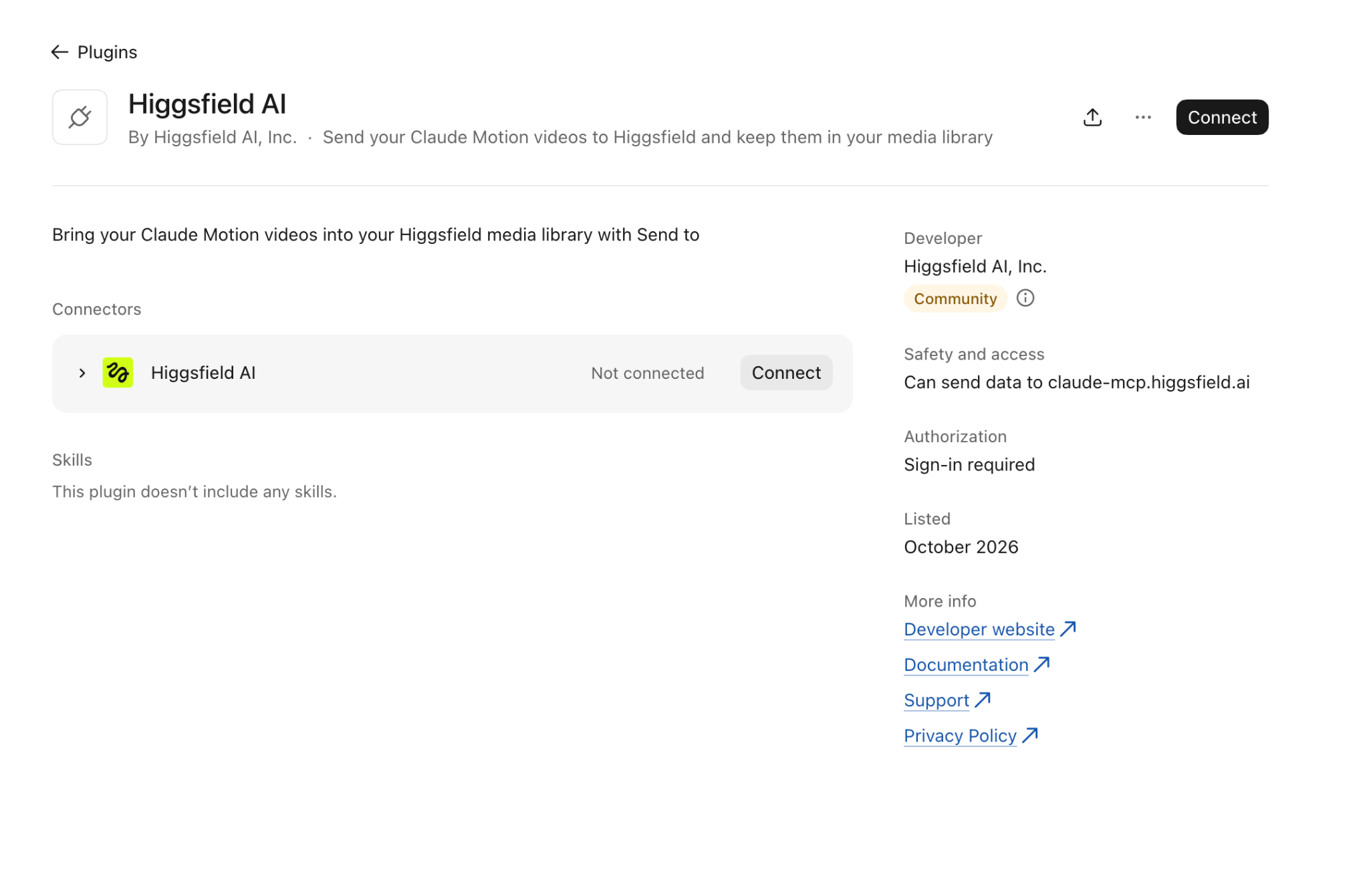
In claude.ai or Claude Desktop, open Customize, then Connectors.
Click + Add, then Add custom connector.
Name it Higgsfield, paste the server URL https://mcp.higgsfield.ai/mcp, click Continue, keep the detected sign-in settings, then click Add.
Click Connect, then sign in to Higgsfield and approve access in the window that opens.
Start a new chat, turn Higgsfield on under + then Connectors, and ask Claude to check your Higgsfield credit balance.
Claude Code: run npm i -g @higgsfield/cli, then higgsfield auth login, then npx skills add higgsfield-ai/skills.
Add the connector once on claude.ai or in Claude Desktop. Remote connectors live in your Claude account, so the same connector is then available in Desktop, Cowork and the mobile apps.
Step 1. Open Connectors. On claude.ai or in Claude Desktop, go to Customize, then Connectors (Or plugins). This depends on what service you’re on.
Step 2. Add a custom connector. Click + Add, then Add custom connector.
Step 3. Enter the details. Name it Higgsfield, paste the server URL https://mcp.higgsfield.ai/mcp and click Continue. Keep the detected sign-in settings, click Continue again, then click Add.
Step 4. Connect and authorize. Click Connect, and a Higgsfield window opens for you to sign in and approve access. If you are already signed in at higgsfield.ai, this step completes on its own.
Step 5. Test it in a new chat. Open a new conversation, click + at the lower left, choose Connectors and make sure Higgsfield is on. Then ask: "Check my Higgsfield credit balance and list the video models I can use."
The connector gives Claude more than raw generation. Higgsfield's MCP overview lists Marketing Studio, which turns a product link into video ads, plus Ad Multiplier and Genjutsu for motion transfer and restyling. It also covers Soul characters, Higgsfield Audio, credit checks, the Asset Library and an upload window for reference images you want to attach.
Claude reaches all of these through tools, so you can ask in plain language and describe the scene, like a woman unboxing your product. A simple trick: name Higgsfield in your first prompts until Claude picks the right tool for each task on its own.
How to Connect Higgsfield to Claude Code (CLI and Skills)
Claude Code has no Connectors menu of its own, so you cannot add the connector from inside it. Some setup posts send Claude Code users to Settings and Connectors anyway, which is the claude.ai path. You have three working options instead.
The Higgsfield CLI and Skills (Recommended)
This is the route Higgsfield documents in its CLI help article for Claude Code and other coding agents. Run three commands:
The login command opens a browser for sign-in. You can also paste Higgsfield's setup message into Claude Code and let it run the commands for you.
The last command uses skills, Vercel's open-source installer for agent skills, not an Anthropic tool. It asks which skills and agents to set up, then writes the skill files to disk in your project's .claude/skills folder, or for every project with the -g flag.
I prefer using the Claude Code integration more than Cowork as I find the depth of iteration that Code provides produces better videos.
Reuse Your claude.ai Connector
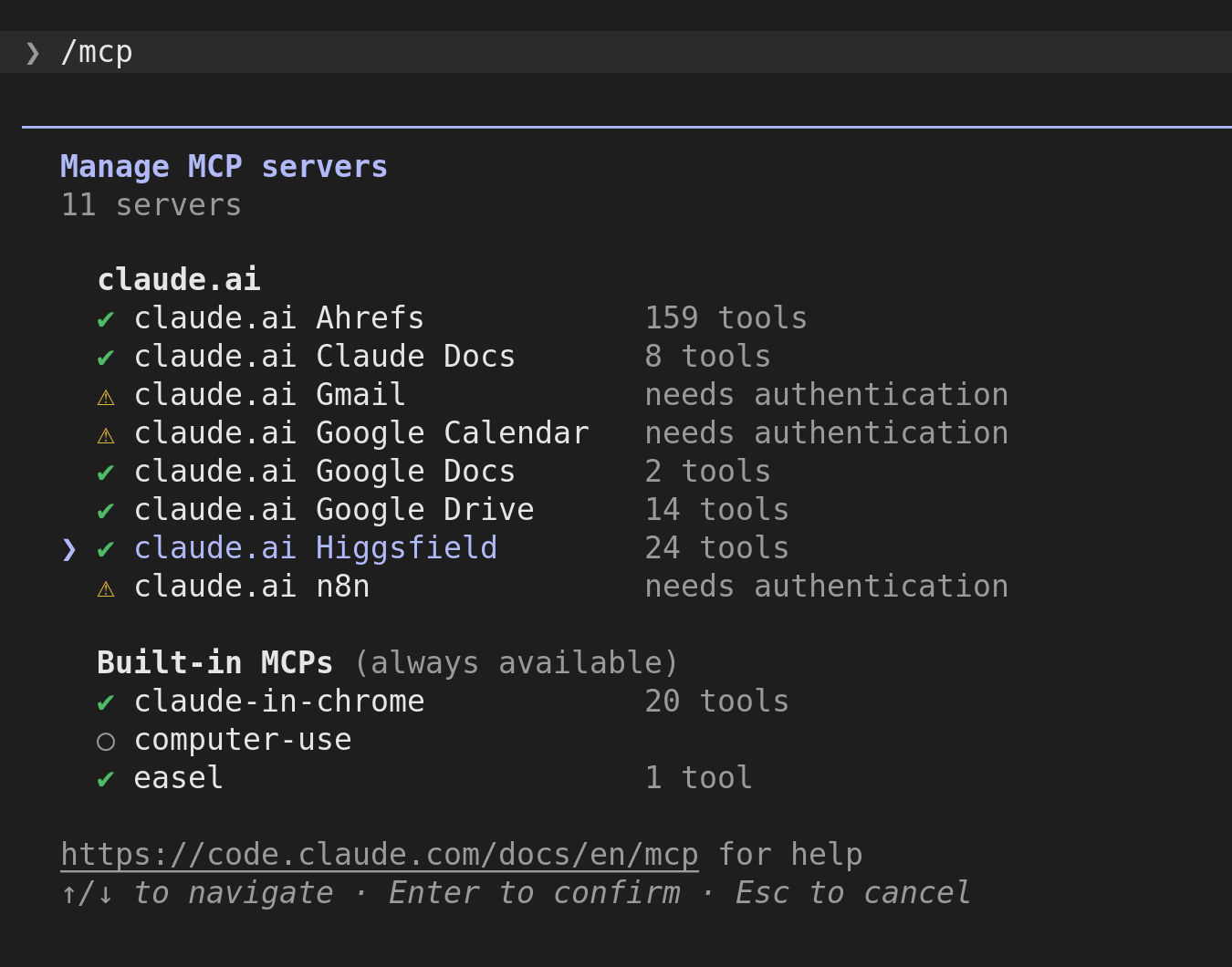
If you already added Higgsfield on claude.ai, Claude Code can use it. The Claude Code MCP docs say connectors from claude.ai appear automatically when you log in with a Claude subscription. Finish the Higgsfield sign-in on claude.ai first, then run /mcp to see it.
This does not work when Claude Code runs on an API key or a cloud provider such as Amazon Bedrock. In that case, use the CLI.
Add the Server With claude mcp add
Claude Code can also add any remote MCP server directly. Higgsfield does not document this route, so treat it as a fallback:
claude mcp add --transport http higgsfield https://mcp.higgsfield.ai/mcp
Then run /mcp inside Claude Code and sign in through the browser. Add --scope user to the command to make Higgsfield available in every project.
Claude Code's /mcp panel listing Higgsfield as connected (CLI route or claude.ai connector)
Which Path Should You Use for Higgsfield Ai Claude Integration
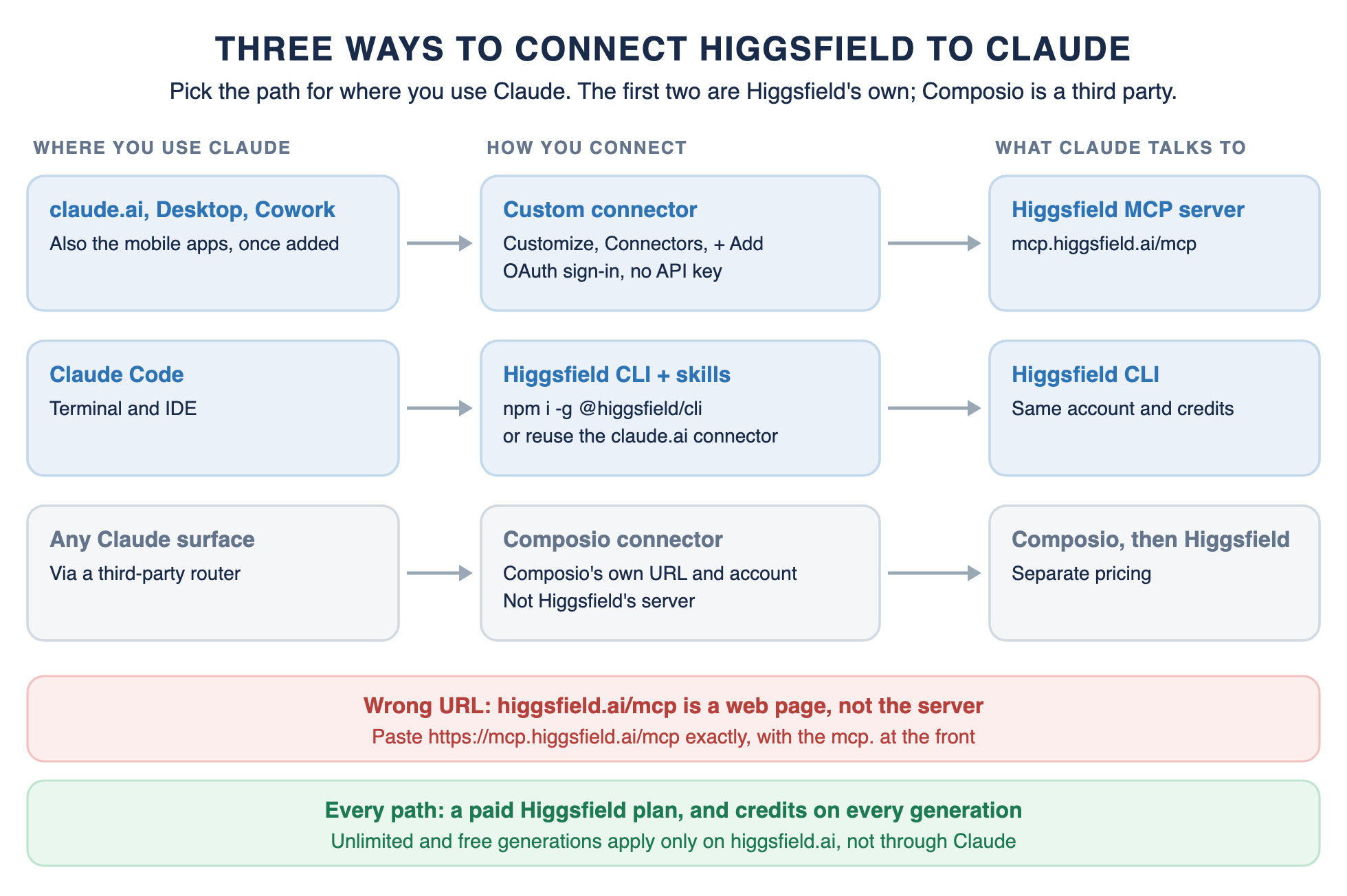
Pick by where you work. The diagram shows the three main routes, and the table adds the admin and non-Claude options
Three ways to connect Higgsfield to Claude, the wrong-URL trap and the credits rule.
Connection paths
How to connect Higgsfield, by where you use Claude
Where you use Claude
How to connect
Best for
claude.ai, Claude Desktop, Cowork
Custom connector with https://mcp.higgsfield.ai/mcp; one setup covers all three and the mobile apps
Marketers and creators working in chat
Claude Code
Higgsfield CLI plus skills, or a claude.ai connector that already shows up in /mcp
Developers and scripted batch runs
Claude Team or Enterprise
An Owner or Primary Owner (or an Enterprise admin role) adds the connector in Organization settings, then each member clicks Connect
Shared company workspaces
ChatGPT
The Higgsfield plugin from the Plugins Directory (no audio or website building)
Teams that also work in ChatGPT
Cursor
Customize, then Marketplace, then Higgsfield, then Add
Building sites and apps in Cursor
Composio (third party)
Composio's own connector URL and account, not Higgsfield's server
Teams already routing many tools through Composio
Steps follow Higgsfield's help center and Anthropic's connector docs as of October 2026.
What Higgsfield Costs Through Claude
Connecting is free on the Claude side, but generating is not. Higgsfield's help center says an active paid subscription is required. It also says every generation through a connected agent deducts credits "regardless of your plan."
That last part surprises people on unlimited plans. Unlimited access and free generations apply only on higgsfield.ai, not when Claude generates for you.
Costs
What it costs to use Higgsfield from Claude
Question
What Higgsfield says (October 2026)
Do I need a paid Higgsfield plan?
Yes. An active paid subscription is required to connect an agent.
Does each generation use credits?
Yes. Every generation through a connected agent deducts credits, whatever your plan.
Do unlimited plans apply in Claude?
No. Unlimited access and free generations apply only on higgsfield.ai.
What was "Unlimited MCP"?
A 24-hour free trial that new users could claim until July 31, 2026.
Do I need an API key?
No. You sign in through OAuth in a browser window.
Does Claude charge for the connector?
Custom connectors are included on every Claude plan; the Free plan allows one.
Credit prices per model change often; check Higgsfield's pricing page before a large run.
Because each request spends real credits, set limits before you run batches:
Ask Claude to check your credit balance before and after a run.
Put a budget in the prompt, such as a maximum number of generations for the session or seconds per clip.
Approve concepts as still images before you generate video, then use the approved still as the first frame.
Generate a few variants from the same prompt, judge them, then scale only the winners. Use the successful variants to generate future variants, instead of the original image.
Credit prices per model change often, so check Higgsfield's pricing page rather than numbers quoted in third-party posts.
After You Connect: A Claude and Higgsfield Ad Workflow
Once Higgsfield is connected, it is tempting to send a plain prompt for videos and see what comes back. That burns credits on concepts nobody approved. A better pattern puts Claude's planning and a human decision ahead of every expensive step.
The workflow below is a recommended pattern. It combines Higgsfield with the kind of Claude skills and automation we build for marketing teams.
Recommended workflow
A Claude and Higgsfield ad workflow with approval and credit controls
Step
What happens
Tool
Control
1. Brief
Claude turns a product page into angles, hooks and a shot list
Claude with a copywriting skill
No credits spent yet
2. Approve
A person picks the concepts worth testing
Your team
Nothing generates without a yes
3. Images first
Higgsfield renders still concepts for the approved angles
Higgsfield through the connector
Credit budget set in the prompt
4. Video for winners
Only the best concepts become video ads and variants
Marketing Studio, Ad Multiplier, Hook Multiplier
Balance checked before and after
5. Review
Check claims, likenesses, brand use and captions
Your team, plus a humanizer skill for copy
You are responsible for the output
6. Distribute
Approved posts go out on each platform
An approval workflow, such as n8n
One more yes before publishing
Every expensive step sits behind a planning step or a human decision.
Step one is where Claude earns its place. The open-source Copywriting skill covered in my guide to real Claude skills for marketing turns a product page into angles, hooks and scripts. The Paid Ads skill in the same guide audits where ad spend is leaking, all before any credits move. Ask Claude for a shot list too, so the video model gets context: composition, timing, camera pushes like a slow push in, and each shot's end frame.
Step four uses Higgsfield's marketing tools. Marketing Studio builds video ads from a product link. Ad Multiplier and the Hook Multiplier skill turn a winning concept into related videos, such as a new opening hook with the rest unchanged.
Step five keeps the words around the creative on-brand. Our Claude Humanizer skill cleans captions and scripts so they do not read as machine-written.
Step six can run through an approval flow like my n8n social media automation workflow, which sends every post in one approval email and publishes nothing until a reviewer clicks Approve. Teams that work in Cowork can apply the approval ideas from our Claude for small business guide in the same way.
One rule applies throughout. Higgsfield says you are responsible for anything an agent generates through your account, so keep a person reviewing claims, likenesses and brand use.
Connecting Is the Easy Part
How to connect Higgsfield to Claude takes a few minutes. Use a custom connector on claude.ai, Desktop or Cowork, or the CLI in Claude Code, with the mcp.higgsfield.ai URL and a paid plan.
The work that pays off is what you build around it. Claude skills write the brief, people approve before credits go out, and a pipeline ships what wins. If you want that built for your team, we build custom Claude skills and creative workflows for marketing teams.
Connected Higgsfield? Build the Workflow Around It
We build custom Claude skills and creative workflows for marketing teams: on-brand briefs and hooks, approval steps before credits are spent, and pipelines that ship the winners.
• Custom Claude skills for paid ads, copy and brand voice
• Approval gates before any batch generation
• Pipelines from brief to published post, like our n8n social workflow
• From the team behind Real Claude Skills for Marketing
Claude skills and creative workflows
Connected Higgsfield? Build the Workflow Around It
We build custom Claude skills and creative workflows for marketing teams: on-brand briefs and hooks, approval steps before credits are spent, and pipelines that ship the winners.
Custom Claude skills for paid ads, copy and brand voice
Approval gates before any batch generation
Pipelines from brief to published post, like our n8n social workflow
From the team behind Real Claude Skills for Marketing
Most failures trace back to a short list of causes. The table explains each error, its likely cause and the fix, drawn from Higgsfield's help center and Anthropic's docs.
Troubleshooting
Higgsfield and Claude connection errors, and how to fix them
Error or symptom
Likely cause
Fix
"Couldn't reach the MCP server"
Wrong URL, such as higgsfield.ai/mcp, which is a web page
Remove the connector and add it again with https://mcp.higgsfield.ai/mcp
"Authorization with the MCP server failed."
The sign-in token expired
Disconnect Higgsfield in Connectors, then connect and authorize again
Connected, but Claude does not use Higgsfield
The connector is off in this chat, or Claude chose another tool
Start a new chat, check + then Connectors, and name Higgsfield in the prompt
"MCP HTTP exchange failed" (Cursor and other agents)
A temporary connection error
Retry; if it keeps happening, disconnect and reconnect
A generation never shows up
The job is still processing
Wait up to 60 seconds and check Manage Account then Usage; if credits were deducted with no output, contact Higgsfield support with the generation ID and time
No option to add the connector
The Free plan's one custom connector is in use, or an admin has not added it
Remove the other connector or upgrade; on Team or Enterprise, ask an Owner or admin
Claude Code does not list the connector
Claude Code is signed in with an API key, not a Claude subscription
Log in with your subscription, or use the Higgsfield CLI
Errors and fixes from Higgsfield's help center, Anthropic's docs and GitHub issue #321.
The Wrong-URL Trap
The clearest example is public. In GitHub issue #321 on Anthropic's claude-ai-mcp repository, a user's connection attempt failed with "Couldn't reach the MCP server." They had entered https://higgsfield.ai/mcp.
A repository maintainer found that higgsfield.ai did not expose the OAuth discovery details Claude looks for and called it a configuration gap on Higgsfield's side. They asked for the URL Higgsfield documents and closed the issue as not planned.
The fix is the documented server address, https://mcp.higgsfield.ai/mcp, with mcp. at the front. The higgsfield.ai/mcp address is Higgsfield's product page about MCP, not the server itself.
Frequently Asked Questions
How do I connect Higgsfield MCP to Claude?
Open Customize, then Connectors in claude.ai or Claude Desktop. Add a custom connector named Higgsfield with the URL https://mcp.higgsfield.ai/mcp, click Connect and sign in to Higgsfield. In Claude Code, install the Higgsfield CLI and run higgsfield auth login.
Step by Step Higgsfield AI Claude Integration
Start a paid Higgsfield plan, since every generation through Claude spends credits.
In claude.ai or Claude Desktop, open Customize, then Connectors, and click + Add, then Add custom connector.
Name it Higgsfield, paste https://mcp.higgsfield.ai/mcp, click Continue, then click Add.
Click Connect, then sign in to Higgsfield and approve access.
Start a new chat, turn Higgsfield on under + then Connectors, and ask Claude to check your credit balance.
In Claude Code, run npm i -g @higgsfield/cli, then higgsfield auth login, then npx skills add higgsfield-ai/skills.
Can you use Higgsfield MCP for free?
No. Higgsfield requires an active paid subscription to connect an agent, and the free generations on higgsfield.ai do not apply through Claude. On the Claude side, even the Free plan can add one custom connector.
Does Higgsfield MCP cost?
Yes. Every image or video generated through Claude deducts Higgsfield credits, even on plans that are unlimited on higgsfield.ai.
Do I need a Higgsfield API key to connect Claude?
No. The connector uses OAuth, so you sign in to Higgsfield in a browser window and approve access. There is no key to copy or store.
Which models can Claude use through Higgsfield?
Higgsfield lists more than 30 image and video models. As of October 2026 its pages name Nano Banana Pro, Soul, Seedance, Kling, Veo 3.1, Sora 2, Flux 2, Seedream 5 and GPT Image 2. The lineup changes often, so check Higgsfield's CLI page or its model pages for the current list.