If you have tried using Claude to optimize Google Ads headlines, you know the first step is easy. Paste an ad into a chat, ask for better headlines, and fifteen fresh lines come back in seconds. Some are good. Several are better written than what is running now.
Then comes the decision: which of your current headlines do you remove? The Claude chat can't say, because it has no idea how any of them performed. Swap the wrong ones and you throw away the lines carrying the ad, along with the history Google built for them.
Writing headlines with ai takes seconds. Deciding which live ones to change takes data and campaign goal understanding. Claude by default has no idea what better means for your Google Ads campaign. It generates based on some vague understanding of what that means.
We built a complex Claude skill that turns that data into a real decision. Our google-ads-headline-optimizer judges every live headline, reads the real ad data, reviews downstream landing page data, reviews competitor data, writes the new lines from your converting searches and approved claims, and hands you a plan. It runs on the Claude plan you already pay for, and nothing in your account changes until you approve it.
Key Takeaways
Generating headlines with ai is easy. Deciding which live headlines to change is the job, and leveraging the actual data makes it useful.
The skill gives each headline's CTR and conversions a 95% range and calls a line weaker only when its range sits clearly below the rest of the ad.
Winning lines are never retyped. The system understands what is working and what isn’t.
New lines come from converting searches, competitor gaps and your approved claims only.
Every change ends in a test with a review date, and nothing changes without your approval.
Using Claude AI to Optimize Google Ads Headlines: Just Generating Is Not Optimizing
How do you use Claude AI to optimize Google Ads headlines?
To optimize Google Ads headlines with Claude, give it each headline's real clicks and conversions, let it decide which lines are clearly underperforming, and have it write replacements for only those lines, then test the change. Writing new headlines is the easy part; the value is in knowing which live ones to keep.
Claude is already good at the writing half. Anthropic's own growth marketing team built a Claude Code command that turns campaign data, existing copy and keywords into 15 headlines and 4 descriptions per ad, checked against skills for brand voice and Google Ads best practices. Anthropic reports that what used to take 30 minutes per ad now takes 30 seconds. That workflow writes ads; it doesn't decide which live lines to change.
Optimizing an ad that is already running is a different job. You are judging what is there, protecting what works and changing as little as possible, so the next test can be read. That only became practical when Google started reporting clicks and conversions per headline, which Search Engine Roundtable covered in July 2025 as it replaced the old Best, Good and Low labels.
Labels were never enough to act on. Ad Strength grades how complete an ad looks, not how it converts. In an Adalysis study of more than 5,900 Google Ads accounts, Brad Geddes found that in ad groups running two RSAs with different Ad Strength ratings, the higher-rated ad had the better conversion rate only 45% of the time.
So the useful version of using Claude for headlines starts from live data, not from a prompt. That is what the skill is built around.
Optimize Google Ads Headlines With Data, Not Labels: How the Skill Judges Each Line
To optimize Google Ads headlines with data, the skill compares each unpinned headline with the ad's other unpinned headlines on two rates: CTR, which is clicks per impression, and conversions per impression. A script does the math, not the model's pattern matching, so the answer is the same every time you run it.
Every headline gets a 95% range around each rate. A line is called clearly above or clearly below only when its whole range sits on one side of the other headlines' rate. If its range includes that rate, there is no clear difference, and the line stays.
Verdict
When the skill gives it
What happens next
Replace
Google barely shows the line (under a tenth as often as the top headline, with no conversions), or its CTR or conversions per impression are clearly below the rest of the ad
Replaced first, unless it is the only line carrying something the ad needs
Keep
Clearly above the rest of the ad on CTR or conversions per impression
Kept exactly as written, down to the capitals
Keep for now
No clear difference from the rest of the ad
Kept this round
Too early
The ad has under 2,000 impressions in the dates, or Google lists the line as learning
Nothing removed; empty slots can be filled
Pinned
Pinned to a position, so it shows every time that position shows
Not compared; changed only if you ask
The five verdicts from the skill's decision rules, judged on each headline's own clicks and conversions, not Quality Score data such as expected CTR. "Clearly" means the headline's 95% range doesn't include the rest of the ad's rate.
The thresholds are the skill's own defaults, printed at the top of the analyzer script so you can change them. Per the skill's decision rules, the ad needs 2,000 impressions in the date range before anything is judged, each headline needs 200 before its rates are compared, and a line Google shows less than a tenth as often as the top headline, with zero conversions, counts as rarely shown. No more than 3 lines are replaced per round.
That last limit matters more than it looks. Change eight headlines at once and you will never know which one moved the numbers. Three at a time keeps the test readable.
If your Google Ads data looks different, you can adjust the decision rules to account for lower impressions, more ad headlines updated per round etc.
A Worked Example With Sample Data
Here is what the review table looks like for one water heater repair ad over 60 days.
Headline (sample data)
Impressions
CTR and 95% range
Conversions
Verdict
Water Heater Repair Austin
9,800
6.1% (5.6% to 6.6%)
41
Keep
Same-Day Water Heater Service
6,300
4.9% (4.4% to 5.4%)
22
Keep for now
Licensed Plumbers Since 1998
5,200
4.6% (4.0% to 5.2%)
17
Keep for now
Call for a Free Estimate
4,100
3.2% (2.7% to 3.7%)
6
Replace
Quality Service You Can Trust
420
3.8% (2.0% to 5.6%)
0
Replace (rarely shown)
Tankless and Tank Heaters
11,200
Not compared
38
Pinned
Illustrative sample data for one water heater repair ad in a single campaign over 60 days, not a client result. The rest of the ad averages 4.8% CTR.
The other headlines average about 5.0% CTR, and each line is compared with the others, leaving itself out. "Water Heater Repair Austin" sits clearly above it, so it stays, character for character. "Call for a Free Estimate" sits clearly below it, so it is a candidate. "Quality Service You Can Trust" barely gets shown, which means Google's own model has stopped choosing it.
The two lines in the middle have ranges that include their baseline, so they stay this round. The pinned line isn't compared at all, because it shows every time its position shows.
What Else the Review Finds
The analyzer also lists converting searches whose words appear in no headline, such as "leaking water heater" bringing calls while no line mentions a leak. It flags themes the ad doesn't cover, such as social proof, an offer or a call to action, and near duplicates that say the same thing twice.
The skill picks the dates for you: from the last headline change to yesterday, 30 to 90 days, and nothing before June 5, 2025. If the headlines changed in the last two weeks, it says it is too soon to judge.
The skill is also honest about its limits, and prints this in every review. Headlines serve in combinations, and Google shows each line more to the searches it expects it to win, so a line's numbers partly reflect its company. A replace verdict is a reason to test a new line, not proof the old one is bad. Google's own advice points the same way: replace low performers with new lines modeled on your best ones, then keep comparing.
Where the New Headlines Come From
Once the weak lines are picked, the skill writes 2 or 3 candidates for each open slot. It draws on five sources, in this order:
Converting searches no headline echoes. A headline in the words people actually typed is usually the safest win for ad relevance, such as "Leaking Water Heater Repair" for the search above.
Themes the kept lines don't cover. Proof, an offer or a call to action, filled only with claims you have approved.
Competitor gaps. A claim type most competitors make and your ad doesn't, used only if your business can make an equal claim and you approve the words.
What only you have. Words only you use, and approved proof points that only your business can back up.
The landing page. Plain service words from it. Any number, price or guarantee seen there needs your approval first.
A Replacement Round on the Sample Water Heater Ad
Back to the water heater ad. Two lines are up for replacement. The review also found that "leaking water heater" brings conversions while no headline mentions a leak.
"Call for a Free Estimate" is the ad's only call to action, so its replacement must be a call to action too. That is the keep-what-the-ad-needs rule. If your claims file approves free estimates, a candidate might be "Book a Free Estimate Today". If it doesn't, the skill leaves out "free" and asks you first.
"Quality Service You Can Trust" is vague, and Google has nearly stopped showing it. Its slot goes to the missing search: "Leaking Water Heater Repair" at 27 characters, with "Fix a Leaking Water Heater" and "Water Heater Leak Repair" as alternates. Each line makes sense next to any other headline, because Google mixes them.
That is two changes, under the limit of three. The ad uses only 6 of its 15 slots, so the third change can add a new angle without removing anything.
Then the checks run. If a kept line like "Licensed Plumbers Since 1998" isn't in your approved claims, the checker flags it even though it is live, because "licensed" is a credential. Phrases like "same-day" are claims too, so the skill asks about them where the checker can't spot them. You approve the claim or replace the line, and nothing moves until the errors reach zero.
Competitor Ads, Collected Without a Click
The skill starts with your competitor names and any research you already have. With your go-ahead, it collects more through Claude in Chrome: the text ads competitors run, from Google's Ads Transparency Center, and the ads showing right now for your top converting searches.
A bundled script reads the ads on the results page without clicking any of them, so you never spend a competitor's budget or skew their data. Every line is saved with its date and source. The comparison then shows the claims competitors lead with that you don't, your lines that sound like theirs, and the words only you use.
The Claims Rule and the Checks
Numbers, prices, "free", guarantees, ratings, awards and phrases like "same-day" come only from the approved claims in your account context file or approved-claims file. A competitor making a claim never approves it for you. If a gap needs a claim you haven't approved, the skill asks.
Two scripts check every draft. The ad copy checker enforces Google's limits for responsive search ads: 30 characters per headline, with Chinese, Japanese and Korean characters counting double, and 3 to 15 headlines per ad. It also checks your approved claims and Google's editorial rules: no repeated punctuation, emoji, gimmicky capitals like "FREE", or phone numbers, and it warns on exclamation marks.
The second script compares the new set with the live ad and confirms every kept line matches exactly. That rule exists because Google treats even a change in capitals as a brand new line with no history, which quietly resets the evidence you just used.
Testing the Change: Ad Variation, New Ad, or Edit
A list of better headlines is not proof. The skill ends every round with a test plan, and you pick the route.
Route
When to use it
What happens
Ad variation (recommended)
The campaign has steady traffic and you can set it up in Google Ads
The same ad runs both ways at once, with a 50% split by user, set up under Experiments from Claude's steps
New paused ad
You want both versions as separate ads, or the account can't run experiments
A new paused ad goes in next to the old one; Google allows 3 enabled RSAs per ad group and favors the one it expects to win
Edit the live ad
Only when you ask for it
The ad starts learning again, and before-and-after numbers mix in seasons, bid strategy changes and budget allocation shifts
Every route comes with a review date about four weeks out.
The ad variation is the recommended route because it is the only one where both versions run at the same time to the same target audience. You set it up by hand under Experiments in the Google Ads interface, following Claude's steps; no connector or Editor file can create it.
The new-ad route is a fallback. A new paused ad goes in through the apply-changes skill or Google Ads Editor, next to the old one. Google allows 3 enabled responsive search ads per ad group, and it gives more traffic to the ad it expects to win, so this comparison is rougher.
Review the test in about four weeks, later for low-volume ads. For a variation, compare clicks, CTR, conversions and cost per conversion on the Ad variations tab. Apply the variation if it wins on conversions per impression, or on CTR with conversions no worse; otherwise end it. Then run the skill again on the winning ad, with dates starting when it went live, for the next round.
Each new headline needs its own impressions before it can be judged, so expect "too early" or "keep for now" on the new lines at first. Log the change once it is live, with the change-log skill if you have it installed, so the follow-up review knows what changed and when.
This testing loop is what using Claude AI to optimize Google Ads headlines adds over prompt-based writing, which skips it. Each round ends with evidence for the next one, which is what turns copywriting into Google Ads optimization.
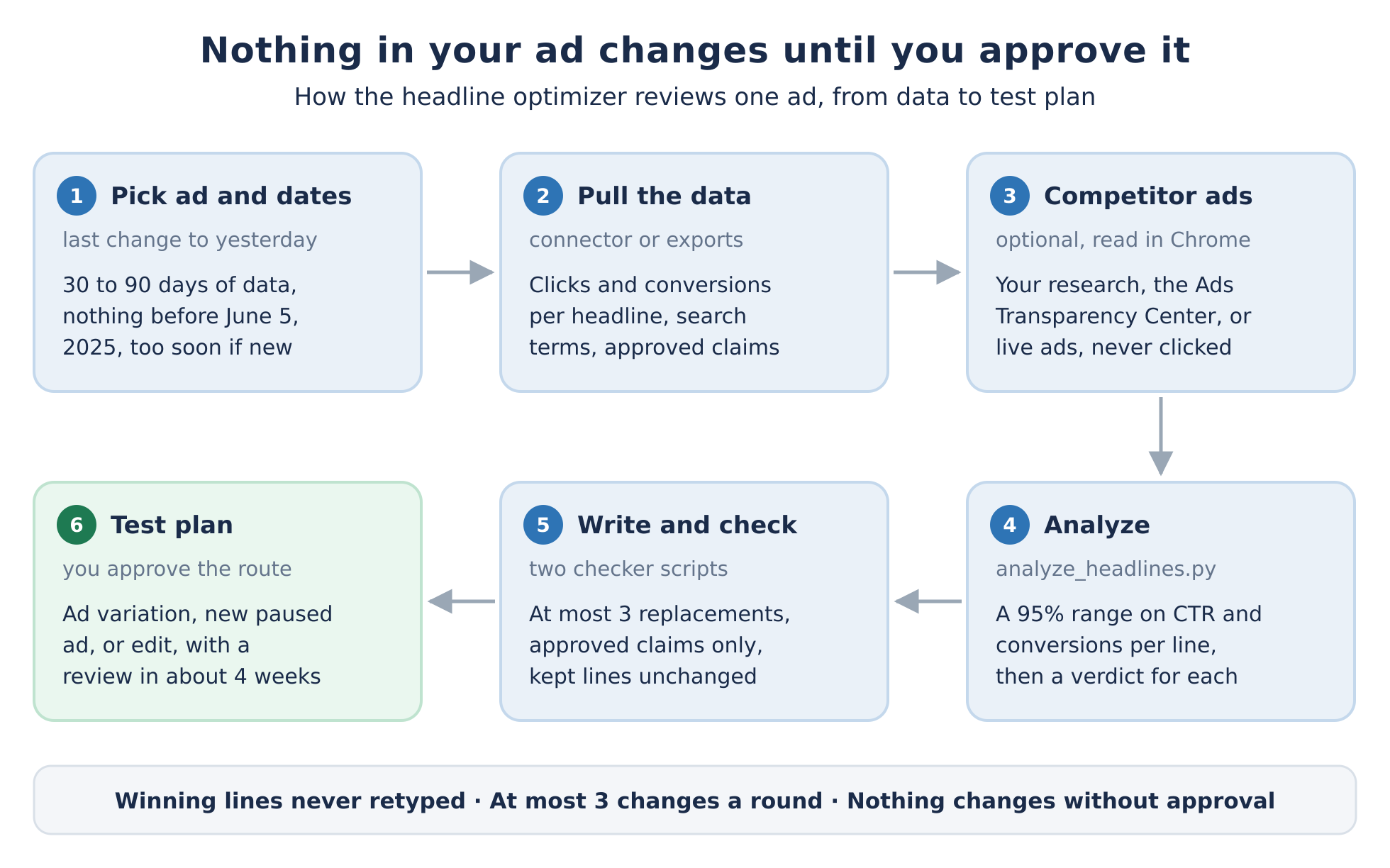
Using Claude AI to optimize Google Ads headlines: the six steps the headline optimizer runs for one ad.
How to Use the Headline Optimizer Skill
Setup takes about 10 minutes, plus the account context if you don't have one yet, per the skill's setup guide. Install it one of three ways:
Claude apps (web and desktop). Download the repo as a ZIP and unzip it, then zip the google-ads-headline-optimizer folder on its own. Per Anthropic's skills help page, upload it under Customize > Skills, and turn on code execution under Settings > Capabilities, because the skill runs Python scripts. On Team and Enterprise plans, an owner turns on skills in Organization settings first.
Claude Code. Copy the folder into ~/.claude/skills/ for all your projects, or into .claude/skills/ inside one Claude project.
Any agent that supports skills. Run the skills command line tool:
Next, give the skill your business facts. Run the account context skill once, list every offer, price and proof point you are happy to show in ads, and name your main competitors. New headlines can only use what is there or what you approve in the chat.
For data, a read-only Google Ads connector works best. Google's own Google Ads MCP server works, and so do third-party connectors that run GAQL queries on the Google Ads API. Without one, Claude tells you which exports to download. Claude in Chrome is optional and only needed to collect competitor ads.
If you work in a project with an AGENTS.md or CLAUDE.md file, add one line so your agent follows the rules even before the skill loads:
- Optimize Google Ads headlines with the google-ads-headline-optimizer skill: keep working lines exactly as they are, replace at most 3 per round, and use only claims approved in `.agents/google-ads-context.md`.
Then start a new chat and send your first request:
Review the headlines on my Water Heater Repair ad for the last 60 days,and compare them with competitor ads for"water heater repair austin".
Allow a few minutes. Check that every headline in the table has impressions, a CTR with a range, and a verdict with a reason. Nothing has changed in your Google Ads account at this point.
What the First Review Shows
The first answer is a table, one row per headline. Each row shows impressions, serving share, CTR with its range, conversions and a verdict with a reason. Below it come the gap lists: converting searches no line echoes, missing themes and near duplicates.
The caveat about combinations is printed too. Replacement candidates and a test plan follow only when you ask the skill to optimize, not just review.
Other Requests the Skill Answers
Ask for
What you get
"Optimize the headlines on the Tankless ad"
The headline review, up to three replacements with alternates, and a test plan
"Which of my headlines are working?"
The headline table with verdicts, and nothing else changed
"Here's our competitor analysis and auction insights, use them to improve our headlines"
Claims they make that you don't, lines that sound like theirs, and new lines that stand apart
"Check the ads showing for 'emergency plumber austin' and compare them to my ad"
Live competitor ads read in Chrome, with the comparison
"Set it up as a new ad instead"
A new paused ad as a change set and Google Ads Editor files
"The variation finished, what's next?"
A fresh review of the winning ad, dated from when it went live
Plain-English requests the skill answers, from its guide. If two ads share a name, add the campaign name.
Three habits get better results. Give it at least 30 days of data, or most lines will show as "keep for now" or "too early". Run one round at a time and let each test finish. Use the ad variation route whenever your account allows it.
When Something Looks Wrong
Every headline shows as too early. The ad has under 2,000 impressions in the dates. Use a longer range, up to 90 days, for more data, or fill empty slots and wait.
Claude doesn't use the skill. It may be turned off under Customize > Skills. Name it directly in one sentence: "Use the google-ads-headline-optimizer skill to review this ad."
A kept line fails the plan check. It was retyped with a small change. Copy it exactly from the live ad.
The browser shows a CAPTCHA. Google flagged the searches. Solve it in the Chrome tab and ask Claude to continue.
One boundary: this skill optimizes an ad that is already running. To write a brand new ad from scratch, even for a new campaign, the RSA asset writer skill does that job with the same approved-claims rules.
The Skill Compared With Prompts, Paid Tools and Analysts
When you compare ways of using Claude AI to optimize Google Ads headlines, the value is in the decision. Here is how the skill compares with the other ways most advertisers optimize headlines, including where each of them is the better choice.
Prompt lists and generators. They produce more headlines fast, which is useful for a new ad. They can't tell you which live lines to keep, because they never see the numbers.
Google's text customization. Formerly called automatically created assets, it writes headlines from your landing page, existing ads and keywords, which saves time. It writes without your approved-claims list, and you remain responsible for whatever it shows.
Paid RSA testing tools. Tools like Adalysis rate RSA assets across multiple campaigns and ad groups, run automated tests and send alerts. If you manage dozens of accounts, that coverage earns its fee. The skill runs only when you ask.
A PPC analyst's hours. The review table, the gap lists and the test plan are the Google Ads management work an analyst does by hand each month. The skill does that part and leaves the judgment calls with you.
The cost is a Claude plan you likely already have and a free skill. We won't put a number on the hours it saves, because your account isn't anyone else's. Time your next manual headline review, then time the same review with the skill, and you will have the figure that matters.
That is the whole case. You already have the data and the Claude plan; the skill makes the keep-or-replace decision with Google's own numbers, so the subscription does much of the analysis an RSA testing tool or an analyst would.
What We've Built Around the Headline Optimizer
The headline optimizer is one skill in a larger set. These write-ups cover the rest:
Google Ads Claude Skill: all ten Google Ads skills in our free library, from the search terms report to negative keywords to the change log.
Landing Page Reporting: Skill framework that leverages PostHog to derive real on page analytics about your landing page.
Keep the Winners, Replace the Laggards, and Prove It
Using Claude AI to optimize Google Ads headlines works when Claude starts from the numbers. You already have the per-headline data and the Claude plan. The skill makes the keep-or-replace decision, writes only from your evidence and approved claims, and gives you a test to prove the change.
Yes, Claude writes strong Google Ads headlines quickly, and with a skill it follows Google's 30-character limit and your approved claims. The more useful question is which live headlines to replace, which needs each line's clicks and conversions, not just better writing.
How many headlines should a responsive search ad have?
A responsive search ad can have up to 15 headlines and needs at least 3. Filling empty slots adds new options without removing anything that works, so the skill fills open slots alongside its replacements, within the three-change limit per round.
How long should I wait before replacing a headline?
Wait until the ad has enough data to judge: the skill's default is 2,000 impressions on the ad over 30 to 90 days, and 200 impressions per headline. It also won't judge an ad whose headlines changed in the last two weeks, because the new lines haven't had time to show.
Is the headline optimizer skill free?
Yes, the skill is free and public in our claude-marketing-skills repo on GitHub. You need a Claude plan with code execution turned on, and a Google Ads connector is optional. If you would rather not set it up yourself, we install it for you at zero cost.
Does Claude connect to Google Ads?
Yes, Claude connects to Google Ads through Google's own Google Ads MCP (Model Context Protocol) server or third-party connectors that run GAQL queries. The headline optimizer only needs to read data, and it also works from exports if you'd rather not connect your account.